
WORKPRO W126083AE
WORKPRO 12V Li-ion Battery Pack Charger User Manual
Model: W126083AE
Introduction
This user manual provides essential information for the safe and efficient operation of your WORKPRO 12V Li-ion Battery Pack Charger. Please read this manual thoroughly before use and retain it for future reference. This charger is specifically designed for WORKPRO 12V Li-ion Battery Packs and is not compatible with other brands or battery types.
Important Safety Information
- Always ensure the charger is connected to a power source within the specified voltage range (100-240VAC).
- Do not attempt to charge non-rechargeable batteries.
- This charger is designed exclusively for WORKPRO 12V Li-ion Battery Packs. Using it with incompatible batteries or other brands may cause damage to the charger, battery, or personal injury.
- Do not expose the charger to rain or wet conditions. Use in dry locations only.
- Unplug the charger from the power outlet when not in use or before cleaning.
- Do not operate the charger if it has received a sharp blow, been dropped, or damaged in any way.
- Keep the charger away from heat sources and direct sunlight.
- Ensure proper ventilation during charging. Do not cover the charger.
Product Overview
The WORKPRO 12V Li-ion Battery Pack Charger consists of two main components: the AC-DC adapter and the charging base.
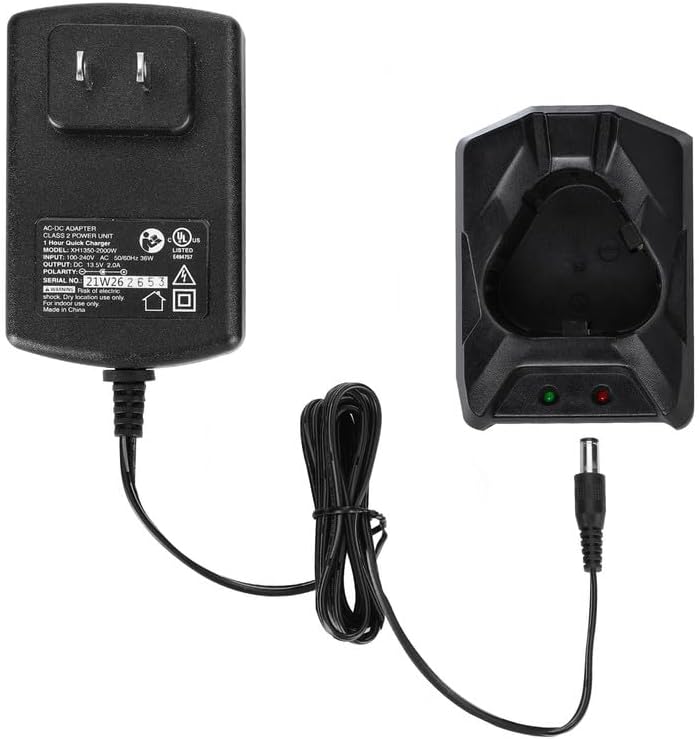
Figure 1: Overview of the WORKPRO 12V Li-ion Battery Pack Charger, showing the AC-DC adapter and the separate charging base connected by a cable.
- AC-DC Adapter: Converts household AC power to the DC power required for charging.
- Charging Base: The cradle where the 12V Li-ion battery pack is inserted for charging. It features indicator lights to show charging status.
Setup
- Unpack: Carefully remove the charger and all components from the packaging.
- Connect: Plug the output cable from the AC-DC adapter into the input port on the charging base.
- Power On: Plug the AC-DC adapter into a standard 100-240VAC wall outlet.

Figure 2: The WORKPRO 12V Li-ion Battery Pack Charger plugged into a wall outlet, ready for use. This charger is exclusively for WORKPRO 12V Li-ion Battery Packs.
Operating Instructions
Charging a Battery Pack
- Ensure the charger is properly set up and plugged into a power outlet.
- Insert a compatible WORKPRO 12V Li-ion Battery Pack into the charging base. Ensure it clicks securely into place.
- Observe the indicator lights on the charging base:
- A red light indicates that the battery pack is currently charging.
- A green light indicates that the battery pack is fully charged.
- The typical charging time for a fully depleted battery pack is approximately 1 hour.
- Once the green light illuminates, the battery is fully charged. Disconnect the battery pack from the charger and unplug the charger from the power outlet.
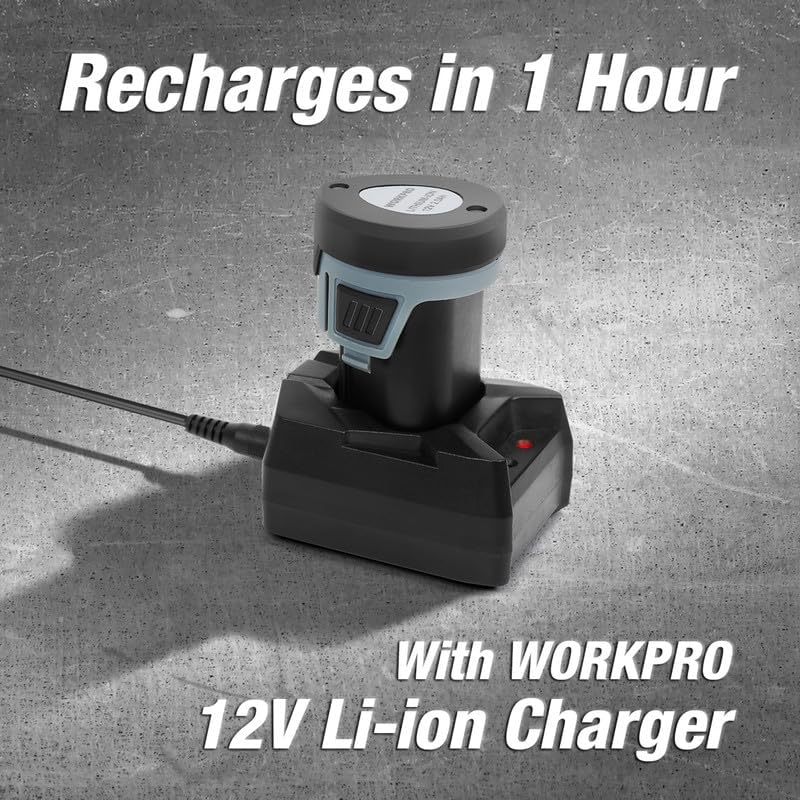
Figure 3: A WORKPRO 12V Li-ion Battery Pack inserted into the charging base, with the red indicator light showing that charging is in progress. A full charge typically takes 1 hour.
Compatibility Notice
This charger is designed exclusively for WORKPRO 12V Li-ion Battery Packs. It is not compatible with battery packs from other brands or other voltage WORKPRO battery packs (e.g., 20V). Attempting to charge incompatible batteries may result in damage or malfunction.

Figure 4: Visual representation of compatible WORKPRO 12V Li-ion Battery Packs and incompatible battery types, including other brands and WORKPRO 20V batteries.
Maintenance
- Cleaning: Disconnect the charger from the power source before cleaning. Use a soft, dry cloth to wipe the exterior of the charger. Do not use abrasive cleaners or solvents.
- Storage: Store the charger in a dry, cool place, away from direct sunlight and moisture, when not in use.
- Inspection: Periodically inspect the charger cord and housing for any signs of damage. If damage is observed, discontinue use and contact customer support.
Troubleshooting
| Problem | Possible Cause | Solution |
|---|---|---|
| Charger indicator light does not illuminate. | No power to the charger; charger or outlet malfunction. | Check if the charger is securely plugged into a working outlet. Try a different outlet. Ensure the adapter cable is firmly connected to the charging base. |
| Red light is always on, but battery does not charge. | Battery not properly seated; incompatible battery; battery fault. | Ensure the battery pack is fully inserted into the charging base. Verify that the battery is a genuine WORKPRO 12V Li-ion Battery Pack. If the issue persists, the battery or charger may be faulty. |
| Green light is always on, even when battery is inserted. | Battery already fully charged; charger malfunction; battery not making proper contact. | Confirm the battery requires charging. Re-insert the battery to ensure proper contact. If the battery is known to be discharged and the light remains green, the charger may be faulty. |
| Charger or battery becomes excessively hot during charging. | Poor ventilation; faulty battery or charger. | Ensure the charger is in a well-ventilated area. Discontinue charging immediately if overheating occurs. Contact customer support. |
Specifications
| Feature | Detail |
|---|---|
| Model Number | W126083AE |
| Input Voltage | 100-240VAC, 50/60HZ |
| Output Voltage | 13.5V DC |
| Output Current | 2.0A |
| Charging Time | Approx. 1 hour (for fully depleted battery) |
| Charger Cord Length | 1.8 meters |
| Compatible Battery Models | WORKPRO 12V Li-ion Battery Packs (W123015AE, W123016AE, W121037AE, W125077AE, W125110AE, W009088AE) |
| Item Weight | 8.4 ounces (approx. 238 grams) |
| Manufacturer | HANGZHOU GREATSTAR INDUSTRIAL CO.LTD |
Warranty and Support
For warranty information or technical support, please contact WORKPRO customer service. Refer to the product packaging or the official WORKPRO website for the most current contact details.
When contacting support, please have your product model number (W126083AE) and purchase information readily available.
Important Note: If you are unsure which products are suitable for this charger, please consult WORKPRO customer service in advance to ensure compatibility and avoid potential issues.
Related documentsW126083AE


Ask a question about this manual
Ask about setup, troubleshooting, compatibility, parts, safety, or missing instructions. Manuals+ will review the question and use this page’s manual context to help answer it.