
Introduction
This manual provides essential instructions for the A-MIND LCD Display Touch Screen Digitizer Assembly Replacement Kit for Oppo A16 (CPH2269) and Oppo A16S (CPH2271) models. Please read carefully before proceeding with installation. This kit is designed to fix faulty screens, including cracked, broken, dead pixels, non-responsive touch, and display issues. It includes the LCD with an integrated frame for easier installation.
Before starting, ensure you have correctly identified your phone model. Installing the wrong screen model can cause damage to your device.
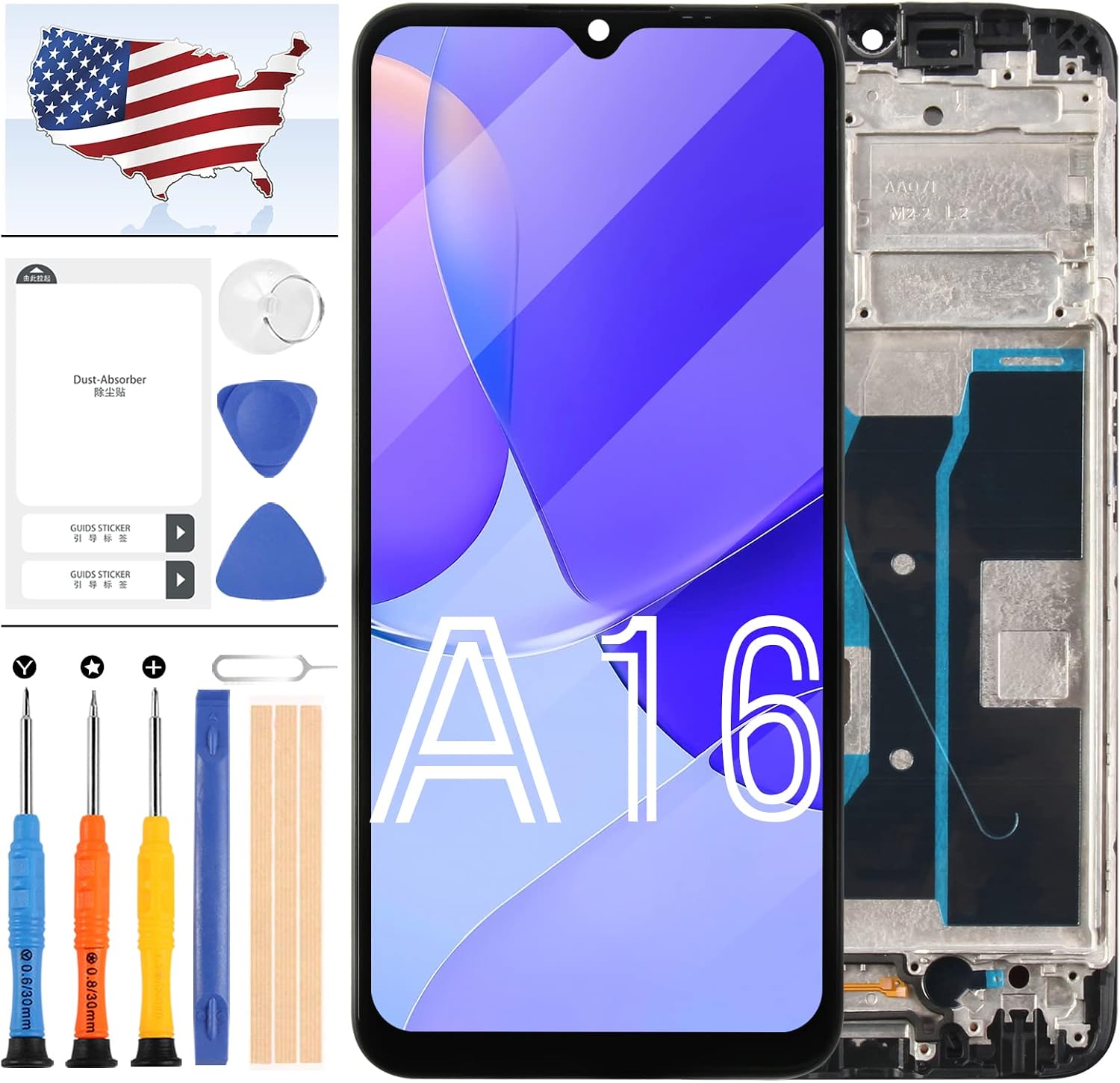
Image: A-MIND Oppo A16/A16S LCD screen replacement kit components, including the screen, frame, and various repair tools.
Setup and Pre-Installation
1. Test Before Installation
When you receive the replacement screen, do not remove any protective film or tags immediately. It is crucial to test the screen functionality first. Please be aware of static electricity. Before attempting any repair, ensure you ground yourself with an ESD (electrostatic discharge) strap. This prevents static electricity from damaging the electronic components within the phone. Always wear eye protection and exercise caution to avoid cutting your fingers with glass splinters.
2. Simulated Testing
Screen replacement is a delicate process. We strongly recommend performing a simulated test before full installation. This means disassembling your mobile phone, connecting the new replacement screen to the motherboard (without fully installing it into the frame), and powering on the device. Test all functions, including touch response, display clarity, and color accuracy. If the test is successful, you may proceed with the full installation. If any issues arise during this test, such as the screen not displaying correctly, please contact our customer service immediately. Do not force the screen into the mobile phone if it is not functioning correctly during the test. We will not be responsible for damage once the screen is fully installed if it was not tested beforehand.
Video: This video demonstrates the A-MIND LCD screen replacement for Oppo A16/A16S, showcasing its features and components.
3. Cable Handling
Please ensure the LCD flex cable is not over-bent. Bending the cable beyond 90 degrees can cause irreversible damage, leading to a black display or other display malfunctions.
4. Included Tools
The replacement kit includes the following tools to assist with installation:
- 1x Strong Suction Cup
- 2x Triangle Opening Tools
- 1x Card Pin
- 1x Plastic Spudger
- 1x Free Tape
For detailed visual guidance on the installation process, it is highly recommended to search for specific video tutorials on platforms like YouTube or Google for 'Oppo A16 screen replacement'.

Image: Back view of the Oppo A16 LCD screen replacement with an integrated frame, emphasizing easier installation. Choosing a screen with a frame can simplify the installation process.
Operating the New Screen
Once the A-MIND LCD screen replacement is successfully installed, it will function identically to the original screen. Verify touch sensitivity, display clarity, and color accuracy. Ensure all applications and features that rely on the screen operate as expected.

Image: Front view of the Oppo A16 LCD screen replacement, highlighting its 720x1600 pixel resolution and 6.52-inch size.
Maintenance
To prolong the life and maintain the performance of your new screen, follow these general maintenance tips:
- Avoid Physical Impact: Protect your device from drops and impacts, which can cause cracks or internal damage to the screen.
- Temperature Control: Do not expose the device to extreme temperatures (very hot or very cold), as this can affect screen performance and longevity.
- Gentle Cleaning: Clean the screen with a soft, lint-free microfiber cloth. For stubborn smudges, use a screen-safe cleaning solution sparingly, applied to the cloth, not directly to the screen.
- Screen Protectors: Consider using a high-quality screen protector to add an extra layer of defense against scratches and minor impacts.
Troubleshooting
If you encounter any issues after installation, refer to the following common problems and solutions:
- Screen Not Turning On / Black Display:
Ensure all flex cable connections are securely seated. Re-check the LCD cable for any over-bending. Perform the 'Simulated Testing' steps again to isolate the issue. - Touch Not Responding / Ghost Touches:
Verify that all flex cables, especially the touch digitizer cable, are properly connected and not damaged. Re-test the screen. If the issue persists, the screen may be faulty. - Dead Pixels / Lines on Display:
If you observe dead pixels or lines on the display, this indicates a potential defect in the LCD panel. If this was present during pre-installation testing, do not proceed with full installation. If it appears after installation, contact customer service. - Wrong Colors / Display Problems:
Check all cable connections for proper seating. If the issue persists after re-testing, contact customer service for further assistance.
For complex installation issues or if the problem cannot be resolved with the above steps, it is recommended to seek professional repair services or contact A-MIND customer support.
Video: This video provides a detailed look at the A-MIND LCD screen replacement for Oppo A16/A16S in black with an integrated frame.
Specifications
| Feature | Detail |
|---|---|
| Compatible Models | Oppo A16 (CPH2269), Oppo A16S (CPH2271) |
| Material | IPS LCD |
| Screen Size | 6.52 inches |
| Resolution | 720x1600 pixels |
| Package Dimensions | 3.36 x 3.36 x 0.78 inches |
| Item Weight | 1.6 ounces |
| Manufacturer | A-MIND |
Warranty Information
This A-MIND LCD screen replacement product comes with a 3-month warranty. The warranty covers manufacturing defects and ensures that the product is in good working condition upon shipment, having passed strict QC double testing. The warranty does not cover any man-made or physical damage to the screen. If the screen cannot function normally due to a quality problem (and without any man-made or physical damage), a new replacement can be exchanged within the warranty period.
Customer Support
For any questions, concerns, or issues regarding your A-MIND Oppo A16/A16S LCD Screen Replacement Kit, please do not hesitate to contact our customer service team. We are committed to providing prompt assistance and aim to respond to all inquiries within 24 hours.