
1. Introduction
Welcome to the user manual for your new Acer Swift Go 16 laptop. This guide provides essential information to help you set up, operate, maintain, and troubleshoot your device. Please read this manual thoroughly to ensure optimal performance and longevity of your laptop.

Image: The Acer Swift Go 16 laptop displayed open, showcasing its sleek design and vibrant screen.
2. What's in the Box
Upon unboxing your Acer Swift Go 16, ensure all the following items are present:
- Acer Swift Go 16 Laptop
- USB Type-C Power Adapter
- Power Cord
3. Initial Setup
3.1 Powering On and Initial Configuration
- Connect the USB Type-C Power Adapter to the laptop and a power outlet.
- Open the laptop lid. The laptop may power on automatically, or you may need to press the power button.
- Follow the on-screen instructions to complete the Windows 11 Home setup, including language, region, network connection, and user account creation.
- Utilize the integrated fingerprint reader on the power button for secure and convenient login.
3.2 Connectivity
Your Acer Swift Go 16 features comprehensive connectivity options:
- Wireless: Killer Wireless Wi-Fi 6E AX1675 for dual-stream Wi-Fi (2.4GHz, 5GHz, 6GHz bands) and Bluetooth 5.1 or above.
- Ports:
- 2 x USB Type-C Ports (supporting USB4 up to 40 Gbps, Thunderbolt 4, USB Charging & Power Delivery up to 100W)
- 2 x USB 3.2 Gen 1 Ports (one featuring power-off charging)
- 1 x HDMI 2.1 with HDCP support
- 1 x Headphone/Microphone-in Jack
- microSD Card Reader

Image: Detailed diagram illustrating the location and type of ports on the left and right sides of the laptop.
4. Operating Your Laptop
4.1 Display Features
Experience stunning visuals on the 16-inch 3.2K OLED display with a 120Hz refresh rate and 400nit brightness. This display offers vivid color accuracy and deep blacks, ideal for creative tasks and media consumption. It is also TÜV RHEINLAND Eyesafe® Display Certified to reduce blue light while maintaining color quality for comfortable extended viewing.

Image: The Acer Swift Go 16 laptop showcasing its 16-inch 3.2K OLED display with rich, vibrant colors.
4.2 Performance
Powered by a 13th Gen Intel Core i7-13700H CPU and Intel Iris Xe Graphics, the Acer Swift Go 16 is an Intel Evo verified notebook designed for superior performance and fast operation. It handles multitasking, browsing, streaming, and productivity tasks efficiently.

Image: The Acer Swift Go 16 laptop highlighting its Intel Evo i7 processor for enhanced performance.
4.3 Video Conferencing and Audio
The laptop features a 1440p QHD camera with Acer’s TNR (Temporal Noise Reduction) technology for clear imagery in low-light conditions. Acer PurifiedVoice with AI Noise Reduction enhances audio clarity. Additionally, Acer PurifiedView offers Background Blur, Automatic Framing, and Gaze Correction for professional e-meetings and live streaming.

Image: A user engaged in a video call on the Acer Swift Go 16, demonstrating its communication capabilities.
4.4 Thermal Management
The TwinAir cooling system ensures high-performing thermal efficiency. It includes dual copper heat pipes and an air inlet keyboard, designed to expel heat effectively and maintain optimal operating temperatures.
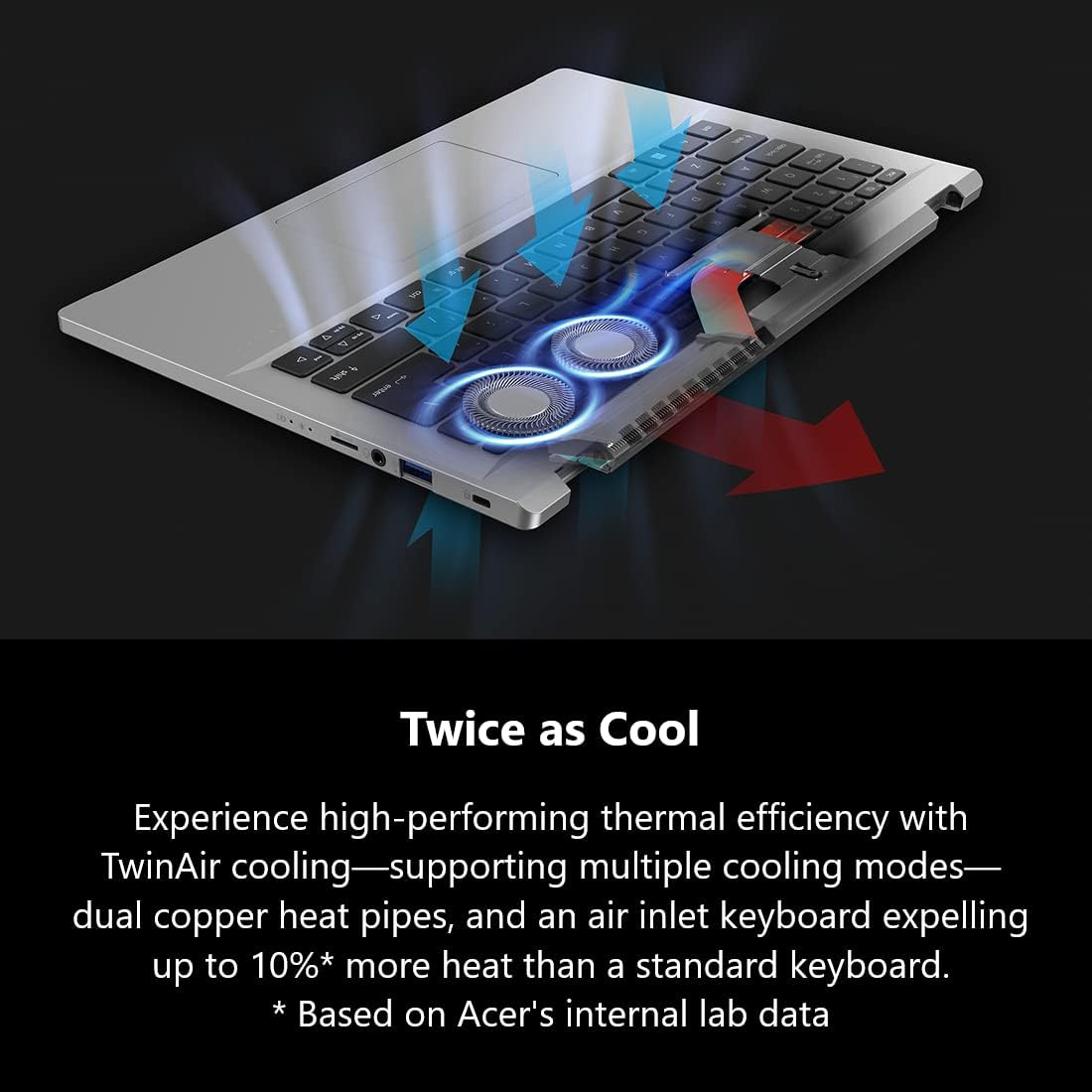
Image: An internal view of the Acer Swift Go 16, highlighting the TwinAir cooling system with its dual fans and heat pipes.
5. Maintenance
5.1 General Care
- Keep the laptop clean by wiping surfaces with a soft, dry cloth.
- Avoid exposing the laptop to extreme temperatures, direct sunlight, or moisture.
- Ensure proper ventilation by not blocking the air vents during use.
5.2 Battery Care
The laptop is equipped with a long-lasting battery. To maximize battery life, avoid fully discharging it frequently and store it in a cool, dry place if not used for extended periods.
5.3 Internal Component Access (Advanced Users)
For advanced users interested in internal component access for maintenance or upgrades, such as the 1TB PCIe Gen 4 SSD, refer to the following video for guidance. Please note that opening the laptop may void your warranty if not performed correctly.
Video: Official Acer product video demonstrating the internal components of the Acer Swift Go 16. This video provides a visual guide for understanding the laptop's internal layout, including the battery and storage drive.
6. Troubleshooting
If you encounter issues with your Acer Swift Go 16, consider the following basic troubleshooting steps:
- No Power: Ensure the power adapter is securely connected to both the laptop and a working power outlet. Try a different outlet if necessary.
- Display Issues: If the screen is blank, try connecting an external monitor to check if the issue is with the laptop's display. Adjust brightness settings.
- Slow Performance: Close unnecessary applications, check for system updates, and ensure sufficient free storage space.
- Connectivity Problems: For Wi-Fi or Bluetooth issues, try restarting the laptop and your router/modem. Ensure drivers are up to date.
- System Freeze: If the laptop becomes unresponsive, press and hold the power button for 10-15 seconds to force a shutdown. Then restart the device.
For more complex issues, refer to the Acer support website or contact customer service.
7. Specifications
| Feature | Detail |
|---|---|
| Model Name | Swift Go 16 (SFG16-71-7902) |
| Processor | Intel Core i7-13700H |
| RAM | 16 GB LPDDR5 (Onboard) |
| Storage | 1 TB PCIe Gen 4 SSD |
| Graphics | Intel Iris Xe Graphics (Integrated) |
| Display | 16-inch OLED, 3200 x 2000 pixels, 120Hz, 400nit |
| Operating System | Windows 11 Home |
| Wireless Connectivity | Killer Wi-Fi 6E AX1675, Bluetooth 5.1+ |
| Ports | 2x USB Type-C (Thunderbolt 4), 2x USB 3.2 Gen 1, 1x HDMI 2.1, 1x Headphone/Mic Jack, microSD Card Reader |
| Weight | 3.53 pounds (1.6 kg) |
| Dimensions (LxWxH) | 14.02 x 0.59 x 9.55 inches |
| Special Features | Backlit Keyboard, Fingerprint Reader, TwinAir Cooling, 1440p QHD Camera |
8. Warranty and Support
8.1 Return Policy
This product typically includes a 30-day return policy for refund or replacement. Please check with your retailer for specific terms and conditions.
8.2 Protection Plans
Extended protection plans are available for purchase to cover your device beyond the standard warranty. Options may include:
- 2-Year Protection Plan
- 4-Year Protection Plan
- Complete Protect (monthly billing option)
For details on coverage and pricing, please consult your retailer or Acer's official website.
8.3 Customer Support
For technical assistance, warranty claims, or further inquiries, please visit the official Acer support website or contact their customer service department. Keep your product model number (SFG16-71-7902) and serial number handy for faster service.