
Introduction
Welcome to the user manual for your new MSI Modern 15 laptop, model B13M-289IN. This document provides essential information to help you get started, operate, maintain, and troubleshoot your device. The MSI Modern 15 is designed for productivity and multimedia, featuring a 13th Generation Intel Core i5-1335U processor, 16GB DDR4 RAM, a 512GB NVMe PCIe Gen3x4 SSD, and a 40CM FHD (1920x1080) 60Hz IPS-Level display. It comes pre-loaded with Windows 11 Home.

Figure 1: MSI Modern 15 Laptop, front view with screen displaying content.
1. Setup
1.1 Unboxing and Initial Inspection
Carefully remove your laptop and its accessories from the packaging. Ensure all components are present and undamaged. The box contents include:
- MSI Modern 15 Laptop
- Power Adapter
1.2 Connecting the Power Adapter
Connect the power adapter to the DC-in port on the side of your laptop and then plug it into a power outlet. It is recommended to fully charge the battery before initial use.

Figure 2: Side view of the MSI Modern 15 laptop highlighting the DC-in port and other connectivity options.
1.3 Initial Power On and Windows Setup
Press the power button to turn on your laptop. Follow the on-screen instructions to complete the Windows 11 Home setup process. This includes selecting your region, language, connecting to a network, and creating a user account.
2. Operating Your Laptop
2.1 Keyboard and Touchpad
The MSI Modern 15 features a single backlit keyboard with a 1.5mm key travel for comfortable typing. It also includes a number pad for enhanced productivity. The precision touchpad supports multi-touch gestures for intuitive navigation.
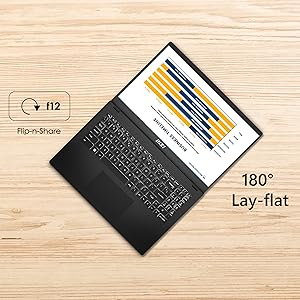
Figure 3: Overview of the MSI Modern 15 keyboard and touchpad features.
2.2 Connectivity Ports
Your laptop is equipped with various ports for connecting external devices:
- 1x Type-C (USB3.2 Gen2 / DP) with PD charging: For high-speed data transfer, display output, and power delivery.
- 1x Type-A USB3.2 Gen2: For high-speed USB devices.
- 2x Type-A USB2.0: For standard USB devices.
- 1x HDMI (4K @ 30Hz): For connecting to external displays.
- 1x Micro SD Card Reader: For reading memory cards.
- Audio Combo Jack: For headphones or headsets.
2.3 Display Features
The 40CM (15.6-inch) Full HD (1920x1080) display offers a 60Hz refresh rate and 45% NTSC IPS-Level panel for clear visuals. The laptop also supports a 180-degree lay-flat design, allowing for easy screen sharing.
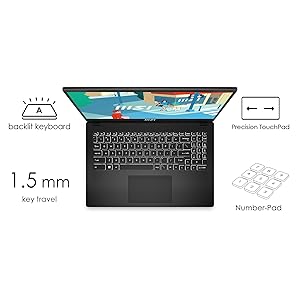
Figure 4: The MSI Modern 15 laptop demonstrating its 180-degree lay-flat capability for easy sharing.
2.4 Audio System
Experience enhanced sound quality with Hi-Res Audio support and built-in speakers. An audio combo jack is available for connecting external headphones or microphones.
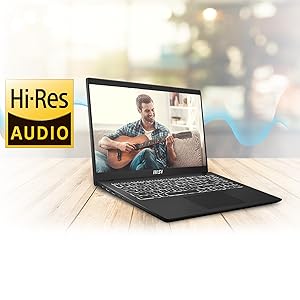
Figure 5: The MSI Modern 15 laptop highlighting its Hi-Res Audio capabilities.
2.5 MSI Center Software
The pre-installed MSI Center software allows you to optimize system performance, monitor hardware, and customize settings for your laptop. Refer to the MSI Center application for detailed usage instructions.
3. Maintenance
3.1 Cleaning Your Laptop
- Use a soft, lint-free cloth slightly dampened with water or a screen cleaner to clean the display.
- For the keyboard and chassis, use a soft cloth. Avoid harsh chemicals or abrasive materials.
- Regularly clean the vents to prevent dust buildup, which can affect cooling performance.
3.2 Software Updates
Keep your operating system (Windows 11) and drivers updated to ensure optimal performance and security. You can check for updates through Windows Update and the MSI Center application.
3.3 Battery Care
- Avoid completely discharging the battery frequently.
- Store the laptop in a cool, dry place if not used for extended periods.
- Do not expose the battery to extreme temperatures.
3.4 General Handling
The MSI Modern 15 is built to MIL-STD-810G military standard for reliability and durability. However, avoid dropping the laptop, exposing it to liquids, or placing heavy objects on it to prevent damage.
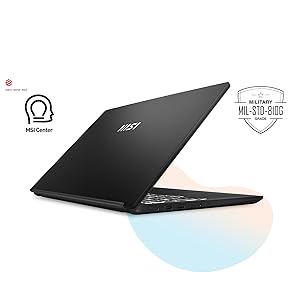
Figure 6: The MSI Modern 15 laptop highlighting its MIL-STD-810G durability and MSI Center software.
4. Troubleshooting
This section provides solutions to common issues you might encounter. For more complex problems, please refer to the MSI support website or contact customer service.
4.1 Laptop Does Not Power On
- Ensure the power adapter is securely connected to both the laptop and a working power outlet.
- Check if the power outlet is functional by plugging in another device.
- If the battery is completely drained, allow it to charge for at least 30 minutes before attempting to power on again.
4.2 Display Issues
- If the screen is blank, try pressing Fn + F2 (or the display toggle key) to ensure the display is not turned off.
- Adjust screen brightness using the function keys (usually Fn + F4/F5).
- If connected to an external monitor, ensure the correct display output mode is selected (e.g., Duplicate, Extend).
4.3 Wi-Fi or Bluetooth Connectivity Problems
- Ensure Wi-Fi and Bluetooth are enabled in Windows settings.
- Restart your router/modem for Wi-Fi issues.
- Update network adapter drivers through Device Manager or MSI Center.
4.4 Keyboard or Touchpad Not Responding
- Restart the laptop.
- Check for any physical obstructions.
- Ensure touchpad is not disabled (often via a function key like Fn + F3).
5. Specifications
Below are the detailed technical specifications for the MSI Modern 15 B13M-289IN laptop:
| Feature | Detail |
|---|---|
| Brand | MSI |
| Model Name | Modern 15 B13M-289IN |
| Processor | 13th Generation Intel Core i5-1335U (Up To 4.6GHz) |
| Operating System | Windows 11 Home (Pre-loaded) |
| Display | 40CM (15.6") FHD (1920x1080), 60Hz, 45%NTSC IPS-Level Panel |
| Memory (RAM) | 16GB DDR4 Onboard RAM |
| Storage | 512GB NVMe PCIe Gen3x4 SSD |
| Graphics | Intel Iris Xe Graphics (Integrated) |
| Wireless Connectivity | 802.11 ax Wi-Fi 6, Bluetooth v5.2 |
| Ports | 1x Type-C (USB3.2 Gen2 / DP) with PD charging, 1x Type-A USB3.2 Gen2, 2x Type-A USB2.0, 1x HDMI (4K @ 30Hz), 1x Micro SD Card Reader, Audio Combo Jack |
| Camera | HD type (30fps@720p) |
| Keyboard | Single Backlit Keyboard (White) |
| Weight | 1.7 Kilograms |
| Dimensions (L x W x Thickness) | 35.9L x 2W x 24.1Th Centimeters |
| Battery | 3-Cell Lithium Polymer, 39.3 Watt Hours |
6. Warranty and Support
6.1 Warranty Information
Your MSI Modern 15 laptop comes with a 1-year On-Site warranty. On-Site Service is eligible for selected regions. The warranty covers manufacturing defects and does not cover physical damage, burn damage, or liquid damage. For complete details and to validate your warranty, please visit the official MSI India Website.
Warranty Validation: Visit https://in.msi.com/support/nb

Figure 7: MSI's warranty and support contact options.
6.2 Customer Support
For any queries regarding your product or warranty, you can contact MSI support through the following channels:
- Visit: More than 80 service centers across India.
- Call: +91-22-4912 5588 (9 AM to 5 PM)
- Email: indiaservicenb@msi.com
Manufacturer Contact Information: Micro-Star International Co., Ltd. No. 88 East Qianjin Road, Kunshan City, Jiangsu, China.


