
1. Introduction
Thank you for choosing the Sharp SumoBox CP-LS100. This high-performance portable speaker is designed to deliver powerful and clear audio for various applications, from personal entertainment to small events. This manual provides essential information for setting up, operating, and maintaining your SumoBox CP-LS100 to ensure optimal performance and longevity.

Figure 1.1: Sharp SumoBox CP-LS100 Portable Speaker
2. Safety Information
Please read all safety instructions before using the product. Keep this manual for future reference.
- Do not expose the speaker to rain, moisture, or extreme temperatures. The CP-LS100 model is not IPX rated and is not designed for use in damp or wet conditions.
- Ensure proper ventilation around the speaker. Do not block any ventilation openings.
- Use only the power adapter supplied with the unit.
- Do not open the speaker enclosure. Refer all servicing to qualified service personnel.
- Avoid placing the speaker on unstable surfaces.
- Keep the speaker away from heat sources such as radiators, heat registers, stoves, or other apparatus (including amplifiers) that produce heat.
- Protect the power cord from being walked on or pinched, particularly at plugs, convenience receptacles, and the point where they exit from the apparatus.
3. Package Contents
Carefully unpack your SumoBox CP-LS100 and ensure all items are present and in good condition. The package should contain:
- Sharp SumoBox CP-LS100 Portable Speaker
- Power Cable
- Eight (8) Round Protective Corners
- Hex Driver and Screws for protective corners
- Instruction Manual (this document)
4. Product Overview
The Sharp SumoBox CP-LS100 is a robust portable speaker designed for powerful audio output and versatile connectivity. It features a durable construction with a heavy-duty metal grill and integrated handles for easy transport.
4.1 Key Features
- High Power Output: Delivers 125W RMS (105dB) through 2 x 8-inch woofers and 2 x 2-inch tweeters.
- Removable Battery: Provides up to 10 hours of playing time on a single charge. Additional batteries are available separately.
- Duo Mode (True Wireless Stereo): Pair two SumoBox speakers for a true stereo sound experience.
- 3-Channel Pro Panel: Features XLR/TRS combo inputs for microphones, instruments (keys, guitar), and other audio sources, with individual volume, treble, bass, and reverb controls.
- Amplified Speaker Link: Connect multiple SumoBox speakers via daisy chain for expanded sound coverage.
- SAM by Devialet: Utilizes Speaker Active Matching (SAM) technology for optimized speaker driver performance.
- USB Charging Port: Conveniently charge mobile devices.
- Indoor/Outdoor Mode: Optimizes sound for different environments.
- Speaker Stand Mount: Integrated 35mm mount for use with compatible speaker stands (minimum 25kg weight handling).
- Smart Life App Control: Manage settings and controls via the dedicated mobile application.
4.2 Controls and Ports
The rear panel of the SumoBox CP-LS100 provides access to all controls and input/output ports.

Figure 4.1: 3-Channel Pro Panel
- CH1/CH2 XLR/TRS Combo Inputs: For connecting microphones or instruments.
- Volume, Treble, Bass, Reverb Knobs: Individual controls for each channel.
- Ducking Button: Automatically lowers music volume when a microphone input is detected.
- Bluetooth Pairing Button: Initiates Bluetooth pairing mode.
- Duo Mode Button: Activates True Wireless Stereo pairing with another SumoBox.
- Indoor/Outdoor Mode Selector: Adjusts sound profile for optimal performance.
- AUX IN (3.5mm): For connecting external audio devices. Note: Using this port will override any active Bluetooth connection.
- Speaker Link IN/OUT: XLR ports for connecting multiple SumoBox units.
- USB Charging Port: For charging external devices.
- DC 18V Input: For charging the battery when it is not in the SumoBox.
- Power Input (AC 100-240V): For main power supply and charging.
5. Setup
5.1 Attaching Protective Corners
The SumoBox CP-LS100 comes with eight protective corners to enhance durability and allow for stable positioning. Use the provided hex driver and screws to attach these corners to the designated points on the speaker.
5.2 Charging the Battery
Before first use, fully charge the speaker's battery. Connect the power cable to the speaker's power input and then to a wall outlet. The battery indicator lights will show the charging status. A full charge provides approximately 10 hours of playback.

Figure 5.1: Removable Battery
5.3 Powering On/Off
Press and hold the Power button on the rear panel to turn the speaker on or off.
6. Operating
6.1 Bluetooth Pairing
- Turn on the SumoBox CP-LS100.
- Press the Bluetooth pairing button on the rear panel. The Bluetooth indicator will flash.
- On your Bluetooth-enabled device (smartphone, tablet, laptop), search for "SumoBox CP-LS100" in the Bluetooth settings.
- Select the speaker to pair. Once connected, the Bluetooth indicator will glow solid.
6.2 Duo Mode (True Wireless Stereo)
To achieve true wireless stereo sound, you can pair two SumoBox CP-LS100 speakers.

Figure 6.1: Duo Mode Setup
- Ensure both SumoBox speakers are powered on and not connected to any other Bluetooth device.
- On the first speaker (which will be the primary/left channel), press the Duo Mode button. The Duo Mode indicator will flash.
- On the second speaker (which will be the secondary/right channel), press the Duo Mode button.
- The two speakers will automatically connect. Once connected, the Duo Mode indicators on both speakers will glow solid.
- Now, connect your Bluetooth device to the primary speaker as described in Section 6.1. Audio will play in stereo across both speakers.
6.3 Connecting Microphones and Instruments
Use XLR or 1/4-inch TRS cables to connect microphones or instruments to the CH1 and CH2 combo inputs. Adjust the individual Volume, Treble, Bass, and Reverb knobs for each channel to achieve the desired sound.

Figure 6.2: XLR/TRS Combo Inputs
6.4 Speaker Linking (Daisy Chain)
For larger venues or events, you can connect multiple SumoBox speakers using the Speaker Link IN/OUT XLR ports. This allows you to expand your sound system.

Figure 6.3: Amplified Speaker Link
Connect the Speaker Link OUT of the first speaker to the Speaker Link IN of the second speaker, and so on. Note that daisy-chaining speakers via this method may introduce a slight latency (approximately 35ms per additional speaker).
6.5 Indoor/Outdoor Mode
Toggle the Indoor/Outdoor mode selector to optimize the speaker's sound profile for your environment. The outdoor mode typically enhances bass and projection for open spaces.
6.6 Smart Life App
Download the Smart Life app to control your SumoBox CP-LS100 from your mobile device. The app provides access to most of the rear panel controls for convenience.
7. Maintenance
- Cleaning: Use a soft, dry cloth to clean the exterior of the speaker. Do not use liquid cleaners or aerosols.
- Battery Care: For optimal battery life, avoid fully discharging the battery frequently. If storing the speaker for an extended period, charge the battery to about 50% and store in a cool, dry place.
- Storage: Store the speaker in a cool, dry environment away from direct sunlight and extreme temperatures.
8. Troubleshooting
| Problem | Possible Cause | Solution |
|---|---|---|
| Speaker does not power on. | Battery is depleted or power cable is not connected. | Connect the power cable and charge the battery. Ensure the power outlet is functional. |
| No sound output. | Volume is too low, input source not connected, or incorrect input selected. | Increase volume. Check all cable connections. Ensure the correct input channel is active. |
| Bluetooth connection issues. | Device is out of range, not in pairing mode, or already connected to another device. | Move device closer to speaker. Ensure speaker is in Bluetooth pairing mode. Disconnect from other devices. |
| Distorted sound. | Volume too high, input signal too strong, or speaker placed on an unstable surface. | Reduce volume on speaker and/or input device. Check input signal level. Ensure speaker is on a stable surface. |
| Duo Mode not connecting. | Speakers are too far apart or already paired to other devices. | Ensure speakers are within close proximity. Disconnect both speakers from any other Bluetooth devices before initiating Duo Mode. |
9. Specifications
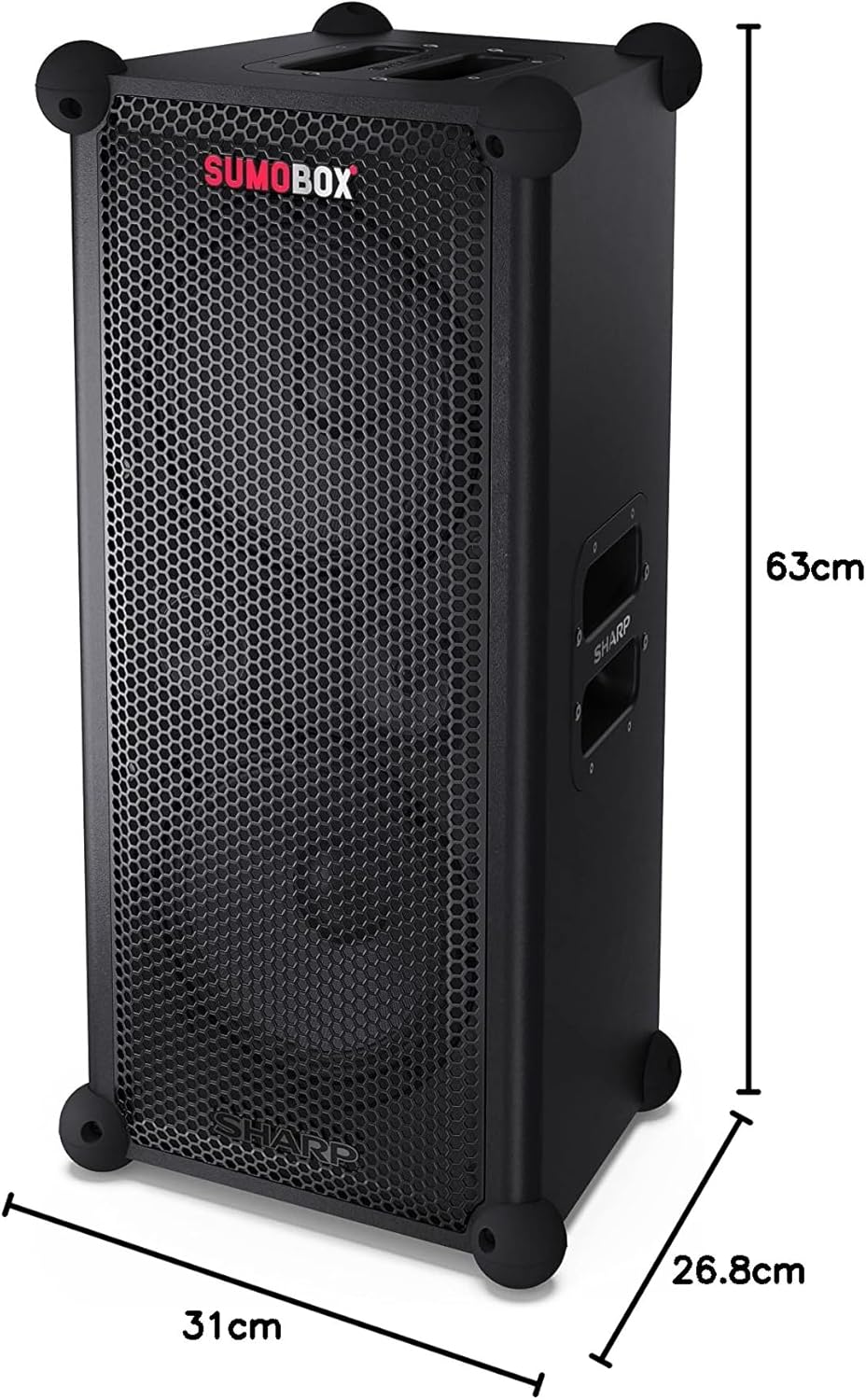
Figure 9.1: Product Dimensions
| Feature | Detail |
|---|---|
| Model Name | SumoBox CP-LS100 |
| Speaker Type | Tower, Portable |
| Speaker Output Power | 120 Watts (RMS) |
| Sound Pressure Level (SPL) | 105dB |
| Subwoofer Diameter | 8 Inches (x2) |
| Connectivity Technology | Bluetooth |
| Audio Output Mode | Stereo (with Duo Mode) |
| Controller Type | Pro panel with advanced control and Sharp Life app |
| Battery Life | Up to 10 Hours |
| Battery Capacity | 5 Amp Hours |
| Item Weight | 9.7 Kilograms |
| Product Dimensions (L x W x H) | 26.8 x 31 x 63 cm |
| Color | Black |
| Waterproof Rating | Not IPX Rated (Not waterproof) |
10. Warranty and Support
For warranty information and technical support, please refer to the warranty card included with your product or visit the official Sharp website. You can also contact Sharp customer service for assistance with product registration, troubleshooting, and service inquiries.
Sharp Customer Support: www.sharp.ca


