
ZOUKAI F3
ZOUKAI Bone Conduction Bluetooth 5.3 Open Ear Clip Headphones User Manual
Model: F3
1. Introduction
Thank you for choosing the ZOUKAI Bone Conduction Bluetooth 5.3 Open Ear Clip Headphones. This manual provides essential information for the proper use, setup, and maintenance of your new headset. Please read it thoroughly before use to ensure optimal performance and longevity.
2. Product Overview
2.1 Key Features
- Open Ear Design: Allows you to enjoy audio while remaining aware of your surroundings, enhancing safety during outdoor activities.
- Bone Conduction Technology: Delivers sound through vibrations to your cheekbones, bypassing the eardrum.
- Bluetooth 5.3 Connectivity: Ensures stable and efficient wireless connection with compatible devices.
- Comfortable Ear Clip Design: Lightweight (4.5g per earbud) and ergonomic for pain-free, secure wearing, even with glasses.
- Automatic Pairing: Simplifies connection after initial setup.
- Intuitive Controls: Easy single-hand operation for music playback, calls, and voice assistant.
- ENC Noise Reduction: Enhances call clarity.
- Waterproof Design: Suitable for use during exercise and in wet conditions.
- Long Battery Life: Up to 72 hours music time (with charging case), 30 days standby, 1 hour fast charging.
2.2 Package Contents
The ZOUKAI Bone Conduction Bluetooth 5.3 Open Ear Clip Headphones package includes:
- ZOUKAI Bone Conduction Bluetooth 5.3 Open Ear Clip Headphones (Left and Right Earbuds)
- Charging Case
- Charging Cable
- User Manual (this document)
2.3 Product Diagram

Image: ZOUKAI Bone Conduction Bluetooth 5.3 Open Ear Clip Headphones with their charging case. The earbuds are white and have an open-ear clip design. The charging case is also white with a green indicator light.
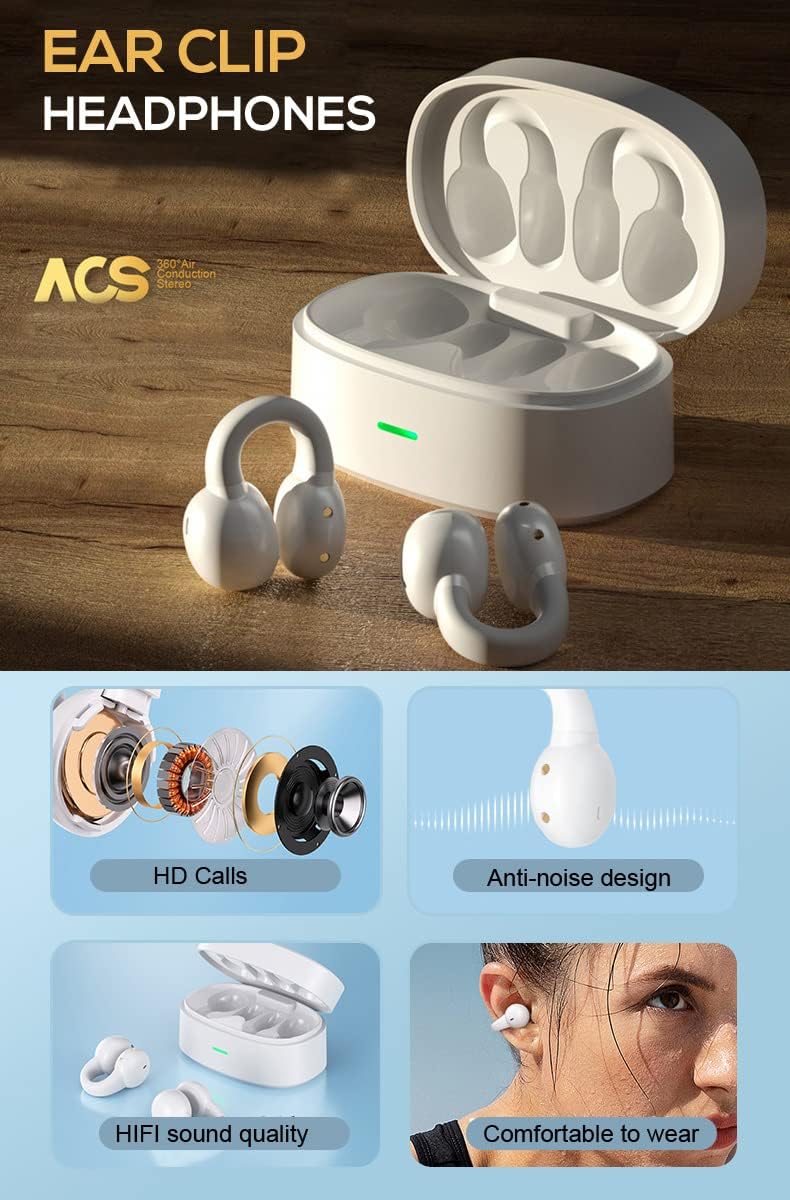
Image: A detailed diagram showing the internal components of the ZOUKAI ear clip headphones, including the bone conduction driver, coil, and other sound elements. Also shows the headphones in their charging case.
3. Setup
3.1 Initial Charging
Before first use, ensure the headphones and charging case are fully charged. Connect the provided charging cable to the charging case and a compatible USB power source. The indicator light on the case will show charging status.
- A full charge takes approximately 1 hour.
- The charging case provides multiple charges for the earbuds.

Image: An illustration highlighting the long battery life of the ZOUKAI headphones, showing 72 hours music time, 30 days standby time, and 1 hour fast charging, with the charging case and earbuds in the background.
3.2 Pairing with a Bluetooth Device
- Ensure the headphones are charged and inside the charging case.
- Open the lid of the charging case. The headphones will automatically enter pairing mode.
- On your device (smartphone, tablet, laptop), go to Bluetooth settings and turn Bluetooth on.
- Search for available devices. Select "ZOUKAI F3" (or similar name) from the list.
- Once connected, the headphones will indicate successful pairing (e.g., a voice prompt or indicator light change).
Note: After the first successful pairing, the headphones will automatically connect to the last paired device when the charging case lid is opened, provided Bluetooth is enabled on the device.

Image: An illustration demonstrating the broad compatibility of the ZOUKAI headphones with Bluetooth 5.3 enabled devices, including smartphones and tablets. It also shows the ear clip design being comfortable even for users wearing glasses.
4. Operating Instructions
4.1 Wearing the Headphones
Gently clip the headphones onto your earlobe. The open-ear design ensures comfort and allows ambient sound awareness. Adjust for a secure and comfortable fit.

Image: A man wearing the white ZOUKAI ear clip headphones, demonstrating their comfortable and discreet fit.

Image: Close-up illustrations showing how the ZOUKAI ear clip headphones are worn, highlighting their secure and comfortable placement on the earlobe for sports and daily use.
4.2 Basic Controls (Touch Sensitive)
The headphones feature touch controls for easy operation:
| Action | Function |
|---|---|
| Single Tap | Play/Pause Music, Answer/End Call |
| Double Tap (Left Earbud) | Volume Down |
| Double Tap (Right Earbud) | Volume Up |
| Triple Tap (Left Earbud) | Previous Song |
| Triple Tap (Right Earbud) | Next Song |
| Long Press (2 seconds) | Reject Call, Activate Voice Assistant |
5. Maintenance
5.1 Cleaning
Regular cleaning helps maintain the performance and hygiene of your headphones.
- Wipe the earbuds and charging case with a soft, dry, lint-free cloth.
- For stubborn dirt, slightly dampen the cloth with water. Avoid using harsh chemicals or abrasive materials.
- Do not submerge the headphones or charging case in water, despite their waterproof rating, to prevent damage to charging contacts or internal components.
5.2 Storage
When not in use, store the headphones in their charging case to protect them from dust, dirt, and physical damage.
- Store in a cool, dry place, away from extreme temperatures and direct sunlight.
- Avoid storing in highly humid environments.
5.3 Battery Care
- Charge the headphones regularly, even if not used frequently, to prolong battery life.
- Avoid completely draining the battery before recharging.
- Use only the provided charging cable or a certified equivalent.
6. Troubleshooting
If you encounter issues with your ZOUKAI headphones, refer to the following common solutions:
| Problem | Possible Cause / Solution |
|---|---|
| Headphones do not turn on. | Battery is low. Place headphones in the charging case and charge fully. |
| Cannot pair with device. |
|
| No sound or low volume. |
|
| Intermittent connection / audio drops. |
|
| Microphone not working during calls. |
|
7. Specifications
| Feature | Detail |
|---|---|
| Model Name | F3 |
| Connectivity Technology | Wireless (Bluetooth) |
| Bluetooth Version | 5.3 |
| Audio Driver Type | Bone Conduction Driver |
| Ear Placement | Open Ear |
| Form Factor | Ear-Clip |
| Control Type | Volume Control, Voice Control, Noise Control (Touch) |
| Noise Control | Active Noise Cancellation (ENC for calls) |
| Water Resistance Level | Waterproof |
| Frequency Range | 20 Hz to 20,000 Hz |
| Material | Plastic |
| Item Weight | 4.2 ounces (total package) |
| Color | White |
| Included Components | Cable |
| Manufacturer | ZOUKAI |
| UPC | 768399192675 |
8. Warranty and Support
For warranty information and customer support, please refer to the purchase platform or contact ZOUKAI customer service directly. Keep your proof of purchase for warranty claims.
Online Support: Visit the official ZOUKAI website or the product page on the retailer's website for FAQs and additional support resources.
Ask a question about this manual
Ask about setup, troubleshooting, compatibility, parts, safety, or missing instructions. Manuals+ will review the question and use this page’s manual context to help answer it.