
Introduction
This manual provides detailed instructions for the setup, operation, maintenance, and troubleshooting of your DOVIICO Smart Watch H13. Please read this guide thoroughly to ensure proper use and to maximize the features of your device.
1. Setup
1.1 Charging the Device
Before first use, fully charge your DOVIICO Smart Watch H13. The watch features a 160 mAh Lithium Ion battery.
- Connect the magnetic charging cable to the charging contacts on the back of the watch.
- Plug the USB end of the cable into a standard USB power adapter (5V/1A recommended) or a computer USB port.
- The watch screen will display a charging indicator. A full charge typically takes approximately 2.5 hours.
- Once fully charged, the watch can operate for up to 7 days with typical use, and has a standby time exceeding 30 days.
1.2 App Installation and Pairing
To unlock the full functionality of your smart watch, you need to install the companion mobile application on your smartphone and pair the devices.
- Download the App: Scan the QR code provided in the watch's packaging or search for the designated app (e.g., 'FitPro' or similar, refer to packaging for exact name) in the Apple App Store (for iOS devices) or Google Play Store (for Android devices). The app is compatible with iOS 9.0 and above, and Android 5.0 and above.
- Install the App: Follow the on-screen instructions to install the app on your smartphone.
- Enable Bluetooth: Ensure Bluetooth is enabled on your smartphone.
- Open the App and Pair: Open the installed app. Follow the in-app instructions to search for and connect to your DOVIICO Smart Watch H13. The watch will typically appear as 'H13' or a similar device name. Confirm the pairing request on both your phone and the watch if prompted.

Image 1.1: The DOVIICO Smart Watch H13 displaying its main interface with various application icons, including heart rate, messages, calls, and settings.
2. Operating Instructions
2.1 Basic Navigation
The DOVIICO Smart Watch H13 features a 1.69-inch full touch screen for intuitive control.
- Swipe Up/Down: Navigate through menus and notifications.
- Swipe Left/Right: Access quick functions or different data screens (e.g., heart rate, activity data).
- Tap: Select an item or confirm an action.
- Side Button: Typically used to return to the home screen or wake the device.
2.2 Customizing Watch Faces
Personalize your watch with various watch faces.
- From the Watch: Long-press the watch face on the screen to cycle through pre-installed options.
- From the App: Connect your watch to the mobile app. Navigate to the 'Dial Market' or 'Watch Face' section. You can download various exquisite dials or upload a custom photo from your phone's gallery to set as your watch face background.

Image 2.1: Examples of customizable watch faces available for the DOVIICO Smart Watch H13, showcasing different styles and information displays.
2.3 Activity Tracking and Sports Modes
The watch tracks your daily activity and supports multiple sports modes.
- Daily Activity: The watch automatically monitors steps, distance, and calories burned throughout the day. View these statistics directly on the watch or in the companion app.
- Sports Modes: The DOVIICO Smart Watch H13 includes 7 sports modes: Bike Riding, Running, Tennis, Strength Training, Basketball, Volleyball, and Football.
- Starting a Workout: Navigate to the 'Sport' or 'Workout' section on your watch, select your desired activity, and tap to start. The watch will display real-time stats such as duration, heart rate, and calories burned during your workout.
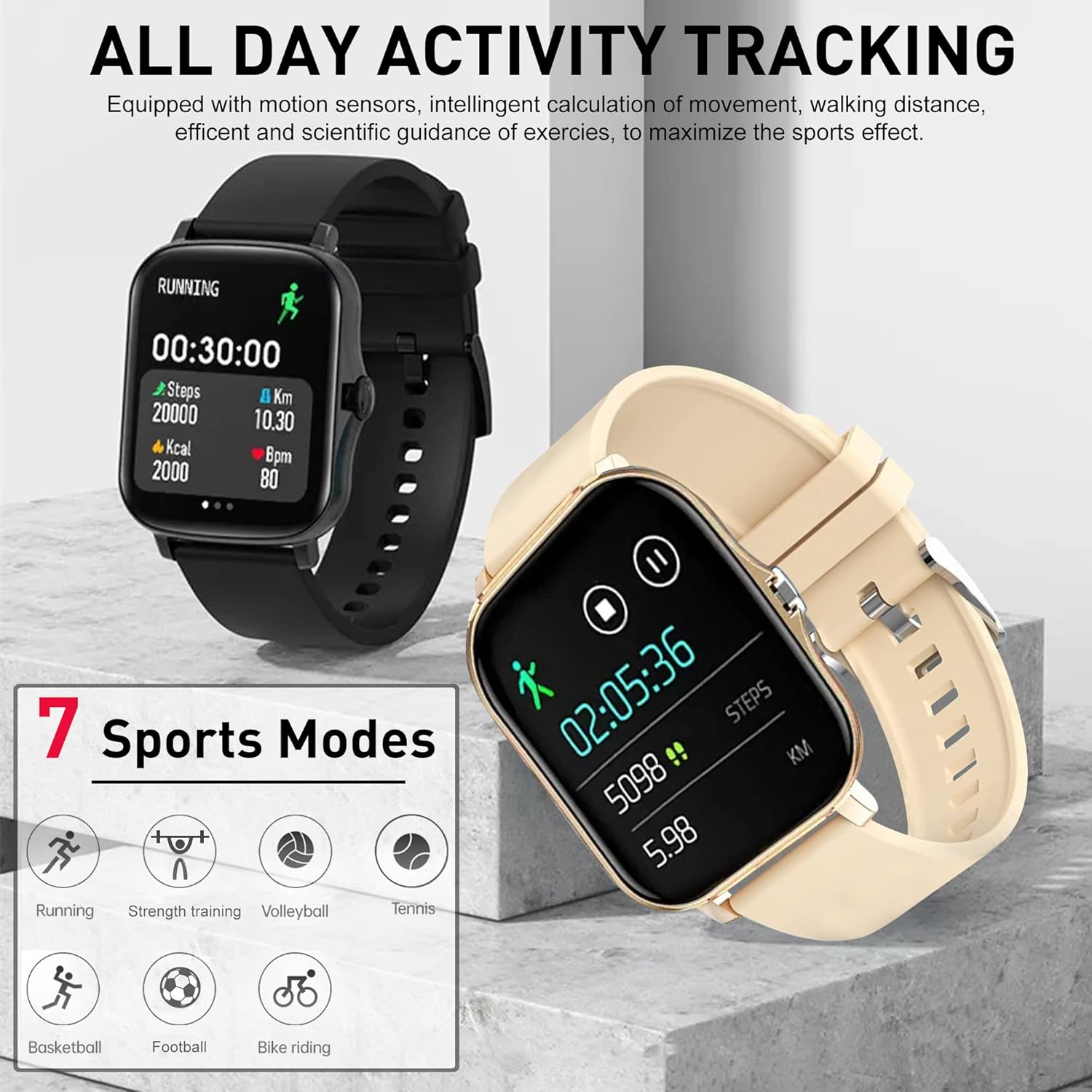
Image 2.2: The DOVIICO Smart Watch H13 showing an activity tracking screen with running duration, steps, distance, and calories. Below are icons representing the 7 available sports modes.
2.4 Health Monitoring
The watch provides 24/7 monitoring of key health metrics.
- Heart Rate Monitoring: The watch continuously monitors your heart rate. Access the heart rate interface on the watch to view real-time BPM (beats per minute). Detailed historical data is available in the app.
- Blood Pressure Monitoring: Navigate to the blood pressure function on the watch to take a reading. For accurate results, remain still during measurement.
- Blood Oxygen (SpO2) Monitoring: Access the SpO2 function on the watch to measure your blood oxygen saturation level.
- Sleep Tracking: Wear the watch to bed for automatic sleep monitoring. It tracks deep sleep, light sleep, and awake times, providing insights into your sleep quality. View detailed sleep reports in the mobile app.

Image 2.3: The DOVIICO Smart Watch H13 showing a heart rate display with BPM and SpO2 percentage, alongside a graph illustrating heart rate trends over time.

Image 2.4: The DOVIICO Smart Watch H13 displaying sleep data, including total sleep duration, deep sleep, light sleep, and awake time, with a weekly sleep quality graph.

Image 2.5: Two DOVIICO Smart Watches H13, one showing a blood pressure reading (128/90 mmHg) and the other displaying a blood oxygen level (98% SpO2).
2.5 Smart Notifications and Calls
Stay connected with notifications directly on your wrist.
- Message Alerts: Once paired with your phone, the watch will vibrate and display notifications from SMS, WeChat, QQ, Facebook, Twitter, Line, WhatsApp, Instagram, and other social apps. Ensure app notifications are enabled in your phone's settings and the companion app.
- Incoming Calls: The watch will alert you to incoming calls. You can choose to answer or reject calls directly from the watch (Bluetooth phone function).
- Other Alerts: The watch supports various reminders including alarm clock, sedentary reminder, and more.

Image 2.6: Two DOVIICO Smart Watches H13, one black and one beige, displaying message notifications from Facebook and a generic message icon, illustrating the real-time news push feature.
2.6 Additional Features
The DOVIICO Smart Watch H13 offers several convenient tools:
- Music Control: Control music playback on your smartphone (play, pause, skip tracks) directly from your watch.
- Weather: View current weather conditions and forecasts.
- Alarm Clock: Set alarms to vibrate on your wrist.
- Stopwatch/Timer: Utilize built-in stopwatch and timer functions.
- Remote Photography: Use your watch as a remote shutter for your phone's camera.
- Find Your Phone/Watch: Use the app to locate your watch, or use the watch to make your phone ring.
- Do Not Disturb Mode: Silence notifications during specific times.

Image 2.7: A comprehensive overview of the DOVIICO Smart Watch H13's features, presented as a grid of icons for various functions like messaging, calling, health monitoring, and utility tools.
3. Maintenance
3.1 Cleaning
- Regularly clean your watch and strap to prevent skin irritation and maintain device functionality.
- Wipe the screen and watch body with a soft, lint-free cloth. If necessary, slightly dampen the cloth with water.
- Avoid using harsh chemicals, abrasive cleaners, or solvents, as these can damage the watch's finish and components.
- Ensure the charging contacts are clean and dry before charging.
3.2 Battery Care
- Avoid fully discharging the battery frequently, as this can reduce its lifespan.
- Do not expose the watch to extreme temperatures (hot or cold) for extended periods, as this can affect battery performance.
- If storing the watch for a long time, charge it to about 50% before storage and recharge it periodically to prevent deep discharge.
3.3 Storage
- Store the watch in a cool, dry place away from direct sunlight and moisture.
- Keep the watch away from strong magnetic fields.
4. Troubleshooting
If you encounter issues with your DOVIICO Smart Watch H13, refer to the following common problems and solutions:
| Problem | Possible Solution |
|---|---|
| Watch does not turn on | Ensure the watch is fully charged. Connect it to the charger for at least 30 minutes. |
| Cannot pair with smartphone |
|
| Notifications are not received |
|
| Inaccurate health data readings |
|
| Screen is unresponsive |
|
5. Specifications
| Feature | Detail |
|---|---|
| Brand | DOVIICO |
| Model Number | H13 |
| Display Size | 1.69 Inches |
| Operating System Compatibility | iOS 9.0 and above, Android 5.0 and above |
| Connectivity | Bluetooth |
| Battery Capacity | 160 Milliamp Hours (Lithium Ion) |
| Charging Time | Approx. 2.5 hours |
| Battery Life (Typical Use) | Up to 7 days |
| Standby Time | Over 30 days |
| Health Monitoring | Heart Rate, Blood Pressure, Blood Oxygen (SpO2), Sleep Tracking |
| Activity Tracking | Steps, Distance, Calories, 7 Sports Modes |
| Notifications | Call, SMS, Social App Alerts |
| Special Features | Custom Watch Faces, Music Control, Weather, Alarm, Stopwatch, Timer, Remote Photography, Find Phone/Watch, Sedentary Reminder, Call Rejection, Do Not Disturb, Bluetooth Phone |
| GPS | No |
| Shape | Square |
6. Warranty and Support
For warranty information and customer support, please refer to the documentation included with your product packaging or visit the official DOVIICO website. Typically, products come with a limited manufacturer's warranty covering defects in materials and workmanship under normal use. Please retain your proof of purchase for warranty claims.
If you require further assistance or have questions not covered in this manual, please contact DOVIICO customer service through the contact details provided on their official website or within the companion mobile application.

