
T-Dagger TGK313 Brown Switch
T-Dagger Bora TGK313 Mechanical Gaming Keyboard User Manual
Model: TGK313 (Brown Switch) | Brand: T-Dagger
Introduction
Thank you for choosing the T-Dagger Bora TGK313 Mechanical Gaming Keyboard. This compact 87-key keyboard is designed for an optimal gaming and typing experience, featuring durable mechanical switches and vibrant rainbow LED backlighting. This manual provides detailed instructions on setting up, operating, maintaining, and troubleshooting your new keyboard to ensure long-lasting performance.

Figure 1: The T-Dagger Bora TGK313 Mechanical Gaming Keyboard, showcasing its compact layout and RGB backlighting.
Setup
Follow these steps to set up your T-Dagger Bora TGK313 keyboard:
- Unpacking: Carefully remove the keyboard from its packaging. Ensure all components are present.
- Connection: Locate the USB cable attached to the keyboard. Insert the USB connector into an available USB port on your computer.
- Driver Installation: The keyboard is plug-and-play. Your operating system should automatically detect and install the necessary drivers. No additional software installation is typically required.
- Initial Test: Open a text editor or any application where you can type. Press various keys to confirm they are functioning correctly.

Figure 2: Angled view of the keyboard, highlighting the USB cable connection point.
Operating Instructions
The T-Dagger Bora TGK313 keyboard offers various functions and customization options.
Standard Key Functions
The keyboard features a standard 87-key layout with both Arabic and English characters on the keycaps. All alphanumeric, symbol, and modifier keys (Shift, Ctrl, Alt, Windows key) function as expected.

Figure 3: Top-down view of the keyboard, showing the full 87-key layout.
Function Keys (Fn Combinations)
Many keys have secondary functions accessible by pressing the Fn key simultaneously with the desired function key.
- Fn + F1-F12: Multimedia and system control functions (e.g., volume, play/pause, web browser, email). Refer to the icons on the F-keys for specific functions.
- Fn + Win: Locks/unlocks the Windows key to prevent accidental presses during gaming.
- Fn + Arrow Keys: Adjust backlight brightness and speed of lighting effects.

Figure 4: Close-up view of the keyboard demonstrating the dual Arabic and English keycap legends.
Backlight Control
The keyboard features dynamic rainbow LED backlighting.
- Fn + INS: Cycle through various backlight modes (e.g., static, breathing, wave).
- Fn + HOME: Change backlight colors within certain modes.
- Fn + PGUP/PGDN: Adjust backlight brightness.
- Fn + DEL: Adjust the speed of dynamic lighting effects.

Figure 5: The keyboard illuminated with its vibrant rainbow LED backlighting.
Maintenance
Proper maintenance ensures the longevity and optimal performance of your keyboard.
- Cleaning:
- Disconnect the keyboard from your computer before cleaning.
- Use a can of compressed air to remove dust and debris from between the keycaps.
- Wipe the keycaps and keyboard surface with a soft, slightly damp, lint-free cloth. Avoid excessive moisture.
- Do not use harsh chemicals, abrasive cleaners, or solvents.
- Storage: When not in use for extended periods, store the keyboard in a dry, cool place away from direct sunlight and extreme temperatures.
- Handling: Avoid dropping the keyboard or exposing it to liquids. Do not attempt to disassemble the keyboard, as this may void the warranty.
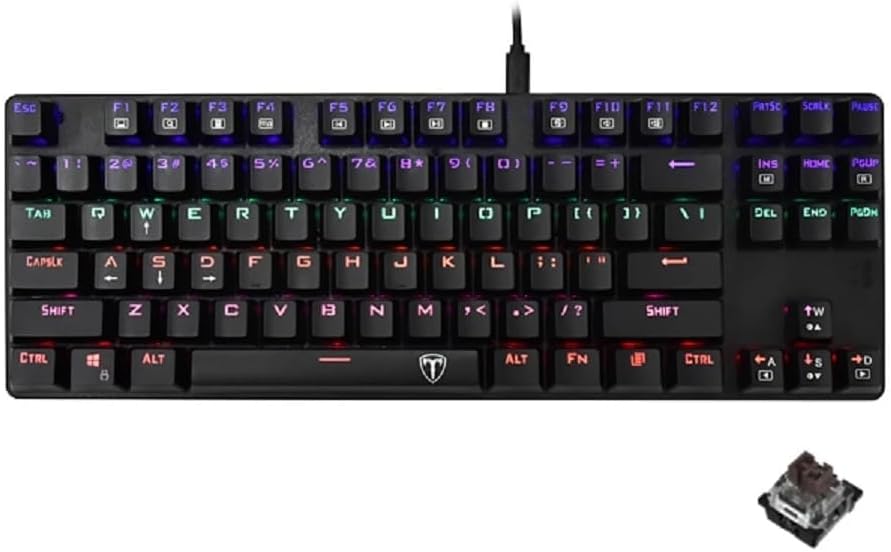
Figure 6: A close-up of a single mechanical switch, illustrating the durable design that benefits from regular cleaning.
Troubleshooting
If you encounter issues with your T-Dagger Bora TGK313 keyboard, refer to the following common problems and solutions:
| Problem | Possible Cause | Solution |
|---|---|---|
| Keyboard not responding. | Loose USB connection, faulty USB port, driver issue. |
|
| Backlight not working or flickering. | Backlight settings, power issue. |
|
| Certain keys are not working. | Debris under keycap, faulty switch. |
|
Specifications
| Feature | Detail |
|---|---|
| Model | TGK313 (Brown Switch) |
| Brand | T-Dagger |
| Connectivity Technology | USB |
| Keyboard Description | Mechanical |
| Number of Keys | 87 |
| Special Features | Backlit (Rainbow LED) |
| Compatible Devices | Computer |
| Recommended Uses | Gaming |
| Color | Multi-color (Rainbow) |
| Package Dimensions | 37.6 x 15.7 x 4.8 cm; 760 grams |
| First Available Date | March 1, 2023 |
Warranty and Support
Your T-Dagger Bora TGK313 Mechanical Gaming Keyboard comes with a warranty to ensure your peace of mind.
- Warranty: This product includes a 1-year warranty from the authorized agent. Please retain your proof of purchase for warranty claims.
- Customer Support: For technical assistance, warranty inquiries, or further questions, please contact T-Dagger customer support through their official website or the retailer where you purchased the product.
Ask a question about this manual
Ask about setup, troubleshooting, compatibility, parts, safety, or missing instructions. Manuals+ will review the question and use this page’s manual context to help answer it.