
1. Introduction
Thank you for choosing the Katrawu Industrial TV Stand. This manual provides detailed instructions for assembly, usage, and maintenance to ensure optimal performance and longevity of your product. Please read this manual thoroughly before assembly and retain it for future reference.
2. Safety Information
Always secure the TV stand to the wall to prevent tipping. Keep pets and children away from the TV stand to avoid accidents.
- Ensure all parts are present and undamaged before assembly.
- Do not overtighten screws during assembly to avoid damaging the material.
- Place the TV stand on a flat, stable surface.
- Do not exceed the maximum weight capacity of 150 lbs.
- Keep small parts away from children during assembly.
3. Package Contents
Before beginning assembly, please verify that all components listed below are included in your package. If any parts are missing or damaged, please contact Katrawu customer support.
- Wooden Top Panels
- Metal Frame Components
- Metal Mesh Shelves
- Adjustable Leg Pads
- Assembly Hardware (screws, wrench)
- Instruction Manual
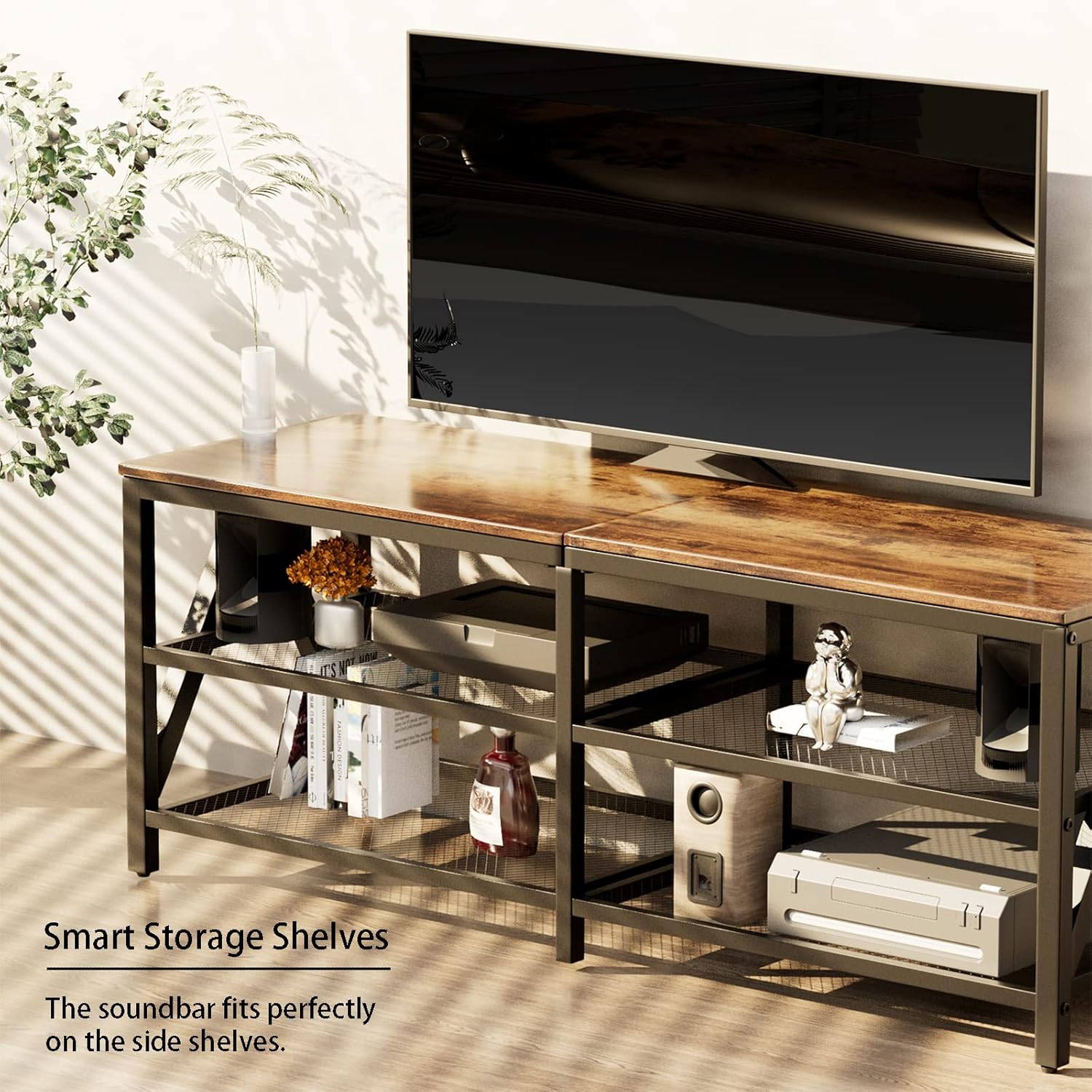
Figure 3.1: All components included in the package.
4. Assembly Instructions
Assembly is designed to be straightforward and can typically be completed by one person in approximately 20 minutes. Follow these steps carefully:
- Prepare the Workspace: Clear a spacious area and lay out all components on a soft, clean surface to prevent scratches.
- Assemble the Top Frame: Begin by attaching the horizontal metal bars to the wooden top panels. Ensure the screw holes align correctly.
- Attach Side Frames: Secure the side metal frames to the assembled top section. The design allows for building from the top down.
- Install Mesh Shelves: Slide and secure the metal mesh shelves into their designated slots on the frame. These shelves are designed for enhanced airflow.
- Attach Adjustable Feet: Screw the adjustable leg pads into the bottom of the stand's legs. These help stabilize the stand on uneven surfaces and protect your floors.
- Final Tightening: Once all components are in place, gently tighten all screws to ensure stability. Do not overtighten.
Video 4.1: An overview of the Katrawu 55-inch TV Stand, demonstrating its features and providing visual guidance for assembly.
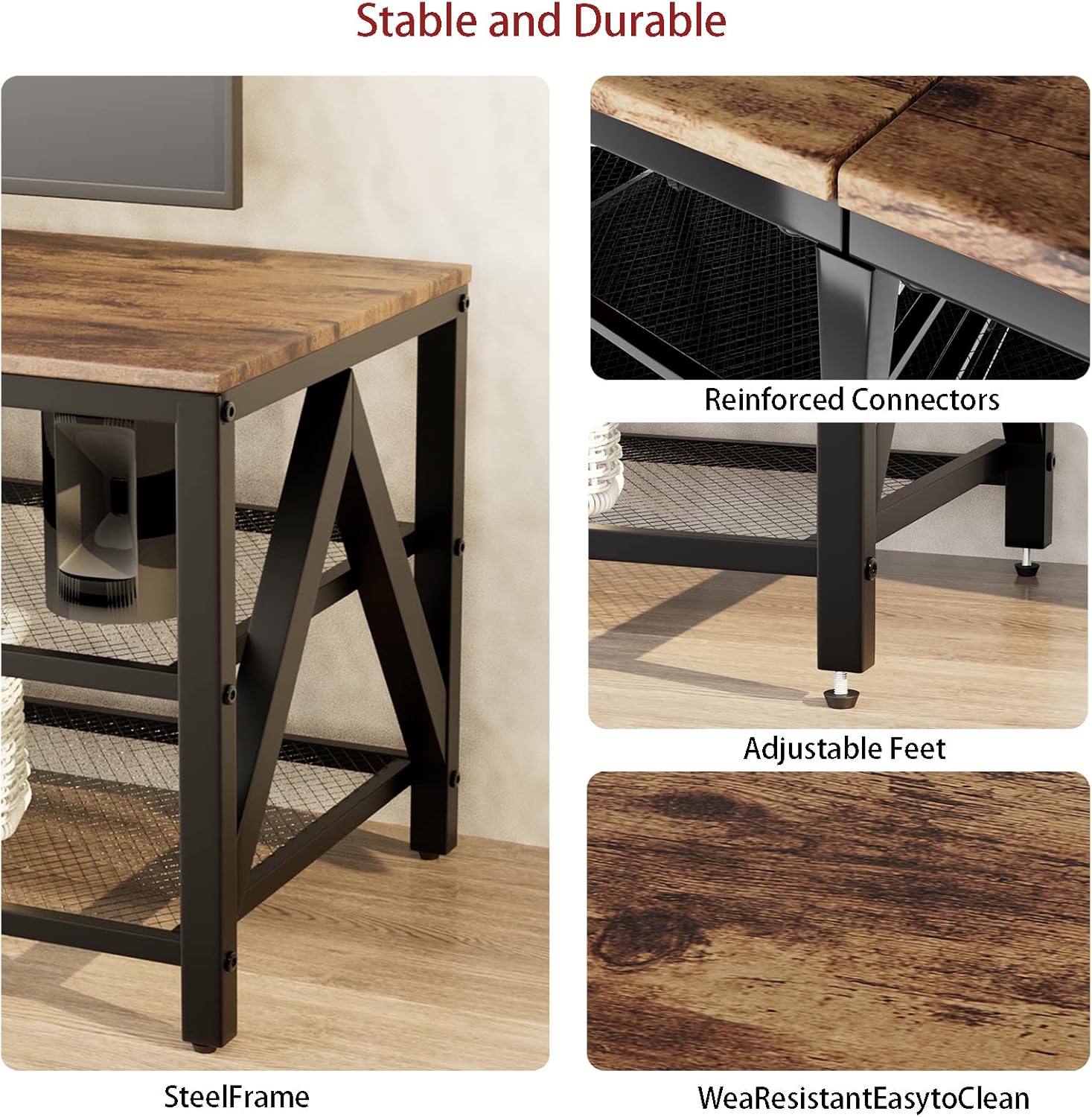
Figure 4.2: Detailed view of reinforced connectors, adjustable feet, and durable wood surface.
5. Product Features
- Spacious Design: Dimensions of 55.12"L x 15.75"W x 19.69"H, suitable for TVs up to 65 inches.
- 3-Tier Storage: Features two open metal mesh shelves below the main tabletop, providing ample space for media devices, game consoles, soundbars, and decorative items.
- Enhanced Airflow: The metal-grid shelves promote air circulation, helping to prevent electronics from overheating.
- Industrial Elegance: Combines rustic brown wood grain with black metal frames, offering a versatile aesthetic that complements farmhouse, industrial, and contemporary decor.
- Stable & Sturdy Construction: Built with a robust steel frame and a solid wood desktop that resists scratches.
- Adjustable Leg Pads: Equipped with adjustable feet to ensure stability on uneven surfaces and protect your floors from scratches.
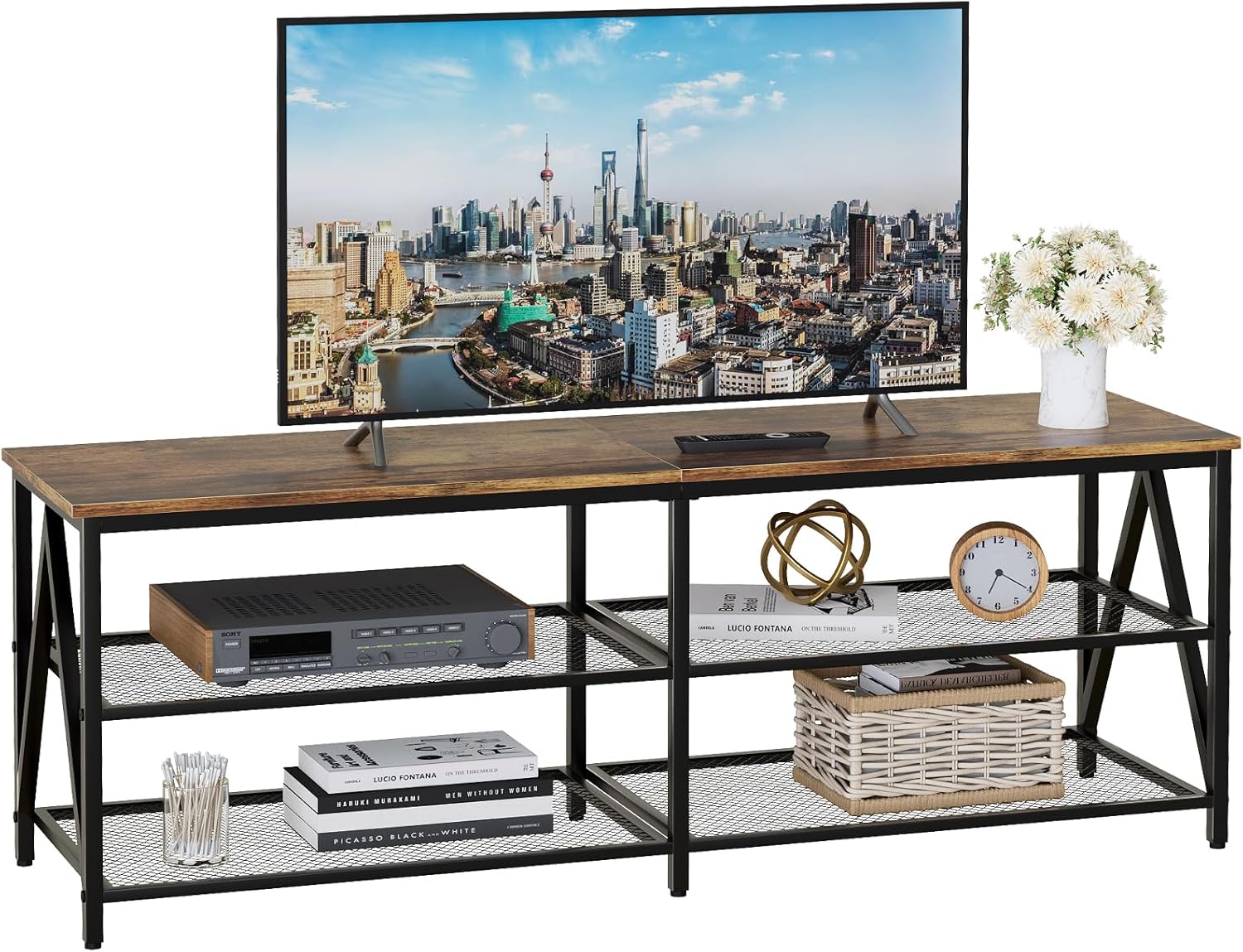
Figure 5.1: The Katrawu TV Stand showcasing its design and storage capabilities.
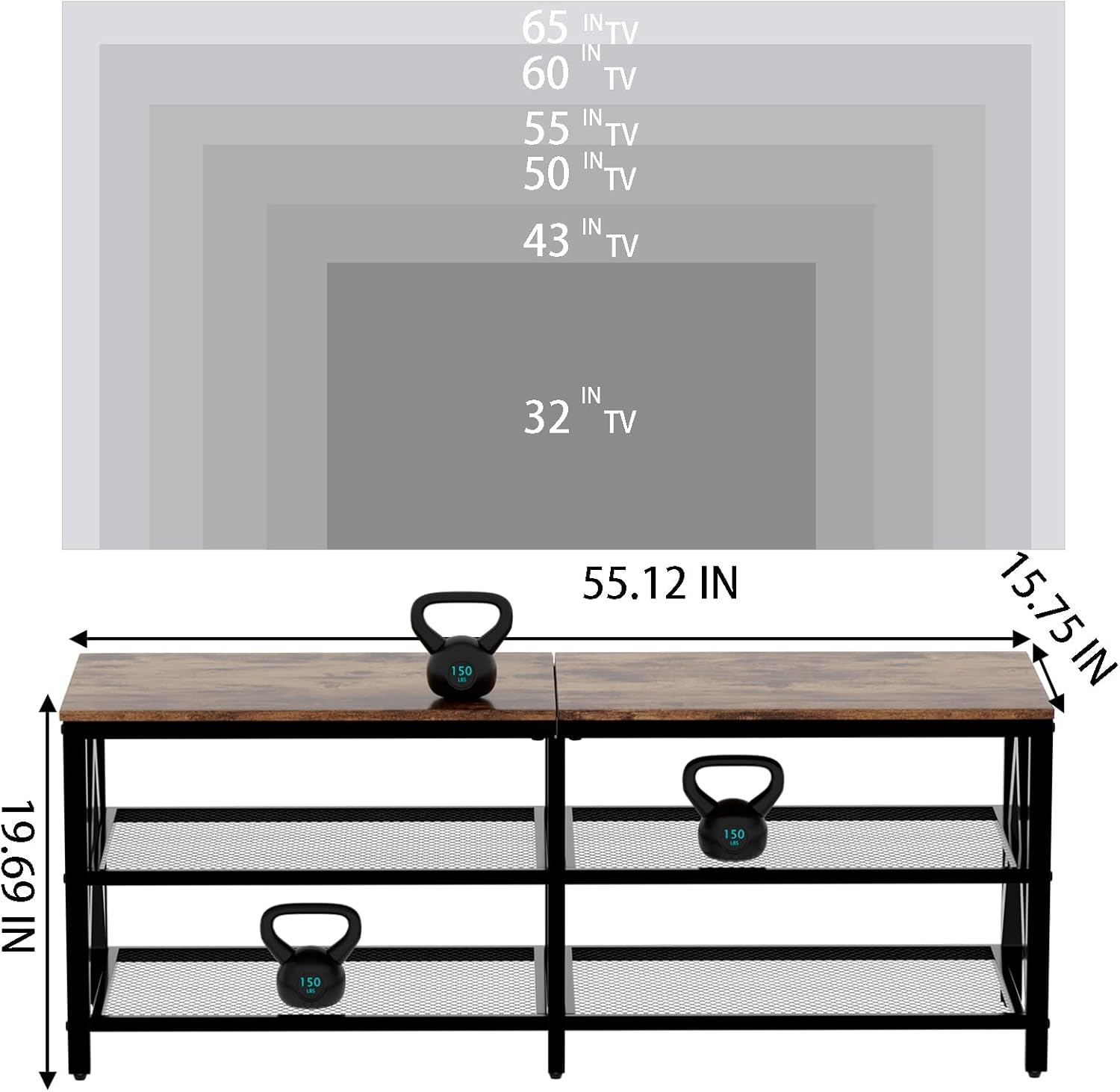
Figure 5.2: Product dimensions and TV size compatibility chart.

Figure 5.3: Smart storage shelves with a soundbar placement example.
6. Usage Guidelines
- TV Placement: This stand is designed to accommodate televisions up to 65 inches. Ensure your TV's base fits securely on the top surface.
- Electronics Storage: Utilize the open metal mesh shelves for media players, gaming consoles, and other electronic devices. The open design facilitates heat dissipation.
- Decorative Use: The stand's industrial aesthetic makes it suitable for displaying decorative items, books, or plants in living rooms, bedrooms, or offices.
- Cable Management: While not explicitly designed with cable management features, the open back allows for easy routing of cables to maintain a tidy appearance.
7. Maintenance
To keep your Katrawu TV Stand in excellent condition, follow these simple maintenance tips:
- Cleaning: Wipe the surfaces with a damp cloth for general cleaning. For a thorough clean, use a dry cloth immediately after to prevent moisture damage.
- Avoid Harsh Chemicals: Do not use abrasive cleaners or harsh chemicals, as these can damage the finish of the wood and metal.
- Regular Checks: Periodically check all screws and connections to ensure they remain tight. Retighten if necessary.
- Protect from Direct Sunlight/Heat: Prolonged exposure to direct sunlight or excessive heat can cause fading or warping of the wood panels.
8. Troubleshooting
If you encounter any issues with your Katrawu TV Stand, please refer to the following common solutions:
- Wobbling/Instability: Ensure the stand is on a level surface. Adjust the leg pads at the bottom of each leg until the stand is stable. Check that all screws are securely tightened.
- Missing Parts: If any parts were missing upon unboxing, please contact Katrawu customer support with your purchase details for assistance.
- Difficulty Assembling: Review the assembly instructions carefully. Ensure you are using the correct hardware for each step. If issues persist, refer to the assembly video or contact support.
For any problems not addressed here, please contact Katrawu customer support.
9. Specifications
| Feature | Detail |
|---|---|
| Item Dimensions (L x W x H) | 55.12 x 15.75 x 19.69 inches |
| Item Weight | 25.3 pounds |
| Material | Iron, Wood |
| Number of Shelves | 3 |
| Color | Brown |
| Style | Retro, Industrial style |
| Assembly Required | Yes |
| Product Care Instructions | Wipe with Damp Cloth, Wipe with Dry Cloth |
| Item Model Number | DY2391 |
| UPC | 759007106184 |
10. Warranty and Support
Katrawu stands behind the quality of its products. For warranty information, missing parts, or any other support needs, please contact Katrawu customer service directly through the retailer's platform or the official Katrawu website. Please have your model number (DY2391) and purchase date ready when contacting support.
