
Product Overview
The SHW 40-Inch Mobile Electric Height Adjustable Sit to Stand Desk is designed to enhance your workspace with ergonomic flexibility and convenient features. This desk allows for seamless transitions between sitting and standing positions, promoting a healthier work environment. Its compact design, coupled with mobility options, makes it suitable for various home and office settings.
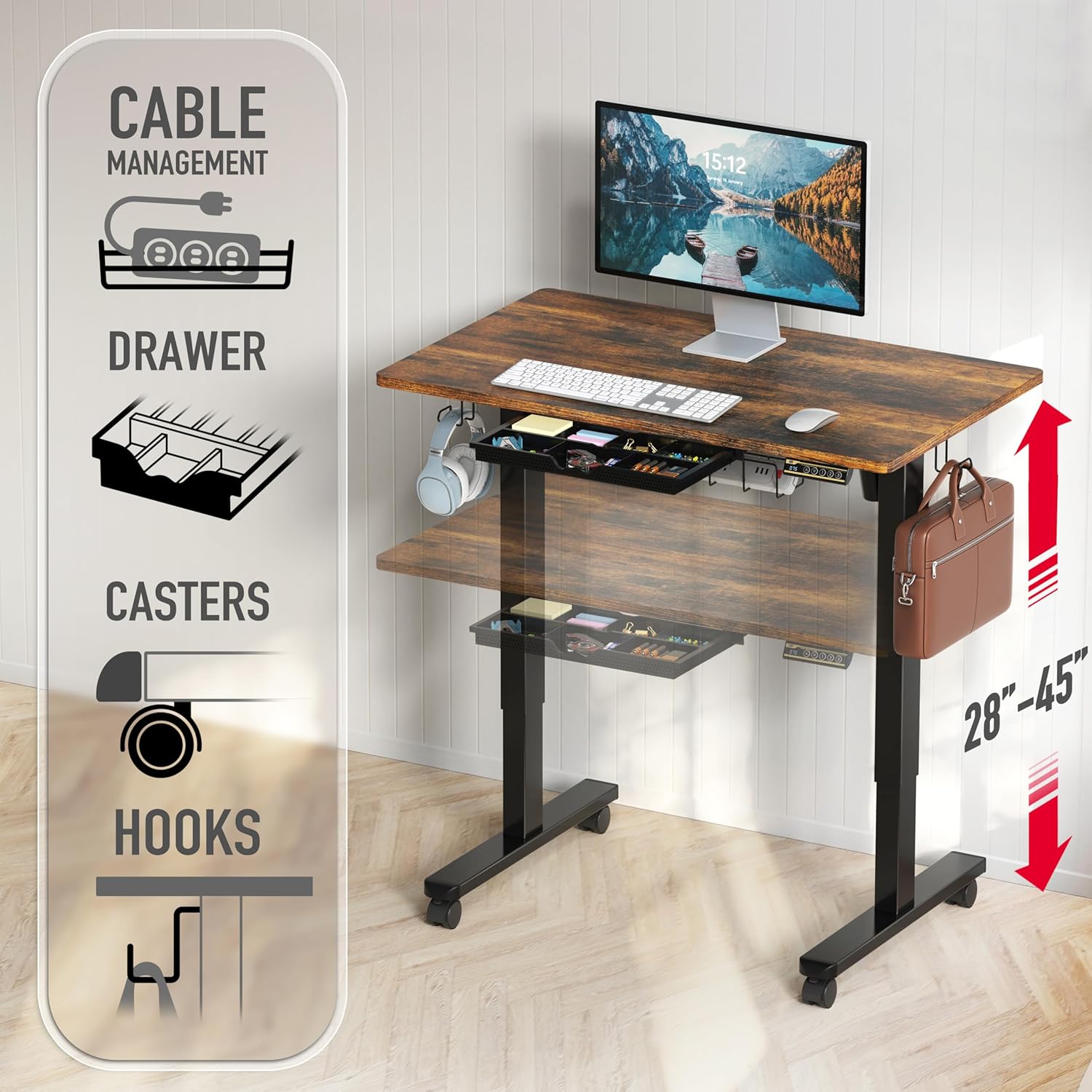
Image: The SHW 40-Inch Mobile Electric Height Adjustable Sit to Stand Desk in Rustic Brown, featuring a monitor, keyboard, and mouse, showcasing its functional design in a modern office setup.
Key Features:
- Electric Height Adjustment: Smoothly transitions between 28" to 45" to support both sitting and standing postures.
- Mobile Technology: Equipped with screw-in locking casters for easy movement and adjustable glides for stationary use.
- Integrated Storage Drawer: A built-in drawer with adjustable compartments keeps office supplies organized and within reach.
- Hanging Hooks: Side hooks provide convenient storage for headphones, bags, or other accessories.
- Curved Edge Desktop: Designed for ergonomic wrist support and comfort during extended use.
- Cable Management: Includes a cable management tray to keep wires tidy and out of sight.
Safety Information
Please read and understand all safety instructions before assembly and use. Failure to follow these instructions may result in injury or damage to the product.
- Always follow the assembly instructions carefully.
- Keep the desk on a stable and level surface.
- Do not adjust the desk's height while in use or with excessive weight.
- Ensure the area around the desk is clear of obstructions during height adjustments.
- Keep children and pets away from the moving parts of the desk.
- Do not overload the desk; refer to specifications for maximum weight capacity.
Package Contents
Before beginning assembly, ensure all parts listed in the instruction manual are present and undamaged. Refer to your packaging for a detailed list of components.
- Desktop (Rustic Brown)
- Desk Legs/Frame (Metal)
- Electric Motor and Control Panel
- Lockable Wheels (4x)
- Adjustable Glides
- Under-Desk Drawer (1x)
- Utility Hooks (2x)
- Cable Management Tray
- Assembly Tools and Hardware
Assembly Instructions
Assembly of the SHW Electric Height Adjustable Desk is designed to be straightforward. It typically takes approximately 30-60 minutes for one person. Having an additional person can expedite the process. All necessary tools are included.
- Unpack and Identify Parts: Lay out all components on a clean, soft surface to prevent scratches. Verify all parts against the included parts list.
- Assemble the Frame: Attach the crossbars to the lifting columns using the provided screws and tools.
- Install Legs and Feet: Secure the desk feet to the bottom of the lifting columns. Choose between installing the lockable casters for mobility or adjustable glides for stationary use.
- Attach Desktop: Carefully place the desktop upside down on a soft surface. Align the pre-drilled holes on the desktop with the frame and secure it with screws.
- Install Control Panel and Motor: Mount the electric motor and control panel to the underside of the desktop as indicated in the manual. Connect all necessary cables.
- Attach Accessories: Install the under-desk drawer, cable management tray, and utility hooks.
- Cable Management: Route all power and data cables through the cable management tray and secure them to prevent tangling during height adjustments.
- Initial Setup: Plug in the desk. Perform the initial reset procedure as described in the operating instructions to calibrate the motor.
Assembly Video Reference:
Video: This video provides a visual guide to the assembly process, demonstrating how to put together the desk components and manage cables. It highlights the ease of assembly and the desk's sturdy construction.
Operating Instructions
Your SHW Electric Height Adjustable Desk features an intuitive control panel for easy operation.

Image: A detailed view of the desk's control panel, showing the LED height display, up/down arrows, and three memory preset buttons (1, 2, 3).
- Adjusting Height: Use the Up (^) and Down (v) arrow buttons on the control panel to manually raise or lower the desk to your desired height. The current height is displayed on the LED screen.
- Setting Memory Presets:
- Adjust the desk to your preferred sitting or standing height using the arrow buttons.
- Press the "S" button (Set). The display will flash.
- Immediately press one of the numbered preset buttons (1, 2, or 3) to save the current height to that memory slot.
- Using Memory Presets: Simply press the corresponding numbered button (1, 2, or 3) to automatically move the desk to your saved height.
- Caster Operation: The desk is equipped with lockable casters. To move the desk, unlock all four casters. To keep the desk stationary, lock all four casters. Adjustable glides are also provided for alternative stationary use.
- Drawer Use: The integrated drawer can be used to store office supplies. It features adjustable compartments for customization.
- Hooks: Utilize the side hooks for hanging headphones, bags, or other items to keep your desktop clear.
Operation Video Reference:
Video: This video demonstrates the electric height adjustment feature, showing the desk smoothly transitioning between sitting and standing positions. It also highlights the use of the control panel and memory presets.
Maintenance
Regular maintenance will help prolong the life and appearance of your desk.
- Cleaning: Wipe the desktop and frame with a soft, damp cloth. Avoid harsh chemicals or abrasive cleaners.
- Inspection: Periodically check all screws and connections to ensure they are tight. Retighten if necessary.
- Cable Management: Ensure cables are properly routed and not pinched or tangled, especially during height adjustments.
Troubleshooting
If you encounter any issues with your desk, refer to the following common solutions:
| Problem | Possible Cause | Solution |
|---|---|---|
| Desk does not move or respond to controls. | Power cable disconnected; Motor overload; Control panel error. | Check power connections. Unplug and replug the desk. Perform a reset procedure (refer to manual for specific steps). Reduce weight on the desk. |
| Motor makes unusual noise or movement is delayed. | Motor calibration issue; Obstruction; Overload. | Ensure no obstructions. Perform a reset procedure. If issues persist, contact customer support. |
| Desk is unstable or wobbly. | Loose connections; Uneven floor; Casters unlocked. | Check and tighten all assembly screws. Adjust the leveling glides or ensure casters are locked. |
Specifications
| Attribute | Detail |
|---|---|
| Brand | SHW |
| Model Number | OD-91B-R |
| Product Dimensions | 24"D x 40"W x 28-45"H |
| Color | Rustic Brown |
| Minimum Height | 28 Inches |
| Maximum Height | 45 Inches |
| Top Material Type | Engineered Wood (Laminated) |
| Base Material | Metal |
| Lifting Mechanism | Electric Motor |
| Number of Drawers | 1 |
| Special Features | Adjustable Height, Ergonomic, Memory Preset, Mobility with wheels |
| Required Assembly | Yes (Tools Included) |
| UL Listed | Yes |
Warranty and Support
This SHW product comes with a limited warranty. For detailed warranty information, product support, or to report any issues, please refer to the contact information provided in your product packaging or visit the official SHW website.
Always retain your proof of purchase for warranty claims.