
TDLOL X26
TDLOL X26 20000mAh Rechargeable Portable Camping Fan with LED Light User Manual
Model: X26 | Brand: TDLOL
Introduction
This manual provides detailed instructions for the safe and efficient operation of your TDLOL X26 20000mAh Rechargeable Portable Camping Fan. Please read this manual thoroughly before use and retain it for future reference.
Safety Instructions
- Do not insert fingers or foreign objects into the fan grille.
- Keep the fan away from water and excessive moisture.
- Do not disassemble or attempt to repair the fan yourself. Contact qualified personnel for service.
- Use only the provided charging cable or a compatible 5V/2A Type-C charger.
- Keep out of reach of children.
- Avoid prolonged exposure to direct sunlight or high temperatures.
Package Contents
- TDLOL X26 Portable Camping Fan
- USB Type-C Charging Cable
- User Manual
Product Overview
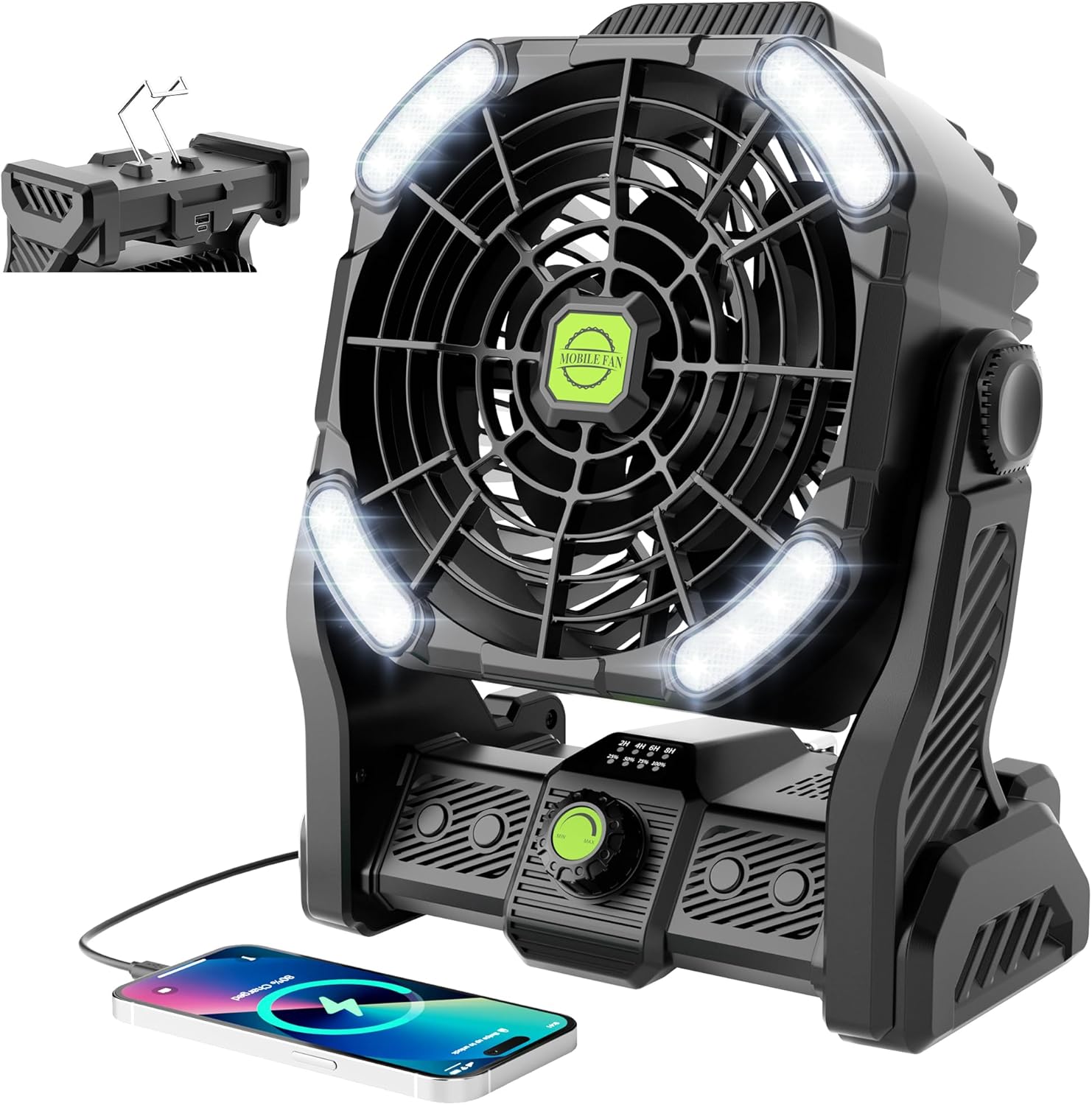
Familiarize yourself with the components of your TDLOL X26 fan.

- Fan Grille: Protects the fan blades.
- LED Lights: Integrated lighting with adjustable brightness and color temperature.
- Speed Control Knob: Adjusts fan speed from minimum to maximum.
- Light Control Button: Cycles through light modes and brightness.
- Timer Button: Sets automatic shut-off timer.
- Power Display: Indicates remaining battery charge (25%, 50%, 75%, 100%).
- Type-C Input Port: For charging the fan.
- USB Output Port: For charging external devices (power bank function).
- Adjustable Stand/Handle: Allows for 270° rotation and serves as a carrying handle.
- Hanging Hook: For suspending the fan in tents or other locations.
Setup
Initial Charging
Before first use, fully charge the fan. Connect the provided USB Type-C cable to the fan's Type-C input port and a compatible 5V/2A USB power adapter (not included). The power indicator lights will illuminate to show charging progress. All four lights will be solid when fully charged.

Positioning the Fan
The fan can be placed on a flat surface using its integrated stand or hung using the retractable hook. The fan head can be rotated up to 270 degrees vertically to direct airflow.


Operating Instructions
Fan Operation
- Power On/Off: Rotate the speed control knob clockwise to turn the fan on. Continue rotating to increase speed. Rotate counter-clockwise to decrease speed and turn off.
- Speed Adjustment: The fan features stepless speed regulation. Turn the knob gradually to achieve your desired airflow intensity.

The fan operates quietly, with a noise level below 28dB, making it suitable for use during sleep or in quiet environments.

LED Light Operation
- Turn On/Off: Press the Light Control Button once to turn on the LED lights. Press again to cycle through modes or turn off.
- Brightness Adjustment: The LED lights have three brightness settings. Press the Light Control Button repeatedly to cycle through low, medium, and high brightness.
- Color Temperature: The fan features dual color temperature LED lights (6500K cool white and 2700K warm white). Press and hold the Light Control Button to switch between color temperatures.

Timer Function
Press the Timer Button to set an automatic shut-off timer. Available settings are 2 hours, 4 hours, 6 hours, and 8 hours. The corresponding indicator light will illuminate to confirm the selected timer duration. To cancel the timer, cycle through the options until no timer light is illuminated.
Power Bank Function
The fan can be used as a power bank to charge other devices. Connect your device's USB charging cable to the fan's USB output port. The fan's 20000mAh battery provides ample power for charging smartphones, tablets, and other USB-powered gadgets.
Maintenance
- Cleaning: Ensure the fan is turned off and unplugged before cleaning. Use a soft, dry cloth to wipe down the exterior. For the fan blades, use a soft brush or compressed air to remove dust. Do not use abrasive cleaners or immerse the fan in water.
- Storage: Store the fan in a cool, dry place when not in use. If storing for an extended period, charge the battery to approximately 50% every 3 months to maintain battery health.
Troubleshooting
| Problem | Possible Cause | Solution |
|---|---|---|
| Fan does not turn on. | Battery is depleted. | Charge the fan using the Type-C cable. |
| Fan speed is weak. | Low battery or speed knob set too low. | Charge the fan or rotate the speed control knob clockwise to increase speed. |
| LED lights do not turn on. | Light control button not pressed or battery depleted. | Press the Light Control Button. If still off, charge the fan. |
| Device not charging from USB output. | Cable issue, device not compatible, or fan battery low. | Ensure cable is securely connected. Try a different cable or device. Charge the fan. |
Specifications
| Feature | Detail |
|---|---|
| Model | X26 |
| Brand | TDLOL |
| Battery Capacity | 20000mAh |
| Input Voltage | 5V |
| Output Voltage | 5V |
| Fan Speeds | Stepless Adjustment |
| LED Light Brightness | 3 Levels |
| LED Light Color Temperature | 6500K (Cool White), 2700K (Warm White) |
| Noise Level | <28dB |
| Head Rotation | 270° Vertical |
| Timer Settings | 2H, 4H, 6H, 8H |
| Dimensions (D x W x H) | 1"D x 1"W x 1"H (Note: These dimensions are as provided in product data and may not reflect actual size.) |
| Material | Plastic |
Official Product Video
Watch this official video for a visual guide on the TDLOL X26 Portable Camping Fan's features and operation.
Warranty and Support
For warranty information or technical support, please refer to the product packaging or contact the manufacturer directly. Specific warranty terms and support contact details are not provided in this manual.
Ask a question about this manual
Ask about setup, troubleshooting, compatibility, parts, safety, or missing instructions. Manuals+ will review the question and use this page’s manual context to help answer it.