
1. Introduction
The Energizer HC-550 LED Flashlight is a robust and versatile lighting tool designed for various tasks. It provides bright, uniform illumination and features a durable construction to withstand demanding environments. This manual provides essential information for the safe and effective use of your flashlight.
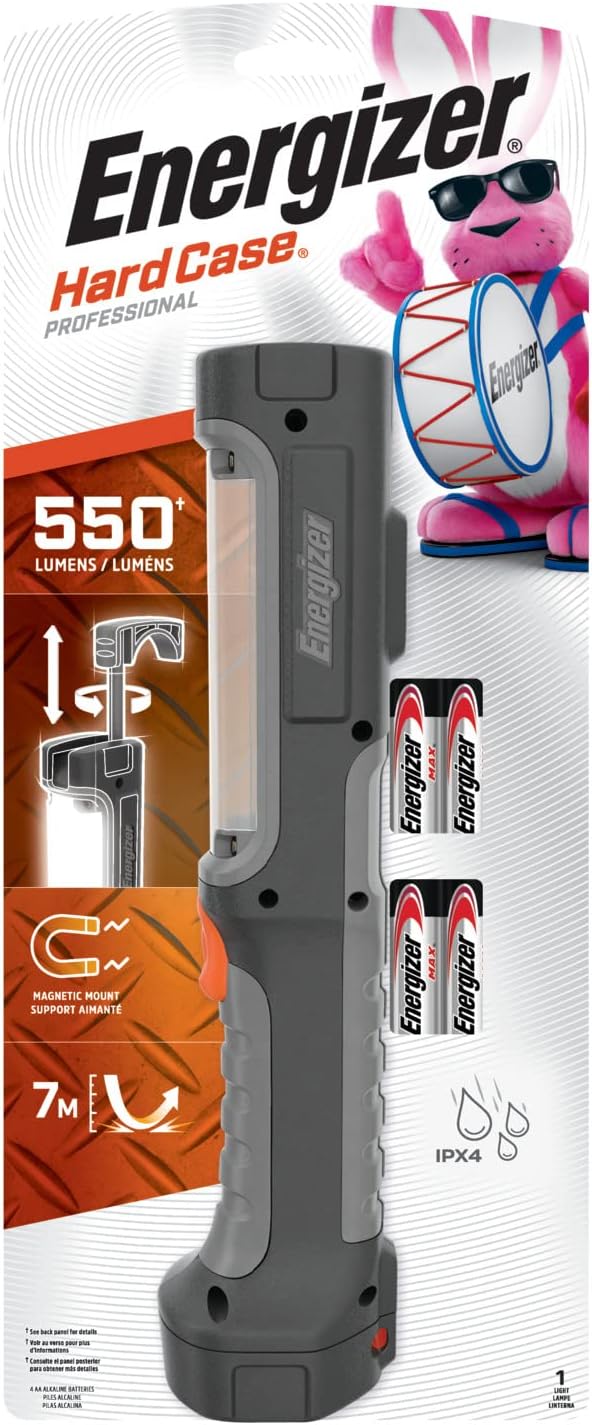
Figure 1: Energizer HC-550 LED Flashlight in its retail packaging, highlighting 550 lumens, magnetic mount, and IPX4 water resistance.
Key Features:
- High-Power LED Technology: Delivers up to 550 lumens of bright, uniform, wide-angle light.
- Durable Construction: Engineered to withstand drops from up to 7 meters (2 stories high).
- Hands-Free Operation: Equipped with a retractable rotating hook and a magnetic wide base for versatile placement.
- Smart Dimming Feature: Allows adjustment of light intensity to conserve power and extend runtime.
- Splash Resistant: Designed to withstand splashing water (IPX4 rated).
- Extended Runtime: Operates for an entire 8-hour workday on high mode.
2. Package Contents
Verify that all items are present in the package:
- 1 x Energizer HC-550 LED Flashlight
- 4 x Energizer MAX AA Batteries
3. Setup
Battery Installation
- Locate the battery compartment cover, typically at the base or side of the flashlight.
- Open the battery compartment. This may involve twisting a cap or unlatching a cover.
- Insert four (4) AA batteries, ensuring correct polarity (+/-) as indicated inside the compartment.
- Securely close the battery compartment cover.

Figure 2: The Energizer HC-550 LED Flashlight shown alongside the four AA batteries required for operation.
4. Operating Instructions
Power On/Off and Light Modes
- To turn the flashlight ON, press the power button located on the side of the unit.
- The flashlight features a Smart Dimming Feature. Pressing the power button repeatedly cycles through different light intensity levels (High, Low, and Off).
- The high mode provides maximum brightness (550 lumens), while the low mode conserves battery life for extended use.

Figure 3: Illustration of the two primary light modes: High for maximum illumination and Low for extended battery life.

Figure 4: The flashlight is designed to provide up to 8 hours of continuous light on its high mode setting.
Hands-Free Operation
The HC-550 is designed for convenient hands-free use:
- Retractable Rotating Hook: Pull out the hook located at the top of the flashlight to hang it from various objects such as ladders, pipes, or tent poles. The hook rotates for optimal light positioning.
- Magnetic Wide Base: The flashlight features a strong magnetic base that allows it to be securely attached to metallic surfaces, providing stable illumination without needing to be held.
- Sturdy Base: The wide, flat base allows the flashlight to stand upright on flat surfaces, directing light where needed.

Figure 5: The flashlight's retractable hook allows it to be conveniently hung from a ladder, providing overhead illumination for tasks.

Figure 6: The magnetic base secures the flashlight to a metallic surface under a car hood, freeing hands for maintenance work.

Figure 7: A visual representation of the flashlight's versatile hands-free capabilities, including magnetic attachment and hanging options.
5. Maintenance
Cleaning
To clean the flashlight, wipe it with a soft, damp cloth. Do not use abrasive cleaners or solvents, as these may damage the finish or internal components. Ensure the flashlight is dry before storage or next use.
Battery Replacement and Storage
- Replace all four AA batteries simultaneously with new, fresh batteries of the same type (Alkaline recommended).
- Do not mix old and new batteries, or different types of batteries.
- If the flashlight will not be used for an extended period, remove the batteries to prevent leakage and potential damage to the device.
6. Troubleshooting
| Problem | Possible Cause | Solution |
|---|---|---|
| Flashlight does not turn on. | Dead or incorrectly inserted batteries. | Check battery polarity. Replace all four AA batteries with new ones. |
| Light is dim or flickers. | Low battery power. | Replace all four AA batteries with new ones. |
| Flashlight turns off unexpectedly. | Low battery power or intermittent connection. | Replace batteries. Ensure battery compartment is securely closed. |
| Difficulty cycling through modes. | Button malfunction or low battery. | Ensure batteries are fresh. If problem persists, contact customer support. |
7. Specifications
| Feature | Detail |
|---|---|
| Model Number | HC-550 |
| Light Source Type | LED |
| Brightness | Up to 550 Lumens |
| Power Source | 4 x AA Batteries (Alkaline recommended) |
| Voltage | 6 Volts |
| Material | Plastic |
| Dimensions (D x W x H) | 2.73" x 5.98" x 14.49" |
| Item Weight | 0.9 Pounds (approximately 14.4 ounces) |
| Water Resistance Level | IPX4 (Splash Resistant, not submersible) |
| Special Features | Durable, Portable, Magnetic Mount, Retractable Hook, Smart Dimming |
8. Safety Information
- Battery Safety: Follow all battery manufacturer warnings and instructions. Do not dispose of batteries in fire. Do not mix battery types or old and new batteries. Remove batteries if the device is not used for extended periods.
- Eye Safety: Do not look directly into the LED light. The intense light can cause temporary vision impairment or eye damage.
- Magnetic Warning: This product contains magnets. Keep magnets away from pacemakers, ICDs, and other medical devices. Consult a physician before use if you have a medical device.
- General Use: Do not attempt to disassemble or modify the flashlight. Use only as intended.

Figure 8: Rear view of the product packaging, displaying important safety warnings and product information.
9. Warranty and Support
The manufacturer's warranty for this product is not explicitly stated as applicable in the provided information. For specific warranty details or customer support, please refer to the official Energizer website or contact their customer service directly.
Energizer Customer Support: Please visit www.energizer.com for further assistance, product information, or to locate contact details.


