
1. Introduction
The Browning Strike Force Pro X 1080 trail camera is designed for capturing high-quality images and videos of wildlife. This model features a 1.5-inch color view screen, rapid trigger speed, and advanced illumination technology for optimal performance day and night. It is built for outdoor use and offers robust features for reliable monitoring.
This manual provides detailed instructions for setting up, operating, and maintaining your camera to ensure optimal performance and longevity.
2. Package Contents
Please verify that all items are present in your package:
- Browning Strike Force Pro X 1080 Trail Camera
- Mounting Strap
- Instruction Manual (this document)
Note: 6 AA batteries and an SDXC memory card (up to 512GB) are not included and must be purchased separately.
3. Setup
3.1. Battery Installation
The camera requires 6 AA batteries for operation. For best performance and battery life, it is recommended to use high-quality alkaline or lithium batteries.
- Open the camera housing by releasing the latch on the side.
- Locate the battery compartment.
- Insert 6 AA batteries, ensuring correct polarity (+/-) as indicated inside the compartment.
- Close the battery compartment securely.
The camera can operate for up to 1 year on a single set of batteries, depending on usage and environmental conditions.
3.2. SD Card Installation
A Class 10 or higher SDXC memory card is required for storing images and videos. The camera supports cards up to 512GB.
- With the camera housing open, locate the SD card slot.
- Insert the SD card into the slot with the label facing forward until it clicks into place.
- To remove the SD card, gently push it in until it clicks, then release, and it will eject.
It is recommended to format the SD card using the camera's menu system before first use and periodically thereafter to ensure optimal performance.
3.3. Mounting the Camera
The Strike Force Pro X 1080 can be mounted using the included tree strap or via its 1/4"-20 tripod socket.
- Tree Strap Mounting: Thread the provided strap through the slots on the back of the camera and secure it around a tree or post. Adjust the camera angle using the all-steel adjustable mounting bracket.
- Tripod Mounting: Attach the camera to any standard tripod or mounting accessory using the 1/4"-20 threaded insert located at the bottom of the camera.
Ensure the camera is mounted securely and pointed towards the desired monitoring area, free from obstructions.
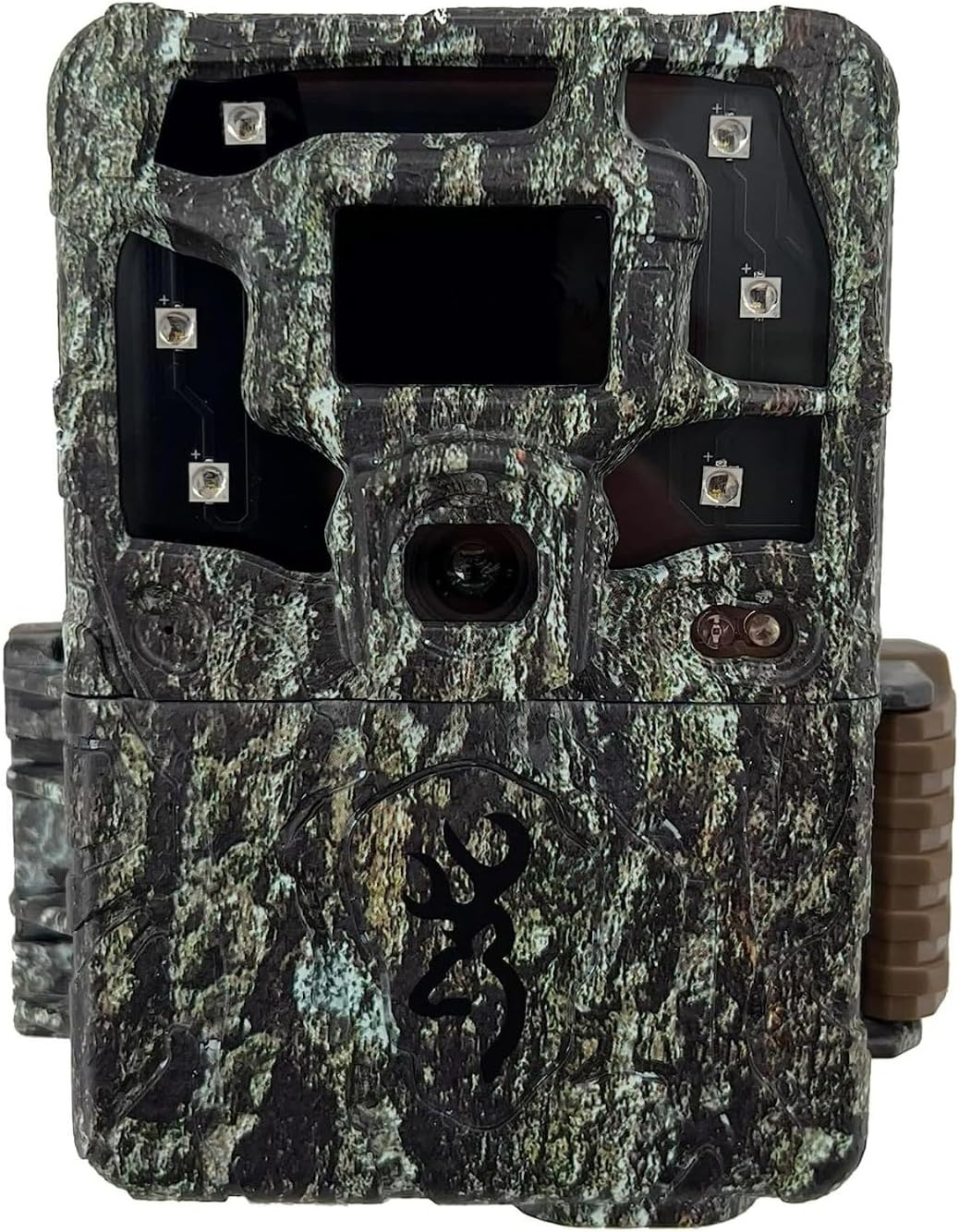
Figure 1: Front view of the Browning Strike Force Pro X 1080 trail camera.

Figure 2: Camera with front cover open, showing the internal screen and controls.
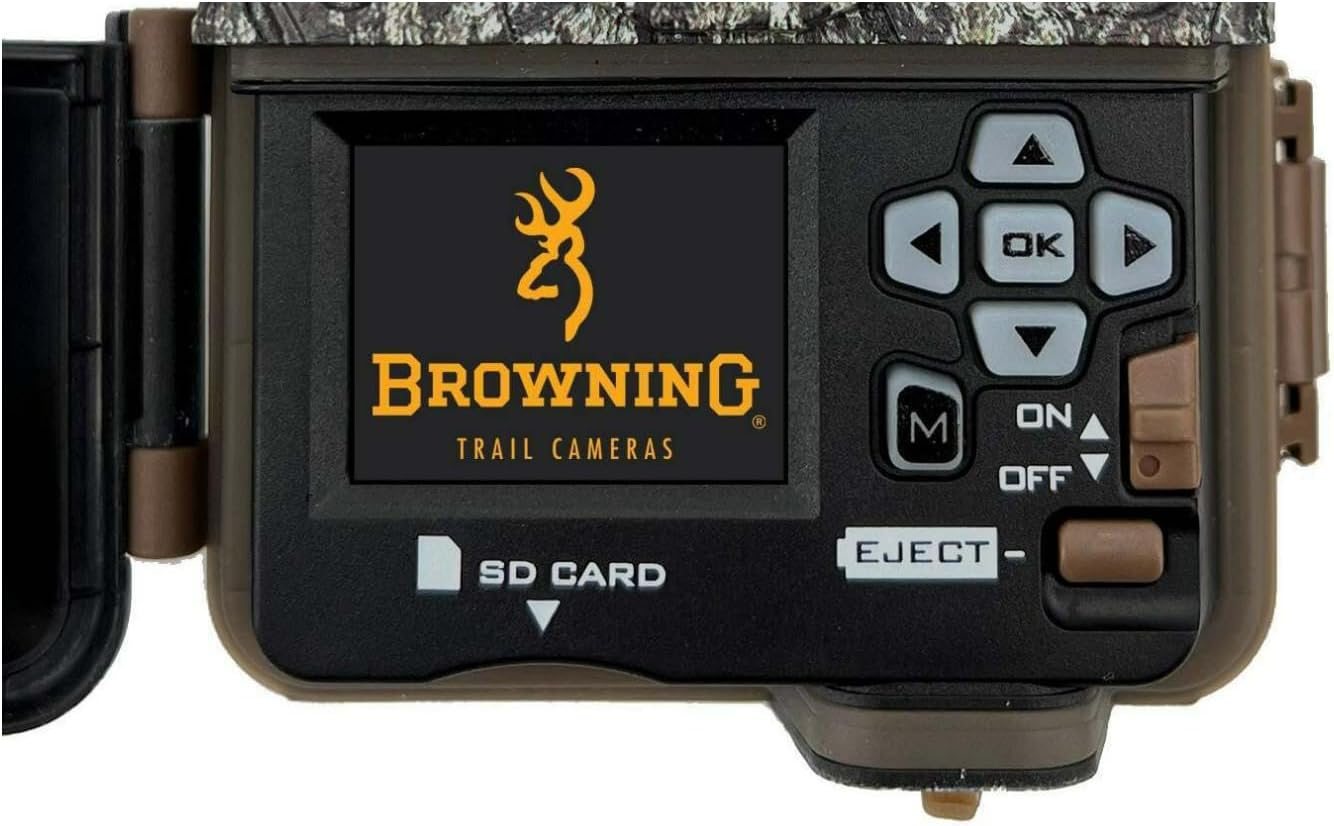
Figure 3: Detailed view of the control panel and screen.
4. Operating Instructions
4.1. Powering On/Off
To power on the camera, slide the ON/OFF switch to the 'ON' position. The screen will illuminate, and the camera will enter setup mode. To power off, slide the switch to the 'OFF' position.
After making setting changes, press the 'OK' button to save them. The camera will then count down 10 seconds before entering 'Ready' mode to begin recording.
4.2. Navigating the Menu
Use the navigation buttons (Up, Down, Left, Right) to scroll through menu options on the 1.5-inch color view screen. Press the 'OK' button to select an option or confirm a setting. The 'M' (Mode) button allows switching between different operational modes.
4.3. Key Features and Settings
- Image Capability: Captures 24MP still images.
- Video Recording: Records Full HD 1080p videos with sound, adjustable from 5 seconds to 2 minutes in length.
- Trigger Speed: Ultra-fast 0.22-second trigger speed to capture fast-moving subjects.
- Recovery Time: Quick 0.35-second recovery time between images.
- Detection Range: Features a 100-foot image detection range.
- Flash Range: 120-foot infrared illumination at night.
- Night Illumination: Utilizes "RADIANT 6" Night Illumination Technology.
- Adjustable IR Flash: Settings include Power Save, Fast Motion, and Long Range to customize night vision.
- Illuma-Smart Technology: Automatically adjusts IR flash for perfect night photos.
- Multi Shot & Rapid Fire: Capture up to 8 multi-shot images or 8 rapid-fire images per trigger.
- Picture Delay: Programmable picture delay from 1 second to 60 minutes.
- Smart IR Video: Allows continuous video recording as long as game is moving within the camera's range.
- SD Card Management: Options for managing storage on the SD card.
- Info Bar: Picture info bar displays Time, Date, Temperature, Moon Phase, and Camera ID.

Figure 4: Example of a daytime image captured by the camera.

Figure 5: Example of a nighttime image captured by the camera using infrared illumination.

Figure 6: Another example of a daytime image captured by the camera.
4.4. Video Playback (if applicable)
No official seller videos are available for direct embedding in this manual. To view captured videos, remove the SD card from the camera and insert it into a compatible device (e.g., computer, card reader) for playback.
5. Maintenance
- Cleaning: Use a soft, dry cloth to clean the camera lens and housing. Avoid abrasive cleaners or solvents.
- Battery Replacement: Replace batteries when the low battery indicator appears or when performance degrades. Always replace all batteries at once with new ones.
- SD Card Management: Regularly check the SD card for available space. Back up important files and format the card periodically to maintain optimal performance.
- Environmental Protection: While the camera is rugged and water-resistant, avoid prolonged submersion in water. Ensure the housing is securely closed to prevent moisture ingress.
6. Troubleshooting
If you encounter issues with your Browning Strike Force Pro X 1080 camera, please refer to the following common solutions:
| Problem | Possible Cause / Solution |
|---|---|
| Camera not powering on | Check battery installation and ensure batteries are new and correctly oriented. Verify the ON/OFF switch is fully in the 'ON' position. |
| No images/videos captured | Ensure an SD card is inserted and formatted. Check camera settings for proper mode (photo/video) and delay. Verify detection range is clear of obstructions. |
| Poor night images/videos | Check IR flash settings (Power Save, Fast Motion, Long Range). Ensure no reflective surfaces are too close to the camera. Verify battery level. |
| Short battery life | Use high-quality alkaline or lithium batteries. Reduce frequency of captures or video length. Avoid extreme temperatures. |
| Camera not responding to controls | Power off the camera, remove and reinsert batteries, then power on again. If issue persists, contact customer support. |
7. Specifications
| Feature | Detail |
|---|---|
| Model Name | BTC-5PX-1080 |
| Effective Still Resolution | 24 MP |
| Video Capture Resolution | 1080p Full HD with Sound |
| Trigger Speed | 0.22 seconds |
| Recovery Time | 0.35 seconds |
| Detection Range | 100 feet |
| Infrared Flash Range | 120 feet |
| Display Screen | 1.5 Inch Color View Screen |
| Power Source | 6 AA Batteries (Not Included) |
| External Power Jack | 12-Volt |
| Memory Card Support | Up to 512GB SDXC Memory Card (Not Included) |
| Mounting Options | All-Steel Adjustable Tree Mount Bracket, 1/4" -20 Tripod Socket |
| Dimensions (L x W x H) | 4.25 x 7.25 x 3.5 inches |
| Weight | 1 pound |
| IP Rating | IP54 (Water-resistant) |
| Connectivity Technology | Wireless (Wi-Fi) |
| Controller Type | Push Button |
8. Warranty and Support
8.1. Limited Warranty
Your Browning Trail Camera is expected to be free from defects in workmanship and materials under normal conditions for a period of 1 year from the date of purchase. Browning will repair or replace the unit with a new or refurbished unit as needed, at their discretion.
Please retain your proof of purchase for warranty claims.
8.2. Customer Support
For technical assistance, troubleshooting, or warranty inquiries, please contact Browning Trail Cameras customer service:
- Phone: 1 (888) 618-4496
- Website: www.browningtrailcameras.com


