
Introduction
This manual provides instructions for the proper use and care of your Mous Phone Lanyard Crossbody with Detachable Wrist Strap. This accessory is designed to keep your phone secure and accessible, offering versatility in how you carry your device.
- Hands-Free Convenience: Offers nearly 1 meter of adjustability and a detachable wrist strap for versatile carrying options.
- Durable Construction: Made from soft, sleek nylon and features scratch-resistant metal hardware for long-lasting use.
- Multiple Wearing Styles: Can be used as a wrist strap, worn across the body, around the neck, or adjusted to various lengths.
- Compatibility: Designed for Mous cases with double wrist strap eyelets (e.g., Limitless 5.0, Clarity 2.0, Clarity Evolution, Clarity and Evolution for iPhone 14, Pixel 7, S23 and later). Also compatible with Mous cases with single wrist strap eyelets (e.g., iPhone 12, Note 20, Pixel 5 and later), including AirPods cases, and other well-made items with eyelets.
1. Setup Instructions
Follow these steps to properly attach the Mous Phone Lanyard to your compatible phone case.
- Prepare Your Phone Case: Ensure your phone case has the necessary eyelets or attachment points. The lanyard is designed for Mous cases with double or single wrist strap eyelets.
- Remove Phone from Case: For easier installation, remove your phone from its case.
- Thread the Loops: Locate the small attachment loops on the lanyard. Carefully thread these loops through the designated eyelets on your phone case.
- Secure the Lanyard: Once the loops are threaded, re-insert your phone into the case. Attach the main lanyard strap to the loops using the integrated clips. Ensure the clips are securely fastened.
- Attach Wrist Strap (Optional): If using the detachable wrist strap, connect it to the designated attachment point on the main lanyard or directly to a single eyelet on your case, if applicable.
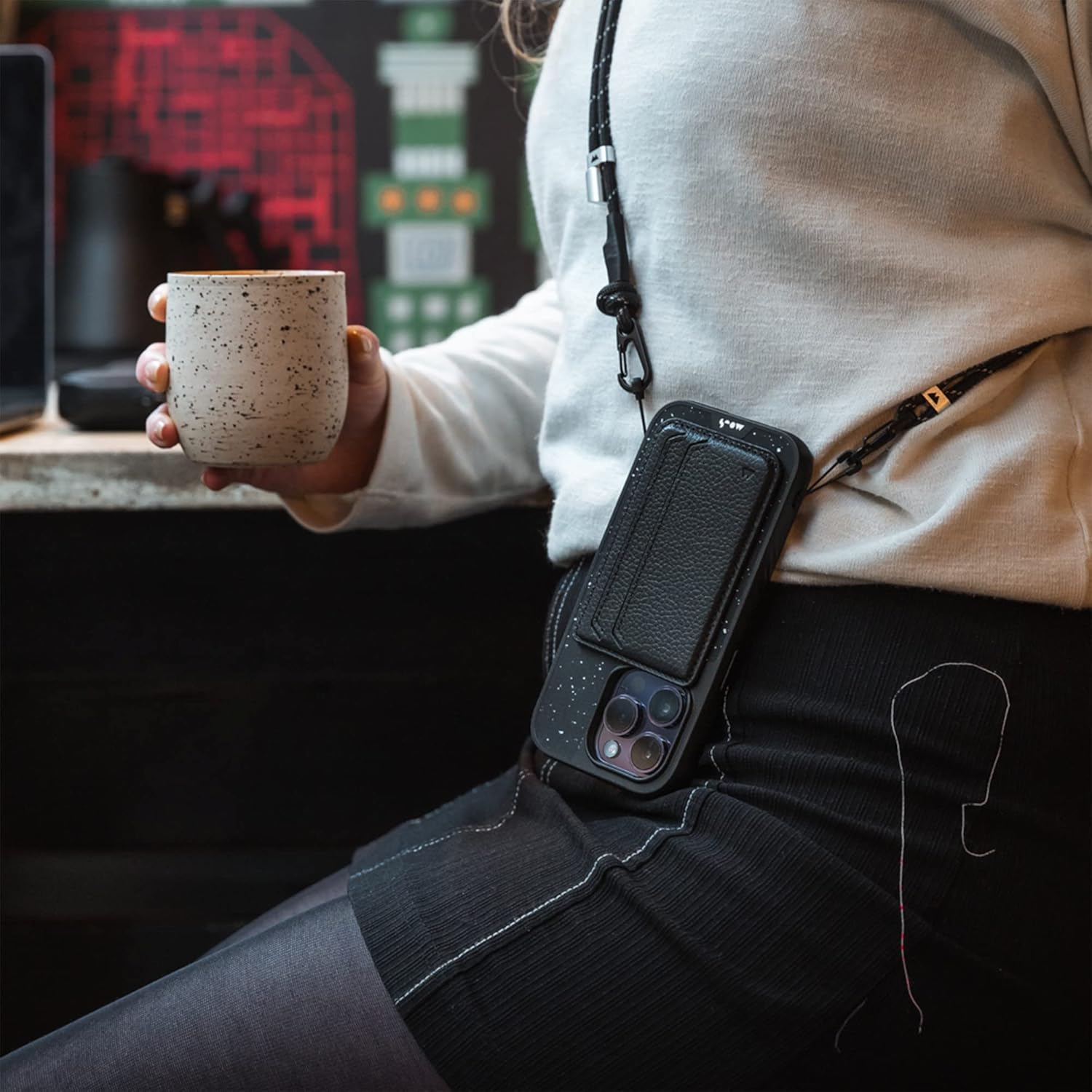
Image: A person wearing the phone lanyard crossbody style, demonstrating how the phone case is attached to the strap. The phone case is black with white speckles, and the lanyard is black with white accents.

Image: A close-up view of a hand holding a phone case with the detachable wrist strap attached. The strap is black with white speckles, and the phone case is also black with white speckles.
2. Operating Instructions
The Mous Phone Lanyard offers multiple ways to carry your device, providing flexibility and convenience.
- Adjusting Lanyard Length: The lanyard features an adjustable mechanism. Slide the adjuster along the strap to achieve your desired length, whether for crossbody, neck, or chest wear. Ensure the strap is comfortably snug but not restrictive.
- Crossbody Wear: For hands-free use, wear the lanyard across your body, positioning your phone securely at your hip or chest level.
- Neck Wear: Adjust the lanyard to a shorter length to wear your phone around your neck.
- Detachable Wrist Strap: The wrist strap can be used independently or attached to the main lanyard. To use as a wrist strap, detach it from the main lanyard and secure it around your wrist.

Image: A person wearing the phone lanyard crossbody, demonstrating the adjustment of the strap length. The lanyard is black with white accents.

Image: A close-up of the Mous phone lanyard, highlighting the adjustable buckle and the durable metal hardware. The strap is black with white speckles.
Video: A short demonstration of the Mous Phone Sling with Detachable Wrist Strap, showing its versatility and ease of use.
3. Maintenance
To ensure the longevity and appearance of your Mous Phone Lanyard, follow these maintenance guidelines:
- Cleaning: Wipe the nylon strap with a damp cloth and mild soap if necessary. Avoid harsh chemicals or abrasive cleaners.
- Drying: Allow the strap to air dry completely before reattaching your phone.
- Hardware Care: The metal hardware is scratch-resistant. However, avoid unnecessary impact or abrasion to maintain its finish.
- Storage: When not in use, store the lanyard in a clean, dry place away from direct sunlight.
4. Troubleshooting
If you encounter any issues with your Mous Phone Lanyard, refer to the following common solutions:
Lanyard Length Adjustment Issues
Problem: The lanyard does not stay at the desired length or slips.
Solution: Ensure the adjustment buckle is properly threaded and secured. The design relies on friction to hold the length. If it consistently slips, double-check the threading of the strap through the buckle. Over time, wear may reduce friction; ensure the strap is not damaged.
Difficulty Attaching to Case
Problem: The small loops are difficult to thread through the case eyelets.
Solution: Remove your phone from the case to provide more flexibility. Use a small, pointed tool (like a toothpick or a small pair of tweezers) to guide the loops through the eyelets. Ensure the loops are fully through before attempting to attach the main strap clips.
Compatibility Issues
Problem: The lanyard does not fit my phone case.
Solution: Verify that your phone case has dedicated eyelets or attachment points for a lanyard. This Mous lanyard is specifically designed for Mous cases with eyelets (e.g., Limitless 5.0, Clarity series, and later models for iPhone 14, Pixel 7, S23). It may not be compatible with all third-party cases or older Mous cases without eyelets.
5. Specifications
| Feature | Detail |
|---|---|
| Brand | Mous |
| Model Number | SHI-A0677-BLKNYL-PSL-W1 |
| Material Type | Nylon |
| Fastener Type | Buckle |
| Length | Approximately 1 meter (adjustable) |
| Compatible Devices | Mous cases with double or single wrist strap eyelets (e.g., Limitless 5.0, Clarity 2.0, Clarity Evolution, Clarity and Evolution for iPhone 14, Pixel 7, S23 and later; iPhone 12, Note 20, Pixel 5 and later) |
| Color (as reviewed) | Black (also available in Purple, Sage Green) |
6. Warranty Information
The Mous Phone Lanyard Crossbody with Detachable Wrist Strap comes with a Limited Lifetime Warranty provided by Mous. This warranty covers manufacturing defects and ensures the product meets Mous's quality standards.
For detailed information regarding warranty terms, conditions, and claims, please refer to the official Mous website or contact Mous customer support directly.
7. Customer Support
For further assistance, product inquiries, or support, please contact Mous Products US directly. You can typically find contact information on the official Mous website.
Manufacturer: Mous
Seller: Mous Products US