
1. Introduction
This manual provides essential instructions for the safe and efficient operation of your KECHAODA K8 Dual Sim Phone. Please read this manual thoroughly before using your device to ensure proper functionality and to understand its features. Keep this manual for future reference.
2. Package Contents
Verify that all items are present in the product packaging:
- KECHAODA K8 Handset
- Battery (1800mAH Lithium-ion)
- Charger
- Warranty Card
3. Device Overview
Familiarize yourself with the physical components of your KECHAODA K8 phone.
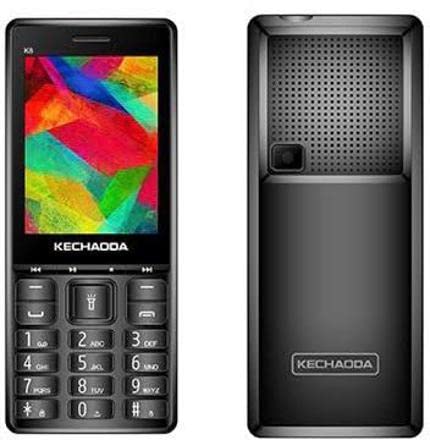
Figure 3.1: Front and Rear View of KECHAODA K8 Phone
The image displays the KECHAODA K8 phone from both its front and rear perspectives. The front view shows the 2.8-inch color display at the top, with the KECHAODA brand logo below it. Below the display is a navigation cluster, followed by a standard alphanumeric keypad with call, end, and function keys. The rear view highlights the phone's back panel, featuring a prominent speaker grille at the top, a small camera lens below the grille, and the KECHAODA brand logo towards the bottom.
Front Panel:
- Display: 2.8-inch (7.11 cm) screen for viewing information.
- Keypad: Alphanumeric keys for dialing and text input, navigation keys, and function keys.
Rear Panel:
- Speaker: For audio output.
- Camera: 0.3MP primary camera.
- Battery Cover: Removable cover to access battery and SIM/memory card slots.
4. Setup
4.1. Battery Installation
- Remove the back cover of the phone by gently prying it from the designated notch.
- Align the gold contacts of the 1800mAH lithium-ion battery with the contacts in the phone's battery compartment.
- Gently press the battery into place until it is securely seated.
- Replace the back cover, ensuring it clicks into position.
4.2. SIM Card Installation
The KECHAODA K8 supports Dual SIM functionality.
- With the battery removed, locate the SIM card slots.
- Insert your SIM card(s) into the designated slot(s) with the gold contacts facing down and the cut corner aligned correctly.
- Ensure the SIM card(s) are fully inserted and locked into place.
4.3. Memory Card Installation (Optional)
To expand storage, you can install a microSD card (not included).
- Locate the memory card slot, usually adjacent to the SIM card slots.
- Insert the microSD card with the gold contacts facing down until it clicks into place.
4.4. Charging the Battery
- Connect the charger to the charging port on your phone.
- Plug the charger into a power outlet.
- Allow the phone to charge completely before initial use. The battery indicator on the screen will show charging status.
5. Operating Instructions
5.1. Power On/Off
- To Power On: Press and hold the Power/End Call key until the screen lights up.
- To Power Off: Press and hold the Power/End Call key until the power-off options appear, then select 'Power Off'.
5.2. Basic Navigation
- Use the directional navigation keys (up, down, left, right) to move through menus.
- Press the center key (OK/Select) to confirm a selection.
- Use the left and right soft keys (located directly below the display) for context-sensitive options.
5.3. Making Calls
- From the home screen, dial the desired phone number using the numeric keypad.
- Press the Call key (usually green) to initiate the call.
- To end a call, press the End Call key (usually red).
5.4. Sending Messages (SMS)
- Navigate to the 'Messages' menu.
- Select 'Create New Message' or 'New SMS'.
- Enter the recipient's phone number or select from contacts.
- Type your message using the keypad.
- Select 'Send'.
5.5. Bluetooth Connectivity
The KECHAODA K8 supports Bluetooth for wireless communication.
- Go to 'Settings' > 'Connectivity' > 'Bluetooth'.
- Turn Bluetooth 'On'.
- Search for available devices and pair with your desired device.
5.6. Camera Operation
The phone features a 0.3MP primary camera.
- Access the 'Camera' application from the main menu.
- Frame your shot using the display.
- Press the center key or a designated camera key to capture the image.
6. Maintenance
- Cleaning: Use a soft, dry cloth to clean the phone's surface. Avoid liquid cleaners.
- Environmental Conditions: Do not expose the phone to extreme temperatures, direct sunlight, or excessive moisture.
- Battery Care: Avoid overcharging the battery. If the phone will not be used for an extended period, charge it periodically.
- Storage: Store the phone in a cool, dry place when not in use.
7. Troubleshooting
This section addresses common issues you might encounter with your KECHAODA K8 phone.
| Problem | Possible Cause | Solution |
|---|---|---|
| Phone does not power on | Low battery; Battery not installed correctly | Charge the battery; Reinstall the battery correctly. |
| No network signal | SIM card not installed; Out of network coverage; SIM card issue | Ensure SIM card is correctly inserted; Move to an area with network coverage; Contact your service provider. |
| Cannot make/receive calls | No network signal; SIM card not active; Call barring enabled | Check network signal; Contact service provider to activate SIM; Disable call barring in settings. |
| Battery drains quickly | Excessive usage; Old battery; Background processes | Reduce usage; Consider replacing battery if old; Close unnecessary applications. |
| Charger not working | Faulty charger; Damaged charging port | Try a different charger; Inspect charging port for damage. |
8. Specifications
Detailed technical specifications for the KECHAODA K8 Dual Sim Phone:
- Model: K8
- Display: 7.11 Centimetres (2.8-inch) with 240 x 320 pixels resolution
- Operating System: Symbian 9.1
- RAM: 16 MB
- Memory Storage Capacity: 8 MB (Internal, expandable via microSD)
- Primary Camera: 0.3MP (Rear)
- Battery: 1800mAH Lithium-ion
- Connectivity: Bluetooth, USB, Cellular
- Special Features: Dual SIM
- Form Factor: Slider
- Color: Black
- Item Weight: 240 g
- Package Dimensions: 14.7 x 9.3 x 4.7 cm
- Manufacturer: Kechaoda India
9. Warranty and Support
9.1. Warranty Information
Your KECHAODA K8 phone comes with the following warranty:
- Device: 1-year manufacturer warranty from the date of purchase.
- In-box Accessories: 6 months manufacturer warranty for accessories, including batteries, from the date of purchase.
Please retain your purchase receipt for warranty claims.
9.2. Customer Support
For any technical assistance, service, or warranty-related inquiries, please refer to the contact information provided on your warranty card or visit the official KECHAODA India website for support resources.