
Ajazz AJ199
AJAZZ AJ199 Wireless Gaming Mouse User Manual
Model: AJ199
1. Introduction
The AJAZZ AJ199 Wireless Gaming Mouse is a high-performance peripheral designed for gaming enthusiasts. It features an ultra-lightweight design, advanced sensor technology, and versatile connectivity options to enhance your gaming experience. This manual provides comprehensive instructions for setup, operation, maintenance, and troubleshooting.
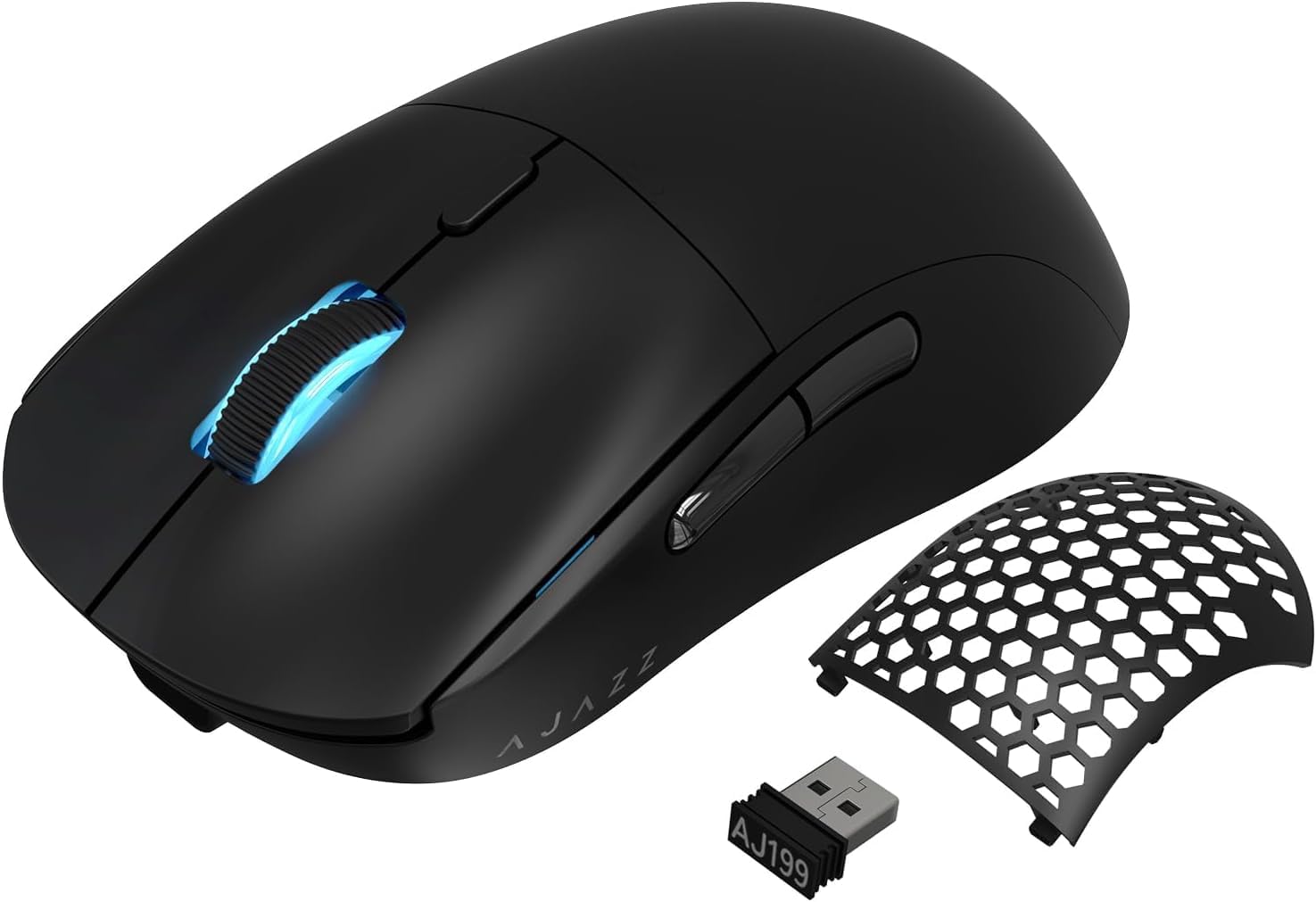
Image: The AJAZZ AJ199 Wireless Gaming Mouse, showcasing its sleek black design, detachable honeycomb back panel, and the included USB receiver.
2. Package Contents
Please verify that all items listed below are included in your package:
- AJAZZ AJ199 Gaming Mouse x 1
- 1.5M USB-C Pro Cable x 1
- Honeycomb Shell x 1 (pre-installed or alternative)
- User Manual x 1
- USB Wireless Receiver (located inside the mouse) x 1

Image: A visual representation of the AJAZZ AJ199 package contents, including the mouse, USB-C cable, an alternative honeycomb shell, and the user manual.
3. Setup
3.1. Wireless Connection (2.4GHz)
- Locate the USB wireless receiver: The receiver is discreetly stored under the magnetic back panel of the mouse. Gently lift the back panel to access it.
- Insert the receiver: Plug the USB wireless receiver into an available USB port on your computer.
- Turn on the mouse: Locate the power switch on the underside of the mouse and slide it to the "ON" position.
- The mouse should automatically connect to your computer. No driver installation is typically required for basic functionality.
3.2. Wired Connection (USB-C)
- Connect the USB-C cable: Plug the USB-C end of the provided cable into the front port of the mouse.
- Connect to computer: Plug the USB-A end of the cable into an available USB port on your computer.
- The mouse will function in wired mode and will also charge its internal battery.

Image: The AJAZZ AJ199 mouse demonstrating both its USB wireless receiver for 2.4GHz wireless connectivity and the USB-C port for wired operation and charging.
Video: An overview of the AJAZZ FPS Gaming Mouse, highlighting its 26,000 DPI optical sensor and features. This video demonstrates the mouse's capabilities and design.
4. Operating the Mouse
4.1. Programmable Buttons
The AJAZZ AJ199 features 6 programmable buttons, allowing for customized functions to suit your gaming and productivity needs. These buttons include the left click, right click, middle click (scroll wheel), two side buttons, and a DPI cycle button.
4.2. DPI Settings
The mouse is equipped with a PAW3395 26K sensor, offering up to 26,000 DPI (Dots Per Inch) with 6 programmable levels. The DPI button, typically located behind the scroll wheel, allows you to cycle through preset DPI stages. Adjusting DPI changes the mouse cursor's sensitivity and speed on the screen.

Image: A detailed view of the powerful PixArt PAW3395 sensor within the mouse, illustrating its 26,000 DPI, 50G acceleration, and 650 IPS capabilities.
4.3. Customization Software
For advanced customization, including button remapping, DPI adjustment, LOD (Lift-Off Distance) settings, and RGB lighting control, download the official AJAZZ software from the manufacturer's website: http://www.a-jazz.com/en/. It is recommended to set the debounce time to 2ms for optimal performance, especially for competitive gaming.

Image: The AJAZZ software interface, demonstrating options for customizing button settings, DPI levels, and other parameters for personalized mouse performance.
4.4. Ergonomics and Grip Styles
The AJ199 features a symmetrical ergonomic design suitable for various grip styles, including claw grip, fingertip grip, and palm grip. Its ultra-lightweight construction (59g with honeycomb shell, 62g with sealed shell) reduces fatigue during extended use.

Image: Visual guide to different ergonomic grip styles (Claw, Fingertip, Palm) compatible with the symmetrical design of the AJAZZ AJ199 mouse.

Image: Comparison illustrating the weight difference between the AJAZZ AJ199 with its sealed shell (62 grams) and the lighter honeycomb shell (59 grams), emphasizing its ultra-lightweight and detachable design.
Video: A demonstration of the AJ199 59G Ultra-Lightweight Wireless Gaming Mouse, showcasing its features and design. This video provides a closer look at the mouse's physical attributes and functionality.
5. Maintenance
5.1. Cleaning
To maintain optimal performance and hygiene, regularly clean your mouse. Use a soft, dry cloth to wipe the surface. For stubborn dirt, a slightly damp cloth with mild soap can be used, ensuring no liquid enters the mouse. Avoid abrasive cleaners or solvents.
5.2. Battery Care
The AJ199 mouse is equipped with a rechargeable Lithium Ion battery. To prolong battery life, avoid fully discharging the mouse frequently. Charge the mouse using the provided USB-C cable when the battery indicator suggests low power. The mouse can be used while charging.
5.3. PTFE Feet
The mouse features 100% PTFE feet for smooth gliding. If the feet become worn or dirty, they can affect mouse movement. Clean them gently with a soft cloth. Replacement PTFE feet may be available from the manufacturer or authorized resellers.
6. Troubleshooting
| Issue | Possible Cause | Solution |
|---|---|---|
| Mouse not responding (Wireless) | Low battery; Receiver unplugged; Interference; Mouse not powered on. | Charge the mouse; Ensure receiver is securely plugged in; Try a different USB port; Turn on the mouse. |
| Mouse not responding (Wired) | Cable not properly connected; Faulty USB port. | Ensure USB-C cable is securely connected to both mouse and computer; Try a different USB port. |
| Cursor stuttering or skipping | Low battery; Dirty sensor; Software debounce setting too high. | Charge the mouse; Clean the optical sensor with a soft cloth; Adjust debounce setting to 2ms in the AJAZZ software. |
| Buttons not registering clicks properly | Software debounce setting; Physical debris. | Adjust debounce setting in software; Ensure no debris is obstructing the buttons. |
| Poor battery life | Frequent use; High polling rate settings. | Ensure mouse is fully charged before use; Adjust polling rate in software if necessary (higher polling rate consumes more battery). |
7. Specifications
| Feature | Detail |
|---|---|
| Model Number | AJ199 |
| Dimensions | 4.64 x 2.42 x 1.52 inches (118mm x 61.5mm x 38.6mm) |
| Weight | 59g (with honeycomb shell), 62g (with sealed shell) |
| Sensor | PixArt PAW3395 Optical Sensor |
| DPI | Up to 26,000 DPI (6 programmable levels) |
| IPS | 650 IPS |
| Acceleration | 50 ACC |
| Micro Switches | HUANUO pinpoint micro switch (80 million clicks lifespan) |
| Encoder | TTC Gold Encoder (for scroll wheel) |
| Connectivity | 2.4GHz Wireless (with USB receiver), USB-C Wired |
| Battery Life | Up to 40 hours (approximate, varies with usage) |
| Buttons | 6 Programmable Buttons |
| Feet | 100% PTFE Feet |
8. Warranty and Support
The AJAZZ AJ199 Wireless Gaming Mouse comes with a manufacturer's warranty. For detailed warranty terms and conditions, please refer to the official AJAZZ website or contact your local retailer.
For technical support, driver downloads, and frequently asked questions, please visit the official AJAZZ website: http://www.a-jazz.com/en/.
Related documentsAJ199


Ask a question about this manual
Ask about setup, troubleshooting, compatibility, parts, safety, or missing instructions. Manuals+ will review the question and use this page’s manual context to help answer it.