

1. Introduction
The Riworal RA-4 is a versatile 4-channel audio interface designed for various audio applications, including home karaoke, computer music production, studio recording, podcasting, and small band performances. It features dual wireless microphones, Bluetooth connectivity, 48V phantom power, and a USB interface for seamless integration with your devices.

Image: Detailed diagram of the Riworal RA-4 Audio Interface, labeling all ports and control knobs for easy identification.
2. Product Features
- 4-Channel Mixing Console: Connect multiple devices including microphones, guitars, and stereo inputs.
- Dual Wireless Microphones: Equipped with two handheld dynamic UHF wireless microphones (CHA 576.1-590.1Mhz, CHB 560.1-574.1Mhz) with excellent sound quality and a receiving distance of 60-100 ft. Microphones require 2 AA batteries (not included) and operate for 4-6 hours on a full charge.
- 48V Phantom Power: Two XLR inputs support +48V phantom power for condenser microphones. Ensure phantom power is off before connecting/disconnecting microphones to prevent device damage.
- USB Music Player & Recording: USB interface allows connection to USB sticks/MP3 players for music playback. Also supports USB audio recording to a computer.
- Bluetooth Wireless Connection: Stream music wirelessly from smartphones, tablets, and computers to the mixer. Features built-in controls for play/pause, song switching, and mode selection.
- Reverb & Delay Effects: Easily add reverb or delay to your mix.
- 2-Band EQ and Gain Controls: Adjust high/low frequencies and gain for each channel.
- Headphone Monitor: Equipped with a headphone monitoring jack for real-time sound and volume monitoring.
- Built-In Power Amplifier: Capable of driving 6-inch or 8-inch passive speakers directly, eliminating the need for an additional amplifier.
3. Package Contents
The Riworal RA-4 package includes the following items:
- 1 x 4 Channel Mixer with 2 antennas
- 2 x Wireless Microphones
- 1 x USB to Type-C Cable
- 2 x RCA to 6.35mm Adapters
- 1 x Instruction Manual
- 2 x Retainers (for microphones)

Image: Visual representation of the Riworal RA-4 package contents, including the mixer, microphones, cables, and adapters.
4. Setup Guide
4.1 Powering the Device
Connect the provided USB to Type-C cable to the mixer's power input and to a suitable USB power source (e.g., computer, power adapter, power bank).
4.2 Connecting Microphones
- Wireless Microphones: Insert 2 AA batteries (not included) into each wireless microphone. Press the Mic Button on the mixer to activate the wireless microphone input. The working status of the microphone can be adjusted via its power button.
- Wired Microphones/Instruments: Use XLR or 6.35mm (1/4") cables to connect wired microphones or instruments to the XLR/6.35mm input jacks (MIC/LINE 1 and MIC/LINE 2).
- Phantom Power: For condenser microphones, activate the +48V phantom power switch next to the respective XLR input. Remember to turn off +48V phantom power before plugging or unplugging any microphone to prevent damage.

Image: Close-up of the Riworal RA-4 Audio Interface highlighting the +48V phantom power switch and headphone volume adjustment.
4.3 Connecting to Speakers/Amplifier
Connect your speakers or power amplifier to the MAIN OUT 1/4" jacks. If connecting to powered speakers, use a 6.35mm interface cable. The built-in power amplifier can directly drive 6-inch or 8-inch passive speakers.
4.4 Connecting to TV for Karaoke
The mixer can be connected to a TV for home karaoke. Use RCA to 6.35mm adapters if your TV does not have RCA sockets.
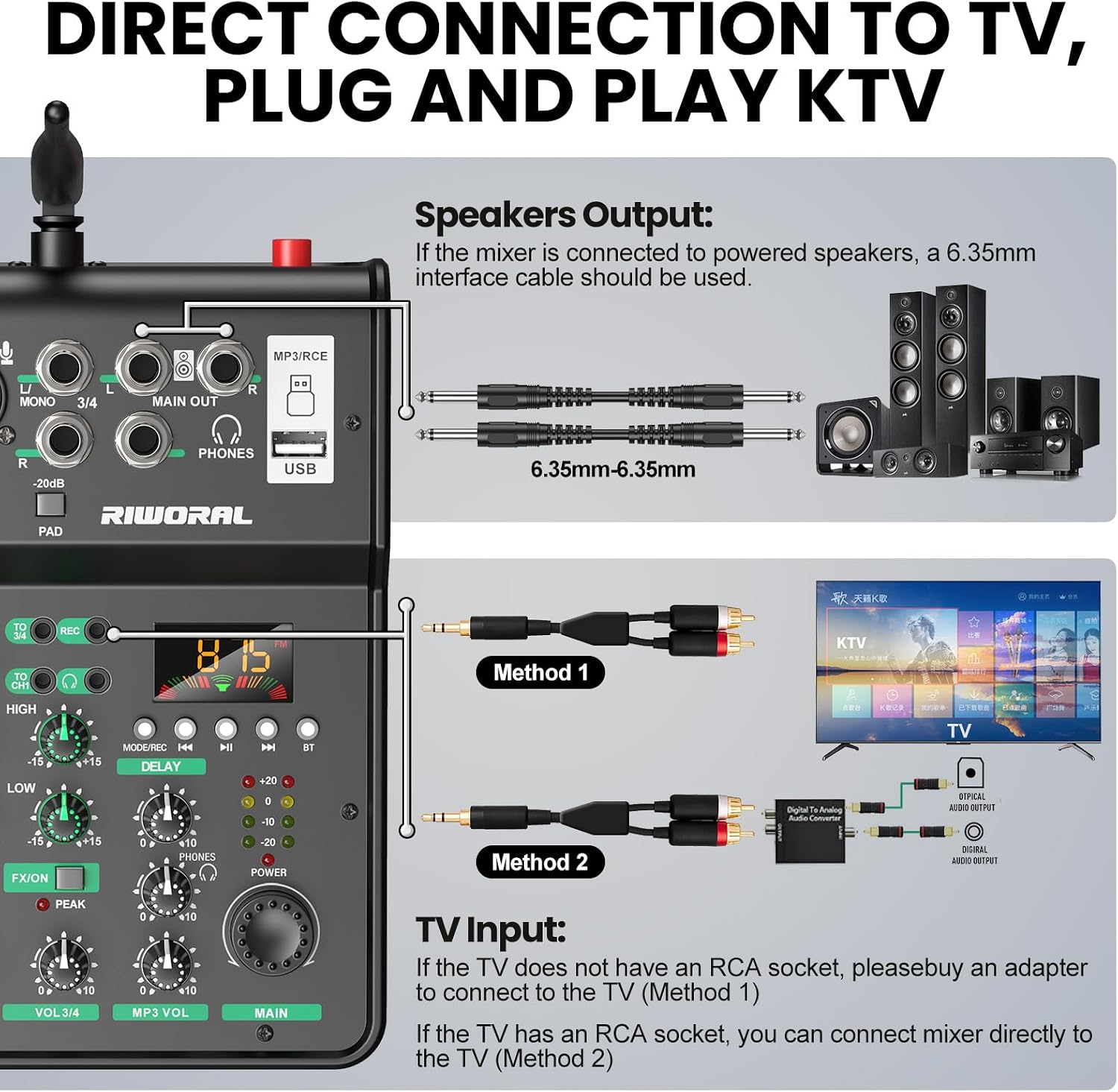
Image: Illustration demonstrating two methods for connecting the Riworal RA-4 Audio Interface to a television for karaoke.
4.5 USB Audio Interface & Bluetooth Connection
Connect the mixer to your computer via the USB interface for recording or playback. For wireless audio streaming, enable Bluetooth on your device (Pad, Phone, Computer) and pair it with the mixer. Use the built-in controls on the mixer to manage playback.
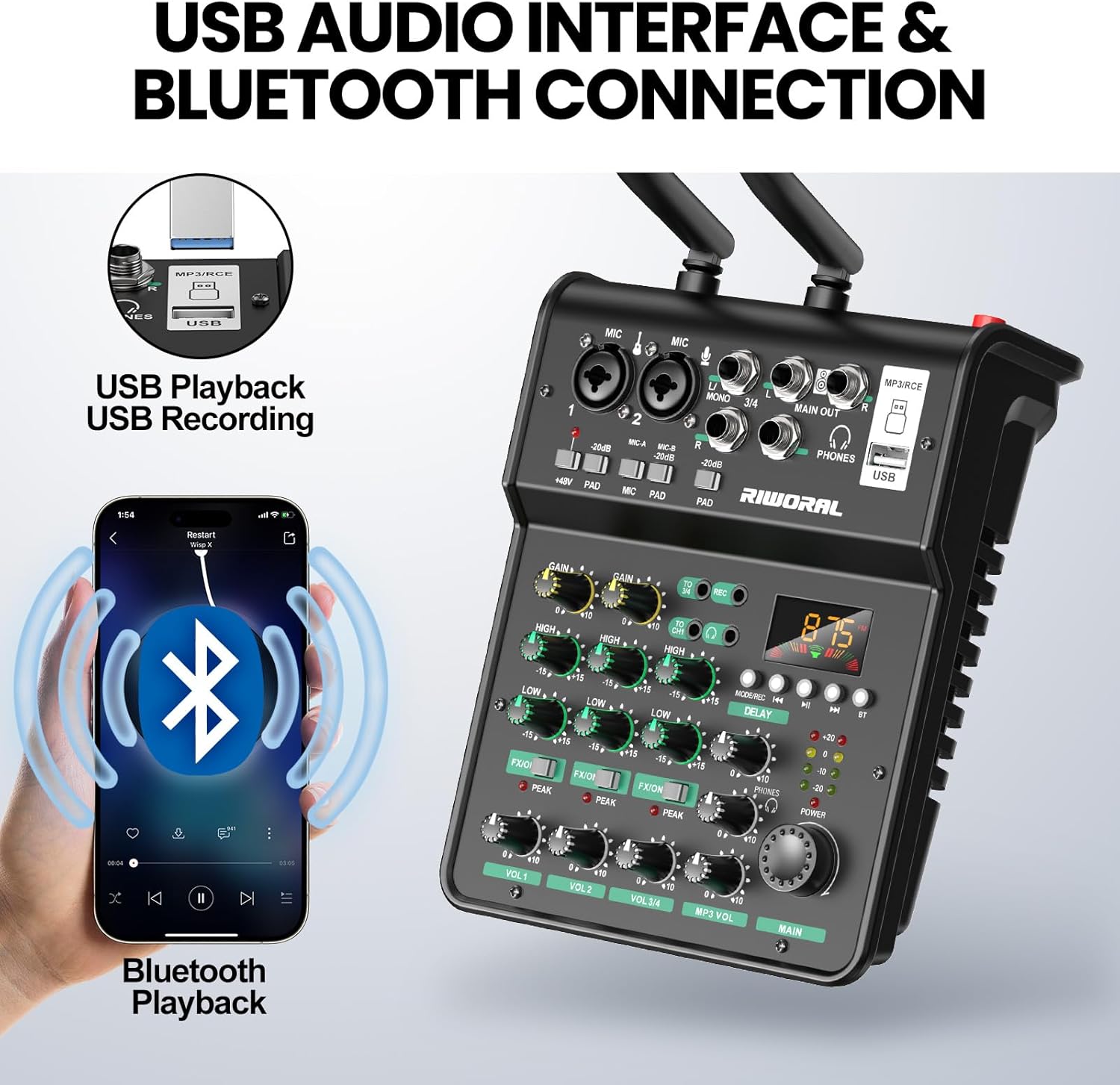
Image: The Riworal RA-4 Audio Interface demonstrating USB playback and Bluetooth wireless connection with a smartphone.
5. Operating Instructions
5.1 Channel Controls
Each channel (MIC/LINE 1, MIC/LINE 2, 3/4, MP3/VOL) features individual gain controls, 2-band EQ (High/Low), and FX/SEND knobs to adjust the audio signal. Use the volume faders (VOL 1, VOL 2, VOL 3/4, MP3 VOL) to set the output level for each channel.
5.2 Wireless Microphone Operation
The dual wireless microphones operate on UHF frequencies (CHA 576.1-590.1Mhz, CHB 560.1-574.1Mhz). Press the Mic Button on the mixer to enable the wireless input. Adjust microphone volume, FX, bass, and treble equalization directly on the mixer.

Image: The Riworal RA-4 Audio Interface demonstrating stable sound quality transmission with wireless microphones over a distance of 60-100 meters (196-328 feet).

Image: Close-up view of the Riworal wireless microphone, highlighting its dynamic capsule, metal mesh head, display screen, power switch, and frequency button, along with specifications.
5.3 USB Player & Bluetooth Playback
Use the USB PLAYER section to control playback from a USB drive or Bluetooth-connected device. Buttons include Play/Pause, Skip songs, and Mode selection. The display shows the current mode (e.g., BT for Bluetooth).
5.4 Headphone Monitoring
Plug headphones into the PHONES jack to monitor the mixed audio. Adjust the headphone volume using the dedicated knob.
6. Specifications
- Item Weight: 2.86 pounds (1.3 Kilograms)
- Product Dimensions: 14.53 x 13.19 x 3.62 inches
- Item Model Number: RA-4
- Body Material: Plastic
- Color: Black
- Compatible Devices: PC, Power Amplifier, Smartphone, Speaker, Effector
- Connector Type: 1/4-Inch Stereo, XLR to 1/4-Inch, XLR to XLR
- Hardware Interface: 1/4-inch Audio, Headphone, USB
- Proficiency Level: Professional
- Hardware Platform: DVD Player, Karaoke Machine
- Power Source: Corded Electric
- Voltage: 5V
- Number of Channels: 4
- Connectivity Technology: USB

Image: Riworal RA-4 Audio Interface and wireless microphones with their respective dimensions.
7. Troubleshooting
- No Audio Output: Ensure all cables are securely connected. Check volume levels on all channels and the main output. Verify that the correct input mode (e.g., Mic, Line, USB, Bluetooth) is selected.
- Static or Noise: This can be caused by interference from other electronic devices or power cables. Try to isolate the mixer from other electronics. Check cable quality; a faulty cable can introduce noise.
- Wireless Microphone Issues: Ensure microphones have fresh batteries and are powered on. Verify they are paired correctly with the mixer. Check the transmission distance.
- USB Recording/Playback Problems: Ensure the USB cable is properly connected to both the mixer and the computer. Check computer audio settings to ensure the mixer is recognized as an input/output device.
- Phantom Power Not Working: Confirm the +48V switch is engaged for the correct channel. Ensure the microphone connected is a condenser microphone requiring phantom power.
8. Maintenance
- Cleaning: Use a soft, dry cloth to clean the mixer's surface. Avoid liquid cleaners or abrasive materials.
- Storage: Store the mixer in a cool, dry place away from direct sunlight and extreme temperatures.
- Cable Care: Handle cables with care. Avoid sharp bends or excessive pulling to prevent damage.
9. Official Product Videos
Flygrow 4 Channel DJ Mixer with Dual Wireless Microphone
Video: A seller-provided overview of a 4-channel DJ mixer with dual wireless microphones, demonstrating its features and connectivity.
Tiimge MX-R42 Audio Mixer With Dual Wireless Microphone
Video: A short seller-provided preview showcasing the Tiimge MX-R42 Audio Mixer and its dual wireless microphones.
10. Warranty & Support
For warranty information or technical support, please refer to the product's official Amazon listing or contact Riworal customer service directly. Contact details are typically available on the product packaging or the brand's official website.
