
Yomile HCT-326
Yomile Programmable Water Timer Instruction Manual
Model: HCT-326
Introduction
The Yomile Programmable Water Timer is designed to automate your irrigation system, providing efficient and consistent watering for your garden or lawn. This dual-outlet timer allows for separate programming of two watering zones, helping to conserve water and ensure optimal plant health.

Figure 1: Front view of the Yomile Programmable Water Timer, showing the digital display and control buttons.
Key Features
- Dual Outlet Control: Independently program two separate watering zones.
- Large LCD Screen: Clear and easy-to-read display for programming.
- Flexible Watering Schedules: Set specific start times, durations, and frequencies.
- Rain Delay Function: Manually defer watering for 24, 48, or 72 hours.
- Manual Watering Mode: Allows for immediate watering without interrupting programmed schedules.
- Child Lock: Prevents accidental changes to settings.
- Durable Construction: Waterproof (IP54 rated), ultraviolet-proof, and corrosion-proof.
- Easy Installation: Designed for quick and tool-free setup with standard NH 3/4" hose faucets.
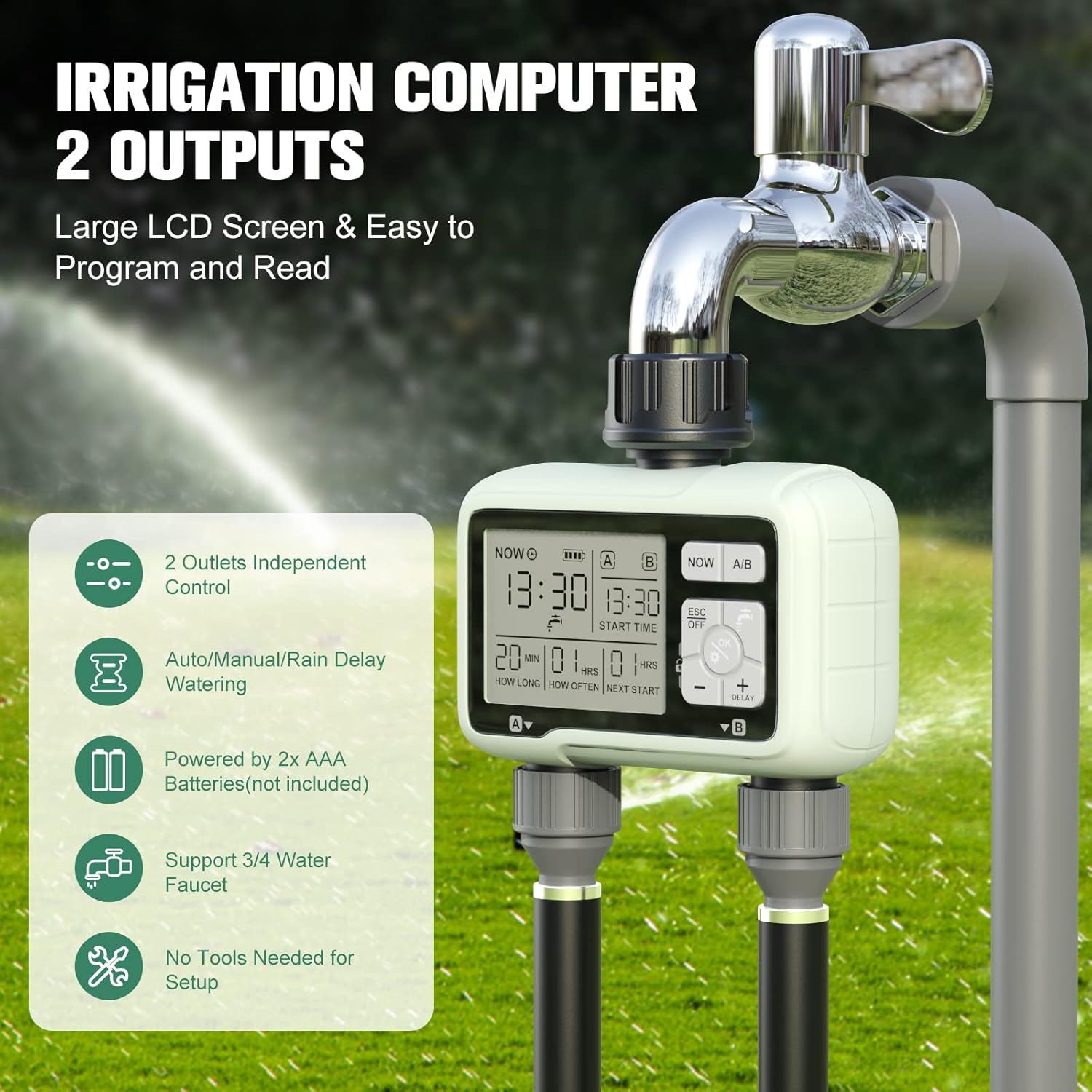
Figure 2: Overview of the water timer highlighting its dual outlets and key features.
Package Contents
- 1 x Yomile Sprinkler Timer (Model HCT-326)
- 1 x Instruction Manual
Note: 2 x AAA batteries are required for operation and are not included in the package.
Setup
1. Battery Installation
- Locate the battery compartment on the back of the timer.
- Slide the battery cover off.
- Insert two (2) new AAA alkaline batteries, ensuring correct polarity (+/-).
- Replace the battery cover, ensuring it is securely sealed to maintain the waterproof rating.

Figure 3: Detailed view of the battery compartment and its seal, emphasizing durability.
2. Connecting to Faucet
- Ensure the faucet is turned off.
- Thread the timer's inlet connector onto your standard NH 3/4" outdoor faucet. Hand-tighten only. Do not overtighten.
- Attach your garden hoses to the two outlet connectors at the bottom of the timer.
- Slowly turn on the faucet. Check for any leaks.

Figure 4: Diagram illustrating the connection of the water timer to a faucet and hoses, highlighting the 360-degree rotating connector.
Operating Instructions
The timer features a user-friendly interface with a large LCD display and intuitive buttons. The display will automatically turn off after a period of inactivity to conserve battery life.
1. Setting Current Time
- Press the "NOW" button to activate the display.
- Use the arrow buttons (+ / -) to adjust the current time. The timer uses a 24-hour (military) format.
- Press "OK" to confirm the time.
2. Programming Watering Schedule (Zones A/B)
The timer allows for independent programming of two zones, A and B.
- Press the "A/B" button to select the zone you wish to program (A or B). The selected zone will be indicated on the display.
- Set Start Time: Use the arrow buttons to set the desired start time for watering. Confirm with "OK".
- Set Watering Duration ("How Long"): Use the arrow buttons to set how long the watering will last.
- Automatic Watering Duration: 1 minute to 3 hours 59 minutes.
- Manual Watering Duration: 1 minute to 59 minutes.
- Set Watering Frequency ("How Often"): Use the arrow buttons to set how often the watering cycle repeats. Options include every 2 days to every 6 days, or specific days from Monday to Sunday. Confirm with "OK".
- The display will show the "Next Start" time.

Figure 5: The timer's display showing independent programming for Zone 1 and Zone 2, allowing simultaneous operation.
3. Rain Delay Function
The rain delay feature allows you to temporarily pause your watering schedule to avoid overwatering during rainy periods.
- Press the "+ DELAY" button.
- Use the arrow buttons to select the desired delay period: 24 hours, 48 hours, or 72 hours.
- Press "OK" to activate the rain delay. The timer will resume its programmed schedule after the selected delay period.
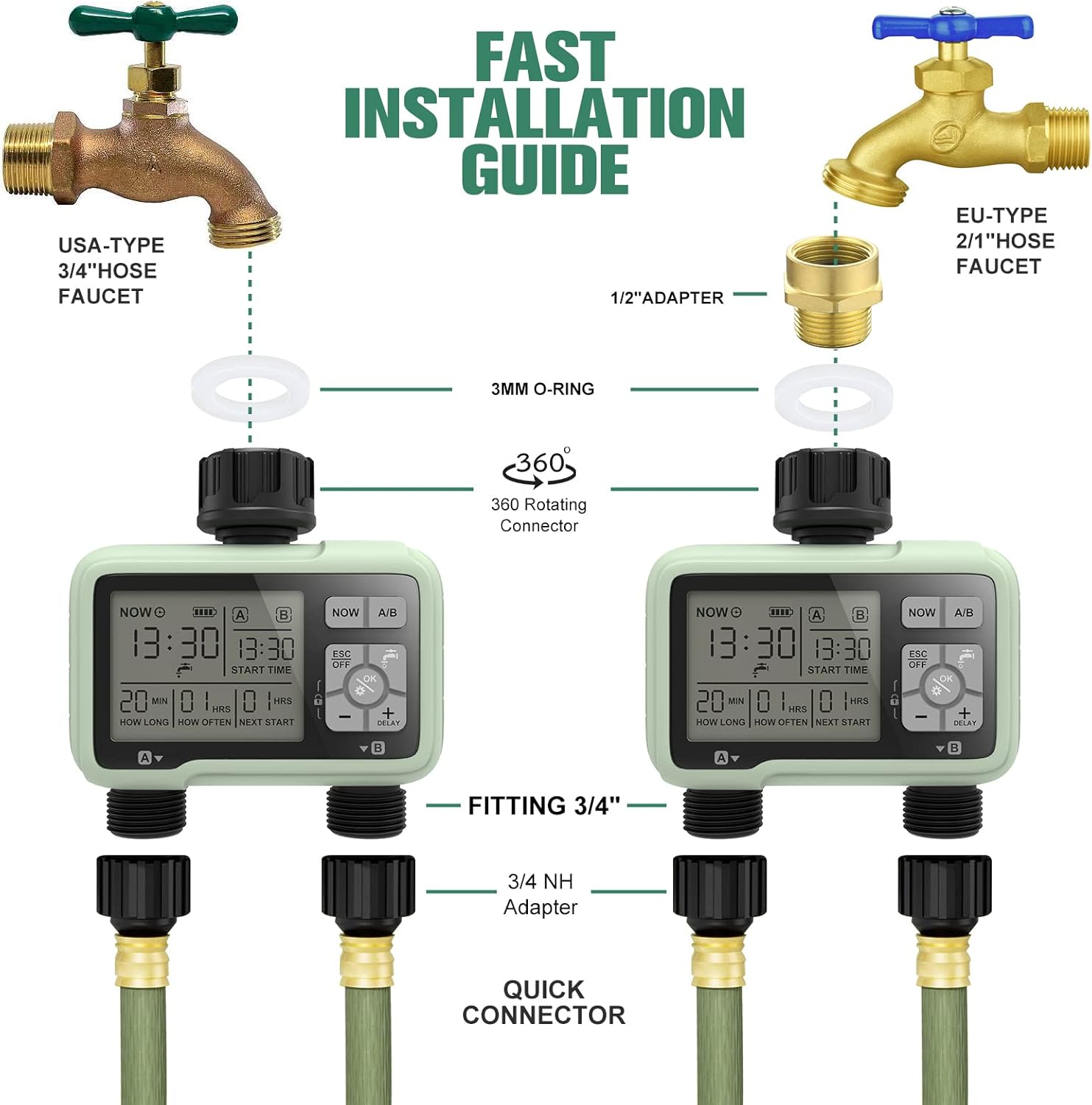
Figure 6: Visual representation of the user-friendly rain delay function, showing how it defers the next watering cycle.
4. Manual Watering
To water manually without affecting your programmed schedule:
- Press the water drop icon button (usually labeled "Manual" or similar).
- Use the arrow buttons to set the desired manual watering duration (1 to 59 minutes).
- Press "OK" to start manual watering.
- To stop manual watering, press the water drop icon button again or "ESC OFF".

Figure 7: Images demonstrating the manual watering function, allowing flexible watering without disrupting programmed schedules.
5. Child Lock
To prevent accidental changes to the timer settings:
- Long press the lock icon button (usually labeled with a padlock symbol) for 5 seconds to activate or deactivate the child lock.
- When activated, a lock symbol will appear on the display, and buttons will be unresponsive.
Maintenance
1. Battery Replacement
Replace batteries when the low battery indicator appears on the display or when the timer's functionality is affected. Refer to the "Battery Installation" section under Setup for instructions.
2. Cleaning
- Regularly check the inlet filter for debris. If clogged, remove and rinse it under running water.
- Clean the exterior of the timer with a soft, damp cloth. Do not use abrasive cleaners or solvents.
Troubleshooting
| Problem | Possible Cause | Solution |
|---|---|---|
| Timer not turning on/display blank. | Dead or incorrectly installed batteries. | Replace batteries with new AAA alkaline batteries, ensuring correct polarity. |
| Water not flowing or low pressure. | Faucet not fully open; clogged inlet filter; low water pressure from source. | Ensure faucet is fully open. Clean the inlet filter. Check water pressure at the source. |
| Timer leaking from connections. | Loose connection; missing or damaged O-ring/washer. | Ensure connections are hand-tight. Check for and replace any missing or damaged washers/O-rings. |
| Timer not watering at programmed time. | Incorrect programming; rain delay active; low battery. | Review programming settings. Check if rain delay is active. Replace batteries. |
| Display shows military time only. | This is the intended design. | No action required. Adjust your time interpretation accordingly. |
Specifications
| Specification | Detail |
|---|---|
| Model Number | HCT-326 |
| Brand | Yomile |
| Color | Green |
| Waterproof Rating | IP54 |
| Inlet/Outlet Thread | NH 3/4" |
| Working Water Pressure | 0.5 - 8 bar (7 psi - 116 psi) |
| Working Temperature | 37°F - 112°F (3°C - 44°C) |
| Auto Watering Duration | 1 minute - 3 hours 59 minutes |
| Manual Watering Duration | 1 minute - 59 minutes |
| Watering Frequency | Every 2-6 days or specific days (Mon-Sun) |
| Rain Delay Time | 24h / 48h / 72h |
| Power Source | 2 x AAA batteries (not included) |
| Product Dimensions | 5"D x 10"W x 20"H |
| Item Weight | 300 Grams (10.6 ounces) |
Warranty and Support
Yomile provides a 365-day warranty for this product. Additionally, a 40-day no-reason return/refund policy is offered.
For any questions or assistance with your Yomile Programmable Water Timer, please contact customer support. Refer to the product packaging or purchase platform for specific contact details.
Ask a question about this manual
Ask about setup, troubleshooting, compatibility, parts, safety, or missing instructions. Manuals+ will review the question and use this page’s manual context to help answer it.