
Introduction
This manual provides detailed instructions for the safe installation, operation, and maintenance of your JULLISON 6-Inch 5CCT Field Selectable LED Low Profile Recessed & Surface Mount Disk Light. Please read this manual thoroughly before installation and retain it for future reference.

Figure 1: JULLISON 6-Inch 5CCT LED Low Profile Disk Lights. This image displays a pack of eight white, round LED disk lights.

Figure 2: Versatile Applications. The image shows the LED disk lights installed in a bathroom, on the exterior of a modern building, and above a home's front entrance, highlighting their suitability for wet and diverse locations.
Safety Information
- Always turn off power at the circuit breaker before installation or servicing.
- Consult a qualified electrician if you are unsure about the installation process.
- Ensure all electrical connections comply with local codes and ordinances.
- Do not modify the fixture in any way.
- This fixture is suitable for wet locations.
Package Contents
- Surface Mount Disk Light (quantity as purchased, e.g., 8 units for an 8-pack)
- Installation Hardware (screws, wire nuts)
- Instruction Manual
Specifications
| Brand | JULLISON |
| Model Name | 6 Inch LED |
| Item Model Number | DL6IN5CCTWH8P |
| Size | 6 inch |
| Color Temperature (CCT) | 2700K, 3000K, 3500K, 4000K, 5000K (Selectable) |
| Wattage | 15 Watts |
| Brightness | 920 Lumens (approx. 75W incandescent equivalent) |
| Voltage | 120 Volts |
| Dimmable | Yes (Triac/ELV Wall Dimmer compatible) |
| Certifications | ETL & Wet Listed |
| Material | Metal, Plastic (frosted shade) |
| Product Dimensions | 7.4 inch (188mm) diameter, 0.78 inch (19.8mm) height |
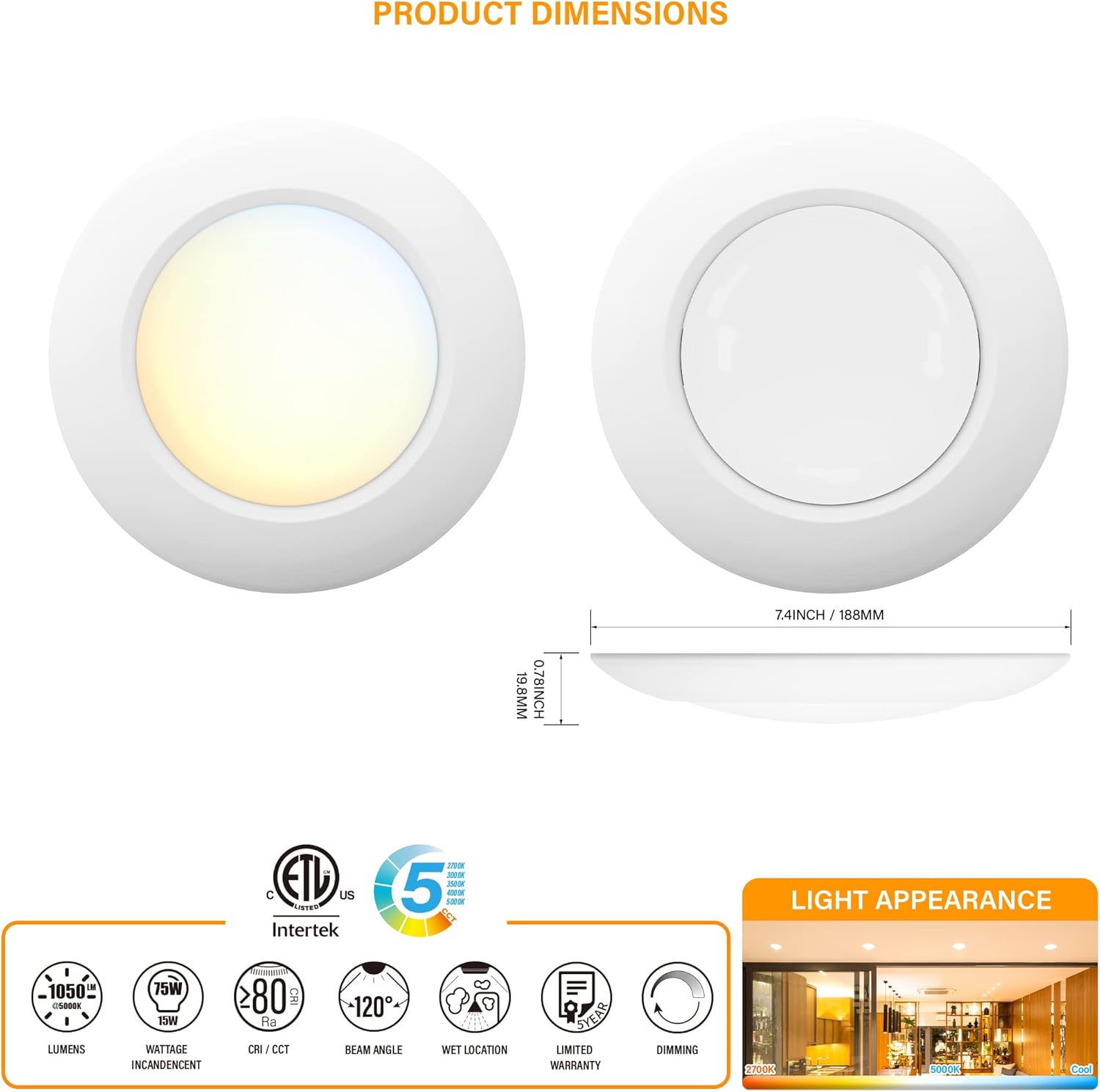
Figure 3: Product Dimensions. The image displays the top and side view of the JULLISON 6-inch LED disk light, indicating a diameter of 7.4 inches (188mm) and a height of 0.78 inches (19.8mm).
Setup and Installation
1. Select Color Temperature (CCT)
Before installation, select your desired color temperature using the switch located on the back of the fixture. Options include 2700K (Warm White), 3000K (Soft White), 3500K (Neutral White), 4000K (Cool White), and 5000K (Daylight White).
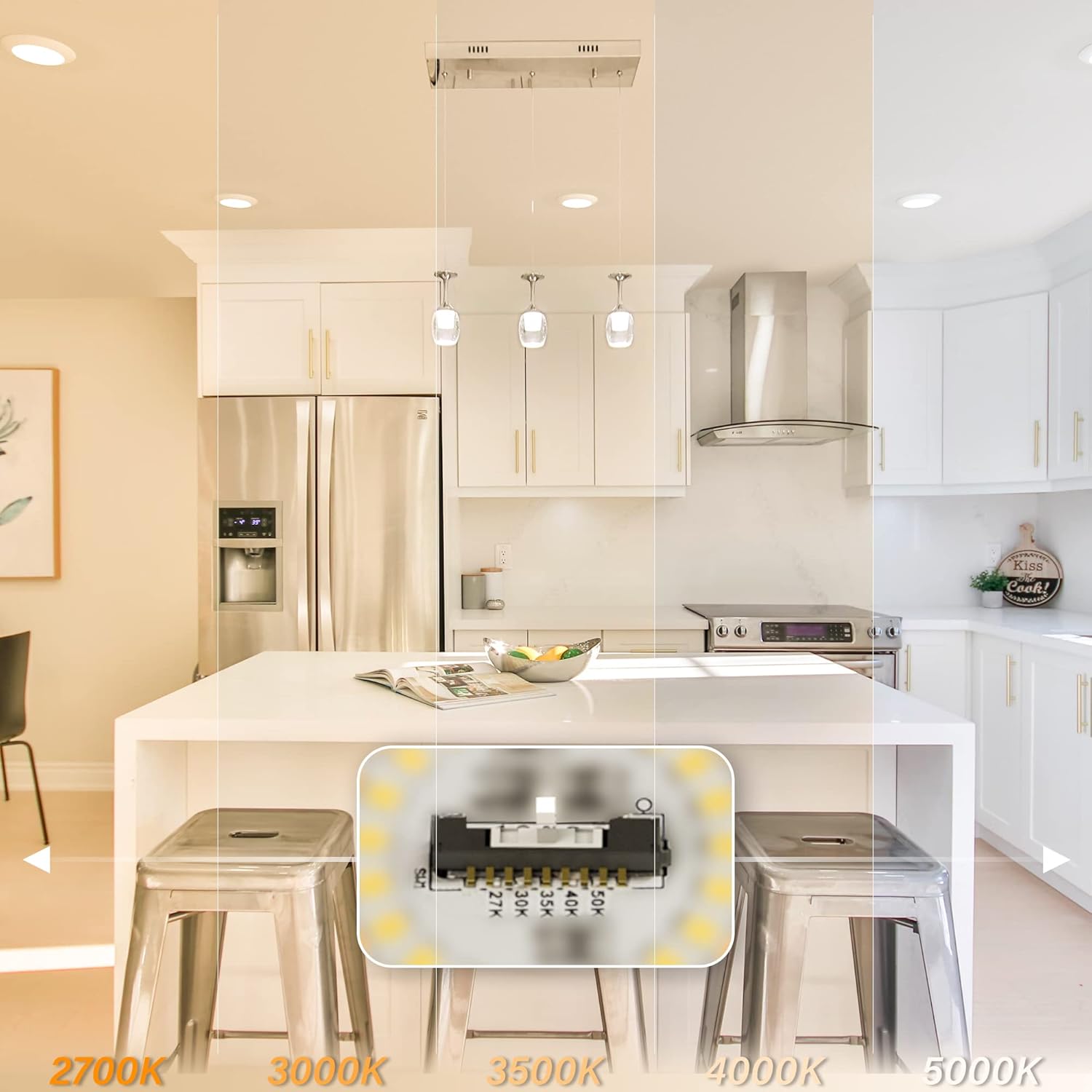
Figure 4: Color Temperature Selection. This image illustrates the switch on the back of the light fixture for selecting between 2700K, 3000K, 3500K, 4000K, and 5000K, with visual examples of each CCT in a kitchen environment.
2. Mounting Options
This fixture supports both recessed and surface mount installations. It is designed to flush mount onto standard 4-inch junction boxes and fire-rated boxes.

Figure 5: Compatible Junction Boxes. This diagram displays different types of junction boxes compatible with the light fixture, such as 4-inch shallow pan, octagon metal, square metal, square plastic, round plastic, and fire-rated boxes.
3. Wiring and Installation Steps
- Turn off power: Ensure power is OFF at the circuit breaker before beginning.
- Prepare wiring: Connect the fixture's wires to the corresponding house wires (black to black, white to white, ground to ground) using the provided wire nuts.
- Mount the fixture: Secure the fixture to the junction box using the provided screws. Ensure it is flush against the ceiling or wall.
- Attach the lens: Twist or snap the frosted lens onto the fixture body.
- Restore power: Turn power back ON at the circuit breaker.

Figure 6: Easy Installation. This image demonstrates the simple steps of connecting wires and mounting the light fixture to a junction box.
Operating Instructions
Color Temperature Adjustment
As described in the setup section, the color temperature is set via a switch on the back of the unit. This setting is fixed once installed unless the fixture is removed to access the switch.
Dimming Functionality
The JULLISON LED Disk Light is compatible with most Triac/ELV wall dimmers, allowing smooth dimming down to 5%. Refer to the dimmer list below for recommended compatible dimmers to ensure optimal performance.

Figure 7: Dimmer Compatibility. This image displays the light fixture installed in a room and includes a table detailing compatible dimmer brands (Lutron, Leviton, Cooper) and their respective model numbers and dimming ranges (typically 10%-100%).
Recommended Dimmer List:
| No. | Brand | Model# | Dimming Range |
|---|---|---|---|
| 1 | LUTRON | CT-600PR-IV | 10%-100% |
| 2 | LUTRON | CTCL-153P-WH | 10%-100% |
| 3 | LUTRON | TG-600P | 10%-100% |
| 4 | LUTRON | MACL-153M-WH | 10%-100% |
| 5 | LUTRON | DVCL-153P-WH-3 | 10%-100% |
| 6 | LUTRON | PD-6WCL | 10%-100% |
| 7 | LEVITON | 6672-1LW | 10%-100% |
| 8 | LEVITON | 6633-P | 10%-100% |
| 9 | LEVITON | 6674 | 10%-100% |
| 10 | COOPER | SAL06P | 10%-100% |
| 11 | LEVITON | 6631-LI | 10%-100% |
Maintenance
- Cleaning: Ensure power is off before cleaning. Wipe the fixture with a soft, damp cloth. Do not use abrasive cleaners or solvents.
- Bulb Replacement: This LED fixture uses integrated LEDs and does not require bulb replacement.
- Inspection: Periodically inspect the fixture for any signs of damage or loose connections.
Troubleshooting
| Problem | Possible Cause | Solution |
|---|---|---|
| Light does not turn on. | No power, loose wiring, faulty switch. | Check circuit breaker. Verify all wire connections are secure. Test the switch. |
| Light flickers or dims improperly. | Incompatible dimmer, loose wiring. | Ensure dimmer is compatible (refer to list). Check wiring connections. |
| Incorrect color temperature. | CCT switch set incorrectly. | Turn off power, remove fixture, adjust CCT switch to desired setting. |
Warranty and Support
JULLISON provides a 5-year limited warranty on this product, covering defects in materials and workmanship under normal use. For warranty claims or technical assistance, please contact JULLISON customer support. Please have your model number (DL6IN5CCTWH8P) and purchase information ready.
Contact information for JULLISON LED can be found on their official website or through your retailer.