
XDUOO LINK2 BAL Max
XDUOO Link2 Bal Max Headphone Amplifier User Manual
Introduction
This manual provides detailed instructions for the XDUOO Link2 Bal Max Headphone Amplifier. It covers product features, setup, operation, maintenance, troubleshooting, and technical specifications to ensure optimal performance and user experience. The Link2 Bal Max is a high-performance portable DAC and headphone amplifier designed to deliver superior audio quality from your digital devices.
What's in the Box
- XDUOO Link2 Bal Max Headphone Amplifier
- USB Type-C Cable
- User Manual (this document)
Product Features
- Dual CS43131 DAC chips for high-fidelity audio.
- Supports PCM up to 32bit/384kHz and native DSD256.
- Features 4.4mm balanced and 3.5mm unbalanced headphone outputs.
- Utilizes TI LM27762 chip for ultra-low noise power supply.
- High SNR (Signal-to-Noise Ratio) of up to 127dB for a clean sound.
- Independent power supply for decoding chip, amplifier, and digital receiving chip to minimize distortion.
- Compact and portable design.
Setup
Follow these steps to set up your XDUOO Link2 Bal Max:
- Connect to Source Device: Use the provided USB Type-C cable to connect the Link2 Bal Max to your smartphone, tablet, or computer. The device will draw power directly from the source.
- Select USB Mode: On the rear of the device, locate the USB switch.
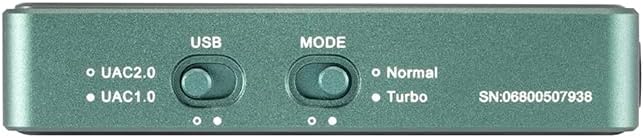
Image: Rear panel of the Link2 Bal Max, highlighting the USB and Mode selection switches. The USB switch allows selection between UAC2.0 and UAC1.0.
- UAC2.0: Recommended for most modern devices (Windows 10/11, macOS, Android, iOS) for high-resolution audio playback.
- UAC1.0: For older devices or systems that do not support UAC2.0.
- Select Operating Mode: Next to the USB switch, locate the Mode switch.
- Normal: Standard operating mode.
- Turbo: Provides higher output power for demanding headphones. Use this mode if your headphones require more power or if you desire higher volume levels.
- Connect Headphones: Plug your headphones into either the 3.5mm unbalanced output or the 4.4mm balanced output port on the front of the device.

Image: Front panel of the Link2 Bal Max, showing the 3.5mm and 4.4mm headphone output jacks.
- Adjust Volume: Start with a low volume level on your source device and gradually increase it to a comfortable listening level.
Operating Instructions
Once connected and set up, the XDUOO Link2 Bal Max operates automatically with your source device. Here are some operational guidelines:
- Power On/Off: The device powers on automatically when connected to a powered USB source and powers off when disconnected.
- Volume Control: Adjust the playback volume directly from your connected source device (smartphone, computer, etc.).
- Mode Selection: The "Normal" and "Turbo" modes can be switched based on your headphone's impedance and desired output power. "Turbo" mode provides a stronger signal for high-impedance or less sensitive headphones.
- USB Compatibility: Ensure the USB switch is set to the appropriate UAC mode (UAC1.0 or UAC2.0) for stable connection and optimal performance with your specific source device.
- Indicator Lights: Observe any indicator lights on the device (if present, not explicitly mentioned in specs but common) for status such as power or sample rate.

Image: Side view of the Link2 Bal Max, showing a control button. This button may be used for playback control or other functions depending on the source device and software.
Maintenance
To ensure the longevity and optimal performance of your Link2 Bal Max, follow these maintenance guidelines:
- Cleaning: Use a soft, dry cloth to wipe the exterior of the device. Avoid using abrasive cleaners, solvents, or harsh chemicals.
- Storage: Store the device in a cool, dry place away from direct sunlight, extreme temperatures, and high humidity.
- Handling: Handle the device with care. Avoid dropping it or subjecting it to strong impacts.
- Connections: Ensure all cables are connected securely but avoid excessive force when plugging or unplugging.
Troubleshooting
If you encounter issues with your XDUOO Link2 Bal Max, refer to the following common problems and solutions:
- No Sound Output:
- Ensure the Link2 Bal Max is properly connected to your source device via USB.
- Verify that your headphones are securely plugged into the correct output port (3.5mm or 4.4mm).
- Check the volume level on your source device; ensure it is not muted or set too low.
- Confirm that the correct audio output device is selected on your computer or smartphone (e.g., "XDUOO Link2 Bal Max" or similar).
- Try switching the USB mode (UAC1.0/UAC2.0) to see if it resolves compatibility issues with your source.
- Distorted Sound or Noise:
- Ensure all connections are secure and free from interference.
- Try a different USB cable or source device to rule out cable or source issues.
- If using "Turbo" mode, try switching to "Normal" mode, especially with sensitive headphones, as excessive gain can cause distortion.
- Check the audio file quality; low-quality files can sound distorted.
- Device Not Recognized by Source:
- Ensure the USB cable is fully inserted into both the Link2 Bal Max and the source device.
- Try connecting to a different USB port on your source device.
- Switch the USB mode (UAC1.0/UAC2.0) on the Link2 Bal Max.
- Restart your source device.
- For computers, ensure necessary drivers are installed (though UAC2.0 is often plug-and-play, some systems might require specific drivers).
Specifications
| DAC Chip | CS43131*2 |
| Input Port | Type-C USB |
| Output Ports | 3.5mm (unbalanced) + 4.4mm (balanced) |
| Output Power (3.5mm) | 125mW @ 32ohm |
| Output Power (4.4mm) | 270mW @ 32ohm |
| PCM Sample Rate Support | 16-32Bit / 44.1-384kHz |
| DSD Sample Rate Support | DSD64-256 |
| Frequency Response | 20Hz~20kHz (+0.5dB) |
| THD+N (3.5mm) | 0.001% @ 1kHz |
| THD+N (4.4mm) | 0.0007% @ 1kHz |
| SNR (3.5mm) | 123dB |
| SNR (4.4mm) | 123dB |
| Crosstalk (3.5mm) | ≥77dB |
| Crosstalk (4.4mm) | ≥120dB |
| Weight | 28g |
| Dimensions | 63mm * 23.5mm * 13mm |
| Color | Green |
Warranty and Support
The XDUOO Link2 Bal Max Headphone Amplifier comes with a 1-year warranty from the date of purchase. This warranty covers manufacturing defects and malfunctions under normal use.
For technical support, warranty claims, or further assistance, please contact your retailer or the manufacturer directly. Please retain your proof of purchase for warranty validation.
Related documentsLINK2 BAL Max


Ask a question about this manual
Ask about setup, troubleshooting, compatibility, parts, safety, or missing instructions. Manuals+ will review the question and use this page’s manual context to help answer it.