
1. Introduction
This manual provides essential information for the proper installation, operation, and maintenance of the Generic 805409-1 Dahao BECS Panel Keypad. This electronic component is designed for use with compatible Chinese embroidery machines. Please read this manual thoroughly before attempting any installation or operation to ensure safe and efficient use.
2. Product Overview
The 805409-1 Dahao BECS Panel Keypad is a replacement membrane keypad designed for specific Dahao control panels found in Chinese embroidery machines. It serves as the primary interface for user input, allowing operators to control various functions of the embroidery machine. The keypad typically consists of a flexible membrane with integrated buttons and a ribbon cable for connection to the machine's control board.
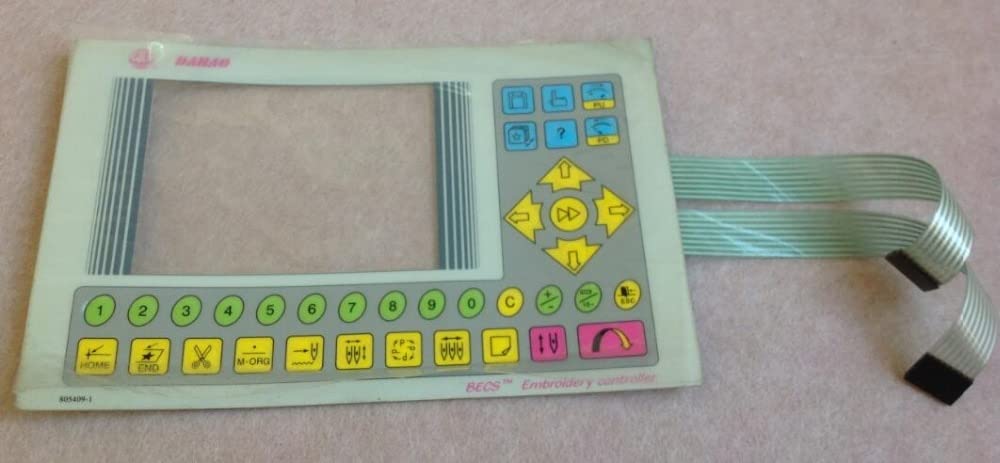
Figure 1: The 805409-1 Dahao BECS Panel Keypad's ribbon cable and connectors. A caliper is shown measuring the width of the ribbon cable, indicating the precision required for compatibility. The image highlights the flexible nature of the membrane and the multi-pin connectors used for electrical connection.
3. Safety Information
- Power Disconnection: Always ensure the embroidery machine is powered off and unplugged from the main power supply before attempting any installation, removal, or maintenance of the keypad.
- Static Electricity: Electronic components are sensitive to static discharge. Handle the keypad by its edges and avoid touching the electrical contacts directly. Consider using anti-static precautions if available.
- Compatibility: Verify that this keypad (Model 805409-1) is compatible with your specific Dahao control panel and embroidery machine model. Incompatible parts can lead to malfunction or damage.
- Professional Installation: If you are unsure about the installation process, it is recommended to seek assistance from a qualified technician.
4. Setup and Installation
The installation of the 805409-1 Dahao BECS Panel Keypad typically involves replacing an existing keypad. Follow these general steps:
- Prepare the Machine: Turn off the embroidery machine and unplug it from the power source.
- Access the Control Panel: Carefully open the control panel housing of your embroidery machine to access the existing keypad and its connections. Refer to your machine's specific service manual for instructions on accessing the control panel.
- Disconnect Old Keypad: Gently disconnect the ribbon cable(s) of the old keypad from the control board. Note the orientation of the connectors to ensure correct re-installation.
- Remove Old Keypad: Detach the old keypad from the control panel. It may be held in place by adhesive, screws, or clips.
- Install New Keypad: Position the new 805409-1 keypad in the designated area of the control panel. Ensure it aligns correctly with the button cutouts. Secure it using the appropriate method (adhesive, screws, or clips).
- Connect New Keypad: Carefully connect the ribbon cable(s) of the new keypad to the corresponding ports on the control board. Ensure the connectors are fully seated and in the correct orientation. Avoid bending or creasing the ribbon cable sharply.
- Reassemble and Test: Close the control panel housing. Plug the embroidery machine back into the power source and turn it on. Test all buttons on the new keypad to ensure they function correctly.
5. Operating Instructions
Once installed, the 805409-1 Dahao BECS Panel Keypad functions as the primary input device for your embroidery machine's Dahao control panel. The specific operations will depend on the firmware and capabilities of your embroidery machine. Generally, the keypad allows you to:
- Navigate menus and settings.
- Select designs and patterns.
- Adjust machine parameters (e.g., speed, stitch length).
- Start, pause, and stop embroidery operations.
- Perform maintenance functions.
Refer to your embroidery machine's specific user manual for detailed instructions on how to utilize each function accessible via the Dahao control panel and keypad.
6. Maintenance
Proper maintenance ensures the longevity and reliable performance of your keypad.
- Cleaning: Gently wipe the surface of the keypad with a soft, dry, lint-free cloth. For stubborn dirt, slightly dampen the cloth with water or a mild, non-abrasive cleaning solution. Avoid excessive moisture, harsh chemicals, or abrasive materials that could damage the membrane.
- Environmental Conditions: Keep the control panel area clean and free from dust, debris, and liquids. Avoid exposing the keypad to extreme temperatures or high humidity.
- Handling: Avoid pressing buttons with excessive force or using sharp objects, which can damage the membrane.
7. Troubleshooting
If you encounter issues with your 805409-1 Dahao BECS Panel Keypad, consider the following:
- Keypad Unresponsive:
- Ensure the embroidery machine is powered on.
- Check that the ribbon cable(s) are securely connected to the control board. A loose connection is a common cause of unresponsiveness.
- Verify that the keypad is correctly seated in the control panel and not obstructed.
- Incorrect Input/Ghosting:
- This could indicate dirt or moisture under the membrane. Try cleaning the keypad surface.
- A damaged ribbon cable or connector could also cause erratic behavior. Inspect for visible damage.
- No Power to Control Panel:
- Ensure the machine's main power supply is connected and functioning.
- Check the machine's fuses or circuit breakers.
If troubleshooting steps do not resolve the issue, consult a qualified technician or the manufacturer of your embroidery machine.
8. Specifications
| Attribute | Detail |
|---|---|
| Model Number | 805409-1 |
| Manufacturer Part Number | IGN-8C54ABC1E3B970698913E969BCCAAB91 |
| Material | Plastic |
| Use | Embroidery Machine Control Panel |
| Type | Electronic Parts (Keypad / Membrane) |
| Compatibility | Dahao control panels for Chinese embroidery machines |
9. Warranty and Support
This product is provided by a generic brand, and as per available information, there is no explicit manufacturer warranty description provided. For any support or inquiries regarding compatibility or installation, please refer to the original seller or a qualified embroidery machine technician.