
Rachio SHVK001
Rachio Smart Hose Timer (1 Valve + 1 WiFi Hub) Instruction Manual
Model: SHVK001
Introduction
This manual provides instructions for the installation, operation, and maintenance of your Rachio Smart Hose Timer (1 Valve + 1 WiFi Hub). This system allows for app-controlled outdoor faucet watering, enabling quick installation and flexible scheduling. It is designed to replace traditional hose timers, offering remote management and water-saving features.

Image: The Rachio Smart Hose Timer system, featuring the gray valve unit, the black circular WiFi hub, and a smartphone displaying the Rachio app interface with a lawn sprinkler view.
Package Contents
Ensure all components are present before beginning installation:
- Rachio Smart Hose Timer Valve (1 unit)
- Rachio WiFi Hub (1 unit)
- Power Adapter for WiFi Hub
- Quick Start Guide

Image: Contents of the Rachio Smart Hose Timer package, showing the timer valve, WiFi hub, power adapter, and a printed quick start guide.
Setup and Installation
The Rachio Smart Hose Timer is designed for quick and easy installation. Follow these steps to get your system operational.
1. Prepare the WiFi Hub
- Locate an indoor power outlet within range of your outdoor faucet. The WiFi Hub requires a 2.4 GHz WiFi network.
- Plug the Rachio WiFi Hub into the power adapter and then into the indoor outlet.
- Ensure the hub is receiving power and its indicator light is active.

Image: A close-up view of the Rachio WiFi Hub, a black circular device with a green illuminated WiFi signal icon, indicating power and network activity.
2. Install Batteries in the Hose Timer Valve
- The Smart Hose Timer valve requires two (2) AA batteries (not included) for operation.
- Open the battery compartment on the valve unit.
- Insert the AA batteries, ensuring correct polarity.
- Securely close the battery compartment to maintain water resistance.
3. Connect the Hose Timer Valve to your Faucet
- Attach the Rachio Smart Hose Timer valve directly to any standard outdoor faucet. The valve features 3/4" female hose threads for connection to the faucet and 3/4" male hose threads for connecting a garden hose.
- Hand-tighten the connection to prevent leaks. Do not overtighten.
- Connect your garden hose or other watering device to the bottom of the timer valve.

Image: A person's hand connecting the Rachio Smart Hose Timer valve to an outdoor faucet, illustrating the installation process.

Image: Diagram illustrating the Rachio Smart Hose Timer and WiFi Hub, highlighting the 3/4" female and male hose threads on the timer, its compatibility with 2.4 GHz networks, and a range of up to 200 feet from the hub.
4. Pair Devices with the Rachio App
- Download the Rachio App from your device's app store.
- Open the app and create an account or log in.
- Follow the in-app instructions to add a new device. Select the Smart Hose Timer.
- The app will guide you through connecting the WiFi Hub to your 2.4 GHz home network and then pairing the hose timer valve(s) to the hub.
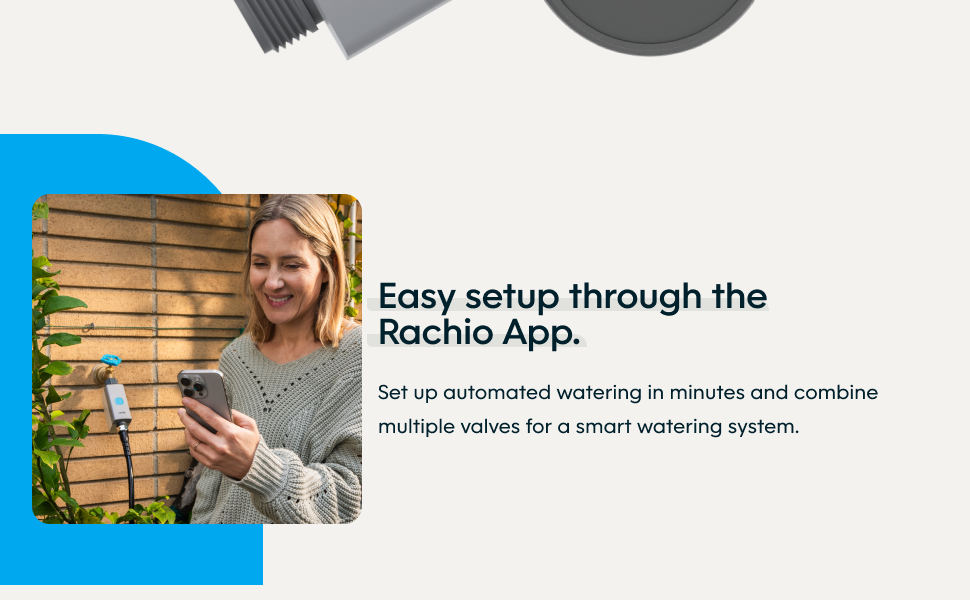
Image: A person interacting with the Rachio app on a smartphone, with the Smart Hose Timer connected to an outdoor faucet in the background, demonstrating the easy setup process.
Operation
The Rachio Smart Hose Timer offers flexible control over your outdoor watering needs through the dedicated Rachio App.
Scheduling Watering
- Create Schedules: Use the Rachio App to set up custom watering schedules. You can define start times, durations, and days for each connected valve.
- Smart Features: The system includes "Rain Skips" which automatically pause watering if rain is forecasted, conserving water.
- Flexible Timing: Set watering times for specific hours or optimize for sunrise/sunset.
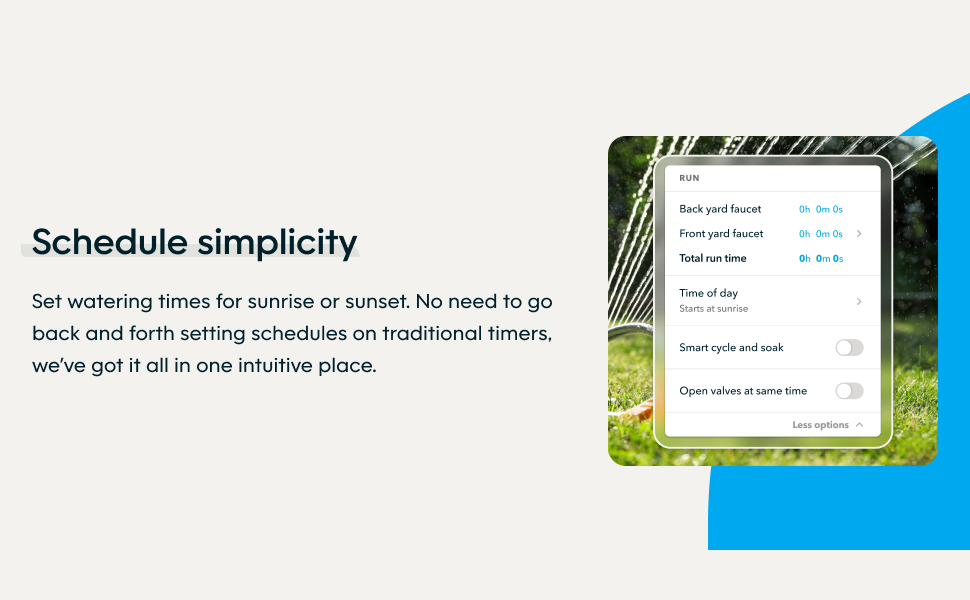
Image: A smartphone screen displaying the Rachio app's scheduling interface, showing options for setting watering times, run durations, and smart cycle/soak settings.
Manual Control (Quick Run)
- App Control: Initiate an instant "Quick Run" directly from the Rachio App to start or stop watering manually.
- On-Device Button: Press the button on the hose timer valve itself for immediate manual watering activation.

Image: The Rachio app on a smartphone, demonstrating remote control functionality to turn water on and off for "Front yard grass" with a sprinkler actively watering in the background.
Expandable System
One Rachio WiFi Hub can support up to eight (8) Smart Hose Timer valves, allowing you to manage multiple watering zones from a single app interface.

Image: An illustration showing two Rachio Smart Hose Timers connected to a Y-splitter on a single faucet, with a smartphone displaying the Rachio app managing multiple zones, demonstrating the system's expandability.
Maintenance
- Battery Replacement: The Rachio App will provide low-battery notifications for the hose timer valve. Replace the two (2) AA batteries promptly to ensure continuous operation.
- Cleaning: Periodically inspect the timer valve for any debris or mineral buildup, especially around the hose connections. Clean with a soft brush and water if necessary.
- Winterization: In freezing climates, disconnect the Smart Hose Timer valve from the faucet and store it indoors during winter months to prevent damage from freezing water. The WiFi Hub should also be stored in a dry, indoor environment.
Troubleshooting
If you encounter issues with your Rachio Smart Hose Timer, refer to the following common solutions:
- Timer Not Connecting to App:
- Ensure the WiFi Hub is powered on and connected to your 2.4 GHz WiFi network. The hub is not compatible with 5 GHz networks.
- Verify that the hose timer valve has fresh AA batteries installed correctly.
- Check the distance between the hose timer valve and the WiFi Hub. The system works up to 200 feet, but obstructions can reduce range.
- Restart the Rachio App and attempt the pairing process again.
- If issues persist, try resetting the WiFi Hub and re-pairing all devices through the app.
- No Water Flow / Flow Monitoring Error:
- Ensure the outdoor faucet is fully open.
- Check for any blockages in the hose or timer valve.
- Verify that the timer valve has sufficient battery power.
- If the issue continues, contact Rachio customer support for further assistance.
- Schedules Not Running:
- Confirm that schedules are enabled in the Rachio App.
- Check for "Rain Skip" notifications; watering may be paused due to forecasted rain.
- Ensure the timer valve is connected to the WiFi Hub and has power.
Specifications
| Model Number | SHVK001 |
| Brand | Rachio |
| Material | Plastic |
| Color | Blue (button), Gray (valve body) |
| Product Dimensions | 2"D x 3"W x 6"H (approximate for valve) |
| Item Weight | 1.46 Pounds |
| Power Source (Valve) | 2 AA Batteries (not included) |
| Connectivity | WiFi Hub requires 2.4 GHz WiFi |
| Max Valves per Hub | Up to 8 |
| UPC | 850028614464 |
Warranty and Support
For detailed warranty information and customer support, please refer to the official Rachio website or the documentation included with your product. You can also access support resources through the Rachio App.
Online Resources: Rachio Support Website
Related documentsSHVK001


Ask a question about this manual
Ask about setup, troubleshooting, compatibility, parts, safety, or missing instructions. Manuals+ will review the question and use this page’s manual context to help answer it.