
Runleader RL-HM032-BT
Runleader RL-HM032-BT Bluetooth Shunt Hours Tachometer User Manual
Model: RL-HM032-BT
1. Product Overview
The Runleader RL-HM032-BT is a versatile Bluetooth-enabled shunt hours tachometer designed for monitoring engine hours and RPM. It features Bluetooth connectivity for data viewing and settings adjustment via the "Moresee" APP, a digital hour meter, a small engine tachometer, and flexible power options. This manual provides detailed instructions for installation, operation, and maintenance.

Image: Front view of the Runleader RL-HM032-BT Bluetooth Shunt Hours Tachometer, showing its display and buttons.
2. Setup and Installation
2.1 App Installation and Bluetooth Pairing
The "Moresee" APP allows you to configure settings and view data from your tachometer. It is compatible with both Apple and Android devices.
- Download the "Moresee" APP from your device's app store.
- Ensure Bluetooth is enabled on your smartphone.
- Open the "Moresee" APP and follow the on-screen prompts to search for and pair with your RL-HM032-BT device.
- Once connected, you can customize the device name and manage various settings.
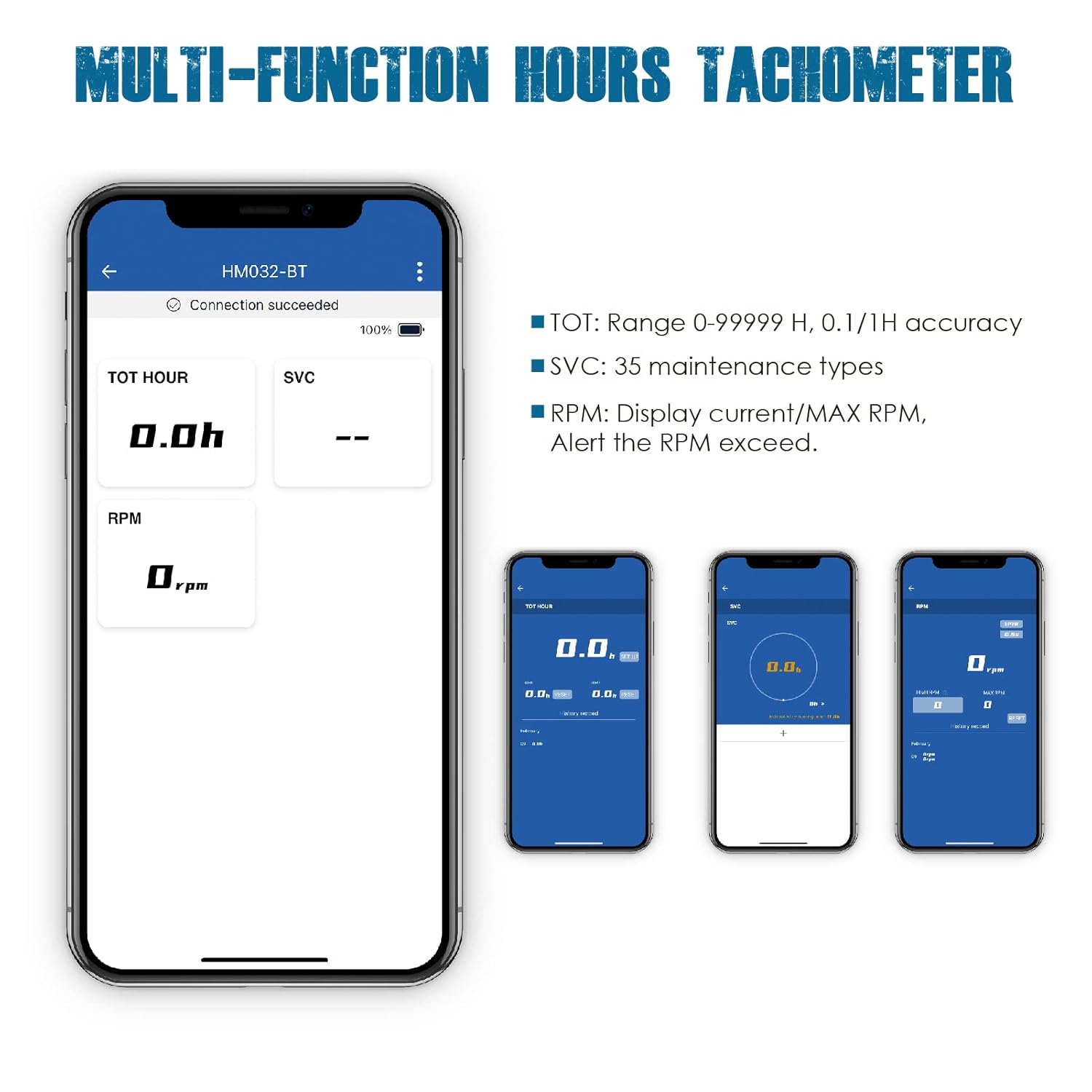
Image: Screenshot of the "Moresee" APP interface displaying total hours (TOT HOUR), service hours (SVC), and RPM readings.
2.2 Product Mounting
The RL-HM032-BT offers multiple mounting options:
- Stick-on: Use the provided 3M Velcro adhesive for quick and easy attachment to a clean, flat surface.
- Screw-in: Utilize the included screws for a more permanent installation. A template may be provided for drilling pilot holes.

Image: Visual guide demonstrating the one-wire connection for engine signal receipt, along with stick-on and screw-in mounting options.
2.3 Wire Connection
Connect the yellow wire around the spark plug wire of your engine to receive the engine signal. The red and black wires are for external DC 12V power, which can extend the battery life and is required for Bluetooth communication.

Image: Diagram illustrating the external power connection, showing the internal CR2032 battery and the option for DC 12V external power.
3. Operating Instructions
3.1 Digital Hour Meter Functions
The device tracks total and partial operating hours. It can be set with initial hours and provides maintenance reminders.
- Total Hours (TOT): Records cumulative operating time from 0 to 99,999 hours.
- Service Hours (SVC): Allows setting up to 35 groups of maintenance reminders with a range of 0 to 2000 hours.
- Initial Hours Setting: Configure the starting hour value as needed.
3.2 Small Engine Tachometer Functions
The tachometer displays real-time RPM and can alert you if RPM exceeds a set limit.
- Real-time RPM: Displays current engine revolutions per minute (0-25000 RPM).
- Maximum RPM: Shows the highest RPM reached since the engine was started.
- RPM Accuracy: Adjustable based on various engine firing patterns.
- RPM Exceed Alert: Provides a reminder if the RPM goes beyond a user-defined threshold.
3.3 Bluetooth Communication and APP Features
The Bluetooth feature allows seamless interaction with the "Moresee" APP.
- Data Monitoring: View real-time hours, RPM, and service intervals on your phone.
- Multi-Device Management: Monitor multiple Runleader Bluetooth devices simultaneously within the APP.
- Customization: Label each connected device with a custom name (e.g., Lawn Mower, Generator, Motorcycle, Outboard Motor) for easy identification.
- Maintenance Timer Customization: Set and customize various maintenance timers directly through the APP.

Image: The "Moresee" APP interface showing how multiple Runleader devices can be monitored and managed from a single screen.

Image: The "Moresee" APP interface for customizing maintenance timers, allowing users to define type, time, and frequency.

Image: The "Moresee" APP interface for customizing usage scenarios, showing icons for Lawn Mower, Generator, Motorcycle, and Outboard Motor.
3.4 Backlight Display
The device features a dual-color backlight display:
- Green Backlight: Default display color for normal operation.
- Red Backlight: Activates as an alert when the RPM exceeds the set limit.

Image: Comparison showing the tachometer display with a green backlight for normal operation and a red backlight indicating an RPM exceed alert.
4. Maintenance
The RL-HM032-BT is designed for low maintenance. Key aspects include:
- Battery Replacement: The unit uses a replaceable CR2032 battery. Replace it when the battery indicator shows low power.
- Maintenance Reminders: Utilize the SVC function in the "Moresee" APP to set up to 35 different maintenance reminders for your engine (e.g., oil changes, spark plug replacement).
- Cleaning: Wipe the device with a soft, damp cloth. Avoid harsh chemicals. The device has a favorable water resistance rating (IP65).
5. Troubleshooting
If you encounter issues with your Runleader RL-HM032-BT, consider the following:
- No Display/Power: Check the CR2032 battery. If using external power, ensure the 12V DC connection is secure and providing power.
- No RPM Reading: Verify that the yellow signal wire is correctly wrapped around the spark plug wire (typically 5-10 wraps). Ensure the connection is secure.
- Bluetooth Connection Issues: Make sure Bluetooth is enabled on your phone and the "Moresee" APP is open. Ensure the device is powered by external 12V DC for stable Bluetooth communication. Try restarting both the app and your phone.
- Inaccurate Readings: For RPM, adjust the engine firing pattern settings within the "Moresee" APP if available, to match your engine type for improved accuracy.
- App Not Responding: Close and reopen the "Moresee" APP. If the issue persists, try reinstalling the app.
For further assistance, please refer to the technical support information provided by Runleader.
6. Specifications
| Feature | Detail |
|---|---|
| Model Number | RL-HM032-BT |
| Power Source | 1 Lithium Metal battery (CR2032, included) and DC 12V external power |
| Material | Acrylonitrile Butadiene Styrene (ABS) |
| Item Weight | 4.66 Ounces |
| Hour Range | 0 to 99,999 Hours |
| RPM Range | 0 to 25,000 RPM |
| Waterproof Rate | IP65 |
| Connectivity | Bluetooth |

Image: Diagram showing the dimensions of the tachometer and a list of included accessories such as power cable, adhesive velcro, screws, and a mini screwdriver.
7. What's in the Box
- Runleader RL-HM032-BT Tachometer
- Power cable assembly
- 3M adhesive velcro
- Mounting screws
- Mini screwdriver
- User manual
8. Warranty and Support
Runleader products are manufactured to high-quality standards. For warranty information and technical support, please refer to the documentation included with your product or visit the official Runleader website. Keep your purchase receipt for warranty claims.
Ask a question about this manual
Ask about setup, troubleshooting, compatibility, parts, safety, or missing instructions. Manuals+ will review the question and use this page’s manual context to help answer it.