
Introduction
Thank you for choosing the YIGER Under Cabinet Lights. These rechargeable, wireless motion sensor lights are designed to provide convenient and efficient illumination for various indoor spaces. This manual will guide you through the setup, installation, operation, and maintenance of your new lighting solution.
Product Features
- Infrared Motion Detection: Equipped with PIR sensors that detect human motion by sensing temperature changes within a 13ft range and 120° angle. The light activates upon approach and automatically turns off after 20 seconds of no motion, ideal for low-light conditions.
- Versatile Lighting Modes: Features 62 LED beads providing even and gentle 3000K warm white light, free from dazzling or video flash. Offers up to 250±20% lumens for optimal illumination. Includes four switch modes: ON (constant light), OFF (no light), AUTO (all-day motion induction), and NIGHT (motion induction only in weak light conditions).
- USB-C Rechargeable Battery: Powered by an inbuilt 2000mAh lithium battery. Fully charges in approximately 3 hours via the included USB-C cable. Provides 4 to 7 weeks of operation when activated five times a day, reducing the need for frequent charging.
- Effortless Magnetic Installation: Designed for easy, drill-free installation. Can be directly absorbed onto metal surfaces or mounted using adhesive tapes and metal pieces for non-magnetic surfaces. Lights can be easily removed for charging or portable use.
- Multi-Scene Application: These wireless lights are suitable for various indoor environments, including baby rooms, stairs, basements, storerooms, closets, cabinets, wardrobes, garages, and trunks. They can also serve as an emergency light.
Package Contents
- YIGER Under Cabinet Light (2 units)
- USB-C Charging Cable (1 unit)
- Adhesive Metal Mounting Plates (4 units)
- User Manual (1 unit)
Specifications
| Attribute | Value |
|---|---|
| Brand | YIGER |
| Model Name | DIO62B |
| Color | Silver-warm Light |
| Material | Aluminum, Polycarbonate |
| Product Dimensions | 14.5"L x 1.7"W x 0.43"H |
| Power Source | Battery Powered (2000mAh Lithium Polymer) |
| Special Feature | Motion Sensor |
| Light Source Type | LED |
| Light Color | Warm white light (3000 Kelvin) |
| Brightness | 300 Lumen |
| Installation Type | Wall Mount, Under Cabinet |
| Indoor/Outdoor Usage | Indoor |
| Item Weight | 15.1 ounces (427 Grams) |
| Number of Items | 2 |
Setup
- Unpack: Carefully remove all components from the packaging.
- Initial Charge: Before first use, fully charge the lights using the provided USB-C cable. The charging indicator light will be red while charging and turn green when fully charged.
- Familiarize with Controls: Locate the USB-C port, motion sensor, and the 4-way switch (AUTO, OFF, ON, NIGHT) on the side of the light bar.
Installation
The YIGER Under Cabinet Lights offer flexible installation options without the need for drilling or screws.
Method 1: Direct Magnetic Adsorption (for metal surfaces)
- Simply place the light bar directly onto any magnetic metal surface. The strong internal magnets will hold it securely.
Method 2: Adhesive Metal Plates (for non-magnetic surfaces)
- Step 1: Attach Metal Strips to Light: Absorb the provided metal strips onto the magnetic areas of the light bar.
- Step 2: Prepare Surface: Clean the desired installation surface thoroughly to ensure it is dry and free of dust or grease.
- Step 3: Peel and Stick: Peel off the protective films from the adhesive side of the metal strips (which are now attached to the light). Carefully position the light bar with the attached metal strips onto the cleaned surface and press firmly for 10-20 seconds.
The light can be easily detached from the metal plates for charging or repositioning.

Image: Step-by-step guide for installing the light onto non-magnetic surfaces using adhesive metal plates.
Operating Modes
The light features a 4-way switch to select different operating modes:
- ON Mode: The light will stay continuously on.
- OFF Mode: The light will remain off.
- AUTO Mode (All-Day Induction): The light will turn on when motion is detected, regardless of ambient light conditions. It will turn off after 20 seconds of no motion.
- NIGHT Mode (Weak Light Induction): The light will only turn on when motion is detected AND the ambient light conditions are weak (dark). It will turn off after 20 seconds of no motion. This mode helps conserve battery life during daylight hours.
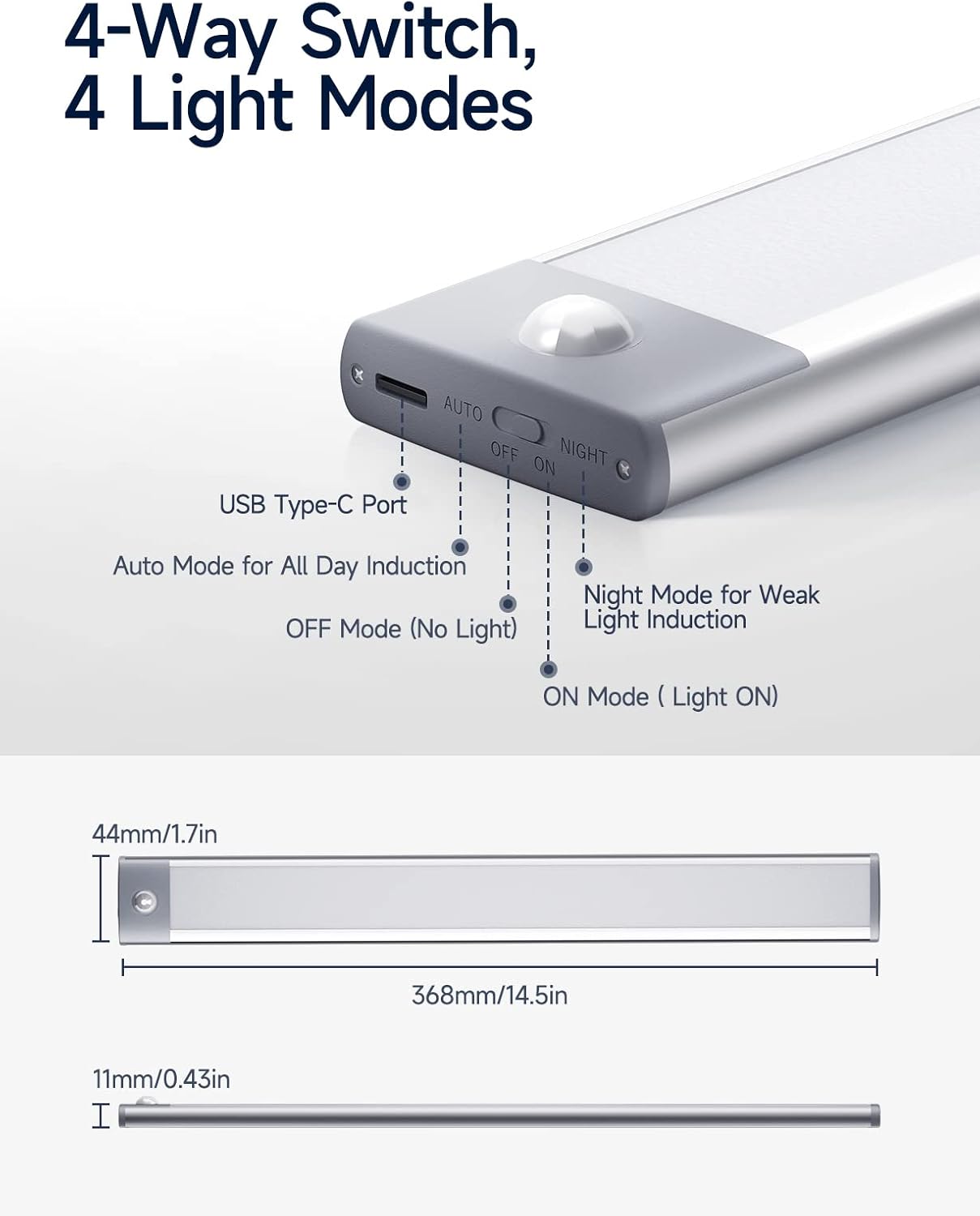
Image: Detailed view of the light's control panel, highlighting the USB-C port, motion sensor, and mode switch.

Image: Visual representation of the motion sensor's detection range and angle.

Image: Explanation of AUTO and NIGHT modes with illustrative icons.
Charging
To charge your YIGER Under Cabinet Light:
- Locate the USB-C charging port on the side of the light bar.
- Connect the provided USB-C charging cable to the light and to a compatible power source (e.g., PC, USB wall adapter, power bank).
- The charging indicator light will illuminate red during charging.
- Once fully charged (approximately 3 hours), the indicator light will turn green.
- Disconnect the charging cable. The light is now ready for use.
A full charge can power the LED light for 4 to 7 weeks, assuming it's activated five times a day.

Image: The light connected to a USB-C charging cable, showing the charging indicator.

Image: Visual guide to battery capacity, charging technology, and indicator lights.
Maintenance
- Cleaning: Wipe the light bar with a soft, dry cloth. Do not use abrasive cleaners or immerse in water.
- Battery Care: For optimal battery life, avoid completely draining the battery frequently. Recharge when the light output noticeably diminishes.
- Storage: If storing the lights for an extended period, ensure they are fully charged and store them in a cool, dry place.
Troubleshooting
| Problem | Possible Solution |
|---|---|
| Light does not turn on. |
|
| Motion sensor not working. |
|
| Light turns off too quickly. |
|
| Battery life is shorter than expected. |
|
Warranty and Support
For warranty information or technical support, please refer to the product packaging or contact YIGER customer service directly. Keep your purchase receipt for any warranty claims.
Visit the YIGER Store for more products and information.