
1. Introduction
Thank you for choosing the Jowua 6D Invisible Foldaway Magnetic Car Mount. This product is designed to provide a secure and convenient mounting solution for your smartphone in Tesla vehicles (Model S, 3, X, Y, Cybertruck). This manual provides detailed instructions for installation, operation, and maintenance to ensure optimal performance and longevity of your car mount.
2. Product Overview
2.1 Key Features
- Magnetic Compatibility: Supports iPhone MagSafe series and MagSafe-compatible cases.
- Invisible and Hidden Design: Retracts to conceal the mount, preserving the minimalist aesthetic of the Tesla interior.
- Adjustable Metal Arm: Features a premium metal arm that extends and retracts for optimal viewing angles.
- Smooth Silicone Surface: Enhances grip and prevents phone slippage and scratches.
- Sticky & Washable Suction Cup: Provides strong adhesion to smooth surfaces and is washable for renewed stickiness.
2.2 Package Contents
- Jowua 6D Invisible Foldaway Magnetic Car Mount

Image 2.2.1: Jowua 6D Invisible Foldaway Magnetic Car Mount.
3. Setup and Installation
Follow these steps to properly install your Jowua 6D Car Mount:
- Prepare the Mount: Unfold and extend the arm of the car mount.
- Unlock Suction Cup: Remove any protective lining and unlock the suction cup mechanism.
- Positioning: Align the car mount at the corner of your Tesla's screen. Ensure the suction cup's release tab faces downwards and is approximately 1cm away from the screen edge.
- Secure the Mount: Press the suction cup firmly against the screen for 10 seconds, then engage the lock mechanism to secure it in place.

Image 3.1: Suction cup design and installation steps.

Image 3.2: The mount offers six degrees of freedom for adjustment, including an adjustable base, foldable metal arm, and 360-degree universal swivel mount.
3.1 Installation Video Guide
Video 3.1.1: Official Jowua 6D Magnetic Car Mount installation and usage demonstration. This video illustrates the unfolding, suction cup application, and various adjustments of the mount.
4. Operating Instructions
Once installed, the Jowua 6D Car Mount offers flexible positioning for your smartphone:
- Adjusting the Arm: Gently pull or push the metal arm to extend or retract it, finding the ideal distance for your view.
- Phone Attachment: Place your MagSafe-compatible iPhone or phone with a MagSafe case onto the magnetic surface. The powerful magnets will securely hold your device.
- Angle Adjustment: Utilize the 120-degree adjustable hinge and the 360-degree swivel ball to rotate your phone between portrait and landscape orientations and adjust the viewing angle.
- Folding Away: When not in use, fold the mount back to its hidden position behind the screen to maintain the Tesla's minimalist interior.
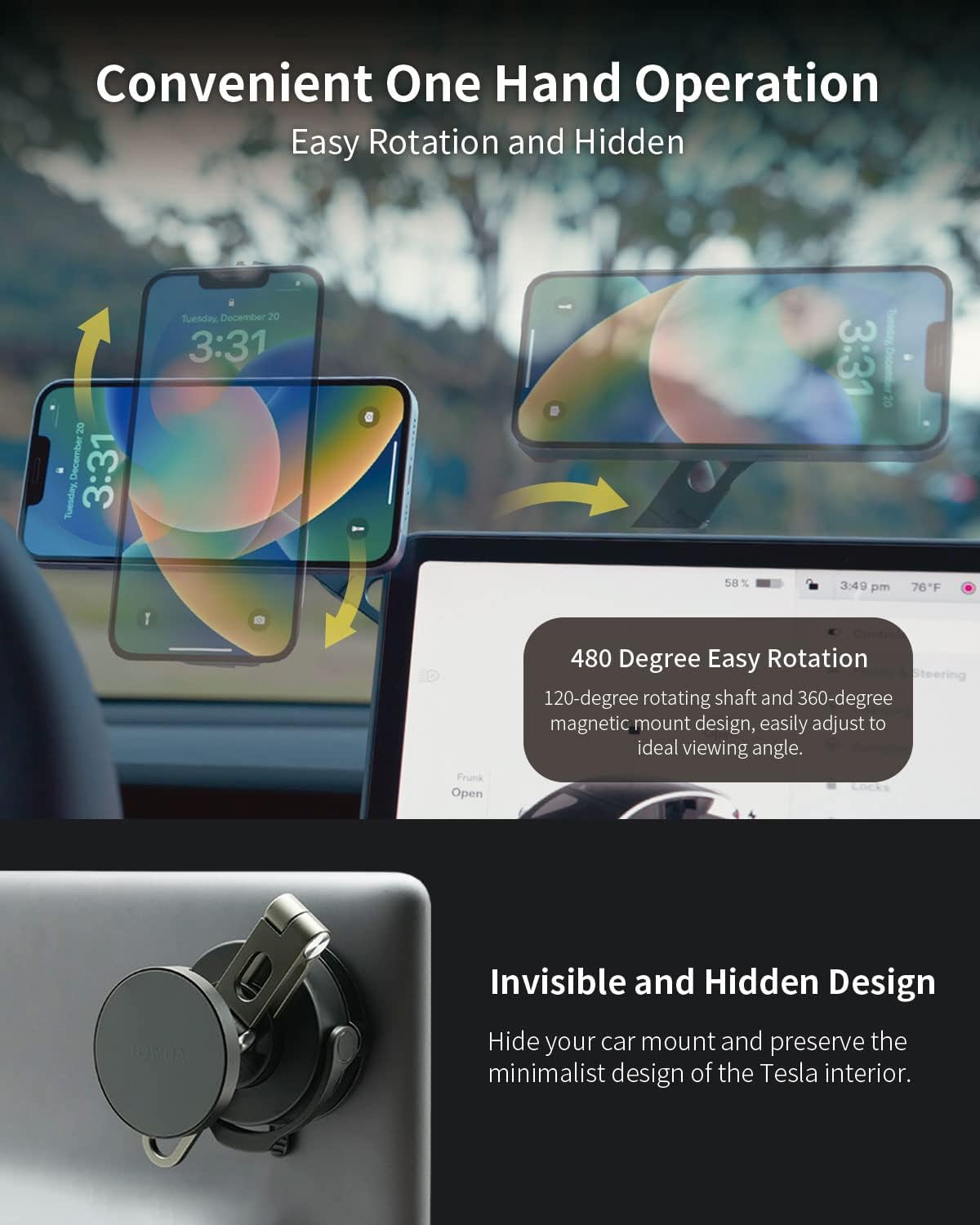
Image 4.1: The mount allows for convenient one-hand operation and 480-degree rotation for optimal viewing.

Image 4.2: The mount supports iPhone MagSafe with powerful magnets and features a smooth silicone surface to prevent scratches and increase friction.
5. Maintenance
To maintain the performance of your car mount:
- Suction Cup Cleaning: If the suction cup loses its stickiness, detach it from the screen and rinse it under warm water. Allow it to air dry completely before re-applying.
- Surface Compatibility: The suction cup is designed for smooth surfaces. Avoid using it on porous materials such as leather or wood, as this may reduce adhesion and leave marks.
- General Cleaning: Wipe the mount with a soft, damp cloth to remove dust and grime. Avoid harsh chemicals.
6. Troubleshooting
- Mount Not Sticking: Ensure the mounting surface is clean and smooth. Clean the suction cup as described in the Maintenance section. Press firmly for 10 seconds before locking.
- Phone Not Holding Securely: Verify your phone or case is MagSafe compatible. Ensure there are no obstructions between the phone and the mount's magnetic surface.
- Difficulty Adjusting Arm/Swivel: Check for any debris in the hinge mechanisms. Apply gentle, consistent force when adjusting.
7. Specifications
| Feature | Detail |
|---|---|
| Product Dimensions | 4.72 x 4.33 x 5.51 inches |
| Item Weight | 9.9 ounces |
| Item Model Number | FG000200106 |
| Special Features | Adjustable, Foldable, Non-Slip |
| Color | Black |
| Compatible Devices | Smartphones |
| Compatible Phone Models | iPhone 15, iPhone 14, iPhone 13, iPhone 12, iPhone 11 series. |
| Mounting Type | Suction Cup |
8. Warranty and Support
For warranty information or technical support, please refer to the official Jowua website or contact their customer service directly. Keep your purchase receipt for warranty claims.
