
1. Introduction
This manual provides essential instructions for the safe and proper installation, operation, and maintenance of your Karini 5 Gun Safe, Model K24-72-XL. Please read this manual thoroughly before using the safe and retain it for future reference. Ensure all users are familiar with its contents.
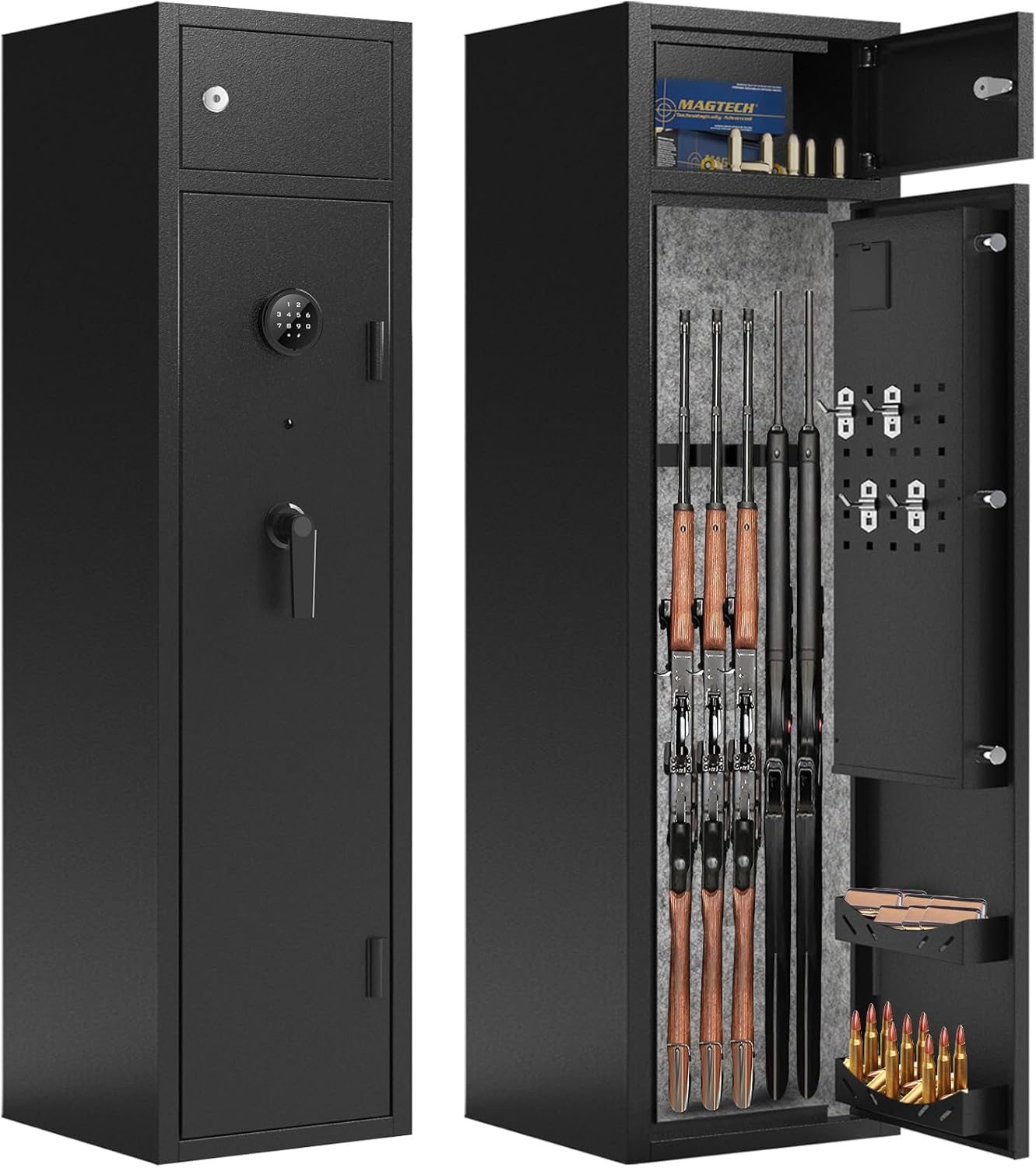
Image 1.1: Front and interior view of the Karini 5 Gun Safe. The safe features an electronic keypad on the front and a separate lockable compartment inside, along with racks for long guns and pistol holders on the door.
2. Package Contents
Verify that all components are present upon unpacking:
- 1x Karini 5 Gun Safe (Model K24-72-XL)
- 2x Master Keys
- 2x Separate Locker Keys
- 4x Expansion Bolts for mounting
- 1x External Emergency Power Box
- 1x Instruction Manual (this document)
- 4x Removable Hooks
3. Setup and Installation
3.1 Unpacking and Placement
Carefully remove the safe from its packaging. Due to its weight (approximately 71.8 lbs), it is recommended that two people handle the safe during placement. Choose a secure and discreet location for installation.
3.2 Battery Installation
The electronic lock requires 4 AA batteries (not included). Open the battery compartment on the back of the keypad and insert the batteries, ensuring correct polarity. Do not use rechargeable batteries, as they may not provide sufficient power or fit correctly, leading to malfunction.
3.3 Mounting the Safe
For optimal security and stability, the safe must be securely mounted to a wall or floor using the provided expansion bolts. The safe's door is heavier than the main body, and without proper mounting, the safe may tip forward when the door is open. Locate suitable studs in a wall or a solid floor surface for anchoring. Mark and drill pilot holes, then secure the safe using the expansion bolts.

Image 3.1: Diagram illustrating the dimensions of the Karini 5 Gun Safe (55.2"H x 12.6"W x 9.9"D) and its capacity for 4-5 shotguns, with a maximum gun height of 46.5 inches. Also highlights the 20mm thick locking latch.
3.4 Setting Your Personal Code
- With the safe door open, locate the reset button on the inside of the door, near the electronic lock mechanism.
- Press the reset button. The keypad will beep, and an indicator light will illuminate.
- Enter your desired 3-8 digit code on the keypad.
- Press the '#' button to confirm your new code. The safe will beep to confirm successful programming.
- Test the new code with the door open before closing it.
4. Operating the Safe
4.1 Opening with Electronic Code
- Enter your personal 3-8 digit code on the keypad.
- Press the '#' button.
- Within 5 seconds, turn the handle clockwise to open the door.

Image 4.1: Close-up of the upgraded digital keypad, featuring touch screen buttons for quick access and a dual password system for enhanced security.
4.2 Opening with Master Key
In case of forgotten code or battery failure, the safe can be opened using the master key. Insert the master key into the keyhole located behind the keypad cover (if applicable, or directly on the lock), turn it, and then turn the handle to open the door.
4.3 Using the Emergency Power Box
If the internal batteries are depleted and you do not have the master key readily available, the emergency power box can be used. Connect the emergency power box to the external port on the keypad. This will temporarily power the electronic lock, allowing you to enter your code and open the safe. Replace the internal batteries immediately after opening.

Image 4.2: Visual guide demonstrating the three quick unlock methods: using the password and turning the knob, connecting the emergency power box and using the keypad, or using the physical key and turning the knob. A note advises against locking the emergency power box and key inside the safe.
4.4 Mute/Unmute Function
To switch between mute and non-mute modes for keypad sounds, long-press the '*' button on the keypad.

Image 4.3: Illustration of the mute function (long press '*' to toggle sound) and the system lock feature, which activates for 5 minutes after 5 consecutive incorrect password entries.
4.5 System Lockout
If an incorrect password is entered 5 consecutive times, the electronic system will lock for 5 minutes. During this period, the keypad will be unresponsive, and the password cannot be used to open the safe. The master key can still be used to open the safe during a lockout.
4.6 Internal Storage and Features
- Separate Lock Box: The safe includes a smaller, lockable compartment (H6.81" x W12.4" x L9.74") for ammunition, handguns, or important documents. This box opens with its own set of keys.
- Gun Racks: The main compartment features 5 slots for long guns.
- Removable Hooks: Four hooks are provided for hanging pistols, gun brushes, or other accessories on the interior door panel.
- LED Light: An upgraded LED light illuminates the interior upon opening, aiding visibility in low-light conditions.
- 180-Degree Door Opening: The safe door is designed to open 180 degrees for easier access to contents.
5. Maintenance
5.1 Battery Replacement
Replace batteries promptly when the low battery indicator appears or if the keypad becomes unresponsive. Always use new, non-rechargeable AA alkaline batteries. Ensure the battery compartment cover is securely fastened after replacement.
5.2 Cleaning
Clean the exterior of the safe with a soft, damp cloth. Avoid abrasive cleaners or solvents that could damage the finish or electronic components. The interior felt lining can be gently vacuumed or wiped.
5.3 Key Storage
Store the master keys and separate locker keys in a secure location outside the safe. Never store them inside the safe, as this defeats the purpose of having a backup access method.
6. Troubleshooting
- Safe does not open with code:
- Ensure batteries are fresh and correctly installed.
- Verify you are entering the correct code.
- Check if the system is in lockout mode (after 5 incorrect attempts). Wait 5 minutes.
- Use the emergency power box or master key to open.
- Keypad does not light up:
- The keypad on this model may not be backlit. This is normal operation. Use external light if needed.
- Safe tips forward when door is open:
- This indicates the safe is not properly mounted. Securely anchor the safe to a wall or floor using the provided expansion bolts.
- Alarm system:
- The safe features an anti-theft alarm system. If the safe is tampered with or moved significantly while locked, the alarm may activate.
7. Specifications
| Brand | Karini |
| Model Number | K24-72-XL |
| Product Dimensions | 9.9"D x 12.6"W x 55.2"H |
| Internal Capacity | 8.5 Cubic Feet |
| Lock Type | Electronic Keypad with Key Override |
| Material | Alloy Steel (1.4mm cold rolled steel, 20mm solid bolts) |
| Color | Black |
| Item Weight | 71.8 pounds |
| Mounting Type | Wall Mount (expansion bolts included) |
| Special Features | Alarm System, Anti-Theft, Removable Shelf, LED Light, 180-degree door opening |
| UPC | 759357320544 |
8. Warranty and Support
Specific warranty details for the Karini 5 Gun Safe are not provided in this manual. For warranty information, please refer to the product packaging or contact the retailer where the safe was purchased. For technical support or assistance, please contact Karini customer service or your authorized dealer.