
1. Introduction
The Jebao ECP-50M Smart Cross-Flow Pump Wave Maker is designed to create optimal water movement in aquariums. This pump utilizes SINE wave technology for quiet and stable performance, featuring a cross-wave single impeller structure to ensure efficient water flow without dead spots. It is suitable for both marine and fresh water environments as it contains no exposed copper elements. The ECP-50M can be operated via a manual controller with an LCD display or through Wi-Fi using the Jebao App on iOS and Android devices.
2. Safety Information
Please read and understand all safety instructions before operating the device. Failure to follow these instructions may result in product damage, injury, or electrical shock.
- Water Immersion: The pump unit must always be fully submerged in water during operation. Running the pump dry will cause damage.
- Temperature Limit: Do not operate the pump in water exceeding 35°C (95°F).
- Power Connection: Ensure the power adapter and controller are kept dry and away from water. Always disconnect power before performing any maintenance or handling the pump.
- Electrical Safety: When disconnecting the power cord from the controller or wall outlet, pull from the plug, not the cord. Avoid touching the plug with wet hands. If you observe any arcing or sparking, immediately discontinue use and contact support.
- Children and Pets: Keep the device and its components out of reach of children and pets.
- Intended Use: This product is designed for aquarium use only. Do not use it for any other purpose.

Image: Close-up of the ECP-50M pump unit, highlighting the label with critical operating parameters and warnings such as "Must run into water" and "Max. water temp. 35°C".
3. Setup Instructions
Follow these steps to properly set up your Jebao ECP-50M Wave Maker:
- Unpack Components: Carefully remove all components from the packaging. Verify that you have the pump unit, controller, and power adapter.
- Mount the Pump: Position the pump unit inside your aquarium. The pump typically attaches to the aquarium glass using a magnetic mount (not explicitly mentioned but common for wave makers). Ensure the pump is securely fastened and fully submerged in water.
- Connect the Controller: Connect the pump unit's cable to the designated port on the ECP-50M controller.
- Connect Power: Plug the power adapter into the controller, then plug the power adapter into a standard wall outlet (100V-240V, 50/60Hz).
- Initial Power On: The LCD display on the controller should illuminate, indicating the device is powered on.
- Wi-Fi Setup (Optional): To control the pump via Wi-Fi, download the Jebao App from your device's app store (iOS or Android). Follow the in-app instructions to connect your ECP-50M controller to your home Wi-Fi network.

Image: Overview of the Jebao ECP-50M package contents, including the pump, controller, power adapter, and instruction manual.
4. Operating Instructions
The ECP-50M offers both manual and Wi-Fi control options.
4.1 Manual Control (LCD Display Controller)
Use the buttons on the controller to navigate through modes and adjust settings. The LCD display will show current settings.
- Mode Selection: Press the "Mode" button to cycle through available operating modes (e.g., constant flow, pulse mode, wave mode).
- Flow Adjustment: Use the "+" and "-" buttons to increase or decrease the flow rate or intensity within the selected mode. The minimum flow setting is typically 30%.
- Feed Mode: Some controllers include a "Feed" button which temporarily pauses the pump for feeding, usually for 10 minutes.
- Lock Function: A lock button may be present to prevent accidental changes to settings.
4.2 Wi-Fi Control (Jebao App)
Once connected to Wi-Fi, the Jebao App provides advanced control and scheduling features.
- App Interface: The app allows for intuitive control over pump modes, flow intensity, and custom programming.
- Scheduling: Set daily or weekly schedules for different flow patterns and intensities to simulate natural reef conditions.
- Firmware Updates: The app may provide notifications for firmware updates to improve performance and add new features.
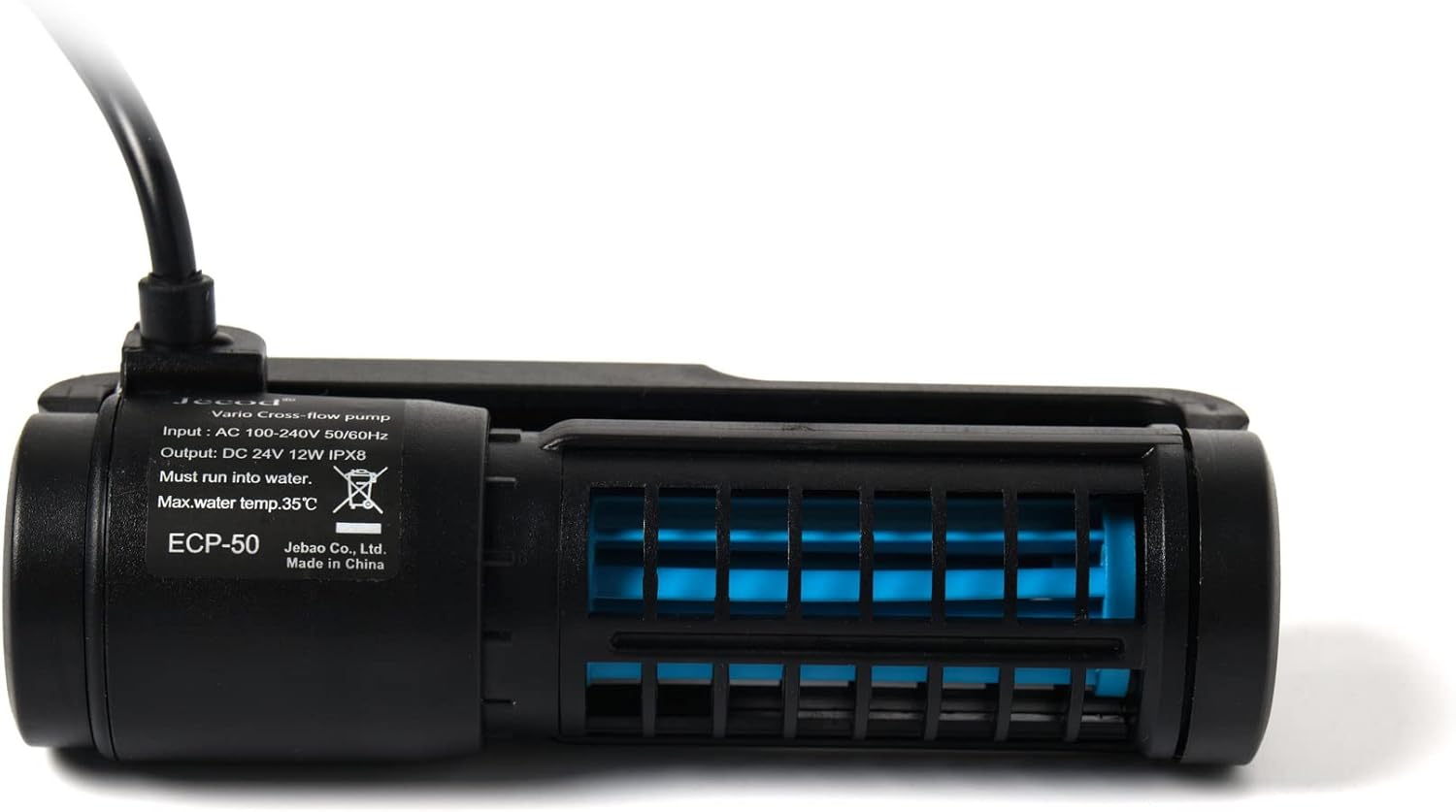
Image: Top-down view of the ECP-50M pump, illustrating its compact design and impeller housing.
5. Maintenance
Regular maintenance ensures optimal performance and extends the lifespan of your wave maker.
- Disconnect Power: Always unplug the power adapter from the wall outlet before performing any maintenance.
- Remove Pump: Carefully remove the pump unit from the aquarium.
- Disassemble (if applicable): Refer to the pump's design for instructions on how to safely disassemble the impeller housing.
- Clean Impeller and Housing: Use a soft brush and clean water (or a mild vinegar solution for stubborn calcium deposits) to clean the impeller, impeller shaft, and pump housing. Remove any algae, debris, or mineral buildup.
- Inspect Components: Check the power cord, controller cable, and pump for any signs of wear, damage, or corrosion. Replace any damaged parts immediately.
- Reassemble and Reinstall: Carefully reassemble the pump and reinstall it in the aquarium, ensuring it is fully submerged before reconnecting power.

Image: Angled view of the ECP-50M pump, illustrating its design for cross-flow water movement.
6. Troubleshooting
If you encounter issues with your ECP-50M Wave Maker, refer to the following common problems and solutions:
| Problem | Possible Cause | Solution |
|---|---|---|
| Pump not turning on / No power |
|
|
| Pump stops working / Error message on controller |
|
|
| Wi-Fi app not connecting / Programming issues |
|
|
| Pump making unusual noise |
|
|
| Electrical arcing/sparking when unplugging |
|
|
7. Specifications
| Feature | Detail |
|---|---|
| Model | ECP-50M |
| Manufacturer | Jebao |
| Power Source | Corded Electric |
| Input Voltage | AC 100-240V, 50/60Hz |
| Output Voltage / Power | DC 24V, 12W |
| Maximum Flow Rate | 792 Gallons Per Hour (GPH) |
| Product Dimensions (L x W x H) | 4.75" x 2.0" x 1.2" (12.07 cm x 5.08 cm x 3.05 cm) |
| Item Weight | 1.52 pounds (0.69 kg) |
| Water Type Compatibility | Marine and Fresh Water |
| Maximum Water Temperature | 35°C (95°F) |
| Included Components | Pump, Controller, Power Adapter |
| Control Method | Wi-Fi (iOS/Android App) + Manual LCD Controller |
8. Warranty and Support
Specific warranty information for the Jebao ECP-50M is not provided in this manual. Please refer to the product packaging or contact your retailer or the manufacturer directly for warranty details and customer support. Keep your purchase receipt as proof of purchase.