
Introduction
The Jebao ELW Smart Wave Maker Circulation Pump is designed to create natural wave patterns and circulation within your aquarium or water garden. Featuring advanced SINE wave technology, this pump operates quietly and efficiently. It offers versatile control options, including a manual controller and Wi-Fi connectivity via the Jebao App for both iOS and Android devices. Its compact design and magnetic base allow for flexible placement and easy adjustment of water flow direction.

Image: The Jecod ELW-30M Smart Wave Maker pump shown next to its product packaging, highlighting its compact size and branding.
Safety Information
- Always disconnect power before performing any maintenance or cleaning.
- Ensure the pump is fully submerged in water during operation to prevent damage.
- Do not operate the pump if the power cord or plug is damaged.
- This product is designed for indoor use in aquariums or water gardens only.
- Keep out of reach of children.
- The pump is suitable for both marine and fresh water environments.
Package Contents
Please verify that all components are present in the package:
- 1 x Jecod ELW Smart Wave Maker Pump
- 1 x LCD Display Controller
- 1 x AC Adapter (US Plug)
- 1 x User Manual (this document)

Image: All included components of the Jecod ELW Smart Wave Maker, neatly laid out, including the pump, controller, AC adapter, and the printed user manual.
Setup Instructions
- Pump Placement: Position the wave maker pump inside your aquarium or water garden. The magnetic base allows for flexible and secure attachment to the tank wall. Ensure the pump is fully submerged and positioned to achieve desired water flow patterns.
- Controller Connection: Connect the pump cable to the designated port on the LCD display controller.
- Power Connection: Plug the AC adapter into the controller, then plug the AC adapter into a standard US electrical outlet (DC 24V).
- Wi-Fi Setup (Optional): For advanced control, download the Jebao App from the App Store (iOS) or Google Play Store (Android). Follow the in-app instructions to connect your ELW wave maker to your home Wi-Fi network. This enables remote control and programming features.
Operating Instructions
Manual Control
The LCD display controller allows for direct adjustment of the pump's settings. Use the buttons on the controller to cycle through different modes (e.g., constant flow, wave mode) and adjust flow intensity. Refer to the controller's display for current settings.
Wi-Fi Control (Jebao App)
Once connected to Wi-Fi, the Jebao App provides comprehensive control over your wave maker.
- Select various wave patterns and modes.
- Adjust flow rate and intensity precisely.
- Set schedules for different operating modes throughout the day.
- Monitor pump status.
Adjusting Water Direction
The ELW wave maker features a 3D big rotation angle, allowing you to manually adjust the output water direction. Gently pivot the pump head to direct the flow as needed for optimal circulation in your tank.

Image: A side view of the Jecod ELW Smart Wave Maker pump, illustrating its design that allows for adjustment of the water output direction.
Maintenance
Regular maintenance ensures optimal performance and longevity of your wave maker.
- Cleaning: Periodically remove the pump from the tank and gently clean any algae or debris that may have accumulated on the impeller or housing. Use a soft brush and clean water. Do not use harsh chemicals.
- Impeller Inspection: Check the impeller for any signs of wear or damage. A damaged impeller can reduce performance or cause noise.
- Cable Inspection: Regularly inspect the power cord and connections for any signs of damage or fraying.
- Water Quality: Ensure your tank's water quality is maintained, as excessive debris can impact pump performance.
Troubleshooting
| Problem | Possible Cause | Solution |
|---|---|---|
| Pump not operating | No power; loose connection; damaged adapter. | Check power outlet; ensure all connections are secure; test with another outlet; inspect adapter for damage. |
| Reduced flow or weak waves | Impeller clogged with debris; pump housing dirty. | Disconnect power and clean the impeller and pump housing thoroughly. |
| Excessive noise during operation | Debris in impeller; impeller worn or damaged; improper placement. | Clean impeller; inspect impeller for damage and replace if necessary; ensure pump is securely mounted and fully submerged. |
| Wi-Fi connection issues | Incorrect Wi-Fi password; router too far; app issues. | Verify Wi-Fi password; move router closer or use a Wi-Fi extender; restart app and controller; ensure app is updated. |
Specifications (ELW-30M)
| Brand | Jebao |
| Model Number | ELW |
| Style | ELW-30M, 3434GPH |
| Maximum Flow Rate | 3434 Gallons Per Hour (GPH) |
| Power Source | AC (via included adapter) |
| Voltage | DC 24V |
| Power Consumption | 30W |
| Material | Polypropylene (PP) |
| Item Weight | 2 pounds |
| Package Dimensions | 6.6 x 6 x 3 inches |
| Country of Origin | China |
| Recommended Tank Size | 100-150 gallons |
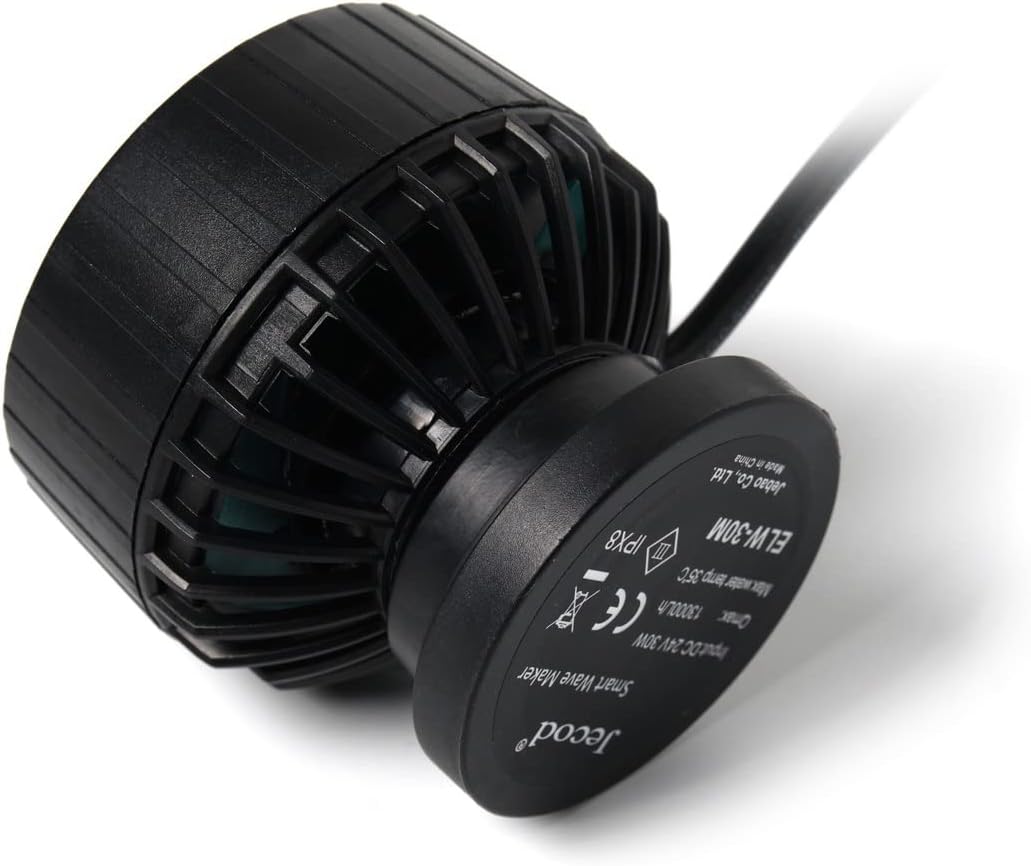
Image: The back of the Jecod ELW-30M pump, displaying its model number, input voltage, maximum flow rate, and various certifications.
Warranty and Support
For detailed warranty information and technical support, please refer to the official Jebao website or contact their customer service directly. Keep your purchase receipt as proof of purchase.
Note: Product specifications and features are subject to change without prior notice.


