
1. Introduction
Thank you for choosing the Jebao ECP-90M Smart Cross-Flow Pump Wave Maker. This device is designed to create optimal water movement in your aquarium, simulating natural ocean currents. Featuring advanced SINE wave technology, it operates quietly and efficiently. The ECP-90M can be controlled via a manual LCD display controller or wirelessly through the Jebao App on your smartphone (iOS and Android compatible).
This manual provides essential information for the safe installation, operation, and maintenance of your ECP-90M pump. Please read it thoroughly before use to ensure proper function and longevity of the product.
2. Important Safety Information
Please observe the following safety precautions to prevent injury or damage to the product:
- Always disconnect power to the pump and any other aquarium equipment before performing maintenance or handling the pump.
- This pump is designed for submersible use only. Do not operate it dry.
- Ensure your hands are dry when plugging or unplugging the power adapter.
- Do not use the pump if the power cord or plug is damaged.
- Keep the controller and power adapter away from water.
- The pump operates on DC 24V. Use only the provided power adapter.
- This product is suitable for both marine and freshwater environments.
- Keep out of reach of children.
3. Package Contents
Carefully unpack the box and ensure all items are present and in good condition:
- ECP-90M Cross-Flow Pump
- Smart Controller with LCD Display
- Power Adapter (AC 100-240V to DC 24V)
- Mounting Magnets
- User Manual (this document)

Image: All components included in the ECP-90M package, including the pump, controller, power adapter, and mounting magnets.
4. Product Features
- Smart Control: Features both Wi-Fi connectivity for iOS and Android devices and a manual LCD display controller for versatile operation.
- Quiet Operation: Utilizes SINE wave technology for ultra-quiet and stable performance.
- Efficient Water Flow: Cross-flow single impeller structure ensures broad water movement with no dead spots in the aquarium.
- Aquarium Safe: Designed with no exposed copper elements, making it safe for both marine (saltwater) and freshwater aquariums.
- Compact Design: Dimensions of approximately 11"L x 2.5"W x 1.25"H allow for discreet placement.
- High Flow Rate: Capable of a maximum flow rate of 2113 Gallons Per Hour (GPH).

Image: A detailed view of the ECP-90M pump, highlighting its cross-flow design and compact form factor.
5. Setup Instructions
Follow these steps to properly install your ECP-90M pump:
- Positioning the Pump:
- Identify a suitable location inside your aquarium, typically on the side or back glass. The pump should be fully submerged and positioned to create optimal water flow without disturbing substrate or corals excessively.
- Ensure the pump is placed at least 2 inches below the water surface to prevent air intake.
- Mounting the Pump:
- The pump uses strong magnets for mounting. Place the pump unit inside the aquarium against the glass.
- Align the external magnet on the outside of the aquarium glass directly opposite the internal magnet on the pump. The magnetic force will secure the pump in place.
- Adjust the pump's orientation to direct water flow as desired.
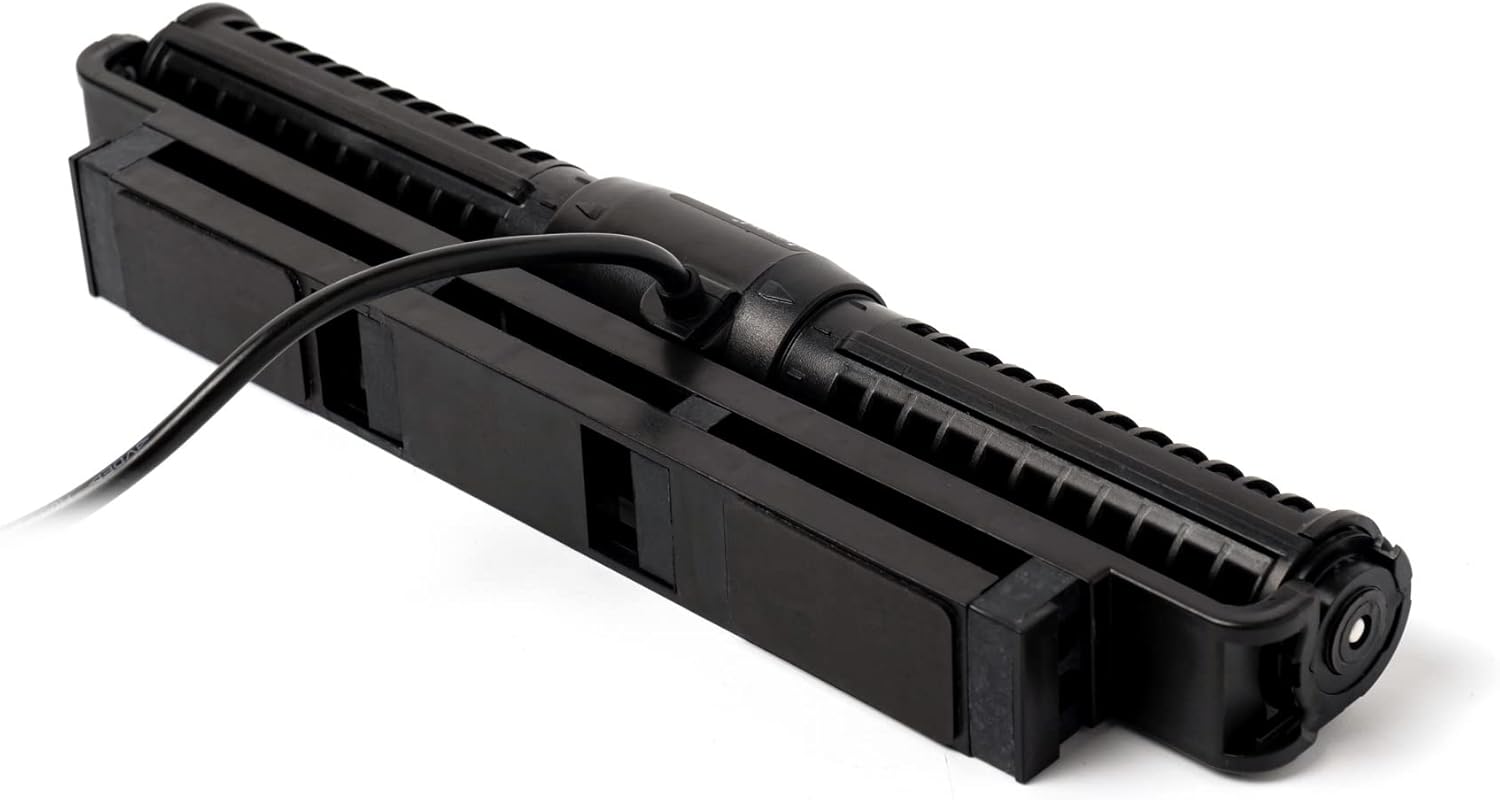
Image: The back of the ECP-90M pump, illustrating the magnetic attachment point for secure aquarium mounting.
- Connecting the Controller:
- Connect the pump's cable to the designated port on the smart controller. Ensure the connection is secure.
- Connect the power adapter to the controller.
- Plug the power adapter into a suitable electrical outlet.
- Initial Power On: The pump will power on and the controller's LCD screen will illuminate.
6. Operating Instructions
The ECP-90M offers both manual control via the LCD controller and smart control via the Jebao App.
6.1 Manual Controller Operation
The LCD controller allows you to adjust pump settings directly:
- Mode Selection: Use the 'Mode' button to cycle through various wave patterns and flow modes (e.g., constant flow, pulse mode, random flow).
- Flow Adjustment: Use the '+' and '-' buttons to increase or decrease the flow intensity/speed within the selected mode.
- Feed Mode: Press the 'Feed' button to temporarily pause the pump for feeding. The pump will resume operation after a set time (usually 10 minutes) or by pressing 'Feed' again.
- Lock Function: Some controllers may have a lock function to prevent accidental changes. Refer to the controller's specific interface for details.
6.2 Wi-Fi App Control
For advanced control and scheduling, download the Jebao App from the App Store (iOS) or Google Play Store (Android).
- Download and Install: Search for "Jebao" in your app store and install the application.
- Account Creation: Open the app and create a new user account or log in if you already have one.
- Add Device: Follow the in-app instructions to add your ECP-90M pump. This typically involves putting the controller into pairing mode (refer to controller instructions for specific steps, often holding a button for a few seconds) and connecting to its temporary Wi-Fi network before linking it to your home Wi-Fi.
- Control and Schedule: Once connected, you can:
- Select different operating modes and adjust flow intensity.
- Set custom schedules for different times of the day.
- Access advanced features and settings.
Note: Ensure your Wi-Fi network is 2.4GHz for optimal compatibility with the device.
7. Maintenance
Regular maintenance ensures the longevity and optimal performance of your ECP-90M pump.
- Disconnect Power: Always unplug the power adapter before performing any maintenance.
- Remove from Aquarium: Carefully detach the pump from the aquarium glass.
- Disassembly: Gently twist or unclip the pump's housing to access the impeller and internal components. Refer to the product diagram for specific disassembly points.
- Cleaning:
- Rinse all components under clean running water to remove debris, algae, and detritus.
- Use a soft brush (e.g., a toothbrush) to clean the impeller, impeller shaft, and inside the pump housing.
- For stubborn calcium deposits or algae, soak the components in a diluted vinegar solution or a commercial aquarium pump cleaner for a few hours, then scrub and rinse thoroughly.
- Reassembly: Ensure all components are clean and properly aligned before reassembling the pump. Make sure all seals are correctly seated.
- Testing: After reassembly, place the pump back in the aquarium and reconnect power. Observe for proper operation.
8. Troubleshooting
If you encounter issues with your ECP-90M pump, refer to the following common problems and solutions:
| Problem | Possible Cause | Solution |
|---|---|---|
| Pump not turning on / No power | Power adapter unplugged, faulty outlet, loose connection, damaged power cord/controller. | Check all power connections. Try a different outlet. Ensure pump cable is securely connected to the controller. Inspect power cord for damage. |
| Pump running but no water flow / Weak flow | Impeller clogged with debris, air trapped in pump, pump not fully submerged, flow setting too low. | Disconnect power, remove pump, and clean the impeller and housing thoroughly. Ensure pump is fully submerged. Increase flow setting on controller/app. |
| Pump making unusual noise | Impeller obstructed, worn impeller, air in pump, pump vibrating against glass. | Clean impeller. Check for foreign objects. Ensure pump is securely mounted and not touching other equipment. |
| Wi-Fi connection issues / App not connecting | Incorrect Wi-Fi password, 5GHz Wi-Fi network, controller not in pairing mode, app glitch. | Ensure your Wi-Fi is 2.4GHz. Re-enter Wi-Fi password carefully. Put controller into pairing mode as per app instructions. Restart app and controller. |
| Controller displaying error codes | Internal malfunction, pump blockage, power fluctuation. | Disconnect power for 30 seconds and reconnect. Clean the pump thoroughly. If error persists, contact customer support. |
9. Specifications
| Model | ECP-90M |
| Brand | Jebao |
| Product Dimensions | 11"L x 2.5"W x 1.25"H |
| Maximum Flow Rate | 2113 Gallons Per Hour (GPH) |
| Power Source | AC (via power adapter) |
| Voltage | DC 24V |
| Material | Metal (internal components), Plastic (housing) |
| Suitable For | Marine and Freshwater Aquariums |

Image: Diagram illustrating the physical dimensions of the ECP-90M pump.
10. Warranty and Support
For warranty information and customer support, please refer to the documentation provided with your purchase or visit the official Jebao website. Keep your proof of purchase for warranty claims.
If you require technical assistance or have questions not covered in this manual, please contact Jebao customer service through their official channels.