
Jebao ELW-5M
Jebao ELW-5M Smart Wave Maker Circulation Pump User Manual
Model: ELW-5M (792 GPH)
Introduction
The Jebao ELW-5M Smart Wave Maker is designed to create optimal water circulation in aquariums, suitable for both marine and freshwater environments. This pump features SINE wave technology for quiet operation, a 3D rotation angle for adjustable water flow, and can be controlled via Wi-Fi using the Jebao App or a manual controller.
This manual provides essential information for the safe and efficient installation, operation, and maintenance of your ELW-5M wave maker.
Safety Warnings
- To ensure performance, do not run the pump dry.
- Keep the controller at a dry place. Avoid water splashing on it.
- Do not disassemble the magnet base. When mounting, ensure the magnet is placed against the outer side of the tank to prevent it from falling.
- Do not disassemble the controller or adapter without professional guidance.
- If the product and APP are changed with the progress of technology, please refer to the actual product and APP for the latest information.

Product Components
The Jebao ELW-5M Smart Wave Maker package includes the following items:
- ELW-5M Wave Maker Pump
- Smart Controller with LCD display
- Magnetic Base for tank attachment
- AC Power Adapter (DC 12V 7.5W 60Hz US plug)
- User Manual

Setup Instructions
- Pump Placement:
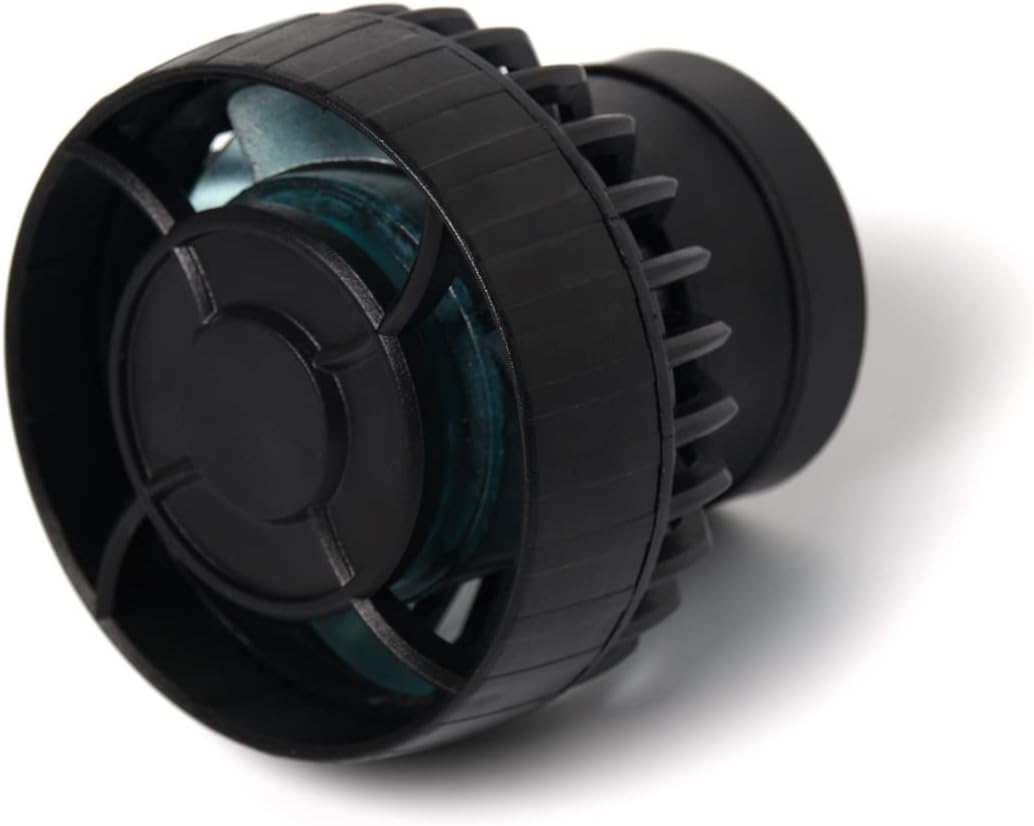
Position the wave maker pump inside your aquarium. Use the magnetic base to secure it to the tank wall. Ensure the external magnet is placed directly opposite the internal pump magnet on the outside of the glass. The pump allows for a 3D rotation angle to adjust the output water direction.

Image: Side profile of the ELW-5M pump, illustrating its compact form factor suitable for various tank sizes. - Controller Connection:
Connect the pump cable to the smart controller. Ensure the connection is secure. Keep the controller in a dry location, away from water splashes.
- Power Connection:
Connect the AC power adapter to the smart controller, then plug the adapter into a standard wall outlet. The pump is DC powered and designed for plug-and-play operation.
- Wi-Fi Setup (Optional):
For Wi-Fi control, download the Jebao App on your smartphone (available for iOS and Android). Follow the in-app instructions to connect the controller to your home Wi-Fi network. This enables advanced control and scheduling features.
Operating Instructions
The ELW-5M wave maker offers both manual and Wi-Fi control options for flexible operation.
Manual Control
Use the buttons and LCD display on the smart controller to adjust pump settings. Refer to the controller's specific interface for mode selection, flow rate adjustments, and other parameters. The SINE wave technology ensures ultra-quiet and stable performance.
Wi-Fi Control (Jebao App)
Once connected to Wi-Fi, the Jebao App provides comprehensive control over your wave maker. Features typically include:
- Real-time monitoring of pump status.
- Multiple wave modes and flow patterns.
- Customizable schedules and timers.
- Adjustable flow intensity.
Always refer to the latest version of the Jebao App for detailed instructions on its features and functionality.

Maintenance
Regular maintenance ensures the longevity and optimal performance of your wave maker.
- Cleaning: Periodically remove the pump from the aquarium and clean any algae or debris accumulated on the impeller and housing. Use a soft brush and aquarium-safe cleaning solutions if necessary. Rinse thoroughly with clean water before reinstallation.
- Impeller Inspection: Check the impeller for any signs of wear or damage. A damaged impeller can lead to reduced performance or increased noise.
- Magnetic Base: Ensure the magnetic base remains clean and free of debris to maintain a strong grip on the tank wall.
- Avoid Dry Running: As a critical safety warning, never operate the pump out of water. Running the pump dry can cause severe damage to the motor.
- No Exposed Copper: The pump is designed with no exposed copper elements, making it safe for both marine and freshwater environments without risk of copper leaching.
Troubleshooting
If you encounter issues with your ELW-5M wave maker, refer to the following common troubleshooting steps:
- Pump Not Starting/No Flow:
- Check if the power adapter is securely plugged into both the controller and the wall outlet.
- Ensure the pump cable is firmly connected to the controller.
- Inspect the impeller for any obstructions (e.g., debris, sand) that might be preventing it from spinning. Clean if necessary.
- Verify the pump is submerged in water and not running dry.
- Reduced Flow/Unusual Noise:
- Clean the impeller and pump housing thoroughly to remove any buildup.
- Check for any foreign objects lodged in the pump.
- Ensure the pump is securely mounted and not vibrating against the tank glass.
- Wi-Fi Connectivity Issues:
- Ensure your smartphone is connected to a 2.4GHz Wi-Fi network during the setup process, as 5GHz networks may not be supported.
- Restart your Wi-Fi router and the wave maker controller.
- Ensure the controller is within range of your Wi-Fi router.
- Refer to the Jebao App's help section or the latest app instructions for specific Wi-Fi troubleshooting steps.
- Magnetic Base Not Holding:
- Ensure both the internal and external magnets are clean and free of algae or debris.
- Verify the tank glass thickness is within the recommended range for the magnetic base.
- Ensure the external magnet is directly aligned with the internal pump magnet.
If issues persist, and you have followed all troubleshooting steps, contact Jebao customer support for further assistance. Note that product and app functionalities may be updated; always refer to the latest information.
Specifications
| Model | ELW-5M |
| Max Flow Rate | 792 GPH (Gallons Per Hour) |
| Power Input | AC 100-240V, 50/60Hz (Adapter) |
| Pump Voltage | DC 12V |
| Power Consumption | 7.5W |
| Recommended Tank Size | 20-30 Gallons |
| Dimensions (Pump, no magnet) | 2-1/4" diameter x 1-1/4" |
| Control Method | Wi-Fi (iOS/Android App) + Manual Controller |
| Technology | SINE Wave Technology for quiet operation |
| Material | Plastic, Polypropylene (PP) |
| Suitability | Marine and Freshwater Aquariums |

Additional Information
For the most up-to-date information, including app updates and advanced features, please refer to the official Jebao website or the Jebao App.
Related documentsELW-5M


Ask a question about this manual
Ask about setup, troubleshooting, compatibility, parts, safety, or missing instructions. Manuals+ will review the question and use this page’s manual context to help answer it.