
1. Introduction
This manual provides essential information for the safe and effective operation of your LEMANIA ENERGY Professional LE/R GX10 12V Battery Charger. Please read this manual thoroughly before using the device and keep it for future reference. The GX10 is an advanced, microprocessor-controlled battery charger designed for various 12V battery types, offering charging, maintenance, reconditioning, and testing functionalities.

Figure 1: Front view of the LEMANIA ENERGY Professional LE/R GX10 Battery Charger, showcasing its robust red and black casing with an LCD display and control buttons.
2. Safety Information
Always observe the following safety precautions to prevent injury or damage to the charger or battery:
- Read all instructions before use.
- Do not expose the charger to rain or wet conditions. The unit has an IP20 rating, meaning it is protected against solid objects larger than 12.5mm but not against water.
- Ensure proper ventilation during charging. Do not cover the charger.
- Avoid charging frozen batteries.
- Never attempt to charge non-rechargeable batteries.
- Disconnect the AC power before making or breaking connections to the battery.
- Wear eye protection and protective clothing when working with batteries.
- Keep out of reach of children.
- In case of damage to the power cord or charger, do not operate the device. Contact qualified service personnel.
3. Package Contents
Verify that all items are present in the package:
- LEMANIA ENERGY Professional LE/R GX10 Battery Charger
- Battery clamps (crocodile clips)
- Eyelet terminals for permanent connection
- User Manual (this document)
4. Product Overview
The GX10 charger features a robust design suitable for workshop environments. It includes a large LCD display for intuitive operation and monitoring.
4.1 Key Features
- Multi-Stage Microprocessor Controlled Charging: Ensures optimal and complete charging cycles.
- Automatic Maintenance Mode: Prevents overcharging by automatically switching to maintenance mode once the battery is full.
- Compatibility: Supports WET, AGM, EFB, VRLA, and 12.8V LiFePO4 lithium batteries.
- Protection: Features reverse polarity protection and spark protection.
- Functions: Combines charging, storage, maintenance, reconditioning, and testing in one procedure.
- IP20 Rating: Resistant to dust and suitable for workshop use.

Figure 2: Overview of the GX10 charger's key features, including automatic maintenance, energy efficiency, extended battery life, spark protection, alternator and battery test, and multi-step charging. Also shows compatibility with Lead Acid (AGM, WET, MF, EFB) and Lithium (LiFePO4) battery types.
4.2 LCD Display
The large LCD display provides real-time information about the charging process and battery status.

Figure 3: Detailed explanation of the GX10 LCD display. Indicators include battery types (STD for WET, ASTOP for EFB, MF for AGM, LFP for LiFePO4), charge voltage (V), charge percentage (%), temperature correction, charge current (A), charge time (H), battery test result, alternator test result, and a warning indicator.
Display Indicators:
- Battery Type: STD (WET), ASTOP (EFB), MF (AGM), LFP (LiFePO4)
- Value: Displays voltage (V), charge percentage (%), current (A), or time (H).
- Temperature Correction: Indicates ambient temperature adjustment.
- Battery Test Result: Shows the outcome of the battery test.
- Alternator Test Result: Shows the outcome of the alternator test.
- Warning Indicator: Alerts to potential issues.
5. Setup and Connection
Follow these steps to safely connect the charger to your battery:
- Ensure the charger is disconnected from the AC power outlet.
- Identify the battery terminals: positive (+) and negative (-).
- Connect the red (+) clamp or eyelet terminal to the positive (+) battery terminal.
- Connect the black (-) clamp or eyelet terminal to the negative (-) battery terminal.
- For in-vehicle charging, connect the negative clamp to the vehicle chassis away from the battery and fuel line if the battery is not grounded. Consult your vehicle's manual.
- Ensure all connections are secure.
- Plug the charger's AC power cord into a suitable wall outlet.
The charger will power on and display the current battery status. You can then select the desired operating mode.
6. Operating Instructions
The GX10 offers multiple functions accessible via the control buttons next to the LCD display.
6.1 Selecting a Mode
Use the mode selection buttons (indicated by arrows next to the function names on the charger) to cycle through the available modes:
- CHARGE: Standard charging mode for various 12V batteries. The microprocessor controls a 10-stage charging process, automatically switching to maintenance mode upon completion.
- RECONDITION: This function uses a pulse charging program to regenerate sulfated batteries, restoring optimal characteristics for proper operation. Suitable for batteries with a capacity of 24-300 Ah.
- SUPPLY: In this mode, the charger acts as a 12V power supply (up to 13.7V). It can also be used as a floating charge to maintain large capacity batteries at 100% charge without time or voltage limits.
- TEST: This mode allows you to check the functionality of both the battery and the vehicle's alternator.
Once a mode is selected, the charger will begin its operation. Monitor the LCD display for progress and status updates.
7. Maintenance
To ensure the longevity and optimal performance of your GX10 charger:
- Keep the charger clean and dry. Wipe with a soft, damp cloth. Do not use solvents.
- Regularly inspect the cables and connectors for any signs of damage or wear.
- Store the charger in a cool, dry place when not in use.
- Ensure the charger is disconnected from both the AC power and the battery before cleaning or storing.
8. Troubleshooting
If you encounter issues with your GX10 charger, refer to the following common problems and solutions:
| Problem | Possible Cause | Solution |
|---|---|---|
| Charger does not power on. | No AC power; faulty outlet; damaged power cord. | Check AC connection and outlet. Inspect power cord for damage. |
| Charging does not start. | Incorrect battery connection (reverse polarity); battery too deeply discharged; incorrect mode selected. | Verify correct polarity (+ to +, - to -). Ensure battery voltage is above minimum threshold. Select appropriate mode. |
| Warning indicator on display. | Internal fault; battery fault; connection issue. | Refer to the LCD display section for indicator meanings. Disconnect and reconnect. If persistent, contact support. |
| Battery not fully charged after extended time. | Battery capacity too large for charger; battery fault; sulfation. | Verify battery capacity is within charger's range. Consider using RECONDITION mode for sulfated batteries. Test battery health. |
9. Specifications
Technical specifications for the LEMANIA ENERGY Professional LE/R GX10 Battery Charger:
| Feature | Specification |
|---|---|
| Model | GX10 |
| Input Voltage | 12 Volts (DC) |
| Output Voltage | 12 Volts (DC) |
| Charging Amperage | 10 A |
| Voltage Selection | Fixed |
| Min-Max Capacity (Charging) | 24 – 200 Ah |
| Min-Max Capacity (Maintenance) | 24 – 250 Ah |
| Min-Max Capacity (Recondition) | 24 – 300 Ah |
| Charging Steps | 10 stages |
| Dimensions (L x W x H) | 185 x 185 x 68 mm |
| Output Cable Length | 160 cm |
| Unit Weight (EPTA) | 1.3 kg |
| IP Rating | IP20 |
| Compatible Battery Types | WET, AGM, EFB, VRLA, 12.8V LiFePO4 |
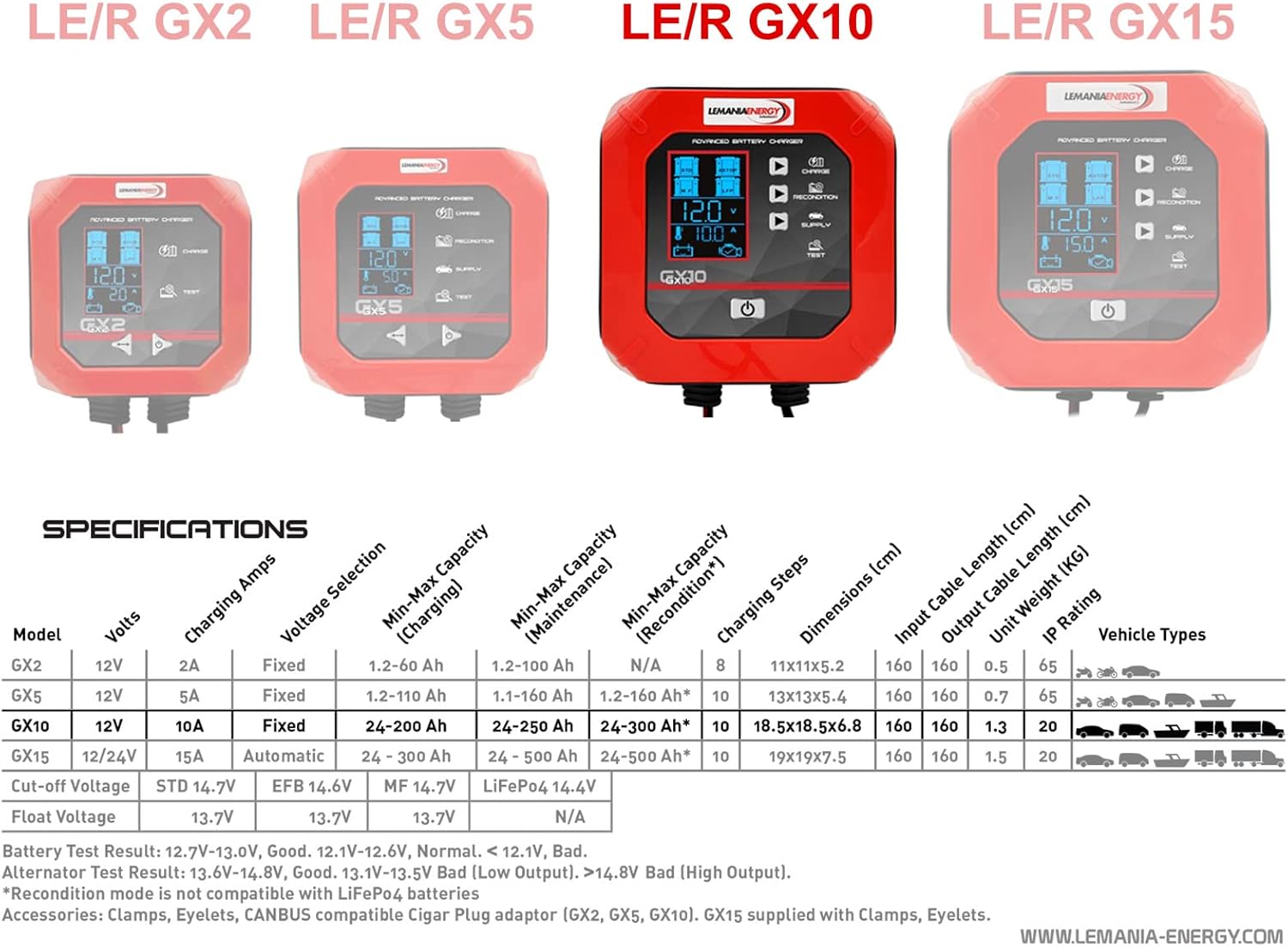
Figure 4: Comparison table of LEMANIA ENERGY GX series models, including detailed specifications for the GX10 model such as voltage, amperage, capacity ranges, charging steps, dimensions, cable length, weight, and IP rating.
10. Warranty and Support
LEMANIA ENERGY products are manufactured to high-quality standards. For warranty information, please refer to the warranty card included with your purchase or contact your local dealer. For technical support or service inquiries, please visit the official LEMANIA ENERGY website or contact their customer service department.
Keep your proof of purchase for warranty claims.


