1. Introduction
Thank you for choosing the OLIGHT Baton3 Pro Max Flashlight. This compact and powerful EDC (Everyday Carry) flashlight is designed for reliability and high performance, making it ideal for a wide range of applications from daily tasks to outdoor adventures and emergency situations. It features advanced technology including a high-lumen LED, a safety proximity sensor, and a user-friendly interface.

Image 1.1: The OLIGHT Baton3 Pro Max Flashlight, showcasing its compact design and orange finish.
Key Features:
- Powerful Output: Delivers a maximum output of 2,500 lumens, providing exceptional brightness for various lighting needs.
- Extended Runtime: Offers a maximum runtime of 60 days on its lowest setting, ensuring long-lasting performance.
- Shake to Awake Battery Indicator: A quick shake activates the battery indicator, allowing for convenient battery status checks without turning on the light. The side switch illuminates for easy location in the dark.
- Upgraded Proximity Sensor: The optimized optical system includes a hidden proximity sensor that automatically dims higher output modes when obstructions are detected, enhancing safety without being overly sensitive or affecting the beam pattern.
- User-Friendly Interface: Features an enlarged and recessed side switch for easier operation and reduced accidental activation.
- Convenient Storage: Comes with an L-shape stand that can be affixed to surfaces, providing a practical storage solution.
2. Setup
2.1 Unboxing and Initial Inspection
Carefully remove all components from the packaging. Inspect the flashlight and accessories for any signs of damage. If any items are missing or damaged, please contact customer support.

Image 2.1: Contents of the product package, including the flashlight, charging cable, L-shape stand, pouch, and user manual.
2.2 What's in the Box
- Baton3 Pro Max Flashlight (Battery Included) x1
- MCC3 Charging Cable x1
- L-shape Stand x1
- Pouch x1
- User Manual x1
2.3 Initial Charging
Before first use, fully charge the flashlight. Connect the MCC3 Charging Cable to the magnetic tail cap of the flashlight and plug the USB end into a power source. The indicator light on the charging cable will show charging status.

Image 2.2: The Baton3 Pro Max connected to its magnetic charging cable, illustrating the charging process.
2.4 Attaching the L-shape Stand
The included L-shape stand can be used to conveniently store your flashlight. Peel off the adhesive backing and attach the stand to a clean, flat surface. The magnetic tail cap of the flashlight will securely attach to the stand.

Image 2.3: The flashlight magnetically attached to the L-shape stand, demonstrating a convenient storage method.
3. Operating Instructions
3.1 Basic Operation
- Turn On/Off: Press the side switch once to turn the flashlight on or off.
- Change Brightness Levels: When the flashlight is on, press and hold the side switch to cycle through brightness levels (Low, Medium, High). Release the switch to select the desired level.
- Turbo Mode: Double-press the side switch quickly to activate Turbo mode for maximum brightness. Double-press again to return to the previous brightness level.
- Moonlight Mode: When the flashlight is off, press and hold the side switch for approximately one second to enter Moonlight mode.
- Strobe Mode: Triple-press the side switch quickly to activate Strobe mode. Press once to exit Strobe mode.

Image 3.1: A diagram illustrating the design of the enlarged and recessed side switch, which improves ease of use and reduces accidental activation.
3.2 Battery Indicator
The Baton3 Pro Max features a convenient 'Shake to Awake' battery indicator. Give the flashlight a quick shake to activate the indicator light located on the side switch. The color of the indicator light signifies the battery level:
- Green: Battery level > 60%
- Orange: Battery level 10% - 60%
- Red: Battery level < 10%

Image 3.2: Visual representation of the 'Shake to Awake' battery indicator, showing different colors for various battery levels.
3.3 Proximity Sensor
The built-in proximity sensor automatically dims the light's output when an obstruction is detected close to the lens, preventing overheating and potential damage. The optical system has been optimized to ensure the sensor is effective without being overly sensitive.
Note: The light ships with the proximity sensor turned on. It can be turned off temporarily or permanently as desired by the user. Please refer to the detailed user manual included in the package for instructions on disabling the proximity sensor.

Image 3.3: An illustration demonstrating the function of the upgraded proximity sensor, which automatically dims the light when an object is too close to the lens.
3.4 Lockout Mode
To prevent accidental activation, the flashlight features a lockout mode. When the flashlight is off, press and hold the side switch for about 2 seconds to access the lockout mode. The flashlight will first enter moonlight mode and then switch off to signal the lockout mode. To unlock it, keep holding the switch for over one second until the moonlight mode is on again.
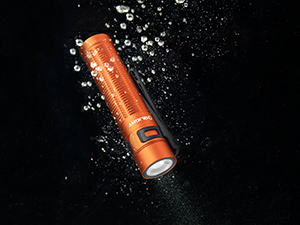
Image 3.4: A visual guide on how to engage and disengage the lockout mode for the flashlight.
4. Maintenance
4.1 Cleaning
Regularly clean the flashlight's body with a soft, damp cloth. For the lens, use a lens cleaning cloth to avoid scratches. Do not use harsh chemicals or abrasive materials.
4.2 Charging Port Care
Keep the magnetic charging port on the tail cap clean and free of debris to ensure proper charging. If the charging port becomes dirty, gently wipe it with a dry cloth or cotton swab.
4.3 Battery Care
The Baton3 Pro Max uses a custom rechargeable Lithium-Ion battery. To prolong battery life, avoid fully discharging the battery frequently. Recharge the flashlight when the battery indicator shows orange or red. Store the flashlight with a partial charge if it will not be used for an extended period.
5. Troubleshooting
If you encounter issues with your OLIGHT Baton3 Pro Max, please refer to the following common troubleshooting steps:
| Problem | Possible Cause | Solution |
|---|---|---|
| Flashlight does not turn on. | Low battery; Lockout mode active; Loose connection. | Charge the battery; Deactivate lockout mode (see Section 3.4); Ensure tail cap is fully tightened. |
| Light dims unexpectedly. | Proximity sensor activated; Overheating protection. | Remove obstruction from lens; Allow flashlight to cool down. |
| Battery indicator not working. | Flashlight not shaken sufficiently. | Give the flashlight a firmer shake. |
| Charging not working. | Dirty charging port; Faulty cable/power source. | Clean the magnetic charging port; Try a different USB power source or charging cable. |
If the problem persists after attempting these solutions, please contact OLIGHT customer support for further assistance.
6. Specifications
| Feature | Detail |
|---|---|
| Brand | OLIGHT |
| Model | BATON3PROMAX-OG-CW#USFBA |
| Special Feature | Adjustable Light Modes, Rechargeable |
| Color | Orange |
| Power Source | Battery Powered |
| Light Source Type | LED |
| Material | Aluminum |
| White Brightness | 2500 Lumens |
| Product Dimensions | 2.16"D x 1.77"W x 6.33"H |
| Voltage | 3.7 Volts |
| Battery Cell Composition | Lithium Ion |
| Item Weight | 0.25 Kilograms (8.8 ounces) |
| Number of Batteries | 1 Lithium Ion (included) |
| Water Resistance Level | Waterproof |
| Runtime | 60 minutes (on highest setting) |
| Style | Cool White (5700K~6700K) |
6.1 Output Specifications

Image 6.1: Detailed output specifications including lumens, runtime, and beam distance for each mode.
7. Warranty and Support
7.1 Warranty Information
The OLIGHT Baton3 Pro Max Flashlight comes with a Limited 5-year warranty. Please refer to the official OLIGHT website or the warranty card included in your package for full details on warranty terms and conditions.
7.2 Customer Support
For any questions, technical support, or warranty claims, please visit the official OLIGHT store or contact their customer service directly. You can find more information and contact details at the OLIGHT Store on Amazon.