
TRIGKEY Green G4 N100
TRIGKEY Green G4 Mini PC User Manual
Model: Green G4 N100
1. Introduction
Thank you for choosing the TRIGKEY Green G4 Mini PC. This compact and powerful desktop computer is designed for a variety of uses, including home office, multimedia entertainment, and light design tasks. Featuring the 12th Generation Intel Alder Lake-N100 processor, 16GB DDR4 RAM, and a 500GB M.2 SSD, it offers a fast and fluid experience. This manual provides essential information for setting up, operating, maintaining, and troubleshooting your device.

Figure 1: TRIGKEY Green G4 Mini PC
The TRIGKEY Green G4 Mini PC is a compact and efficient computing solution, ideal for various daily tasks. Its small form factor allows for easy placement in any environment.
2. Product Features and Overview
The TRIGKEY Green G4 Mini PC is equipped with advanced components to ensure optimal performance and connectivity.
- Processor: 12th Gen Intel Alder Lake-N100 (up to 3.40 GHz, 4 Cores/4 Threads, 15W TDP).
- Memory: 16GB DDR4 3200 MHz (single channel).
- Storage: 500GB M.2 2280 SSD, expandable with a 2.5" SSD/HDD (up to 2TB).
- Graphics: Integrated Intel UHD Graphics, supporting dual 4K@60Hz output via HDMI.
- Connectivity: Gigabit Ethernet, Dual-band Wi-Fi 6 (802.11ax), Bluetooth 5.2.
- Ports: Four USB 3.2 Gen2 ports, two HDMI ports, 3.5mm audio jack, DC power input, LAN port, CLR CMOS button.
- Operating System: Pre-installed Windows 11 Pro, also supports Linux and Ubuntu.
- Additional Features: Auto Power On, RTC Wake-up function, Wake-on-LAN.
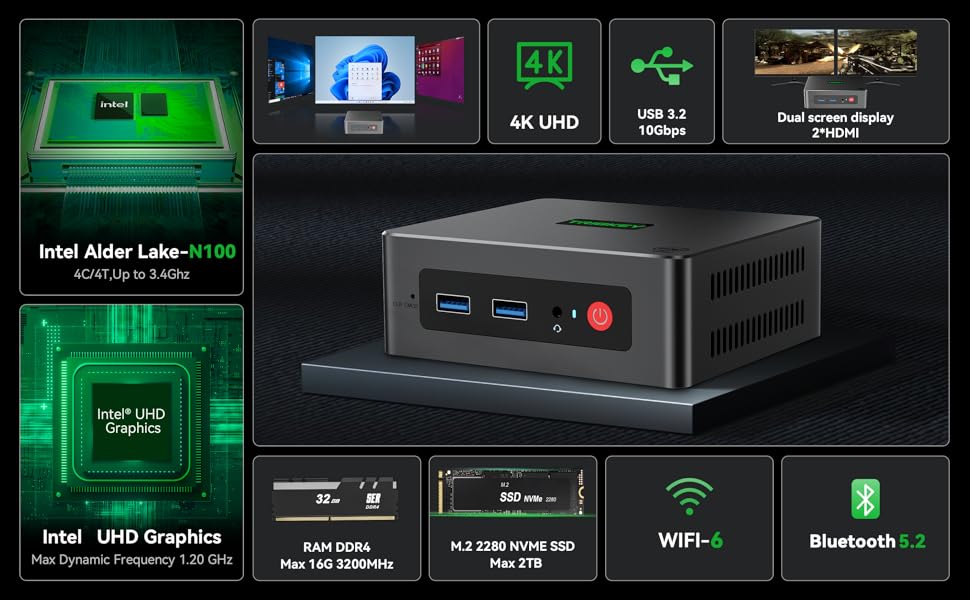
Figure 2: Detailed Product Specifications
This image provides a comprehensive overview of the TRIGKEY Green G4 Mini PC's technical specifications, including dimensions, CPU, graphics, wireless capabilities, storage, and interfaces.

Figure 3: Rich Interfaces Design
This diagram illustrates the various ports available on the TRIGKEY Green G4 Mini PC, including USB 3.2 Gen2, HDMI, LAN, and audio jacks, highlighting its versatile connectivity options.
3. Setup Guide
3.1 Unboxing and Initial Inspection
Carefully remove all components from the packaging. Verify that all accessories are present:
- TRIGKEY G4 Mini PC
- Power Adapter
- VESA Mount
- HDMI Cable (long)
- User Manual
- Screws for storage expansion
Inspect the Mini PC for any visible damage before proceeding.
3.2 Connecting Peripherals
- Connect Display: Connect your monitor(s) to the HDMI ports on the back of the Mini PC using the provided HDMI cable. The Green G4 supports dual 4K@60Hz displays.
- Connect Keyboard and Mouse: Plug your USB keyboard and mouse into any of the available USB 3.2 ports.
- Connect Network (Optional): For a wired connection, connect an Ethernet cable from your router to the LAN port on the Mini PC. For wireless, ensure your Wi-Fi network is available.
- Connect Power: Insert the power adapter into the DC input port on the Mini PC, then plug the adapter into a power outlet.
4. Operating Instructions
4.1 Powering On/Off
- Power On: Press the power button located on the front of the Mini PC. The power indicator light will illuminate.
- Power Off: To shut down the system, go to the Start Menu in Windows and select "Power" > "Shut down". Alternatively, you can press and hold the power button for a few seconds for a forced shutdown (not recommended for regular use).
- Restart: From the Start Menu, select "Power" > "Restart".
4.2 Operating System and Initial Setup
The TRIGKEY Green G4 Mini PC comes with Windows 11 Pro pre-installed and activated. Upon first boot, you will be guided through the Windows setup process, including language selection, network connection, and user account creation. Follow the on-screen prompts to complete the setup.
The Mini PC also supports other operating systems like Linux and Ubuntu, allowing for flexible customization based on user preference.
4.3 Network Connectivity
- Wi-Fi: To connect to a wireless network, click the Wi-Fi icon in the system tray, select your desired network, enter the password, and click "Connect". The Mini PC supports Wi-Fi 6 for faster and more stable connections.
- Ethernet: If an Ethernet cable is connected, the system will automatically detect and connect to the wired network.
- Bluetooth: To pair Bluetooth devices (e.g., headphones, speakers), go to Windows Settings > Bluetooth & devices, and follow the instructions to add a new device. The Mini PC features Bluetooth 5.2.
4.4 Dual Display Setup
The TRIGKEY Green G4 Mini PC supports connecting two monitors simultaneously via its dual HDMI ports, enabling extended desktop or mirrored display modes.
- Connect both monitors to the HDMI ports.
- Right-click on the desktop and select "Display settings".
- Under "Multiple displays", choose your preferred display option (e.g., "Extend these displays" or "Duplicate these displays").

Figure 4: Dual Screen Display Capability
This image demonstrates the TRIGKEY Green G4 Mini PC's ability to support two independent displays, enhancing productivity for office work or immersive viewing for movies.
5. Maintenance
5.1 Storage Expansion
The TRIGKEY Green G4 Mini PC comes with a 500GB M.2 2280 SSD. For additional storage, you can install a 2.5-inch SSD or HDD (up to 2TB).
- Ensure the Mini PC is powered off and unplugged.
- Locate the bottom cover of the Mini PC.
- Carefully remove the screws securing the cover.
- Install the 2.5-inch SSD/HDD into the designated slot and secure it with the provided screws.
- Replace the bottom cover and secure the screws.

Figure 5: M.2 2280 SSD and Expansion
This image highlights the M.2 2280 SSD and the potential for storage expansion with an additional 2.5-inch drive, demonstrating the system's upgradeability.
5.2 Cooling and General Care
The Mini PC features an integrated fan for cooling. To ensure optimal performance and longevity:
- Place the Mini PC in a well-ventilated area.
- Avoid blocking the ventilation holes.
- Keep the device clean and free from dust. Use a soft, dry cloth for cleaning the exterior.
- Avoid exposing the device to extreme temperatures, humidity, or direct sunlight.
6. Troubleshooting
If you encounter issues with your TRIGKEY Green G4 Mini PC, refer to the following common troubleshooting steps:
| Problem | Possible Solution |
|---|---|
| No display on monitor |
|
| No power |
|
| Wi-Fi/Bluetooth not working |
|
| System is slow or unresponsive |
|
For more complex issues or if the above steps do not resolve the problem, please contact TRIGKEY customer support.
7. Technical Specifications
| Feature | Specification |
|---|---|
| Brand | TRIGKEY |
| Model Number | Green G4 N100 |
| Processor Brand | Intel |
| Processor Type | Celeron N (Alder Lake-N100) |
| Processor Speed | Up to 3.4 GHz |
| Number of Cores | 4 |
| RAM | 16 GB DDR4 |
| Max Memory | 16 GB |
| Storage Size | 500 GB M.2 2280 SSD |
| Storage Technology | SSD (expandable to 2TB with 2.5" SSD/HDD) |
| Graphics Chipset Brand | Intel |
| GPU | Intel UHD Graphics |
| Display Resolution | 3840 x 2160 (4K@60Hz) |
| Connectivity Type | Bluetooth, Wi-Fi 6, Gigabit Ethernet |
| Wireless Technology | Bluetooth 5.2, 802.11ax |
| Hardware Interface | 3.5mm Audio, Bluetooth 5, HDMI, USB 3.2 Gen 2 |
| Number of HDMI Ports | 2 |
| Number of USB 3.0 Ports | 4 (USB 3.2 Gen2) |
| Operating System | Windows 11 Pro (supports Linux, Ubuntu) |
| Package Dimensions | 21.4 x 12.8 x 5.4 cm |
| Item Weight | 680 grams |
8. Warranty and Support
TRIGKEY is committed to providing excellent customer service.
- Warranty: The TRIGKEY Green G4 Mini PC comes with a 1-year warranty from the date of purchase.
- Technical Support: Lifetime technical support is available for all TRIGKEY products.
- Resources: A variety of files and tutorials are available to help customers resolve common PC issues. Phone and remote assistance are also offered.
Contact Information:
If you have any questions or require assistance, please do not hesitate to contact TRIGKEY customer service.
Figure 6: TRIGKEY Customer Service
This image displays various contact methods for TRIGKEY customer support, including email, online consultation, website, and technical support.
Related documentsGreen G4 N100


Ask a question about this manual
Ask about setup, troubleshooting, compatibility, parts, safety, or missing instructions. Manuals+ will review the question and use this page’s manual context to help answer it.