
Introduction
The HEXIEDEN GPS Wireless Dog Fence System utilizes advanced GPS satellite positioning technology to create a customizable containment area for your dog. This system provides a safe and effective way to train your pet to stay within designated boundaries without the need for physical wires. It offers adjustable warning modes including sound, vibration, and static correction to suit various dog temperaments and training needs.
Package Contents
Please verify that all items are present in your package:
- 1 x GPS Dog Fence Collar
- 1 x Instruction Manual
- 1 x Charging Cable
- 1 x Shock Test Light
Product Overview

Figure 1: GPS Dog Collar Display and Controls
The GPS dog collar features an LED touchscreen display for easy configuration and monitoring. Key components and controls include:
- Power Button: Turns the device on/off.
- Mode Button (M): Cycles through different settings and warning modes.
- Increase (+) / Decrease (-): Adjusts intensity levels and navigates menu options.
- Screen Lock Indicator: Shows if the screen is locked to prevent accidental changes.
- Signal Intensity Indicator: Displays the strength of the GPS signal.
- Warning Mode Indicators: Icons for Sound, Vibration, and Static Correction.
- Intensity Adjustment Display: Shows the current intensity level (0-9).
- Battery Capacity Indicator: Displays the remaining battery life.
Setup
1. Initial Charging
Before first use, fully charge the GPS dog collar using the provided charging cable. Connect the magnetic charging solution to the collar and plug the USB end into a compatible power adapter (not included). The battery indicator on the screen will show charging progress.
2. Collar Fitting
Ensure the collar fits snugly but comfortably around your dog's neck. The contact points should touch the dog's skin. A properly fitted collar is crucial for the static correction function to be effective and safe. The collar is suitable for dogs weighing 15-120 lbs.
3. Setting the Safe Area
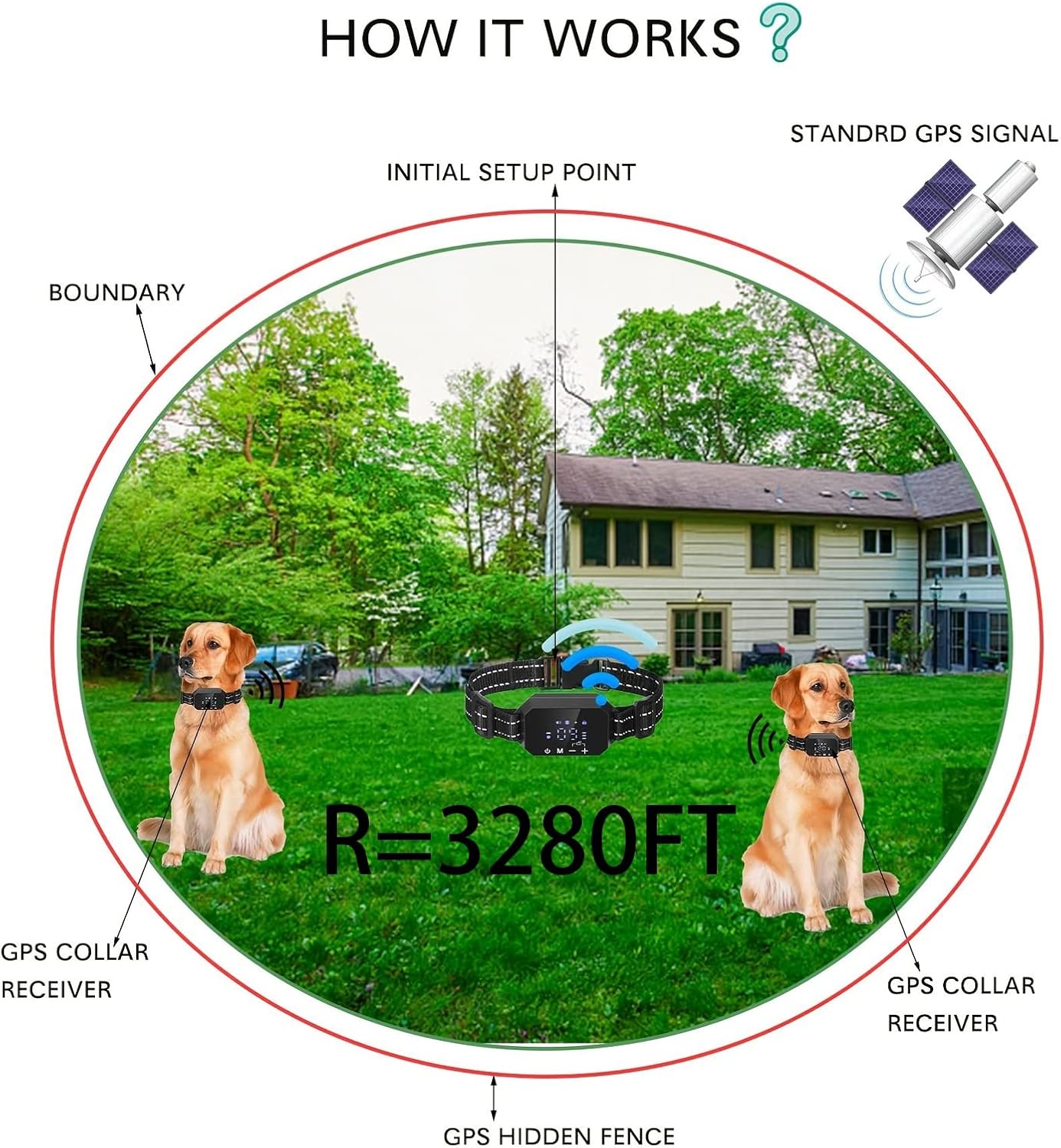
Figure 2: GPS Wireless Fence Principle
- Turn on the collar and ensure it acquires a stable GPS signal. This may take a few moments.
- Stand at the desired center point of your dog's safe area. This location will be the 'Initial Setup Point'.
- Using the LED touchscreen and the Increase/Decrease buttons, set the desired radius for the safe area. The adjustable range is from 100 feet (min.) to 3280 feet (max.).
- Confirm your settings. The system will now define a circular boundary around your initial setup point.
Operating Instructions
1. Power On/Off
Press and hold the Power Button until the screen illuminates (for power on) or turns off (for power off).
2. Adjusting Warning Modes and Intensity

Figure 3: Available Warning Modes
The system offers three warning modes: Sound, Vibration, and Static Correction. Each mode's intensity can be adjusted from level 0 (off) to level 9 (maximum).
- Unlock the screen by pressing the '+' and '-' buttons simultaneously if it is locked.
- Press the Mode Button (M) to cycle through the Sound, Vibration, and Static Correction settings.
- Use the Increase (+) and Decrease (-) buttons to set the desired intensity level (0-9) for the selected mode.
- It is recommended to start with lower intensity levels and gradually increase them as needed for effective training.
3. Warning Sequence

Figure 4: Warning Sequence When Dog Exits Boundary
If your dog exits the defined safe area, the collar will activate a progressive warning sequence:
- First Warning: The device will beep for 1 second. If vibration and static correction are enabled, they will also activate for 1 second.
- Second Warning: If the dog remains outside the boundary, the device will beep, vibrate, and apply static correction for 2 seconds.
- Third Warning: If the dog still does not return, the device will beep, vibrate, and apply static correction for 3 seconds.
- Overcorrection Protection: After the third warning, if the dog is still outside the boundary, the static correction will automatically turn off to prevent overcorrection. The beep will continue to sound until the dog returns to the safe area.
Maintenance
1. Cleaning
Regularly clean the collar and contact points with a damp cloth to remove dirt, debris, and oils. Ensure the collar is dry before charging or prolonged storage.
2. Charging
Charge the collar as needed. The battery life will vary depending on usage and GPS signal strength. The magnetic charging solution ensures a secure connection.
3. Waterproof Performance
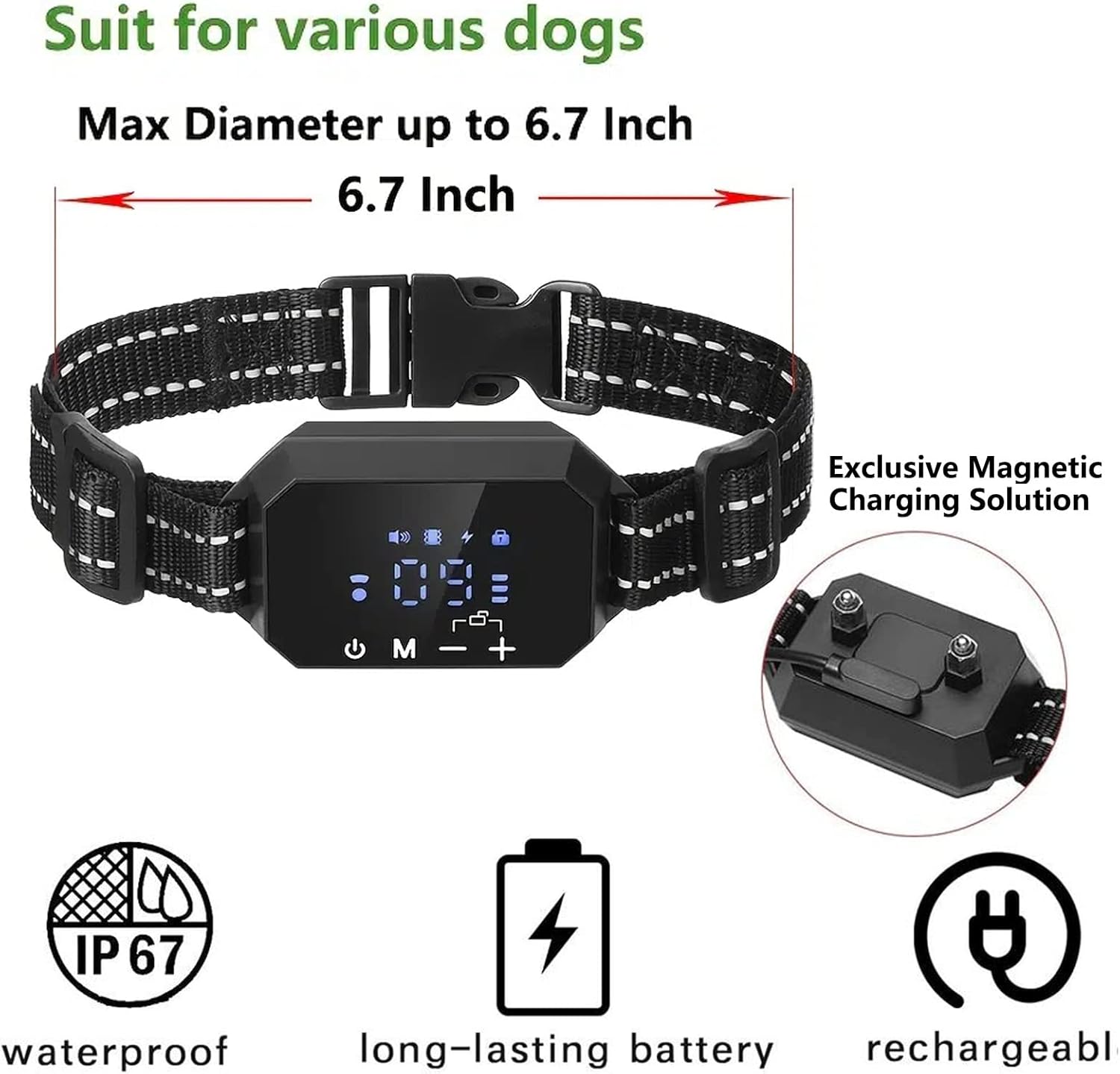
Figure 5: Collar Features - Waterproof, Long-lasting Battery, Rechargeable
The collar has an IP67 waterproof rating, meaning it is protected from dust and can withstand immersion in water up to 1 meter for up to 30 minutes. This allows for use in wet weather conditions, such as rain or sprinklers, but it is not recommended for prolonged submersion or swimming.
Troubleshooting
- Collar not responding: Ensure the collar is charged and powered on. Check for a stable GPS signal. If the screen is locked, unlock it by pressing '+' and '-' simultaneously.
- Inaccurate boundary: GPS accuracy can be affected by tall buildings, dense foliage, or severe weather. Ensure the collar has a clear line of sight to the sky for optimal performance. Re-establish the safe area if necessary.
- No static correction: Verify that the static correction intensity is set above 0. Ensure the contact points are making proper contact with your dog's skin. Use the included shock test light to confirm functionality.
- Battery drains quickly: Frequent use of warning modes or poor GPS signal reception can increase battery consumption. Ensure the collar is fully charged before each use.
- Overcorrection protection: The system is designed to automatically turn off static correction after three consecutive warnings if the dog remains outside the boundary. This is a safety feature to prevent harm to your pet. The beep will continue until the dog returns.
Specifications
- Material: ABS
- Waterproof Grade: IP67
- Battery Capacity: 3.7V 400MAH
- Operation Modes: Sound, Vibration, Electric Shock
- Fit Type: For dogs weighing 15-120 LBS
- Intensity Levels: 0-9 files adjustable
- Signal Range: 100 to 3280 Feet (adjustable radius)
Warranty and Support
For warranty information, technical support, or any questions regarding your HEXIEDEN GPS Wireless Dog Fence System, please refer to the contact details provided with your purchase or visit the official HEXIEDEN website. Keep your purchase receipt for warranty claims.