
urbetter M8
urbetter M8 E-Scooter User Manual
Model: M8
1. Introduction
Thank you for choosing the urbetter M8 E-Scooter. This manual provides essential information for the safe operation, assembly, maintenance, and troubleshooting of your new electric scooter. Please read this manual thoroughly before your first ride to ensure optimal performance and safety.
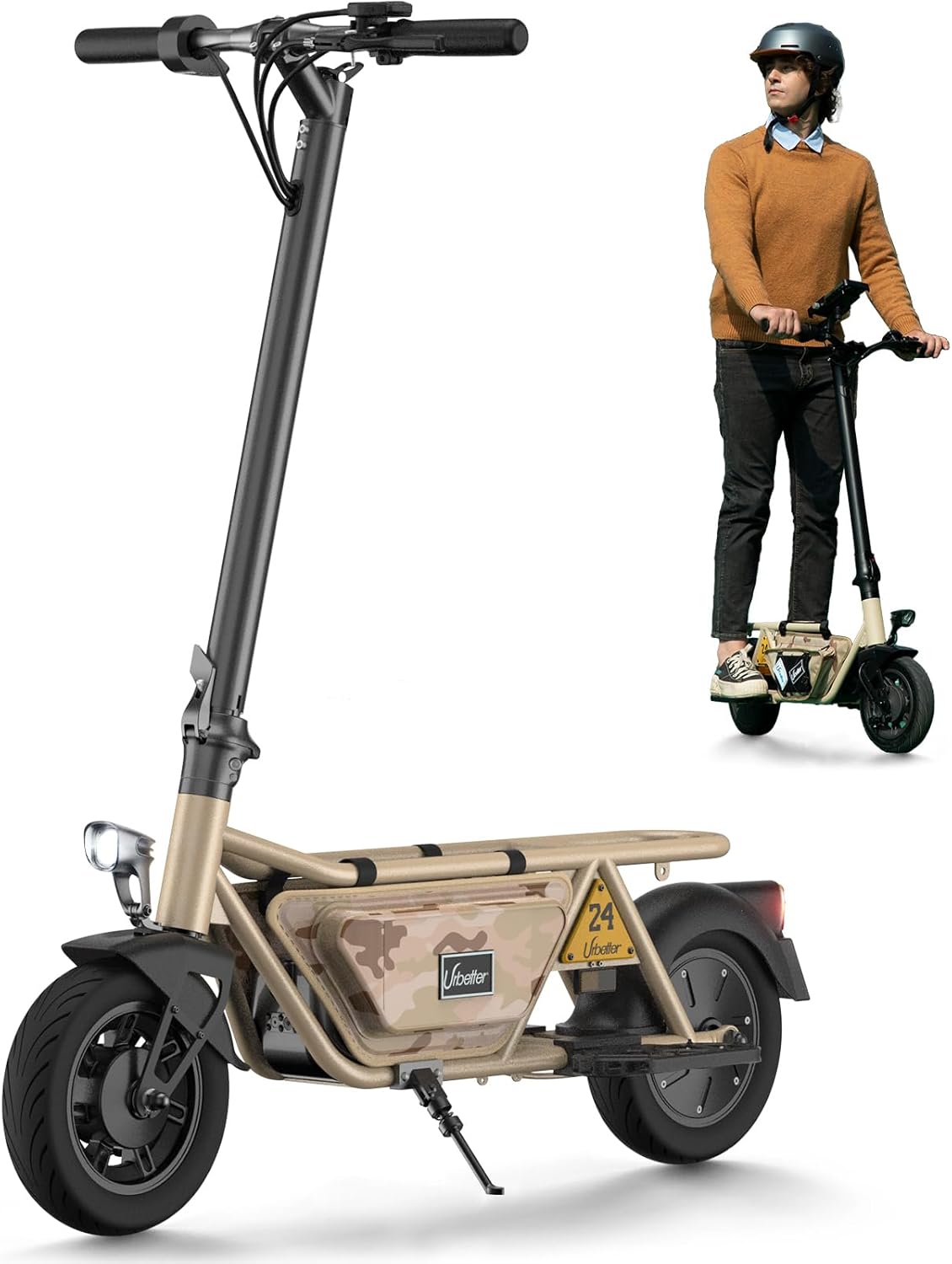
Image: The urbetter M8 E-Scooter, showcasing its design and a rider demonstrating its use.
2. Safety Information
Your safety is paramount. Always adhere to the following safety guidelines:
- Always wear a helmet and appropriate safety gear (knee pads, elbow pads) when riding.
- Do not ride in heavy rain, snow, or icy conditions.
- Ensure all bolts and quick releases are securely tightened before each ride.
- Familiarize yourself with local laws and regulations regarding e-scooter use.
- Maintain a safe distance from other vehicles and pedestrians.
- Avoid riding under the influence of alcohol or drugs.
- Do not perform stunts or dangerous maneuvers.
3. Package Contents
Please check the box for the following items:
- urbetter M8 E-Scooter (main unit)
- Power Adapter/Charger
- User Manual
- Assembly Tools (if required)
If any items are missing or damaged, please contact customer support immediately.
4. Setup and Assembly
The urbetter M8 E-Scooter is designed for quick and easy setup. Follow these steps:
- Unfold the Scooter: Carefully lift the handlebar stem until it locks into the upright position. Ensure the folding mechanism is securely latched.
- Attach Handlebars: If the handlebars are separate, slide them onto the stem and tighten the screws using the provided tools.
- Charge the Battery: Before first use, fully charge the scooter's battery. Connect the charger to the charging port and then to a power outlet. The indicator light on the charger will change when fully charged.
- Check Tire Pressure: Ensure tires are inflated to the recommended pressure for optimal performance and safety.

Image: The urbetter M8 E-Scooter demonstrating its portability when folded, being carried up stairs.
5. Operating Instructions
Familiarize yourself with the controls and riding techniques:
5.1 Controls Overview
- Power Button: Press to turn on/off.
- Accelerator: Thumb throttle or twist grip to control speed.
- Brake Levers: Located on the handlebars, control front and rear brakes.
- Display: Shows speed, battery level, and riding mode.
- Headlight/Taillight: Activate for visibility, especially at night.

Image: A detailed view of the scooter's handlebar display, showing battery level and mode.
5.2 First Ride
- Find an open, flat area away from traffic.
- Turn on the scooter.
- Place one foot on the deck and push off with the other foot to gain initial momentum.
- Gently press the accelerator.
- Practice braking smoothly.

Image: A person riding the urbetter M8 E-Scooter, demonstrating its ease of use for daily commutes or leisure.
5.3 Riding Tips
- Maintain a balanced posture with knees slightly bent.
- Look ahead and anticipate turns or obstacles.
- Use hand signals when turning or stopping.
- Be aware of your surroundings, especially when riding with accessories like storage bags or pet carriers.

Image: The urbetter M8 E-Scooter equipped with storage bags, highlighting its versatility for carrying items or even a small pet (additional purchase required for pet carrier).
6. Maintenance
Regular maintenance ensures the longevity and safety of your scooter:
- Cleaning: Wipe down the scooter with a damp cloth. Do not use high-pressure water or corrosive cleaners.
- Battery Care: Charge the battery regularly, even if not in use, to maintain its health. Avoid completely draining the battery.
- Tires: Check tire pressure and tread wear periodically. Replace worn tires.
- Brakes: Inspect brake pads and cables for wear. Adjust or replace as needed.
- Folding Mechanism: Keep the folding mechanism clean and lubricated to ensure smooth operation.
- Storage: Store the scooter in a cool, dry place away from direct sunlight and extreme temperatures.
7. Troubleshooting
Here are solutions to common issues:
| Problem | Possible Cause | Solution |
|---|---|---|
| Scooter won't turn on | Low battery; Loose connections | Charge battery; Check all cable connections. |
| Loss of power during ride | Low battery; Overheating | Recharge battery; Allow scooter to cool down. |
| Brakes not effective | Worn brake pads; Loose brake cable | Inspect and replace brake pads; Adjust brake cable tension. |
| Unusual noises | Loose parts; Debris in wheels | Check all fasteners; Inspect wheels for foreign objects. |
If the problem persists, please contact urbetter customer support.
8. Specifications
Key technical details of the urbetter M8 E-Scooter:
- Model: M8
- Brand: urbetter
- Age Range: Adults
- Frame Material: Aluminum
- Wheel Material: Rubber
- Tire Size: 10 inches
- Max Slope: Approximately 15°
- Estimated Range: Up to 45 km (28 miles) on a single charge
- Dimensions (unfolded): Approximately 112 x 26 x 52 cm
- Features: Lightweight, Foldable, Integrated Lights

Image: Side profile of the urbetter M8 E-Scooter, illustrating its compact design and highlighting key performance specifications like range and tire size.
9. Warranty and Support
The urbetter M8 E-Scooter comes with a standard manufacturer's warranty. Please refer to the warranty card included in your package for specific terms and conditions, including coverage period and what is covered.
For technical support, spare parts, or warranty claims, please contact urbetter customer service through the contact information provided on the product packaging or the official urbetter website. When contacting support, please have your model number (M8) and purchase date ready.
Online Resources: For additional information, FAQs, and video tutorials, visit the official urbetter website.
Related documentsM8

Ask a question about this manual
Ask about setup, troubleshooting, compatibility, parts, safety, or missing instructions. Manuals+ will review the question and use this page’s manual context to help answer it.