Introduction
This manual provides detailed instructions for the setup, operation, and maintenance of your Jensen JE4023S LED 40" Smart TV. Please read this manual thoroughly before using your TV to ensure proper and safe operation.
The Jensen JE4023S is a 40-inch LED Smart TV featuring a wide 16:9 LCD panel, AC power, and white LED illumination. It includes an integrated HDTV (ATSC) tuner and supports VESA 200mm x 200mm mounting. Key features include downward-facing speakers and a dual-function wireless remote control.

Figure 1: Front view of the Jensen JE4023S 40-inch Smart TV.
Package Contents
Before proceeding with the setup, please verify that all items are present in the package:
- Jensen JE4023S 40" LED Smart TV
- Wireless Remote Control
- TV Stand (if included, for tabletop placement)
- Power Cord
- User Manual (this document)

Figure 2: The Jensen JE4023S TV, along with its remote control and power cord, as typically found in the package.
Setup
1. Placement and Mounting
Choose a stable, flat surface for tabletop placement or a suitable wall mount. The TV supports a VESA 200mm x 200mm mounting pattern.
Important:
- Ensure adequate ventilation around the TV.
- Avoid direct sunlight or heat sources.
- If wall-mounting, use a VESA-compatible bracket and consult a professional for installation if unsure.
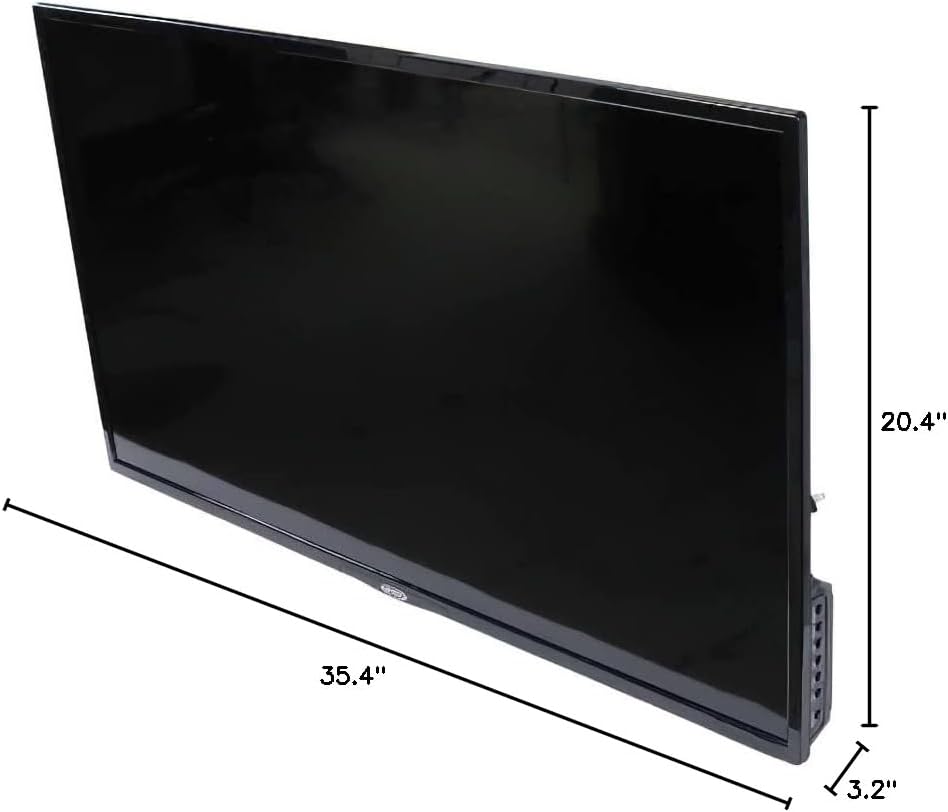
Figure 3: Dimensions of the Jensen JE4023S TV, showing its width, height, and depth for placement and mounting considerations.
2. Connecting Power
Connect the supplied AC power cord to the TV's power input and then to a standard AC outlet (110 Volts AC).
3. Connecting External Devices
The Jensen JE4023S offers various input and output ports for connecting external devices. Refer to the image below for port locations.

Figure 4: Rear view of the Jensen JE4023S TV, highlighting the various input and output ports available for connecting external devices.
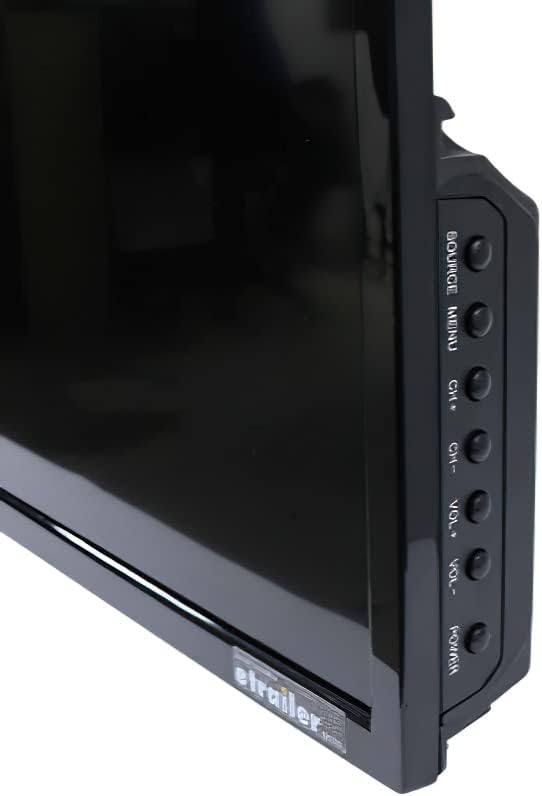
Figure 5: Close-up view of the side-mounted ports on the Jensen JE4023S TV, including USB and RF inputs.
- RF Input (Antenna/Cable): Connect your antenna or cable TV coaxial cable to the RF input.
- USB Ports (x2): For connecting USB storage devices to play media.
- HDMI Inputs (x2): For connecting high-definition devices like Blu-ray players, game consoles, or set-top boxes.
- RJ45 LAN Input (Ethernet): For a wired internet connection.
- Digital Optical Audio Output: For connecting to a soundbar or home theater system.
- Headphone Output (3.5mm): For connecting headphones.
Operating Instructions
1. First Time Setup
Upon first power-on, the TV will guide you through an initial setup process, including language selection, network connection (Wi-Fi or Ethernet), and channel scanning for the integrated ATSC tuner.
2. Remote Control Functions
The included dual-function wireless remote control allows full operation of your TV. Insert two AAA batteries (not included) into the remote.

Figure 6: The wireless remote control for the Jensen JE4023S TV, showing various buttons for navigation, volume, channel, and direct access to streaming services like Netflix and YouTube.
- Power Button: Turns the TV on or off.
- Navigation Buttons (Up/Down/Left/Right/OK): For menu navigation and selection.
- Volume Up/Down: Adjusts the volume level.
- Channel Up/Down: Changes TV channels.
- Source/Input: Selects the input source (HDMI, RF, USB, etc.).
- Smart TV Buttons: Direct access to pre-installed apps like Netflix and YouTube.
- Menu: Accesses the main settings menu.
- Exit/Back: Returns to the previous screen or exits a menu.
3. On-TV Controls
For basic control, buttons are located on the side of the TV.

Figure 7: Side view of the Jensen JE4023S TV, showing the physical control buttons for power, volume, channel, and source selection.
- Power: Turns the TV on/off.
- Source/Menu: Changes input source or accesses menu.
- CH+/CH-: Changes channels.
- VOL+/VOL-: Adjusts volume.
4. Smart TV Features
The Jensen JE4023S is a Smart TV with built-in internet connectivity. You can access streaming services like Netflix and browse the web directly on your TV. Ensure your TV is connected to the internet via Wi-Fi or Ethernet for these features to function.
Maintenance
1. Cleaning the Screen
Gently wipe the screen with a soft, lint-free cloth. For stubborn marks, dampen the cloth slightly with water or a specialized screen cleaner. Do not spray liquid directly onto the screen.
2. Cleaning the Cabinet
Use a soft, dry cloth to clean the TV cabinet. Avoid using abrasive cleaners or solvents.
3. General Care
- Unplug the TV from the power outlet before cleaning or if it will be unused for an extended period.
- Keep the TV away from direct sunlight, high temperatures, and high humidity.
- Do not block ventilation openings.
Troubleshooting
If you encounter issues with your Jensen JE4023S TV, refer to the following common problems and solutions:
| Problem | Possible Cause / Solution |
|---|---|
| No Power |
|
| No Picture / Poor Picture Quality |
|
| No Sound / Poor Sound Quality |
|
| Remote Control Not Working |
|
| Cannot Connect to Internet |
|
Specifications
| Feature | Detail |
|---|---|
| Model Number | JE4023S |
| Panel Size | 40" TFT LED |
| Display Technology | LED |
| Max. Resolution | 1920x1080 (1080p) |
| Aspect Ratio | 16:9 |
| Brightness | 200 Nit |
| Contrast Ratio | 5000:1 |
| Viewing Angle | 178/178 degrees |
| Integrated Tuner | HDTV (ATSC) |
| Mounting Pattern | VESA 200mm x 200mm |
| Inputs/Outputs | RF x 1, USB x 2, HDMI input x 2, RJ45 LAN input x 1, Digital Optical Audio output x 1, Headphone output (3.5mm) x 1 |
| Power Source | AC (110 Volts AC) |
| Power Consumption | 60W |
| Dimensions (W x H x D) | 35.8 x 20.4 x 3.2 inches (Product Dimensions: 3.2 x 35.4 x 20.4 inches) |
| Weight | 13.2 pounds |
| Supported Internet Services | Netflix, Browser |
Warranty and Support
For warranty information and technical support, please refer to the documentation included with your purchase or visit the official Jensen website. Keep your proof of purchase for warranty claims.
For further assistance, you may contact Jensen customer support. Contact details are typically available on the manufacturer's website or in the product packaging.
Online Resources: Visit the Jensen Store on Amazon


