
1. Safety Instructions
- Read all instructions carefully before installation and use.
- Keep the product away from fire and extreme heat sources.
- Do not attempt to disassemble or modify the product. This may void the warranty and cause damage.
- Ensure the installation surface is stable and can support the weight of the light.
- Avoid placing the solar panel in shaded areas to ensure optimal charging.
- The product contains non-rechargeable batteries. Do not attempt to replace them unless specified by the manufacturer.
2. Package Contents
Verify that all components are present in the package:
- COLBOR Vintage Outdoor Solar Wall Light (1 or 2 units, depending on purchase)
- E26/E27 LED Bulb (pre-installed or included separately)
- Mounting Screws and Wall Anchors
- User Manual
3. Product Overview
The COLBOR Vintage Outdoor Solar Wall Light is designed for efficient and aesthetic outdoor illumination. It features a classic vintage style combined with modern solar technology.

Image: Basic Information and Dimensions of the COLBOR Solar Wall Light. Displays work rate (1W), lamp shell material (ABS), human body induction distance (1-5 meters), sensing angle (120 degrees), solar panel specifications (Polysilicon 6.5V/1.5W), bulb specification (DC-3V/1W, E27 LED warm light bulb), bulb interface (E26/E27 universal), charging time (6-8 hours in full sunlight), and applicable scenes.

Image: Key Components and Features of the Solar Wall Light. Highlights the 3 solar panels, intelligent motion detector, ON/OFF & Mode button, high-quality ABS material, transparent dust cover, and open-bottom design for easy bulb replacement and cleaning.
Key Features:
- Solar Powered: Equipped with multi-face solar panels for efficient charging (6-8 hours for full charge).
- Motion Sensor: High-sensitivity PIR motion sensor detects movement within 5 meters at a 120° angle.
- 3 Lighting Modes: Offers versatile lighting options for different needs.
- IP65 Waterproof: Constructed from high-quality ABS material, ensuring durability and performance in various weather conditions.
- Replaceable Bulb: Features an E26/E27 universal interface for easy bulb replacement.
- Easy Installation: No wiring required, simple 3-step installation.
4. Setup and Installation
Follow these steps to install your COLBOR Solar Wall Light:
- Choose Location: Select a location that receives direct sunlight for 6-8 hours daily to ensure optimal charging. Avoid areas under eaves or trees that might block sunlight.
- Mark and Drill: Use the light as a template to mark the positions for drilling holes on your wall. Drill holes and insert the provided wall anchors.
- Activate Light: Before mounting, locate the ON/OFF button and the Mode button (usually near the motion sensor). Press and hold the ON/OFF button for 3 seconds to turn on the light. Then, press the Mode button to select your desired lighting mode.
- Mount the Light: Align the light with the drilled holes and secure it using the provided screws.

Image: Installation Steps. Shows drilling holes, inserting plastic expansion anchors, pressing the ON/OFF button to activate, and finally installing the solar light.

Image: Optimal Solar Panel Placement. Emphasizes exposing the solar panel to direct sunlight for complete charging and avoiding other light sources shining on the panel at night.
Bulb Installation/Replacement:
The light uses an E26/E27 universal bulb interface. To install or replace the bulb:
- Gently unscrew the bottom part of the lamp to access the bulb socket.
- Screw in the E26/E27 LED bulb clockwise until secure.
- Reattach the bottom part of the lamp.

Image: Replaceable Bulb Feature. Illustrates the E26/E27 universal bulb interface and examples of compatible bulb types.
5. Operating Instructions
The COLBOR Solar Wall Light features 3 intelligent lighting modes. Press the 'Mode' button to cycle through them:

Image: 3 Lighting Modes. Visually explains how each mode functions with motion detection.
- Mode 1 (Dim to Bright): The light stays on at 30% brightness throughout the night. When motion is detected, it switches to 100% brightness for 15 seconds, then returns to 30% brightness.
- Mode 2 (Motion Activated): The light remains off. When motion is detected at night, it turns on at 100% brightness for 15 seconds, then automatically turns off if no further motion is detected.
- Mode 3 (Constant Dim): The light automatically turns on at night and stays on at a constant 30% brightness throughout the night, regardless of motion.
The light automatically turns off during the day and charges via its solar panels.

Image: Dusk to Dawn Outdoor Solar Wall Lights. Illustrates the light automatically turning off and charging during the daytime, and turning on and lighting at night.
6. Maintenance
- Cleaning: Regularly wipe the solar panel with a soft, damp cloth to remove dust, dirt, or debris. A clean solar panel ensures efficient charging.
- Inspection: Periodically check the light for any signs of damage or loose components.
- Bulb Replacement: If the LED bulb needs replacement, ensure the light is off and follow the bulb installation/replacement steps in Section 4.
- Battery: The product uses non-rechargeable AA and lithium-ion batteries. Do not attempt to replace them. Contact customer support if you suspect a battery issue.
7. Troubleshooting
| Problem | Possible Cause | Solution |
|---|---|---|
| Light does not turn on at night. | Insufficient sunlight for charging. | Ensure the solar panel receives 6-8 hours of direct sunlight daily. Relocate if necessary. |
| ON/OFF button is off. | Press and hold the ON/OFF button for 3 seconds to turn it on. | |
| Solar panel is dirty. | Clean the solar panel surface. | |
| Motion sensor not working. | Sensor is obstructed or dirty. | Clear any obstructions and clean the sensor lens. |
| Light is in constant dim mode (Mode 3). | Press the Mode button to switch to Mode 1 or 2 for motion detection. | |
| Light stays dim or turns off quickly. | Insufficient charge due to cloudy weather or poor solar panel placement. | Ensure optimal sunlight exposure. Allow several sunny days for a full charge. |
8. Specifications
| Feature | Specification |
|---|---|
| Product Dimensions (L x W x H) | 28 x 23 x 15 cm (10.5L x 10.5W x 22.5H centimeters) |
| Weight | 1.07 Kilograms |
| Material | Acrylonitrile Butadiene Styrene (ABS), Polycarbonate (PC) |
| Style | Vintage |
| Fixture Form | Lantern |
| Room Type | Outdoor |
| Specific Uses for Product | Courtyard, Garden, Patio |
| Indoor/Outdoor Usage | Outdoor |
| Power Source | Solar Powered |
| IP Rating | IP65 |
| Assembly Required | Yes |
| Batteries Required | No (Batteries included are non-rechargeable and integrated) |
| Battery Type | 1 AA battery (non-rechargeable) and 1 Lithium-ion battery (non-rechargeable) |
| Included Components | Outdoor Solar Projector |
| Model Number | MOKCL-SW-SW2-SWLC |
9. Media Gallery
Product Videos
Video: Product Overview. This video showcases the COLBOR solar wall light, demonstrating its design and how it illuminates.
Video: New Solar Wall Lamps - Decorate Your Yard. This video demonstrates the aesthetic appeal and functionality of the solar wall lights in a garden setting.
Video: Outdoor Waterproof Wall Lamp Display. This video highlights the waterproof features of the outdoor wall lamp, showing its resilience to weather conditions.
Product Images

Image: Dustproof Cover Design and Good Weather-Proof. Showcases the light's IP65 waterproof, snow-prevention, and heat-resistant features, ensuring durability in various climates.
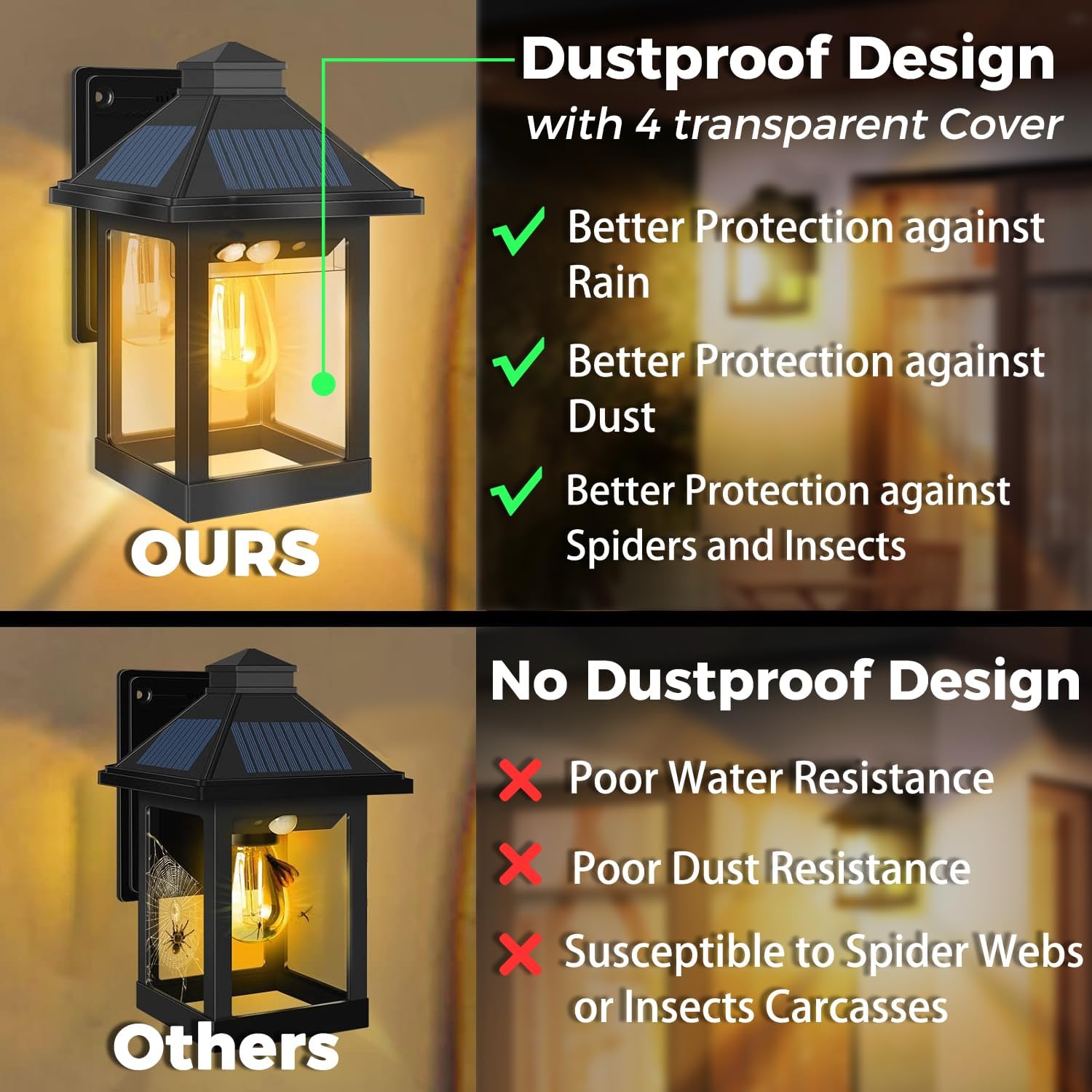
Image: Dustproof Design with 4 Transparent Covers. Compares the product's superior dustproof design, offering better protection against rain, dust, spiders, and insects compared to other designs.

Image: Applicable Scenes. Displays the versatility of the light, showing it installed in different outdoor settings such as villas, aisles, and fences, enhancing the ambiance.
10. Warranty and Support
For warranty information or technical support, please refer to the seller's contact details provided at the point of purchase or visit the official COLBOR website. Keep your purchase receipt as proof of purchase.