1. Introduction
This manual provides essential information for the safe and efficient operation of your new Candy RapidO 9 kg Front Loading Washing Machine, model RO1496DWMCT. Please read these instructions carefully before using the appliance and keep them for future reference. This washing machine is designed for domestic use only.
Key features of your appliance include a 9 kg capacity, 1400 rpm spin speed, and an energy efficiency class A rating. It offers 16 wash cycles, including 9 rapid cycles, and features a Smart Touch panel with a Smart Text display for easy control. Connectivity via the hOn app provides additional functionalities such as machine check-ups, cycle downloads, voice assistant activation, and delayed start via smartphone.
2. Safety Information
Always adhere to the following safety precautions to prevent electric shock, fire, or injury.
- Electrical Safety: Ensure the appliance is connected to a properly grounded electrical outlet. Do not use extension cords or adapters. Disconnect the power supply before any cleaning or maintenance.
- Water Safety: Ensure water inlet and drain hoses are correctly installed to prevent leaks. Do not operate the machine if there is a water leak.
- Child Safety: Keep children and pets away from the appliance during operation. Do not allow children to play with the controls.
- Installation: The appliance must be installed on a firm, level surface. Ensure adequate ventilation around the machine.
- Usage: Do not overload the machine. Only use detergents and additives suitable for washing machines.
3. Setup and Installation
Proper installation is crucial for the performance and longevity of your washing machine.
3.1 Unpacking
Carefully remove all packaging materials. Inspect the appliance for any damage. Remove all transit bolts from the rear of the machine before use. Keep packaging materials out of reach of children.
3.2 Positioning and Leveling
Place the washing machine on a flat, stable floor. Adjust the leveling feet to ensure the appliance is perfectly level and stable. This prevents excessive vibration and noise during operation.

Figure 3.1: Front view of the Candy RapidO washing machine, showing its compact design suitable for under-counter installation.
3.3 Water Connection
Connect the water inlet hose to a cold water tap with a 3/4" thread. Ensure the connection is tight to prevent leaks. The machine requires a water pressure between 0.05 MPa and 0.8 MPa.
3.4 Drain Connection
Insert the drain hose into a standpipe or secure it over the edge of a sink. Ensure the drain hose is not kinked or obstructed. The drain hose should be positioned at a height between 60 cm and 100 cm from the floor.
3.5 Electrical Connection
Plug the power cord into a grounded electrical outlet. The appliance operates on 230 Volts and has a power consumption of 1600 Watts. Ensure the electrical supply matches the requirements stated on the rating plate of the machine.
4. Operating Instructions
Familiarize yourself with the control panel and washing programs for optimal performance.
4.1 Control Panel Overview

Figure 4.1: The Smart Touch control panel and Smart Text display, located above the door for ergonomic access, showing various program options and settings.
The control panel features a Smart Text display and touch-sensitive buttons for program selection, spin speed, temperature, delay start, and special functions. The main dial allows for easy selection of the 16 available wash cycles.
4.2 Detergent Dispenser

Figure 4.2: The detergent dispenser drawer, clearly labeled for pre-wash, main wash, and fabric softener compartments.
Open the detergent dispenser drawer and add the appropriate amount of detergent and fabric softener to the designated compartments. Refer to your detergent packaging for recommended dosages.
4.3 Loading Laundry
Open the washing machine door and load your laundry, ensuring not to exceed the 9 kg capacity. Close the door firmly until it clicks.

Figure 4.3: The washing machine with its large front-loading door open, providing easy access to the drum for loading and unloading laundry.
4.4 Program Selection
Turn the program dial to select one of the 16 available wash cycles. The Smart Text display will show information about the selected program. The machine includes 9 rapid cycles such as Special 39', Color and Mixed 59', Hygiene Plus 59', and Quick 14', 30', and 44'.
4.5 Starting a Cycle
Press the 'Start/Pause' button to begin the selected wash cycle. You can also use the delay start function (up to 24 hours) or activate the cycle via the hOn app if connected.
4.6 hOn App Connectivity
The hOn app allows you to connect your smartphone to the washing machine via Wi-Fi and Bluetooth. This enables features such as machine check-ups, downloading additional wash cycles, activating a voice assistant, and remote control of the appliance.
5. Maintenance and Cleaning
Regular maintenance ensures the longevity and efficiency of your washing machine.
5.1 Cleaning the Exterior
Wipe the exterior surfaces with a soft, damp cloth. Do not use abrasive cleaners or solvents.
5.2 Cleaning the Detergent Dispenser
Periodically remove the detergent dispenser drawer and rinse it under running water to remove any detergent residue. Clean the housing of the dispenser with a brush.
5.3 Cleaning the Drum
Run a maintenance wash cycle (e.g., a hot wash with no laundry and a descaling agent) periodically to clean the drum and remove any build-up.
5.4 Cleaning the Filter

Figure 5.1: The drain pump filter compartment, located at the bottom front of the machine, with the filter removed for cleaning.
The drain pump filter should be cleaned regularly to prevent blockages. Open the small cover at the bottom front of the machine, unscrew the filter, and remove any lint or foreign objects. Replace the filter and close the cover securely.
6. Troubleshooting
Before contacting service, refer to the following table for common issues and their solutions.
| Problem | Possible Cause | Solution |
|---|---|---|
| Machine does not start | No power supply; Door not closed properly; Program not selected. | Check power plug and fuse; Ensure door is firmly closed; Select a program and press 'Start'. |
| Water not filling | Water tap closed; Inlet hose kinked or blocked. | Open water tap; Straighten hose; Clean filter in inlet hose. |
| Water not draining | Drain hose kinked or blocked; Drain pump filter blocked. | Straighten hose; Clean drain pump filter (refer to Section 5.4). |
| Excessive vibration/noise | Transit bolts not removed; Machine not level; Overloaded or unbalanced load. | Remove transit bolts; Adjust leveling feet; Redistribute laundry evenly. |
| Detergent residue in dispenser | Too much detergent; Low water pressure; Dispenser blocked. | Reduce detergent amount; Check water supply; Clean dispenser (refer to Section 5.2). |
If the problem persists after attempting these solutions, please contact qualified service personnel.
7. Specifications
Detailed technical specifications for the Candy RapidO Washing Machine.
| Specification | Value |
|---|---|
| Brand | Candy |
| Model Number | RO1496DWMCT (31018841) |
| Capacity | 9 Kilograms |
| Spin Speed | 1400 rpm |
| Energy Efficiency Class | A |
| Annual Energy Consumption | 49 Kilowatt-hours per 100 cycles |
| Noise Level (Spin) | 76 dB |
| Dimensions (H x W x D) | 85 x 60 x 53 cm |
| Weight | 63 Kilograms |
| Voltage | 230 Volts |
| Power | 1600 Watts |
| Material | Steel |
| Color | White |
| Control Type | Tactile |
| Special Features | 16 programs, Easy Iron, Inverter Speed Driver Motor, Quick & Clean, Wi-Fi + Bluetooth |

Figure 7.1: Energy label indicating the appliance's energy efficiency class A, 9.0 kg capacity, 49 kWh/100 cycles energy consumption, and 76 dB spin noise level.
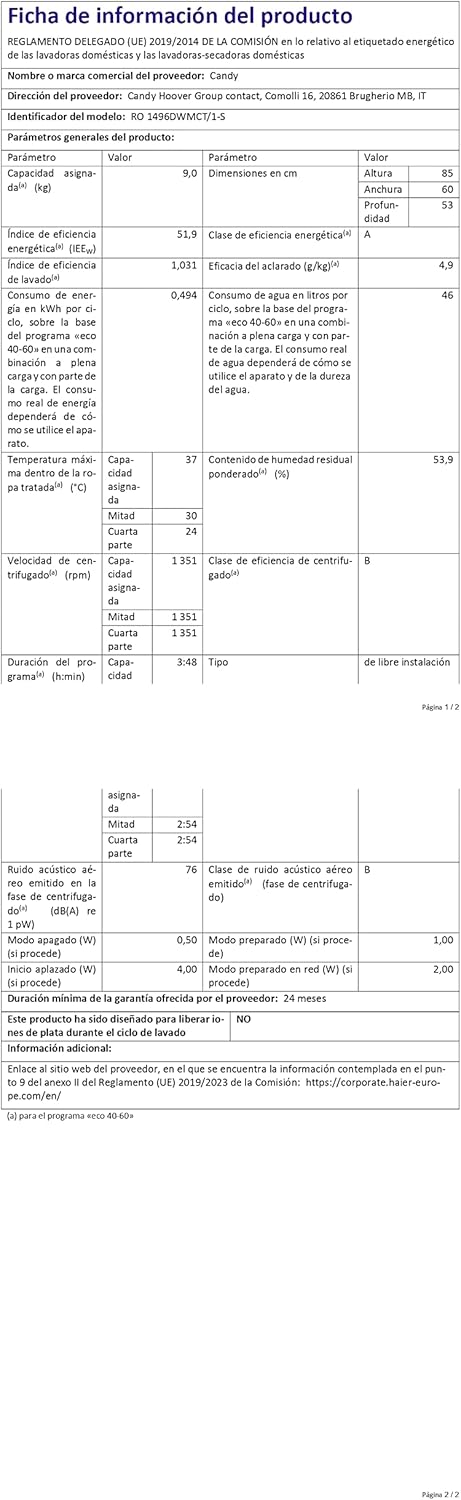
Figure 7.2: Detailed product information sheet providing comprehensive technical data and compliance details.
For more detailed information, refer to the EPREL database: https://eprel.ec.europa.eu/qr/1183031
8. Warranty and Support
Your Candy RapidO washing machine comes with a manufacturer's warranty. Please refer to the warranty card included with your purchase for specific terms and conditions, including the duration and coverage.
For technical assistance, spare parts, or service requests, please contact your local authorized Candy service center. Information regarding spare parts availability is currently unavailable through general product data.
When contacting support, please have your model number (RO1496DWMCT) and serial number ready. The serial number is typically located on a label inside the door or on the back of the appliance.


