
1. Introduction
This manual provides essential instructions for the safe and effective use, maintenance, and care of your KTC Neplos 9.5sq. Long Ratchet Handle, model NBR390AL. Please read this manual thoroughly before using the tool and retain it for future reference.
2. Safety Information
Always observe the following safety precautions to prevent injury and damage to the tool.
- Wear Eye Protection: Always wear safety glasses or goggles to protect your eyes from flying debris.
- Inspect Tool Before Use: Check the ratchet handle for any signs of damage, wear, or loose parts before each use. Do not use a damaged tool.
- Use Correct Size Sockets: Ensure that the socket size matches the fastener and that the socket is securely attached to the ratchet drive.
- Avoid Over-Torquing: Do not use extension pipes or other means to increase leverage beyond the tool's design limits, as this can damage the tool or fastener.
- Maintain a Firm Grip: Hold the handle firmly to prevent slipping, especially when applying force.
- Keep Work Area Clear: Ensure your work area is well-lit and free from obstructions.
- Store Properly: Store the tool in a dry, clean place, away from children.
3. Product Overview
The KTC Neplos NBR390AL is a 9.5sq. (3/8-inch drive) long ratchet handle designed for professional use. It features a 90-tooth gear mechanism, providing fine increments for precise fastening in confined spaces. Constructed from Chromium Molybdenum Steel with a durable powder-coated finish, this tool offers reliability and longevity.

Figure 1: KTC Neplos 9.5sq. Long Ratchet Handle NBR390AL. This image displays the full length of the chrome-finished ratchet handle, highlighting its sleek design and the drive head with the direction switch.

Figure 2: KTC Neplos Ratchet Handle held in a hand. This image illustrates the ergonomic design and the extended length of the ratchet handle, providing a sense of its size and how it fits in a user's grip.
4. Setup
To prepare your ratchet handle for use:
- Select the Correct Socket: Choose a 9.5sq. (3/8-inch drive) socket that matches the size of the fastener you intend to work with.
- Attach the Socket: Align the square drive of the socket with the drive head of the ratchet handle. Push the socket firmly onto the drive until it clicks into place, ensuring a secure connection.
- Verify Direction: Use the direction switch on the ratchet head to select the desired rotation (tightening or loosening). Ensure the switch is fully engaged in one direction.
5. Operating Instructions
Using the KTC Neplos NBR390AL ratchet handle:
- Position the Socket: Place the attached socket onto the fastener.
- Apply Force: Hold the handle firmly and apply steady, controlled force in the desired direction. The 90-tooth mechanism allows for small arcs of movement, ideal for tight spaces.
- Change Direction: To switch between tightening and loosening, move the direction switch on the ratchet head to the opposite position.
- Remove Socket: To remove the socket, firmly pull it off the drive head. Some models may feature a quick-release button; if present, press it while pulling the socket.
6. Maintenance
Proper maintenance ensures the longevity and optimal performance of your ratchet handle.
- Cleaning: After each use, wipe the ratchet handle clean with a dry cloth to remove dirt, grease, and debris. For stubborn grime, use a mild solvent and ensure the tool is thoroughly dried afterward.
- Lubrication: The internal mechanism of the ratchet benefits from periodic lubrication. Apply a small amount of high-quality, light machine oil to the gear mechanism through the access points on the ratchet head. Caution: Over-lubrication or using thick grease can sometimes impede the 90-tooth mechanism's smooth operation. If the mechanism feels stiff after lubrication, clean and re-lubricate sparingly.
- Storage: Store the tool in a clean, dry environment to prevent rust and corrosion. Avoid storing in areas with high humidity or extreme temperature fluctuations.
7. Troubleshooting
| Problem | Possible Cause | Solution |
|---|---|---|
| Ratchet mechanism feels stiff or locks up. | Excessive or incorrect lubrication; debris in mechanism. | Clean the ratchet head thoroughly to remove old lubricant and debris. Apply a very small amount of light machine oil. If the issue persists, consult KTC support. |
| Direction switch is hard to move. | Accumulation of dirt or lack of lubrication. | Clean the switch area and apply a drop of light machine oil. Work the switch back and forth to distribute the lubricant. |
| Socket does not attach securely. | Incorrect socket size; worn drive head; debris in drive. | Ensure socket is 9.5sq. (3/8-inch drive) and clean. Inspect the drive head for wear. If worn, the tool may need replacement or professional repair. |
8. Specifications
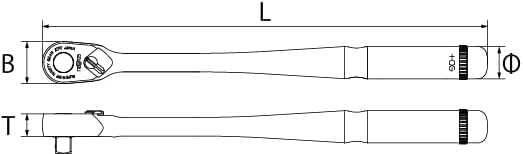
Figure 3: Dimensional diagram of the KTC Neplos Ratchet Handle. This diagram provides a top-down and side view with labels for length (L), width (B), and thickness (T) to indicate the physical dimensions of the tool.
| Feature | Detail |
|---|---|
| Model Number | NBR390AL |
| Drive Size | 9.5 sq. (3/8 inch) |
| Number of Gears | 90 |
| Style | Long Type |
| Material | Chromium Molybdenum Steel |
| Color | Silver |
| Finish Type | Powder Coated |
| Item Length | 275 Millimeters |
| Item Weight | 380 Grams (13.4 ounces) |
| Included Components | Main unit |
| Batteries Required? | No |
9. Warranty and Support
For information regarding warranty coverage, repairs, or technical support for your KTC Neplos NBR390AL ratchet handle, please contact KTC customer service directly. Refer to the official KTC website or product packaging for the most current contact details and warranty terms.