
Ingco FCLI12071
Ingco 12V Battery Charger FCLI12071 Instruction Manual
Model: FCLI12071
1. Introduction
Thank you for choosing the Ingco 12V Battery Charger, model FCLI12071. This manual provides essential information for the safe and efficient operation, maintenance, and troubleshooting of your battery charger. Please read these instructions carefully before use and retain them for future reference.
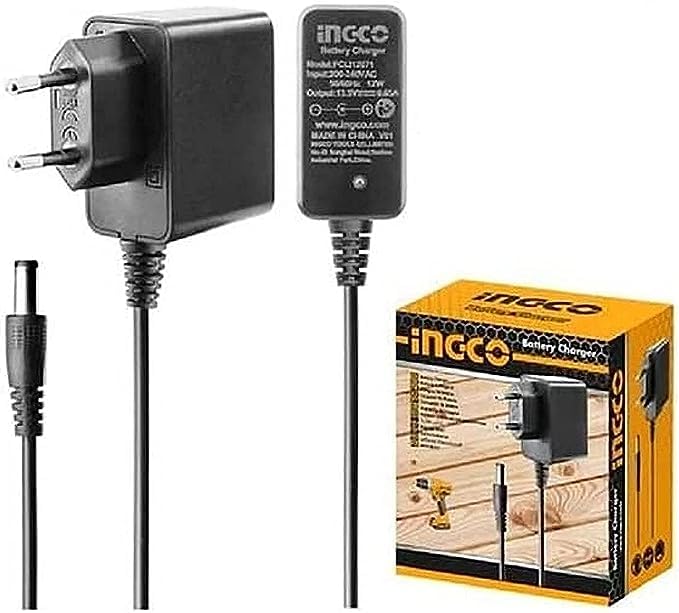
Image 1.1: The Ingco 12V Battery Charger FCLI12071. This image shows the compact design of the charger with its main body and connection cables.
2. Safety Instructions
WARNING: Failure to follow these safety instructions may result in electric shock, fire, or serious injury.
- Always operate the charger in a well-ventilated area.
- Do not expose the charger to rain or wet conditions.
- Ensure the charger is disconnected from the power supply before making or breaking connections to the battery.
- Wear eye protection and protective clothing when working with batteries.
- Keep children and unauthorized persons away from the charging area.
- Never charge a frozen battery. Allow it to thaw before charging.
- Avoid sparks or flames near the battery during charging, as batteries can produce explosive gases.
- If battery acid comes into contact with skin or eyes, flush immediately with water and seek medical attention.
- This charger is designed for 12V lead-acid batteries only. Do not use it for other battery types.
3. Package Contents
Verify that all items are present upon unpacking:
- Ingco 12V Battery Charger (Model FCLI12071)
- User Manual
- Battery connection clamps (Red for positive, Black for negative)
- AC power cord
4. Product Overview
Familiarize yourself with the main components of your Ingco battery charger:
- Power Indicator Light: Illuminates when the charger is connected to AC power.
- Charging Indicator Light: Illuminates during the charging process.
- Fully Charged Indicator Light: Illuminates when the battery is fully charged.
- Positive (+) Clamp (Red): Connects to the positive terminal of the battery.
- Negative (-) Clamp (Black): Connects to the negative terminal of the battery.
- AC Power Cord: Connects the charger to a standard wall outlet.
5. Setup
- Preparation: Ensure the battery is clean and free of corrosion. If charging a battery in a vehicle, ensure the vehicle's ignition is off and all accessories are disconnected.
- Ventilation: Place the charger and battery in a well-ventilated area.
- Connect Positive Clamp: Connect the RED positive (+) clamp to the positive (+) terminal of the battery.
- Connect Negative Clamp: Connect the BLACK negative (-) clamp to the negative (-) terminal of the battery. If charging a battery in a vehicle, connect the black clamp to the vehicle chassis away from the battery and fuel line.
- Connect to Power: Plug the AC power cord into a standard 220-240V AC wall outlet. The Power Indicator Light should illuminate.
Note: Always connect the battery clamps before plugging the charger into the AC power outlet.
6. Operating Instructions
Once the charger is properly set up:
- Initiate Charging: After connecting to AC power, the Charging Indicator Light will illuminate, indicating that charging has begun.
- Monitor Charging: The charger is designed to charge a 12V battery. The charging process typically takes approximately 2 hours for a standard battery, though actual time may vary based on battery size and discharge level.
- Charging Completion: When the battery is fully charged, the Fully Charged Indicator Light will illuminate, and the Charging Indicator Light may turn off or change color, depending on the model. The charger will automatically switch to a maintenance mode to prevent overcharging.
- Disconnecting:
- Unplug the AC power cord from the wall outlet first.
- Disconnect the BLACK negative (-) clamp from the battery terminal or vehicle chassis.
- Disconnect the RED positive (+) clamp from the battery terminal.
Important: Always disconnect the charger from the AC power source before disconnecting the battery clamps.
7. Maintenance
- Cleaning: Disconnect the charger from all power sources and batteries. Wipe the exterior with a soft, dry cloth. Do not use solvents or abrasive cleaners.
- Cable Inspection: Regularly inspect the AC power cord and battery clamps for any signs of damage, fraying, or corrosion. Replace damaged components immediately.
- Storage: Store the charger in a cool, dry place, away from direct sunlight and moisture, when not in use. Ensure cables are neatly coiled to prevent damage.
8. Troubleshooting
| Problem | Possible Cause | Solution |
|---|---|---|
| Charger not turning on (Power Indicator off) | No AC power; faulty outlet; damaged power cord. | Check AC outlet with another device. Ensure power cord is securely plugged in. Inspect power cord for damage. |
| Charging Indicator not illuminating | Incorrect battery connection; battery too deeply discharged; battery fault. | Verify correct polarity of battery clamps. Ensure clamps have good contact. Battery may be beyond recovery. |
| Charger gets hot during operation | Normal during charging; poor ventilation; excessive load. | Ensure adequate ventilation around the charger. If overheating is extreme, disconnect and contact support. |
| Battery not fully charging | Battery fault; incorrect battery type; charger fault. | Have battery tested by a professional. Ensure battery is a 12V lead-acid type. |
9. Specifications
| Feature | Detail |
|---|---|
| Brand | Ingco |
| Model | FCLI12071 |
| Input Voltage | 220-240V AC (via power cord) |
| Output Voltage | 12 Volts DC |
| Power Source Type | AC |
| Compatible Battery Type | 12V Lead-Acid Batteries |
| Approximate Charging Time | 2 hours (for standard batteries, varies by capacity) |
| Product Dimensions | 10 x 20 x 37 cm |
| Item Weight | 2 Kilograms |
| Compliant Standards | CE |
10. Warranty and Support
Ingco products are manufactured to high-quality standards. For warranty information, please refer to the warranty card included with your purchase or visit the official Ingco website. For technical support or service inquiries, please contact your local Ingco dealer or authorized service center.
Please have your model number (FCLI12071) and purchase date available when contacting support.
Related documentsFCLI12071


Ask a question about this manual
Ask about setup, troubleshooting, compatibility, parts, safety, or missing instructions. Manuals+ will review the question and use this page’s manual context to help answer it.