Introduction
The Jebao EOW Smart Wave Maker Circulation Pump is designed to create natural wave patterns in your aquarium, promoting a healthy environment for aquatic life. This compact and quiet DC-powered pump offers versatile control options, including direct plug-and-play operation and Wi-Fi control via the Jebao App on your smartphone.
This manual provides essential information for the safe and efficient operation, installation, and maintenance of your EOW-5M wave maker.
Safety Warnings
- Always disconnect power before performing any maintenance or installation.
- Do not operate the pump dry. Ensure it is fully submerged in water before powering on.
- This device is for indoor use only and must be kept away from direct sunlight and high temperatures.
- Ensure the power cord is not damaged or pinched. Do not use if the cord or plug is damaged.
- Keep out of reach of children.
- Only use the original power adapter provided with the pump.
- Do not attempt to disassemble or repair the pump yourself. Refer to qualified personnel for service.
Package Contents
Verify that all components are present and undamaged upon opening the package:
- Jebao EOW Smart Wave Maker Pump (EOW-5M)
- Magnetic Base
- Controller (with LCD display)
- Power Adapter (DC 24V)
- User Manual

Figure 1: Complete package contents of the EOW Smart Wave Maker.
Setup and Installation
- Positioning the Pump:
Select a suitable location inside your aquarium for the wave maker. The pump features a 3D large rotation angle, allowing you to adjust the output water direction for optimal flow. Ensure the pump is fully submerged and positioned to create desired water movement without disturbing substrate or delicate corals.

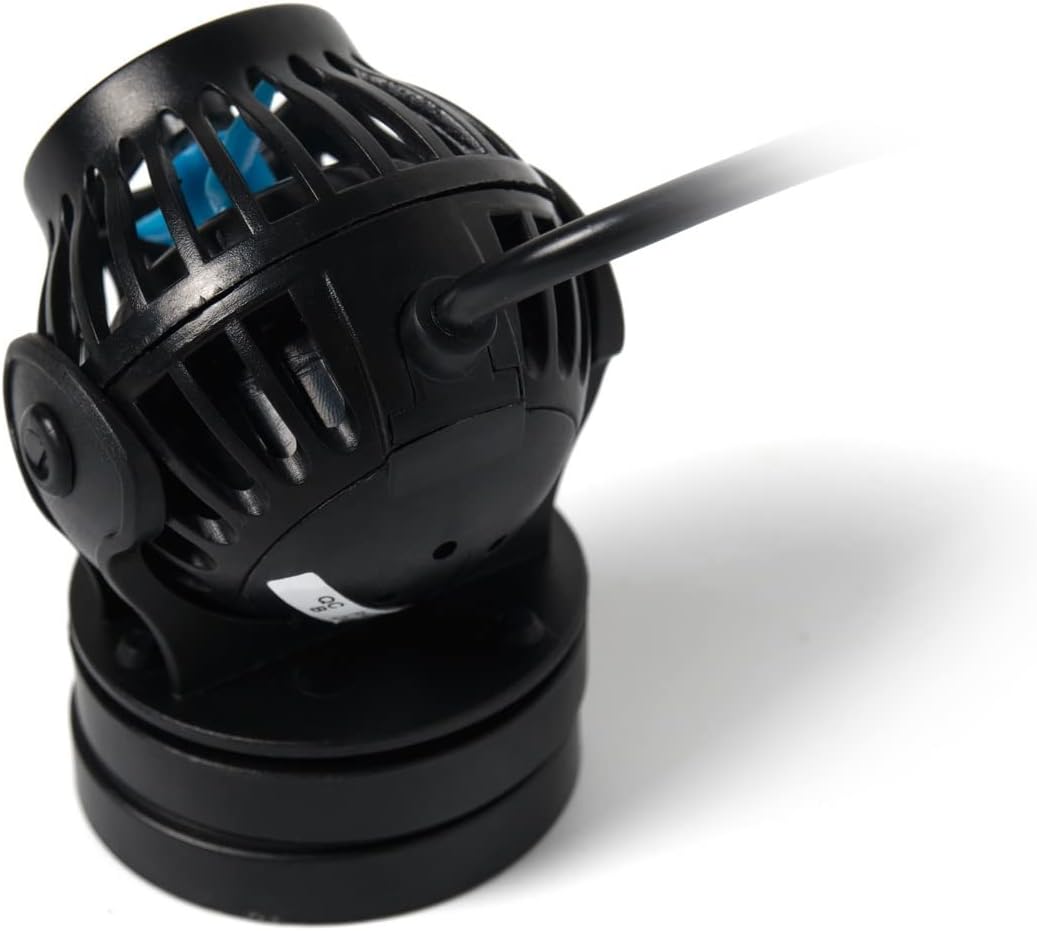
Figure 2: Front and side views of the EOW wave maker pump.
- Attaching the Magnetic Base:
Place the pump inside the aquarium and align the external magnet of the magnetic base on the outside of the aquarium glass, directly opposite the internal magnet attached to the pump. The strong magnetic force will secure the pump in place. Ensure the glass thickness is within the recommended limits for the magnetic base.
- Connecting the Controller:
Connect the pump's cable to the designated port on the controller. Then, connect the power adapter to the controller and plug the adapter into a suitable electrical outlet. Ensure all connections are secure before powering on.
Operating Instructions
The EOW Smart Wave Maker offers both manual control via the LCD display controller and Wi-Fi control through the Jebao App.
Manual Control (LCD Display Controller)
The LCD display controller allows for direct adjustment of pump settings. Refer to the controller's specific button functions for mode selection, flow rate adjustment, and timer settings. The SINE wave technology ensures ultra-quiet operation and stable performance across various settings.
- Mode Selection: Use the mode button to cycle through different wave patterns (e.g., constant flow, pulse mode, random flow).
- Flow Rate Adjustment: Use the up/down arrows to increase or decrease the pump's output (132GPH to 1320GPH for EOW-5M).
- Feed Mode: Activate feed mode to temporarily pause the pump for feeding, preventing food from being drawn into the filtration system.
Wi-Fi Control (Jebao App)
For advanced control and scheduling, download the Jebao App (available for iOS and Android devices) from your smartphone's app store. Follow the in-app instructions to connect your wave maker to your home Wi-Fi network.
- App Pairing: Ensure your smartphone is connected to a 2.4GHz Wi-Fi network during the initial pairing process.
- Custom Programs: Create custom schedules and wave patterns directly from the app.
- Real-time Monitoring: Monitor pump status and adjust settings remotely.
Maintenance
Regular maintenance ensures the longevity and optimal performance of your wave maker.
- Cleaning the Impeller:
Over time, calcium deposits and algae can build up on the impeller, reducing efficiency. Disconnect the pump from power, remove it from the aquarium, and carefully detach the front cage. Remove the impeller and clean it thoroughly with a soft brush and a mild acid solution (e.g., vinegar or citric acid) to dissolve deposits. Rinse all parts with fresh water before reassembly.
- Cleaning the Pump Body:
Wipe down the exterior of the pump body and the magnetic base to remove any debris or algae. Ensure no water enters the electrical connections.
- Cable Inspection:
Periodically inspect the power cable and connections for any signs of wear, damage, or corrosion. Replace if necessary.
Note: The pump is designed with no exposed copper elements, making it suitable for both marine and freshwater environments.
Troubleshooting
| Problem | Possible Cause | Solution |
|---|---|---|
| Pump not operating | No power; Loose connection; Impeller jammed. | Check power outlet and connections. Disconnect power and inspect/clean impeller for obstructions. |
| Reduced flow rate | Impeller dirty; Air trapped in pump; Incorrect setting. | Clean impeller. Gently shake pump to release trapped air. Adjust flow rate setting on controller/app. |
| Unusual noise | Impeller obstructed or damaged; Pump not fully submerged; Vibration against glass. | Disconnect power and inspect impeller for debris or damage. Ensure pump is fully submerged. Adjust pump position to prevent vibration. |
| Wi-Fi connection issues | Incorrect Wi-Fi password; Router too far; 5GHz network. | Verify Wi-Fi password. Move pump closer to router. Ensure router is broadcasting a 2.4GHz network. Re-pair device in app. |
Specifications
| Feature | Detail |
|---|---|
| Model | EOW-5M |
| Flow Rate (GPH) | 132 GPH to 1320 GPH (adjustable) |
| Recommended Tank Size | 40-60 gallons |
| Power Source | DC 24V, 12W, 60Hz (AC power adapter included) |
| Dimensions (Pump) | Approx. 2-1/4" dia. x 3" |
| Control Method | Wi-Fi (iOS/Android App) + Manual Controller (LCD display) |
| Technology | SINE Wave Technology for quiet operation |
| Water Type Suitability | Marine and Freshwater (no exposed copper element) |
| Item Weight | 1.38 pounds |
| Package Dimensions | 6.3 x 6 x 2.75 inches |
Warranty and Support
For warranty information and technical support, please contact Jebao customer service. Details are typically provided on the product packaging or the official Jebao website.
Product design and specifications are subject to change without prior notice as part of continuous product improvement.


