
Introduction
The Jebao EOW-16M Smart Wave Maker Circulation Pump is designed to create natural wave patterns in your aquarium, promoting a healthy environment for marine and freshwater inhabitants. This pump features advanced SINE wave technology for quiet operation, a 3D rotation angle for adjustable water flow, and convenient control via Wi-Fi or a manual LCD display controller.

Image: Front view of the Jebao EOW-16M Smart Wave Maker Circulation Pump, showcasing its compact design and protective cage.
Safety Information
- Always disconnect power before performing any maintenance or installation.
- Ensure the pump is fully submerged in water during operation to prevent damage.
- Do not operate the pump if the power cord or plug is damaged.
- Keep the controller and power adapter away from water to prevent electrical hazards.
- This product is designed for indoor aquarium use only.
Package Contents
Please verify that all components are present in the package:
- Jebao EOW-16M Wave Maker Pump
- Manual LCD Display Controller
- Power Adapter (DC 24V)
- Magnetic Base
- User Manual
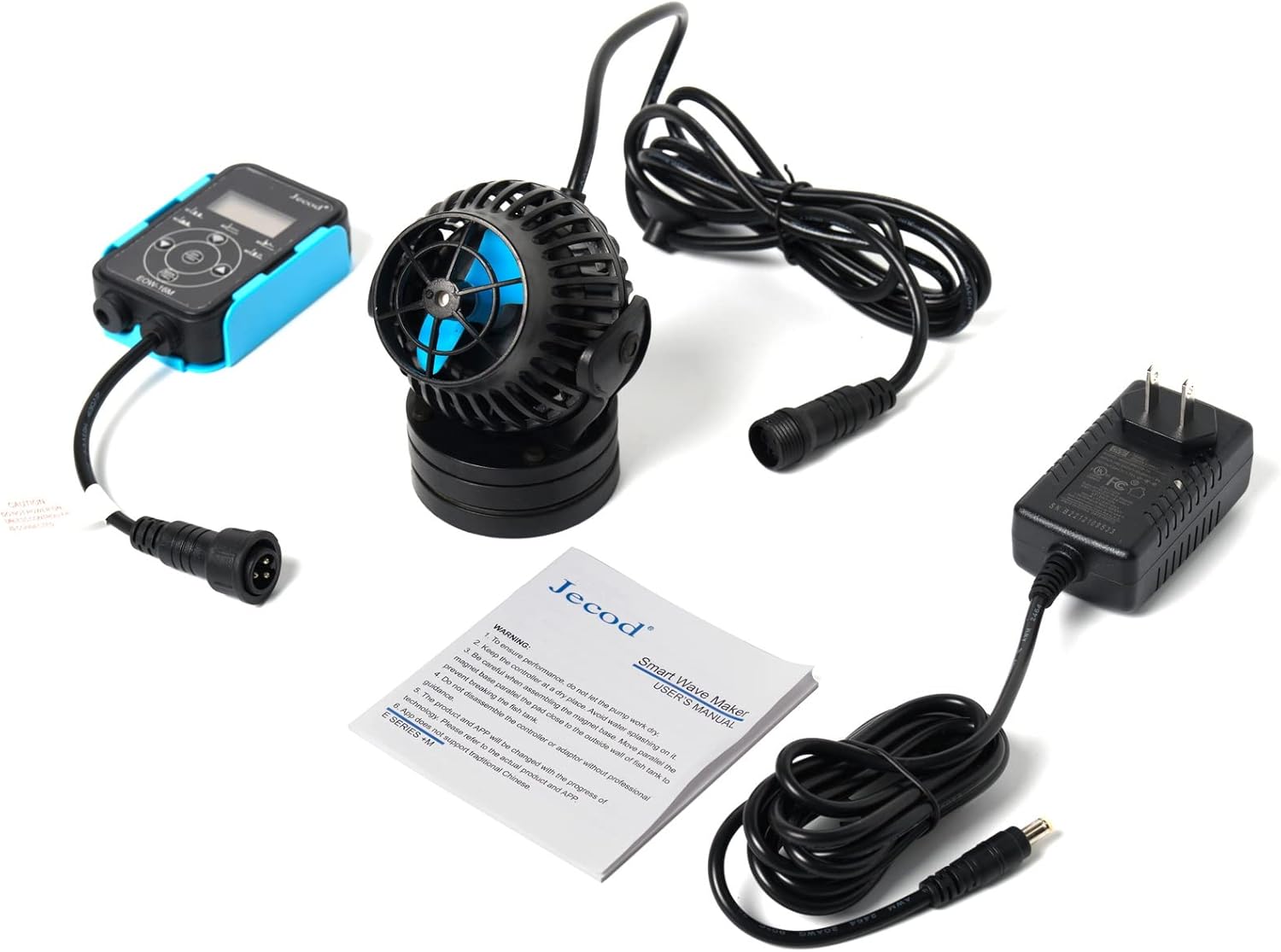
Image: The complete package contents, including the wave maker pump, controller, power adapter, and instruction manual.
Setup Instructions
- Mounting the Pump: Position the wave maker pump inside the aquarium, ensuring it is fully submerged. Attach the magnetic base to the outside of the aquarium glass, aligning it with the pump's internal magnet. Ensure the pump is securely held in place.
- Connecting the Controller: Connect the pump's cable to the designated port on the manual LCD display controller.
- Connecting Power: Plug the power adapter into the controller, then plug the power adapter into a standard US 120V AC outlet.
- Adjusting Direction: The pump features a 3D rotation angle. Adjust the pump's position to direct the water flow as desired within the aquarium.

Image: Side view of the Jebao EOW-16M pump, illustrating how the magnetic base supports the pump and allows for angle adjustment.
Operating Instructions
Manual Control
The included LCD display controller allows for direct adjustment of pump settings. Refer to the controller's specific instructions for navigating modes, adjusting flow rates, and setting timers. Common modes include constant flow, pulse mode, and random flow.
Wi-Fi Control (iOS & Android)
For advanced control, download the Jebao App from your smartphone's app store. Follow the in-app instructions to connect your EOW-16M pump to your home Wi-Fi network. The app provides comprehensive control over pump modes, intensity, scheduling, and more.
- Ensure your smartphone is connected to a 2.4GHz Wi-Fi network during initial setup.
- Follow the pairing instructions provided within the Jebao App.
- Once connected, you can customize wave patterns and flow intensity remotely.
Maintenance
Regular maintenance ensures optimal performance and longevity of your wave maker pump.
- Cleaning the Impeller: Periodically remove the pump from the aquarium and carefully disassemble the front cage to access the impeller. Clean any debris, algae, or calcium buildup from the impeller and its housing using a soft brush and warm water. For stubborn calcium deposits, a mild vinegar solution can be used, followed by thorough rinsing.
- Inspecting the Cable: Regularly check the power cord for any signs of damage or wear.
- Magnetic Base: Ensure the magnetic base is clean and free of debris to maintain a strong grip on the aquarium glass.
Always disconnect the pump from power before performing any cleaning or maintenance.
Troubleshooting
- Pump Not Starting:
- Check if the power adapter is securely plugged into both the controller and the wall outlet.
- Ensure the pump cable is firmly connected to the controller.
- Verify that the power outlet is functional.
- Reduced Flow/Noise:
- The impeller may be obstructed by debris or algae. Refer to the Maintenance section for cleaning instructions.
- Check for air bubbles trapped inside the pump. Gently shake the pump while submerged to release them.
- Wi-Fi Connection Issues:
- Ensure your router is broadcasting a 2.4GHz Wi-Fi signal.
- Move the pump and controller closer to your Wi-Fi router.
- Restart your router, controller, and smartphone, then attempt to reconnect via the Jebao App.
Specifications
| Feature | Detail |
|---|---|
| Model | EOW-16M |
| Flow Rate | 4226 GPH (Gallons Per Hour) |
| Power | DC 24V, 35W, 60Hz |
| Voltage | 24 Volts (DC) |
| Dimensions | 3.5" diameter x 4.5" |
| Control | Wi-Fi (iOS + Android) + Manual LCD Controller |
| Technology | SINE Wave Technology |
| Application | Marine and Freshwater Aquariums |
| Recommended Tank Size | 100-120 Gallons |
| Item Weight | 2.44 pounds |
Warranty and Support
For warranty information and technical support, please refer to the documentation included with your purchase or visit the official Jebao website. Keep your purchase receipt as proof of purchase for any warranty claims.


