Introduction
This manual provides instructions for the ALLIMITY Voice Remote Control, model QYSY-02ADBBT-SO-QYSY. This remote is designed to replace your original remote and offers voice control functionality for compatible televisions. No programming is required; simply insert batteries for immediate use with supported models.

Image: An angled view of the ALLIMITY Voice Remote Control, showcasing its ergonomic design and button layout.
1. Setup
1.1. Battery Installation
The remote control requires alkaline batteries for operation.
- Step 1: Locate the battery compartment cover on the back of the remote control.
- Step 2: Slide the cover downwards or press the latch to open it.
- Step 3: Insert two new AAA alkaline batteries, ensuring the positive (+) and negative (-) terminals match the diagrams inside the compartment.
- Step 4: Close the battery compartment cover securely.
Note: Ensure batteries are inserted correctly. Incorrect insertion may prevent the remote from functioning.
2. Operating Instructions
The ALLIMITY Voice Remote Control provides comprehensive control over your television. Below is a general overview of the button layout and their functions.
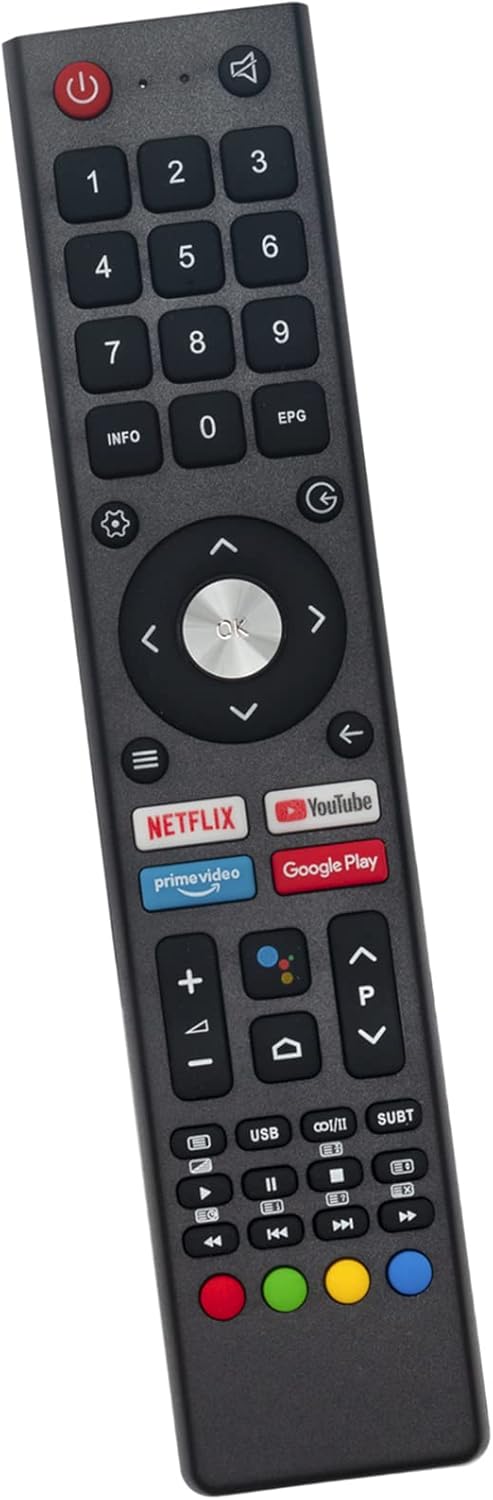
Image: Top-down view of the ALLIMITY Voice Remote Control, clearly showing all buttons including the number pad, navigation controls, dedicated app buttons, and media playback keys.
2.1. Basic Functions
- Power Button (●): Turns the television on or off.
- Number Pad (0-9): Direct channel selection or inputting numbers.
- Volume Up/Down (+/-): Adjusts the television's volume.
- Channel Up/Down (P+/P-): Changes the television channel.
- Mute Button (🔇): Mutes or unmutes the television audio.
2.2. Navigation and Selection
- Directional Pad (Up, Down, Left, Right): Navigates through menus and options.
- OK Button: Confirms selections.
- Back Button (←): Returns to the previous screen or menu.
- Home Button (🏛): Accesses the television's home screen or smart hub.
2.3. Voice Control
This remote features voice control functionality. To use voice commands:
- Step 1: Press and hold the Voice Assistant Button (often depicted as a microphone icon or Google Assistant logo).
- Step 2: Speak your command clearly into the microphone located on the remote.
- Step 3: Release the Voice Assistant Button once you have finished speaking.
Note: Voice control functionality requires your television to be connected to the internet and may require initial setup on the TV itself.
2.4. Dedicated App Buttons
The remote includes dedicated buttons for quick access to popular streaming services:
- Netflix
- Prime Video
- YouTube
- Google Play
2.5. Media Playback Controls
- Play/Pause (►⏸)
- Stop (■)
- Fast Forward (⏩)
- Rewind (⏪)
- Previous Track (⏮)
- Next Track (⏯)
3. Compatible Television Models
This ALLIMITY Voice Remote Control is compatible with a wide range of Saba, OK.Changhong, and ODL series televisions. No programming is required for these models; simply insert batteries.
Saba / OK.Changhong Models:
- SA24S46A9
- SA32K67A9
- SA32S67A9
- SA40S67A9
- SA43K67A9
- SA43S67A9
- U58H7SX
- U65H7A
- U65H7S
- U65H7SX
- L32H7A
- L32H7LX
- L32H7S
- L32H7SX
- L32K5
- U43H7A
- U43H7S
- U43H7SX
- U50G7U
- U50H7A
- U50H7S
- U50H7SX
- U55H7A
- U55H7S
- U55H7SX
- U55IP7UHD
- U58H7A
- U58H7S
- L40G7U
- L40K5
- L42G6F
- L42G7W
- L43H7S
- L50H7A
- L40H7A
- L40H7S
- L40H7SX
ODL Series Models:
- ODL24771HN-TAB
- ODL43671U-TAB
- ODL50672U-TAB
- ODL42850FC-TAB
- ODL43850UC-TIB
- ODL 24771HN-TAB
- ODL 43671U-TAB
- ODL 50672U-TAB
- ODL 42850FC-TAB
- ODL 43850UC-TIB
4. Maintenance
4.1. Battery Replacement
Replace batteries when the remote control's response becomes sluggish or stops working. Always replace both batteries at the same time with new alkaline batteries of the same type (AAA). Do not mix old and new batteries, or different types of batteries, as this can cause leakage or damage.
4.2. Cleaning
To clean the remote control, use a soft, dry cloth. For stubborn dirt, slightly dampen the cloth with water or a mild cleaning solution. Do not use abrasive cleaners, alcohol, or solvents, as these can damage the surface. Avoid getting liquids inside the remote control.
5. Troubleshooting
| Problem | Possible Cause | Solution |
|---|---|---|
| Remote is not responding. | Batteries are dead or inserted incorrectly. | Replace batteries with new alkaline batteries, ensuring correct polarity. |
| Remote is not responding. | Obstruction between remote and TV's IR sensor. | Ensure a clear line of sight between the remote and the TV. |
| Voice control is not working. | TV is not connected to the internet or voice assistant is not configured. | Check your TV's internet connection and voice assistant settings. Ensure you are pressing and holding the voice button while speaking. |
| Some buttons do not work. | Remote may not be fully compatible with all TV functions, or TV settings are preventing certain actions. | Verify your TV model is listed as compatible. Consult your TV's manual for specific function limitations. |
6. Product Specifications
- Brand: ALLIMITY
- Model Number: QYSY-02ADBBT-SO-QYSY
- Connectivity Technology: Voice Remote Control
- Controller Type: Remote Control
- Maximum Range: 10 Meters
- Battery Type: AAA Alkaline (not included)
- Maximum Number of Supported Devices: 10 (refers to the remote's internal capability, not necessarily simultaneous control)
- Compatible Devices: Saba, OK.Changhong, and ODL series televisions (refer to Section 3 for a detailed list)
7. Warranty and Support
Specific warranty information for this product is not provided in the available data. For support or warranty inquiries, please refer to the retailer or manufacturer's official website where the product was purchased.
