
1. Introduction
Thank you for purchasing the ODK L-Shaped Computer Gaming Desk. This desk is designed for versatility, suitable for use as a computer desk, gaming desk, office desk, or study desk. Its L-shaped design maximizes corner space, providing ample room for your daily activities. This manual provides essential information for assembly, operation, maintenance, and troubleshooting to ensure safe and efficient use of your new desk.
Important Safety Notice: The tabletop has a maximum load capacity of 60kg. The fillet design helps prevent injuries from impacts.

Image 1.1: The ODK L-Shaped Computer Gaming Desk in a typical setup, showcasing its spacious design and integrated storage.
2. Setup and Assembly
This product requires customer assembly. Please follow these instructions carefully for a smooth setup. It is recommended to have two people for assembly, though it can be done by one person with care.
2.1 Package Contents
Before starting, verify all parts are present according to the included parts list. If any parts are missing or damaged, please contact customer support.
2.2 Assembly Steps
- Unpack and Organize: Carefully unpack all components and lay them out on a clean, soft surface to prevent scratches. Group similar parts together.
- Attach Frame Components: Assemble the steel frame structure according to the diagrams in the instruction manual. Ensure all screws are tightened securely. The desk features a sturdy steel frame for enhanced durability.
- Install Cross Bracing: Attach the cross bracing hardware to prevent lateral swaying and ensure stability.
- Mount Tabletop: Carefully place the melamine laminated tabletop onto the assembled frame and secure it with the provided fasteners. The tabletop has a fillet design for safety.
- Assemble Storage Rack: The integrated storage rack is located at the base of the desk. Assemble the shelves as indicated. The shelves are adjustable to accommodate various items.
- Adjust Leveling Feet: The desk is equipped with adjustable feet. After assembly, adjust each foot to ensure the desk is stable and level on uneven surfaces.
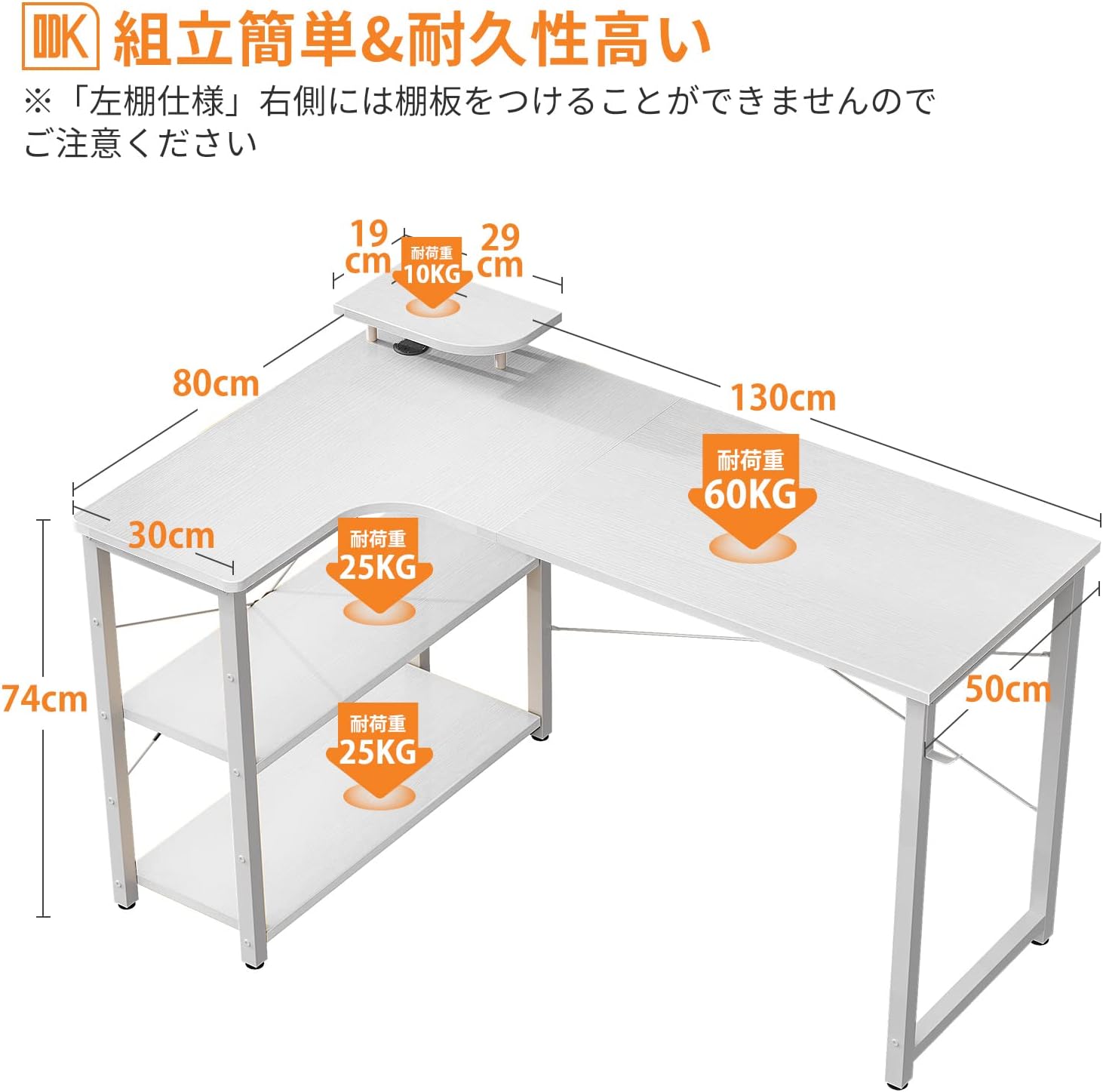
Image 2.1: Desk dimensions and load capacities. The main tabletop supports up to 60kg, and each shelf supports up to 25kg.

Image 2.2: Adjustable feet allow for leveling the desk on uneven floors, ensuring stability.
3. Operating and Usage
The ODK L-Shaped Desk offers a wide and open workspace, allowing for smooth movement and efficient work. Its design is optimized for various uses:
- Gaming Setup: The L-shape provides ample space for multiple monitors, gaming peripherals, and a PC tower on the integrated rack.
- Home Office: Ideal for remote work, offering sufficient surface area for laptops, documents, and office accessories.
- Study Area: Keep books, stationery, and study materials organized on the shelves, easily accessible when needed.
Utilize the monitor stand (if included or purchased separately) to elevate your screen, improving posture and reducing strain during long work or gaming sessions.

Image 3.1: The desk provides a spacious and uncluttered workspace, enhancing productivity.

Image 3.2: A gaming setup on the ODK L-shaped desk, demonstrating its suitability for immersive gaming experiences.
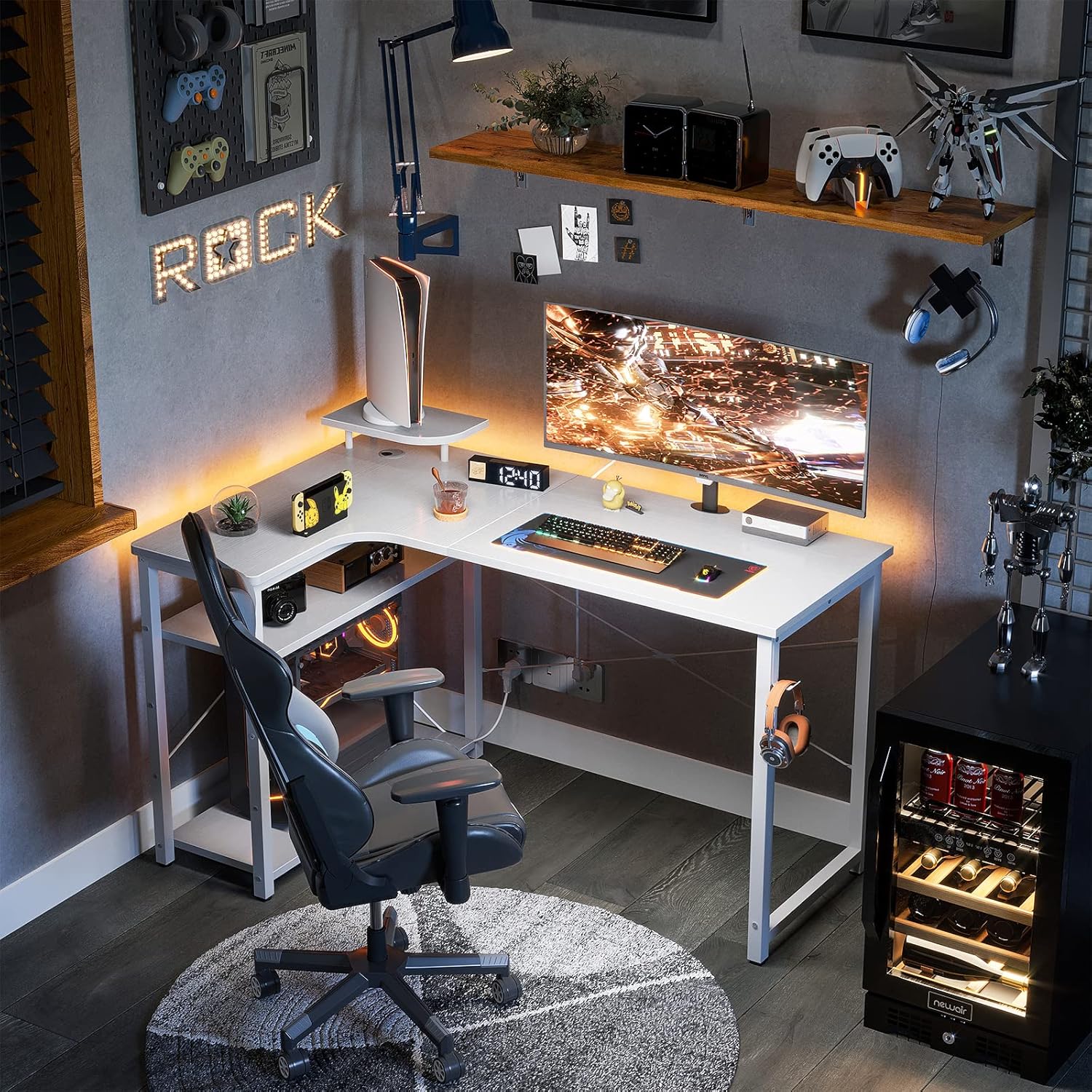
Image 3.3: The integrated storage rack provides convenient space for a PC tower, books, or other items, keeping your workspace tidy.
4. Maintenance
To ensure the longevity and appearance of your ODK L-Shaped Desk, follow these maintenance guidelines:
- Cleaning: The desk surface is made of high-strength melamine laminated board, which is resistant to dirt, scratches, heat, and moisture. Wipe the surface with a soft, damp cloth. Avoid abrasive cleaners or harsh chemicals.
- Spills: Immediately wipe up any spills to prevent water damage, although the surface is moisture-resistant.
- Heat Protection: While the surface is heat-resistant, it is advisable to use coasters or heat pads for hot beverages or dishes to prevent potential damage over time.
- Regular Checks: Periodically check all screws and fasteners to ensure they remain tight. Retighten if necessary to maintain stability.
5. Troubleshooting
If you encounter any issues with your ODK L-Shaped Desk, refer to the following common problems and solutions:
5.1 Desk is Wobbly
- Check Leveling Feet: Ensure all adjustable feet are properly extended and making firm contact with the floor. Adjust them until the desk is stable.
- Tighten Screws: Verify that all assembly screws, especially those connecting the frame and tabletop, are securely tightened. The cross bracing hardware is designed to prevent wobbling.
- Even Surface: Ensure the desk is placed on a flat, even surface.
5.2 Parts Missing or Damaged
- If you find any parts missing or damaged upon delivery, please contact ODK customer support immediately for assistance.
6. Specifications
| Feature | Detail |
|---|---|
| Brand | ODK |
| Model | L-Shaped Desk |
| Dimensions (L x W x H) | 130 x 80 x 74 cm (approx.) |
| Weight | Approx. 16.75 kg (product), 18.6 kg (package) |
| Color | White |
| Material | Steel frame, Melamine laminated board |
| Tabletop Load Capacity | 60 kg |
| Shelf Load Capacity | 25 kg per shelf |
| Special Features | Integrated storage rack, Adjustable leveling feet, Cross bracing for stability, Fillet design for safety |
| Assembly Required | Yes |
7. Warranty and Support
7.1 Manufacturer's Warranty
This ODK L-Shaped Computer Gaming Desk comes with a 1-year manufacturer's warranty from the date of purchase. This warranty covers defects in materials and workmanship under normal use.
7.2 Customer Support
Should you encounter any initial defects with your purchased product or require assistance with assembly or troubleshooting, please do not hesitate to contact ODK customer support. Our team is ready to assist you with any inquiries or issues you may have.
For support, please refer to the contact information provided with your purchase or visit the official ODK store on Amazon: ODK Store


