
IKEA FREDDE
IKEA FREDDE Gaming Desk Instruction Manual
Model: FREDDE | Brand: IKEA
1. Introduction
The IKEA FREDDE Gaming Desk is designed to provide an ergonomic and functional workstation for gaming and office use. Its thoughtful design includes features that enhance comfort and organization, making it an ideal choice for extended periods of use. This manual will guide you through the assembly, operation, and maintenance of your FREDDE desk.

Figure 1.1: The IKEA FREDDE Gaming Desk, showcasing its overall structure and design.
2. Key Features
The FREDDE Gaming Desk incorporates several design elements for an optimized user experience:
- Ergonomic Design: The contoured table top allows users to sit closer to the desk, providing support for wrists and forearms, which is beneficial during long sessions.
- Integrated Cup Holders: Convenient cut-out cup holders on either side of the table top keep beverages within reach and prevent spills. These are made from food-approved plastic.
- Adjustable Shelving: Small shelves can be hung inside or outside the side panels, offering flexible storage solutions to suit individual needs.
- Monitor/TV Compatibility: The desk can accommodate a 32-inch computer monitor or TV by removing the shelf positioned directly above the table top.
- Glare Reduction: High side panels are designed to block sunlight and minimize distracting glare on your computer monitor, enhancing visibility.

Figure 2.1: Detail of the contoured desk surface and integrated cup holder.
3. Setup and Assembly
The IKEA FREDDE Gaming Desk requires assembly. For optimal stability and safety, it is recommended that two people participate in the assembly process. All necessary assembly tools are not included, so ensure you have basic tools like screwdrivers and wrenches available.
- Unpack Components: Carefully unpack all parts and hardware from the packaging. Verify that all components listed in the assembly instructions (provided separately with the product) are present.
- Follow Instructions: Refer to the detailed graphical assembly instructions included with your FREDDE desk. Follow each step precisely to ensure correct and secure construction.
- Secure Connections: Ensure all screws, bolts, and fasteners are tightened securely. Periodically check and re-tighten fasteners as needed to maintain stability.
- Placement: Position the assembled desk on a flat, stable surface. Avoid placing it in direct sunlight or near heat sources to prevent material degradation.

Figure 3.1: Dimensional overview of the FREDDE desk, useful for planning your space.
4. Operating and Usage
The FREDDE desk is designed for versatile use, primarily as a gaming or home office workstation.
- Monitor Placement: The upper shelf is ideal for placing monitors. For larger displays up to 32 inches, the middle shelf can be removed to create more vertical space.
- Cable Management: The desk features integrated solutions for cable management, including hooks and pass-through holes, to keep your setup tidy and organized.
- Shelf Customization: Utilize the small side shelves to hold speakers, accessories, or other items. These can be positioned on the inside or outside of the side panels based on your preference and space requirements.
- Cup Holders: Use the designated cup holders for beverages to prevent accidental spills on your electronics or documents.

Figure 4.1: FREDDE desk configured for a gaming setup.
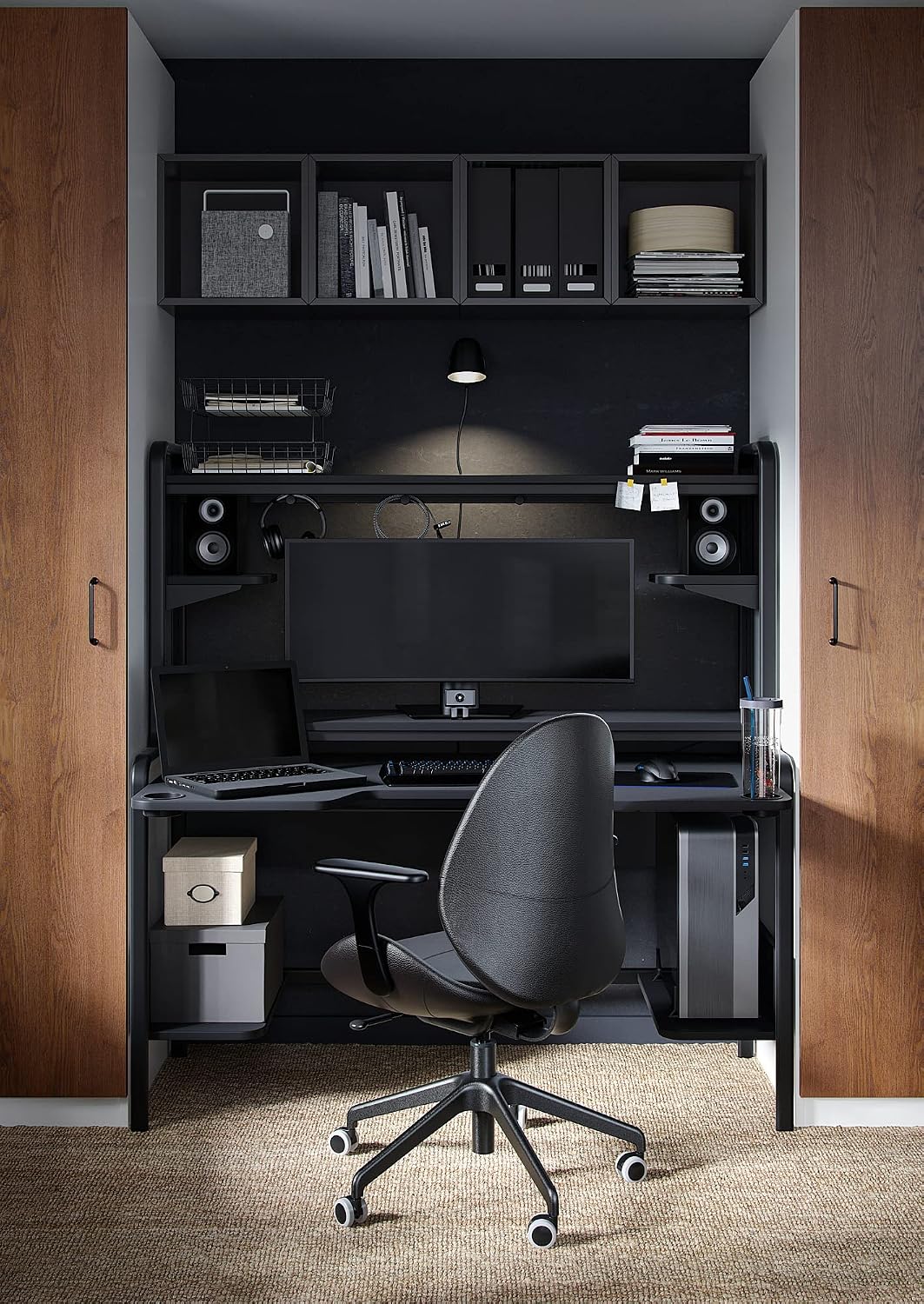
Figure 4.2: FREDDE desk configured for a home office setup.

Figure 4.3: Detail of cable management hooks for organizing wires.

Figure 4.4: Detail of the cable pass-through hole for neat cable routing.
5. Maintenance
To ensure the longevity and appearance of your FREDDE Gaming Desk, follow these simple maintenance guidelines:
- Cleaning: Wipe the desk surfaces clean with a damp cloth and a mild cleaner. Dry thoroughly with a clean cloth. Avoid abrasive cleaners or harsh chemicals that could damage the finish.
- Hardware Check: Periodically check all assembly hardware (screws, bolts) and re-tighten if necessary to maintain structural integrity.
- Avoid Excessive Moisture: Do not allow liquids to sit on the surface for extended periods, as this can cause damage.
- Weight Distribution: Distribute weight evenly across the desk surface and shelves. Avoid placing excessively heavy items on any single point.
6. Troubleshooting
If you encounter any issues with your FREDDE Gaming Desk, consider the following common troubleshooting steps:
- Desk Wobbles: Ensure all assembly screws and bolts are fully tightened. Check that the desk is placed on a level surface. If the floor is uneven, use furniture pads or shims to stabilize.
- Missing Parts: If you find any parts missing during assembly, refer to the parts list in your assembly manual and contact IKEA customer service for assistance.
- Damage During Assembly: If a part is damaged during assembly, stop and contact IKEA customer service for replacement parts. Do not force damaged parts into place.
7. Specifications
Below are the detailed specifications for the IKEA FREDDE Gaming Desk:
| Attribute | Detail |
|---|---|
| Brand | IKEA |
| Model Name | FREDDE |
| Product Dimensions (D x W x H) | 29.13"D x 72.83"W x 57.48"H (140/185x74x146 cm) |
| Color | Black |
| Style | Gaming |
| Base Material | Metal |
| Top Material Type | Plastic |
| Finish Type | Black Painted or Black Powder Coated |
| Special Feature | Ergonomic |
| Room Type | Office |
| Recommended Uses | Gaming |
| Mounting Type | Tabletop |
| Required Assembly | Yes |
| Recommended Number of People for Assembly | 2 |
| Number Of Shelves | 2 |
| Working Surface Diagonal Length | 32 Inches (monitor compatibility) |
8. Warranty and Support
The IKEA FREDDE Gaming Desk comes with a 3-year guarantee. This is a standard limited warranty covering manufacturing defects and material flaws under normal use. For specific terms and conditions of the guarantee, please refer to the guarantee brochure provided with your purchase or visit the official IKEA website.
For any questions regarding assembly, missing parts, or warranty claims, please contact IKEA customer support. You can find contact information on the IKEA website or in your purchase documentation.
Note: Keep your proof of purchase for warranty purposes.
Related documentsFREDDE


Ask a question about this manual
Ask about setup, troubleshooting, compatibility, parts, safety, or missing instructions. Manuals+ will review the question and use this page’s manual context to help answer it.