
Introduction
Thank you for choosing the Coleshome L Shaped Gaming Desk. This manual provides comprehensive instructions for the assembly, operation, and care of your new desk. Designed for both gaming and home office use, this desk features integrated LED lighting, convenient power outlets, a full monitor stand, and ample storage shelves. Please read this manual thoroughly before beginning assembly or use to ensure proper setup and to maximize the desk's functionality and lifespan.
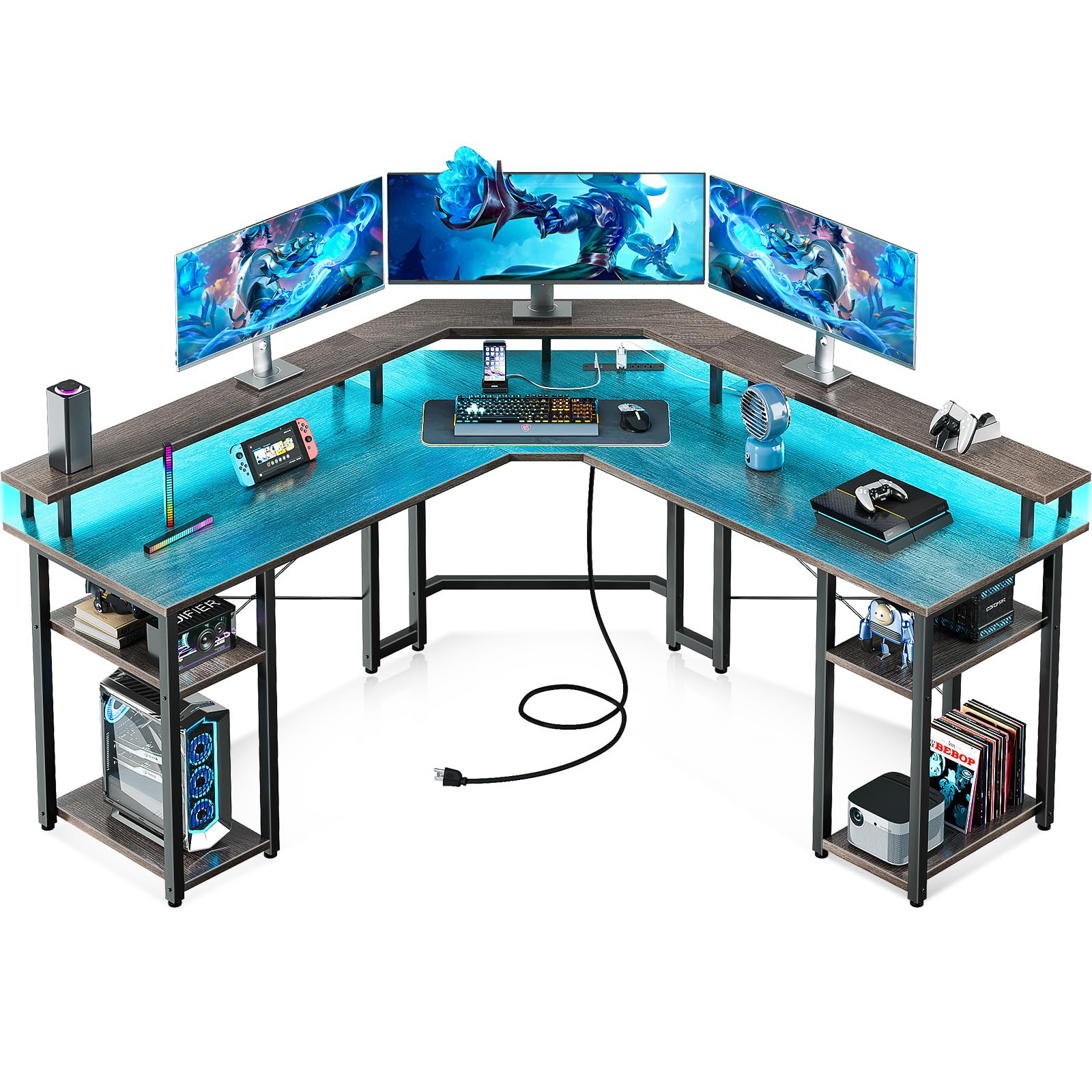
Image: The Coleshome L Shaped Gaming Desk in a typical setup, showcasing its L-shape, monitor stand, and integrated LED lighting.
Package Contents
Before assembly, verify that all components listed below are present and undamaged. If any parts are missing or damaged, please contact customer support.
- Desk panels (L-shaped main desktop, monitor stand, shelf panels)
- Steel frame components (legs, support bars)
- Hardware kit (screws, bolts, nuts, washers, adjustable leg pads)
- LED light strip with controller
- Power outlet unit with USB ports and power cord
- Assembly tools (Allen wrenches)
- Instruction manual
Setup Instructions
Assembly typically takes 1-2 hours for one person. It is recommended to have a clear, spacious area for assembly. All necessary tools are included.
- Unpack and Identify Parts: Carefully remove all components from the packaging. Lay them out on a soft, clean surface to prevent scratches. Refer to the parts list in your included manual to identify each piece.
- Assemble the Steel Frame: Begin by attaching the main steel leg frames to the support bars using the provided screws and Allen wrenches. Ensure all connections are secure but do not overtighten until the desk is fully assembled.
- Attach Desk Panels: Secure the main L-shaped desktop panels to the assembled steel frame. Pay attention to the orientation for left or right corner configuration, as the desk is reversible.
- Install Monitor Stand: Attach the full monitor stand to the designated areas on the desktop. This stand provides an elevated surface for monitors and additional storage underneath.
- Mount Storage Shelves: Install the two-tier storage shelves on both sides of the desk. These shelves are designed to accommodate computer hosts, headphones, and other accessories.
- Install Power Outlet Unit: Secure the power outlet unit, which includes 3 standard outlets and 2 USB ports, to the underside of the desk in the designated location. Ensure the power cord is routed safely.
- Apply LED Light Strip: Carefully attach the LED light strip to the underside of the monitor stand or other desired locations using its adhesive backing. Connect the light strip to its controller and power source.
- Adjust Leg Pads: Once the desk is fully assembled and in its desired position, adjust the leg pads at the bottom of each leg to ensure stability on uneven floors.

Image: Detailed dimensions of the L-shaped desk, illustrating its structure and stability with 12 legs.

Image: The double shelf design of the desk, highlighting space for dual computer hosts or other equipment.
Operating Instructions
LED Lighting System
The integrated LED lighting system offers customizable illumination for your workspace.
- Power On/Off: Use the power button on the LED controller to turn the lights on or off.
- Color Selection: Cycle through 7 available colors using the 'C' button on the controller.
- Lighting Modes: Select from 13 different lighting modes using the 'M' button.
- Brightness Adjustment: Adjust the brightness level (8 options) to your preference.
- Flicker Frequency: Choose from 9 flicker frequencies.
- Memory Function: The LED system retains the last selected mode and color when powered off and on again.

Image: The desk illuminated by RGB LED strips, showing the controller for various lighting modes and colors.
Power Outlets & USB Charging Ports
The integrated power strip provides convenient access to power for your devices.
- Standard Outlets: The unit includes 3 standard 125V/12A AC outlets for powering monitors, computers, and other office equipment.
- USB Ports: Two 5V/2A USB ports are available for charging smartphones, tablets, and other USB-powered devices.
- Power Cord: The unit is connected via a 6 ft 7 in power cord. Ensure it is plugged into a grounded wall outlet.

Image: A close-up view of the built-in power strip, showing the three AC outlets and two USB charging ports.
Maintenance
Proper maintenance will help preserve the appearance and functionality of your Coleshome desk.
- Cleaning the Desktop: Wipe the engineered wood surface with a soft, damp cloth. Avoid abrasive cleaners or harsh chemicals, which can damage the finish.
- Addressing Oil Stains: The desktop surface may be sensitive to skin oils. Clean regularly with a mild, non-abrasive cleaner to remove any marks.
- Frame Care: The alloy steel frame can be cleaned with a damp cloth. Dry immediately to prevent rust.
- Hardware Check: Periodically check all screws and bolts to ensure they remain tight. Retighten if necessary to maintain stability.
- LED Strip Care: Ensure the LED strip remains securely attached. If the adhesive weakens, re-secure it with appropriate adhesive to prevent detachment.
Troubleshooting
| Problem | Possible Cause | Solution |
|---|---|---|
| Desk is wobbly/unstable | Uneven floor; loose hardware | Adjust the leg pads at the bottom of each leg. Check and tighten all assembly screws and bolts. |
| LED lights not working | Power connection issue; faulty strip/controller | Ensure the LED strip is properly connected to the controller and power source. Check if the power outlet is functional. If issues persist, contact customer support. |
| Power outlets/USB ports not functioning | Power cord not plugged in; circuit breaker tripped; faulty unit | Verify the desk's power cord is securely plugged into a working wall outlet. Check your home's circuit breaker. If still not working, contact customer support. |
| LED strip adhesive failing | Environmental factors; insufficient adhesion | Re-secure the LED strip using stronger adhesive tape or clips. Ensure the surface is clean and dry before application. |
| High-pitched frequency from LED lights | Electrical interference; component issue | Try plugging the LED power adapter into a different outlet. If the noise persists, contact customer support for assistance. |
Specifications
| Feature | Detail |
|---|---|
| Brand | Coleshome |
| Model | B0BW8FWXWV |
| Shape | L-Shape, Reversible |
| Product Dimensions (D x W x H) | 18.9" x 55.9" x 35" |
| Color | Gray Oak |
| Top Material Type | Engineered Wood |
| Base Material | Alloy Steel |
| Special Features | LED Lights (7 colors, 13 modes), Power Outlets (3 AC, 2 USB), Full Monitor Stand, Storage Shelves |
| Number of Shelves | 4 (two-tier on each side) |
| Item Weight | 30.84 Kilograms |
| Maximum Weight Recommendation | 35 Kilograms |
| Assembly Required | Yes (Tools included) |

Image: An overhead view illustrating the ergonomic design of the desk, providing a spacious sitting area compared to traditional designs.
Warranty and Support
Coleshome stands behind the quality of its products. While specific warranty details are not provided in this manual, please retain your proof of purchase for any warranty claims.
For technical assistance, missing parts, or warranty inquiries, please contact Coleshome customer support through the retailer where the product was purchased or visit the official Coleshome website for contact information.
Online Support: Visit the Coleshome Store on Amazon
