
1. Introduction
The EASYLONGER ES960 CPAP Battery Backup Power Supply is a versatile and reliable portable power solution designed to provide uninterrupted power for CPAP machines and other electronic devices. With its high capacity and multiple output options, it is ideal for use during power outages, camping trips, or any off-grid situation where a stable power source is essential. This manual provides detailed instructions for the safe and efficient use of your ES960 power supply.
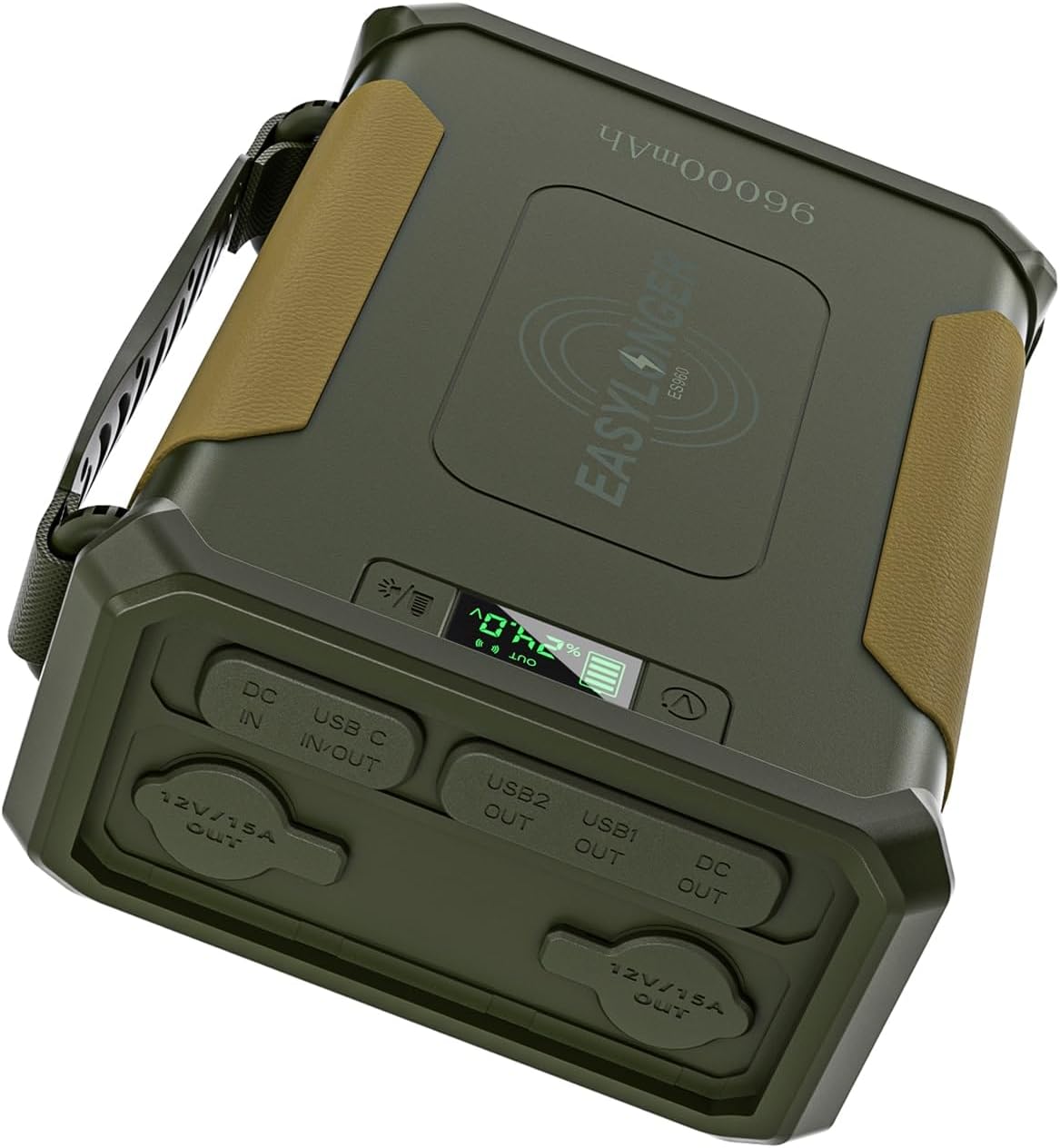
Image: The EASYLONGER ES960 CPAP Battery Backup Power Supply, showcasing its compact design and various ports.
2. What's in the Box
Upon unboxing your EASYLONGER ES960, please verify that all the following items are included:
- 1 × 96000mAh CPAP Battery
- 1 × 72W AC Adapter
- 1 × DC Cable for Philips Dreamstation / 2
- 1 × DC Cable for ResMed S9
- 1 × DC Cable for AirSense 10/ AirCurve 10
- 1 × DC Cable for AirMini/ AirSense 11/ AirCurve 11
- 1 × Handy bag
- 1 × User Manual (this document)
3. Product Features
- FSA or HSA Eligible Off-Grid CPAP Battery: Includes 4 CPAP DC cables, compatible with ResMed S9, AirSense 10, AirSense 11, AirCurve 10, AirCurve 11, AirMini, Philips DreamStation, DreamStation 2, and Luna G3 (heated tube not supported), etc.
- 297.6Wh High Capacity: Powers your CPAP for at least 3 nights during outages or camping with the humidifier and heated tube off. Note that using these features will reduce the run time.
- Widely Compatible: Set the CPAP battery backup output to 24V and use a 5.5mm × 2.1mm to 5.5mm × 2.5mm DC cable (not included, sold separately) to power Sefam S Box, Resvent iBreeze, and Apex Medical iCH.
- For Other CPAP Models: Use a cigarette lighter inverter or a cigarette lighter CPAP cable with a voltage converter to be compatible with F&P SleepStyle, Löwenstein Prisma, Breas Z1/Z2, DreamStation GO, Transcend Micro Auto, Transcend 3 Auto, etc.
- Versatile Power Station: The battery pack features 7 ports and 10W wireless charging, powers all portable devices, like car refrigerators, air pumps, and other devices under the power of 180W, laptops, tablets, phones, drones, Steam Deck, Switch, etc.
- Safe and Stable: Built-in LiFePO4 cells that won't ignite under over-charge, over-discharge, over-current, or short-circuit conditions and can withstand high temperatures without decomposing, offering 3000 battery cycles.
- Three Recharge Options: 1. Charge with a 60W Type-C PD charger (6-8 hours to full), 2. Charge with the included 72W AC adapter (5-6 hours to full), 3. Use a solar panel with 100W or more output (not included).

Image: Illustration of the included CPAP DC cables compatible with ResMed AirMini, AirSense 11, AirCurve 11, AirSense 10, AirCurve 10, DreamStation, DreamStation 2, and ResMed S9.

Image: Visual representation of the internal LiFePO4 battery cells, highlighting 297.6Wh capacity and 3000+ cycles for safer use and long service life.
4. Setup and Initial Use
4.1 Charging the ES960
Before first use, fully charge the ES960. There are three primary methods:
- Using the Included AC Adapter: Connect the 72W AC adapter to the DC IN port on the ES960 and plug it into a wall outlet. A full charge typically takes 5-6 hours.
- Using a Type-C PD Charger: Connect a 60W (or higher) Type-C PD charger to the USB-C IN/OUT port. Charging time is approximately 6-8 hours.
- Using a Solar Panel (Not Included): Connect a solar panel with 100W or more output to the DC IN port. Charging time depends on solar intensity, typically 4-5 hours in direct sunlight.

Image: Visual guide showing the three recharging options: AC Adapter, PD Charger (via car), and Solar Panel.
4.2 Connecting Your CPAP Machine
The ES960 offers multiple ways to power your CPAP machine:
- Direct Connection with Included DC Cables: Use the appropriate DC cable provided for your ResMed S9, AirSense 10/11, AirCurve 10/11, AirMini, or Philips DreamStation/2. Ensure the correct voltage setting (e.g., 24V for ResMed, 12V for DreamStation 2) is selected on the ES960.
- Using a Cigarette Lighter Cable with Voltage Converter (Sold Separately): For models like Luna G3 Auto, Resvent iBreeze, DreamStation GO, Breas Z1/Z2 Travel, Transcend Micro Auto Travel, Luna TravelPAP, use a compatible cigarette lighter cable with a voltage converter.
- Using an Inverter Connected to a Battery Pack (Sold Separately): For models such as Löwenstein Prisma, F&P SleepStyle, SEFAM EcoStar, Apex Medical XT Auto, use a suitable inverter connected to one of the ES960's 12V outlets.

Image: Diagram illustrating the three methods to power a CPAP machine: direct DC connection, cigarette lighter cable with converter, and inverter connection.
5. Operation
5.1 Powering Devices
The ES960 can power a variety of devices:
- DC Output: Use the adjustable DC output (12V, 16.5V, 20V, 24V) for CPAP machines and other compatible devices.
- USB-A Ports: Two USB-A ports are available for charging smartphones, tablets, and other USB-powered devices.
- USB-C PD Port: The USB-C port supports Power Delivery for fast charging compatible devices.
- 12V/15A Outlets: Two cigarette lighter style 12V outlets are provided for car refrigerators, air pumps, and other 12V accessories.
- Wireless Charging: Place compatible devices on the designated wireless charging pad for convenient charging.
5.2 CPAP Runtime Considerations
The runtime of your CPAP machine when powered by the ES960 is significantly affected by several factors:
- Humidifier and Heated Tubing usage (turning these off maximizes runtime).
- CPAP pressure setting.
- Machine type and model.
- Presence of mask leaks.
- Use of additional features like Ramp-Up Function, Pressure Relief, Bluetooth/Wi-Fi.
For example, an AirSense 11 with humidification and heating off can run for up to 23 hours at 10 cm H₂O pressure. Using these features can reduce runtime to 7-12 hours.
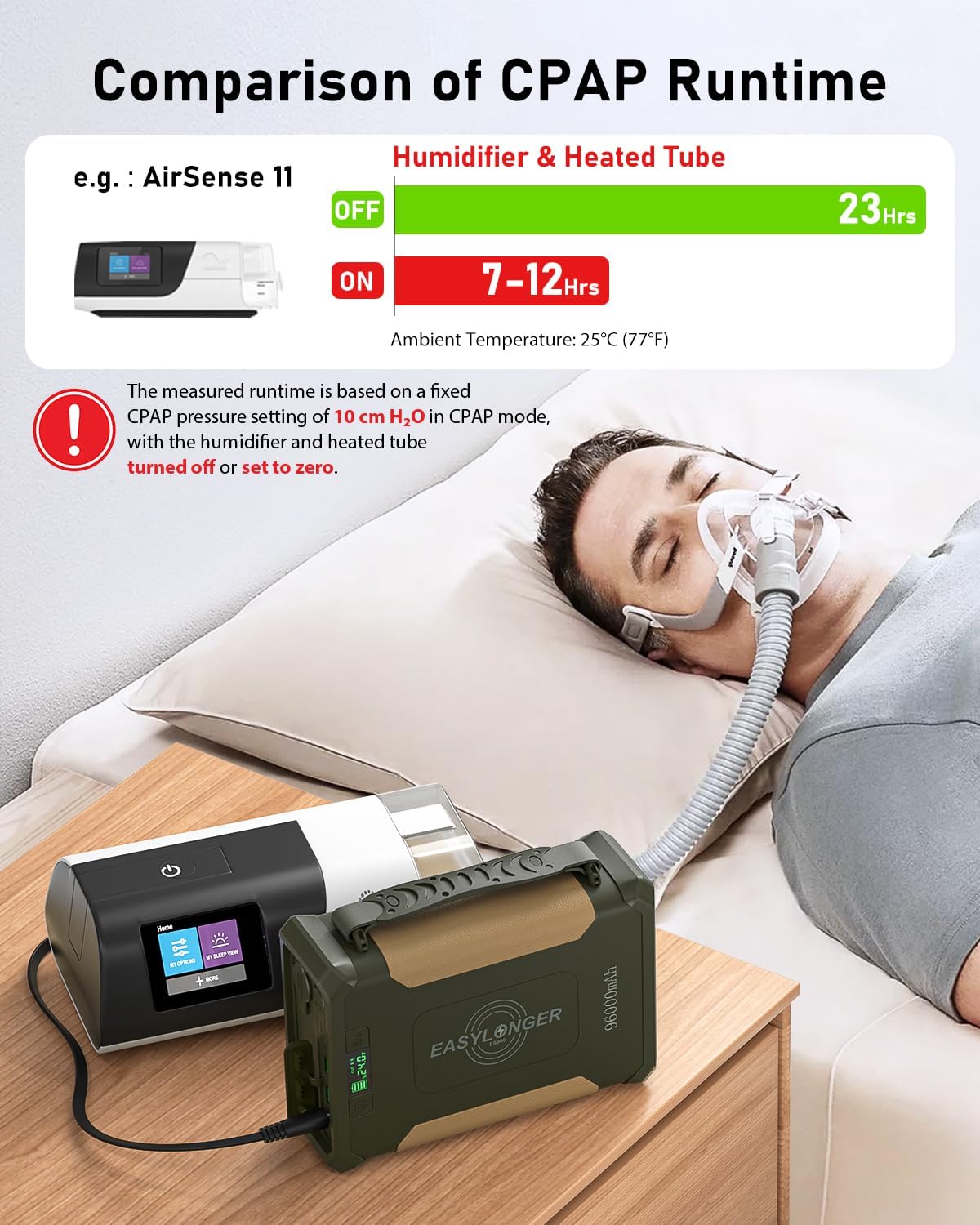
Image: Chart comparing CPAP runtime with humidifier and heated tube ON vs. OFF, showing significant difference in battery life.
5.3 Pass-through Charging
The ES960 supports pass-through charging, allowing you to charge the power supply while simultaneously powering your CPAP machine or other devices. This ensures continuous operation during power outages.

Image: Depiction of the ES960 being charged from a wall outlet while simultaneously powering a CPAP machine, illustrating the pass-through charging capability.
6. Maintenance
- Storage: Store the ES960 in a cool, dry place away from direct sunlight and extreme temperatures. For long-term storage, it is recommended to charge the unit to about 50-70% every 3-6 months to preserve battery health.
- Cleaning: Use a soft, dry cloth to clean the exterior of the unit. Do not use harsh chemicals or abrasive materials. Keep ports free of dust and debris.
- Battery Health: The built-in LiFePO4 cells are designed for longevity (3000+ cycles). Avoid fully discharging the battery frequently to extend its lifespan.
7. Troubleshooting
If you encounter issues with your EASYLONGER ES960, refer to the following common troubleshooting tips:
- Unit Not Charging:
- Ensure the charging cable and adapter are securely connected to both the ES960 and the power source.
- Verify the power outlet is functional.
- Check if the charging adapter is the correct wattage (72W AC or 60W+ Type-C PD).
- Device Not Powering On/Charging:
- Confirm the ES960 has sufficient charge.
- Ensure the output voltage setting on the ES960 matches the requirement of your device, especially for CPAP machines.
- Check all cables and connections for proper seating.
- Verify the device's power consumption does not exceed the ES960's output limits (180W for AC via inverter, specific limits for DC/USB).
- Short CPAP Runtime:
- Turn off the humidifier and heated tubing on your CPAP machine. These features significantly increase power consumption.
- Check for mask leaks, as these can cause the CPAP machine to work harder and consume more power.
- Ensure the CPAP pressure setting is not excessively high if possible.
- Avoid using an AC inverter if a direct DC connection is available, as DC is more efficient.

Image: A visual summary of factors influencing CPAP battery duration, including humidifier/heated tubing, pressure settings, mask leaks, and additional features.
8. Specifications
| Feature | Detail |
|---|---|
| Product Dimensions | 8.86 x 3 x 6.2 inches |
| Item Weight | 6.6 pounds |
| Model Number | GP50 |
| Battery Type | LiFePO4 (Lithium Iron Phosphate) |
| Battery Capacity | 297.6Wh (96000mAh) |
| Battery Cycles | 3000+ |
| DC Output Voltage | 12V, 16.5V, 20V, 24V (Adjustable) |
| Wireless Charging | 10W |
| AC Adapter Input | 72W (5-6 hours to full charge) |
| USB-C PD Input | 60W (6-8 hours to full charge) |
| Solar Input | 100W+ (4-5 hours to full charge) |
| Special Features | Built-in MPPT, Digital Display, FSA or HSA eligible, Flashlight, Wireless Charging |

Image: Visual representation of the product dimensions (8.86 x 3 x 6.2 inches) and weight (6.6 lbs), noting it is not TSA approved due to high capacity.
9. Warranty and Support
For warranty information and technical support, please refer to the official EASYLONGER website or contact their customer service directly. Protection plans may also be available for purchase to extend coverage beyond the standard warranty period.
For further assistance, you may visit the EASYLONGER Store on Amazon.


