
1. Product Overview
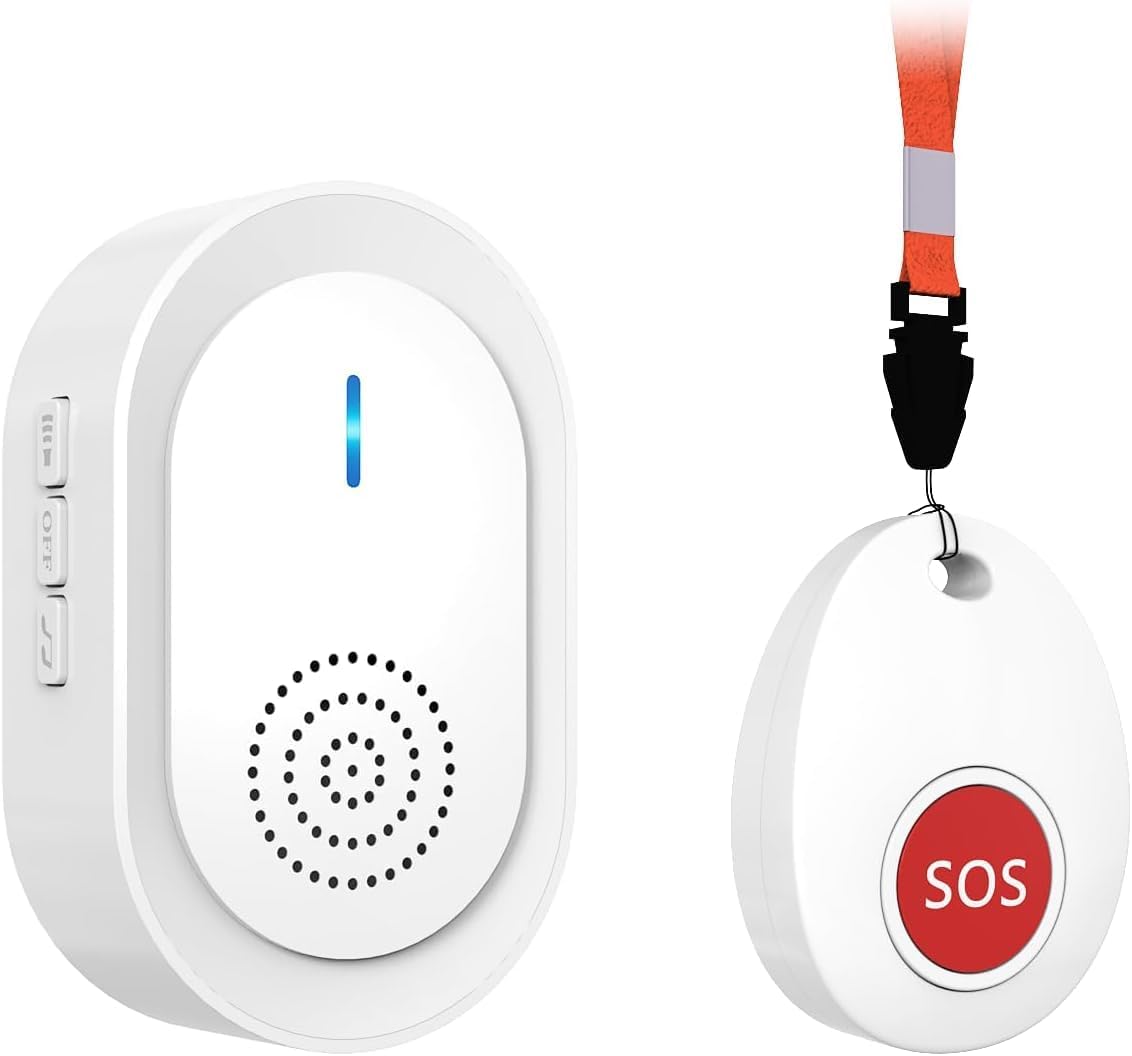
The CallToU Wireless Caregiver Pager System (Model CC06W 1-1) is designed to provide reliable communication between a caregiver and a patient, elderly individual, or resident. This system allows individuals to call for assistance with a simple press of a button, ensuring timely response and peace of mind. The portable receiver can be carried by the caregiver, offering flexibility and freedom of movement within the signal range.
2. Components
The CallToU Wireless Caregiver Pager System typically includes the following components:
- 1 x Portable Receiver: The device that emits an alert when the call button is pressed. It is rechargeable and features volume control and melody options.
- 1 x SOS Call Button: A waterproof button that, when pressed, sends a signal to the receiver. It can be worn as a pendant or placed in a convenient location.
- 1 x Neck Strap: For wearing the SOS call button as a pendant.
- 1 x Magnetic Suction Piece: For mounting the receiver to various surfaces.
- 1 x USB Charging Cable: For recharging the portable receiver.
- 1 x 23A 12V Alkaline Battery: Pre-installed in the SOS call button.

3. Setup
3.1 Charging the Receiver
- Before first use, charge the portable receiver for at least 1 hour using the provided USB charging cable.
- Connect the USB cable to the receiver's charging port and a standard USB power adapter (not included).
- The indicator light on the receiver will show charging status.
- After charging, press the volume key to activate the receiver.

3.2 Call Button Battery
The SOS call button comes with a pre-installed 23A 12V Alkaline battery. No initial installation is required for the call button. Refer to the Maintenance section for battery replacement instructions.
3.3 Powering On/Off the Receiver
To power on or off the receiver, press and hold the power/OFF key for 5-10 seconds. A brief indicator light or sound may confirm the action.

3.4 Mounting the Receiver
The receiver can be conveniently mounted using the included magnetic suction piece.
- Tear off the blue protective film from the magnetic suction piece.
- Fix the magnetic suction piece firmly in the desired location.
- Attach the receiver directly to the magnetic suction piece.
- The receiver can be easily removed and reattached as needed.

4. Operating Instructions
4.1 Using the SOS Call Button
To request assistance, simply press the red 'SOS' button on the call transmitter. This will send a signal to the portable receiver, triggering an alert.

4.2 Receiver Functions
The portable receiver has several functions to manage alerts:
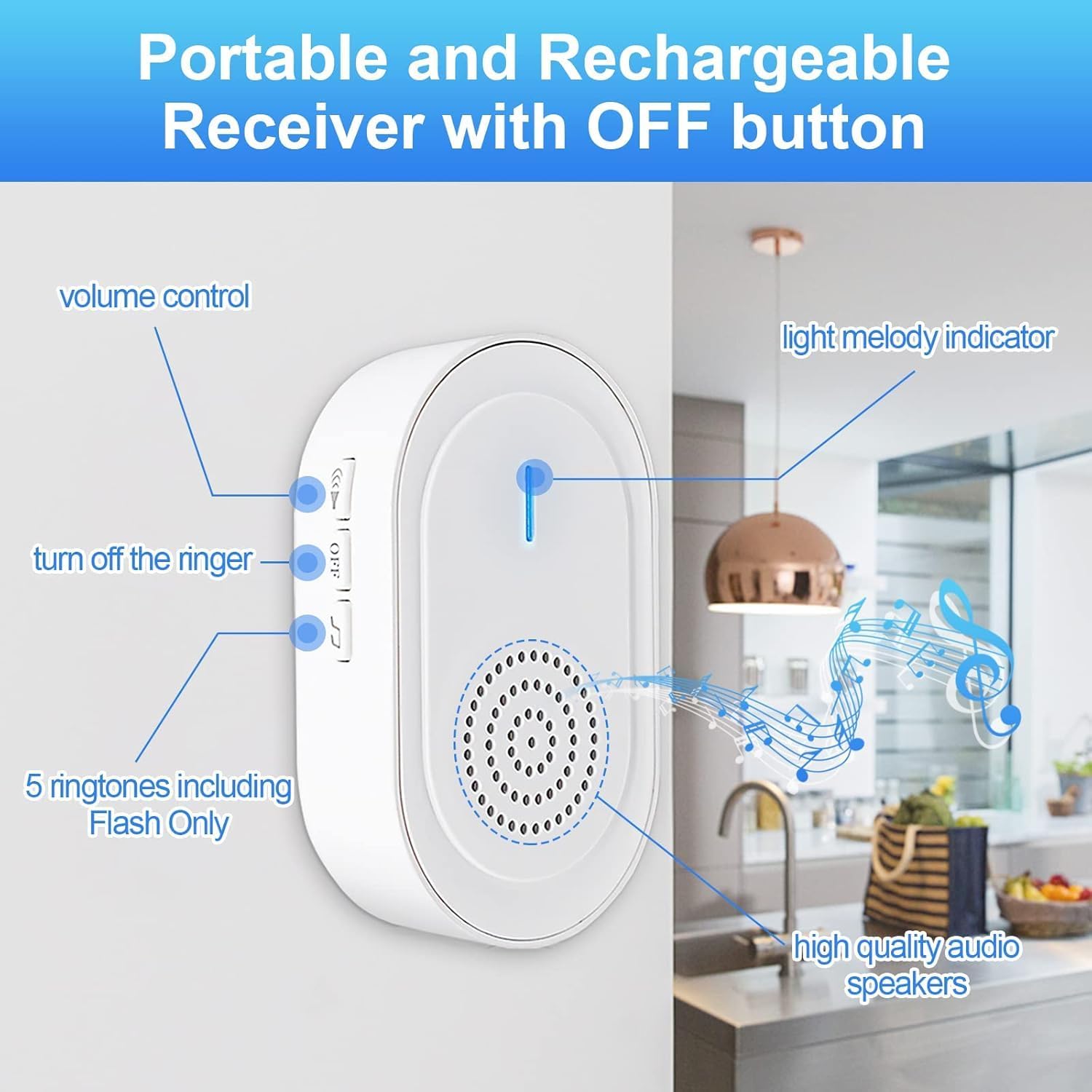
- Volume Control: Use the volume buttons on the side of the receiver to adjust the alert sound level. There are 5 volume levels available.
- Melody Selection: The receiver offers 5 ringtones, including a 'Flash Only' option. Use the music button to cycle through the melodies.
- OFF Button: When a help signal is received, press the 'OFF' button on the receiver to stop the alarm without affecting others.
4.3 Signal Transmission and Range
The system provides a long-range transmission capability. In open areas, the signal can reach over 600 feet (approximately 180 meters). The receiver will emit an alert within this range when the call button is pressed.

5. Maintenance
5.1 Cleaning
To clean the devices, use a soft, dry cloth. Avoid using abrasive cleaners or solvents, as these can damage the product's finish and internal components.
5.2 Call Button Battery Replacement
The SOS call button requires a 23A 12V Alkaline battery. When the battery is low or the button stops functioning, replace it as follows:
- Carefully open the call button casing.
- Remove the old 23A 12V battery.
- Insert a new 23A 12V Alkaline battery, ensuring correct polarity.
- Securely close the casing.
5.3 Water Resistance
The panic button for the elderly is designed with an IP55 water resistance rating. This means it is protected against dust ingress and low-pressure water jets from any direction. It is acceptable for meal/soup splash and can be installed in a washing room. However, it is not designed for submersion in water.

6. Troubleshooting
If you encounter issues with your CallToU Wireless Caregiver Pager System, please refer to the following common solutions:
- Receiver Not Alarming:
- Ensure the receiver is powered on and charged.
- Check the receiver's volume setting; it might be set to 'Flash Only' or a very low volume.
- Verify the call button battery is not depleted. Replace if necessary.
- Ensure the call button and receiver are within operational range. Obstacles like thick walls or metal structures can reduce range.
- Call Button Not Responding:
- Replace the 23A 12V battery in the call button.
- Ensure the button is not physically damaged.
- Reduced Range:
- Move the receiver or call button to a location with fewer obstructions.
- Ensure no other wireless devices are causing interference.
If the problem persists after attempting these solutions, please contact CallToU customer support for further assistance.
7. Specifications
| Feature | Specification |
|---|---|
| Brand | CallToU |
| Model Number | CC06W 1-1 |
| Item Weight | 4.6 ounces |
| Product Dimensions | 2.8 x 2.4 x 3 inches |
| Voltage | 260 Volts |
| Control Method | Touch |
| Noise Level | 110 dB |
| Mounting Type | Magnet Mount |
| Sensor Technology | Contact Sensor |
| Call Button Battery | 1 x 23A 12V Alkaline (included) |
| Receiver Power Source | Battery Powered (Rechargeable via USB) |
| Water Resistance | IP55 (Call Button) |
8. Warranty and Support
8.1 Warranty Information
Specific warranty details are typically provided with your purchase documentation. Please refer to the warranty card or contact the seller for information regarding the warranty period and terms.
8.2 Customer Support
For technical assistance, troubleshooting not covered in this manual, or any other inquiries, please contact CallToU customer support. Contact information can usually be found on the product packaging, the seller's website, or your purchase invoice.


