
Introduction
Thank you for choosing the Oasser Portable Air Compressor. This compact and versatile device is designed for convenient inflation of various items, including car tires, motorcycle tires, bicycle tires, and sports balls. Featuring both cordless and 12V DC power options, a large LCD display, and automatic shut-off, it provides efficient and precise inflation wherever you need it.

Image: The Oasser Portable Air Compressor shown with its accessories and examples of items it can inflate, such as car tires, motorcycle tires, bicycles, inflatable rings, and basketballs.
Key Features
- Dual Power Supply: Operates cordlessly with a built-in 4000mAh rechargeable Li-ion battery or via the included 12V DC car adapter.
- Large LCD Display: A 4-inch warm color HD screen provides real-time pressure readings and allows for easy setting adjustments.
- Automatic Shut-Off: Automatically stops inflation once the preset pressure is reached, preventing over-inflation.
- Fast Inflation: Equipped with a high-efficiency motor for quick inflation times.
- Multi-Purpose: Four preset modes for cars, motorcycles, bicycles, and balls, with adjustable pressure settings.
- 3-in-1 Functionality: Functions as a tire inflator, a flashlight, and a power bank for charging other devices.
- Portable Design: Compact and lightweight for easy storage and transport.
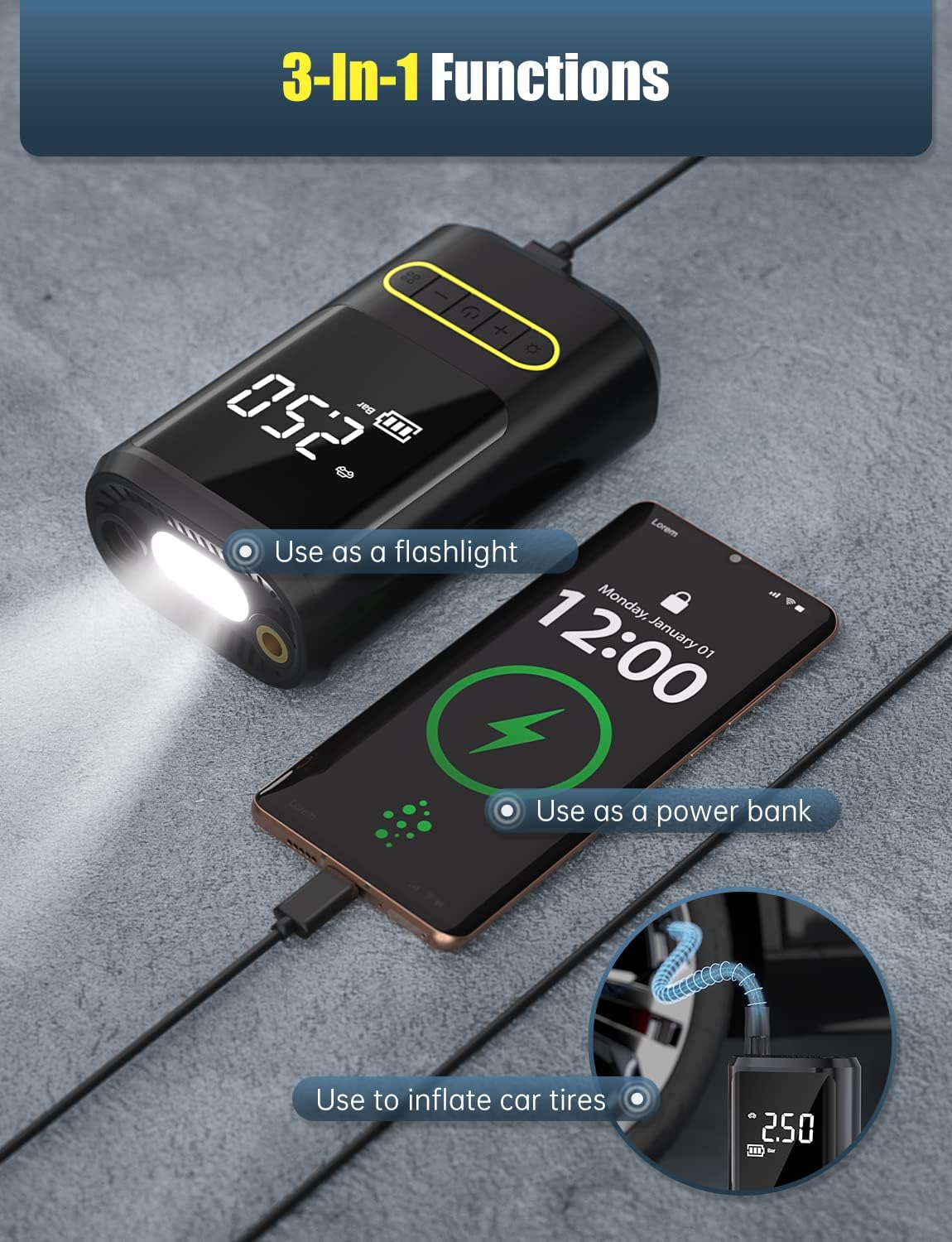
Image: The air compressor is shown highlighting its three main functions: acting as a flashlight, a power bank for charging a smartphone, and inflating a car tire.
Package Contents
Please check the package contents upon opening to ensure all items are present:
- Oasser Portable Air Compressor (Model ATJ-8466-2)
- Air Hose with Presta Valve adapter
- USB-C Charging Cable
- 12V DC Car Charging Cable
- Ball Needle Adapter
- Various Nozzle Adapters (for inflatable toys, etc.)
- User Manual

Image: A flat lay of all components included in the product package, showing the main inflator unit, various cables, inflation nozzles, and the user manual.
Setup
Charging the Device
Before first use, fully charge the air compressor. The device can be charged using either the USB-C charging cable or the 12V DC car charging cable.
- Connect the USB-C cable to the charging port on the device and the other end to a compatible USB power adapter (not included) or a 12V DC car outlet using the provided car charging cable.
- The battery indicator on the LCD display will show charging progress.
- Once fully charged, the battery indicator will show full bars.

Image: The air compressor is depicted with both its 12V DC corded power supply connected to a car's cigarette lighter port and its internal rechargeable battery for cordless operation.
Attaching the Air Hose
Screw the air hose securely into the air hose interface at the top of the compressor. Ensure it is tightened to prevent air leakage during inflation.

Image: A detailed diagram of the air compressor, pointing out key components such as the air hose interface, LED light, LCD display, and control buttons. Dimensions are also indicated.
Operating Instructions
Power On/Off
Press and hold the power button for 3 seconds to turn the device on or off.
Selecting Pressure Unit
Long press the 'Mode' button (often indicated by a square icon with four smaller squares) to cycle through different pressure units: PSI, BAR, KPA, and KG/CM².
Choosing Inflation Mode and Setting Pressure
The device offers four preset inflation modes:
- Car
- Motorcycle
- Bicycle
- Ball
Press the 'Mode' button (short press) to switch between these modes. Each mode has a default preset pressure, but you can adjust it using the '+' and '-' buttons. The display will show the target pressure. Once the desired pressure is set, press the power button to begin inflation. The compressor will automatically stop when the target pressure is reached.

Image: The air compressor's display shows the four quick preset modes: car, motorcycle, bicycle, and ball, along with their typical pressure settings.
Using the Flashlight
Press the 'Light' button (indicated by a lightbulb icon) to turn on the LED flashlight. Press again to cycle through different light modes (e.g., solid white, flashing white/red, flashing red) and a final press to turn it off.
Using as a Power Bank
The device can be used to charge other electronic devices via its USB-A output port. Connect your device's charging cable to the USB-A port on the air compressor.
Maintenance
- Cleaning: Wipe the device with a soft, dry cloth. Do not use harsh chemicals or abrasive cleaners.
- Storage: Store the air compressor in a cool, dry place away from direct sunlight and extreme temperatures. Ensure the air hose is properly stored to prevent damage.
- Battery Care: For optimal battery life, charge the device regularly, even if not in frequent use. Avoid completely draining the battery before recharging.
- Usage Duration: Do not operate the compressor continuously for more than 10 minutes. Allow it to cool down before resuming use.

Image: The compact air compressor fits easily into a car's storage compartment.

Image: A hand demonstrates how the air hose can be neatly stored on the device, emphasizing its portability.

Image: A close-up view of the hose connection point on the inflator, illustrating the double anti-scalding design feature.
Troubleshooting
| Problem | Possible Cause | Solution |
|---|---|---|
| Device does not turn on or respond (Error EE9) | Battery is completely drained or internal error. | Ensure the device is fully charged. Try connecting it to both USB-C and 12V DC power sources. If the error persists after charging, contact customer support. |
| Pressure settings reset after power off | This is a design characteristic; settings are not saved upon power cycle. | Re-enter your desired pressure settings each time the device is powered on. |
| Inaccurate pressure reading | Loose hose connection or incorrect pressure unit selected. | Ensure the air hose is screwed on tightly to the valve. Verify the correct pressure unit (PSI, BAR, KPA, KG/CM²) is selected. |
| Device gets hot during use | Normal operation during prolonged use. | Do not use continuously for more than 10 minutes. Allow the device to cool down for at least 15 minutes before resuming operation. |
Specifications
| Feature | Detail |
|---|---|
| Brand | Oasser |
| Model Number | ATJ-8466-2 |
| Power Source | Corded Electric (12V DC), Battery Powered |
| Battery Capacity | 4000mAh (Li-ion) |
| Voltage | 12 Volts |
| Max Pressure | 120 PSI |
| Noise Level | 92 dB |
| Item Weight | 1.32 pounds (approx. 600 Grams) |
| Material | Aluminum, Plastic |
| Special Features | Portable, Automatic Shut-Off, Quick Inflation, Flashlight, Power Bank |
Warranty and Support
For warranty information, technical support, or any inquiries regarding your Oasser Portable Air Compressor, please refer to the contact details provided in the warranty card included with your product or visit the official Oasser website. Keep your purchase receipt for warranty claims.


