
Introduction
This manual provides detailed instructions for the proper use and maintenance of your Sunny CRS-300AT Android Smart LED TV Remote Control. This remote is designed for compatibility with AXEN LED TVs and features a dedicated Live TV button for convenient access to live broadcasts. Please read this manual carefully before using the remote control to ensure optimal performance and longevity.
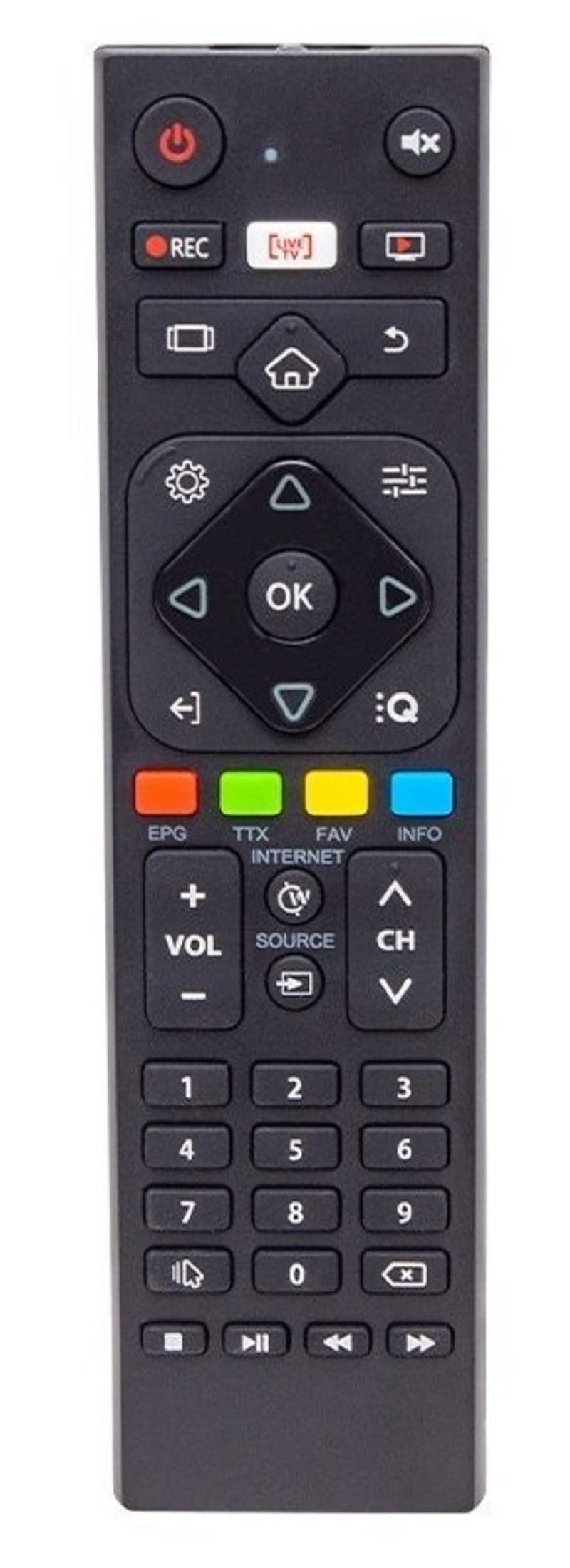
Image of the Sunny CRS-300AT remote control, showing its ergonomic design and button layout, including the dedicated Live TV button.
Setup
Battery Installation
- Locate the battery compartment on the back of the remote control.
- Slide the battery compartment cover downwards or in the direction indicated by an arrow to open it.
- Insert two AAA batteries (not included), ensuring the positive (+) and negative (-) terminals align correctly with the markings inside the compartment. Incorrect battery orientation can prevent the remote from functioning.
- Replace the battery compartment cover by sliding it back into place until it clicks securely.
The remote control is an infrared (IR) device and does not require pairing. Once batteries are installed, it is ready for use with compatible AXEN LED TVs.
Operating Instructions
Point the remote control directly at your television's IR receiver. Ensure there are no obstructions between the remote and the TV.
Key Functions
- Power Button (⏻): Turns the TV on or off.
- Volume Up/Down (Vol+/-): Adjusts the sound volume.
- Channel Up/Down (Ch+/-): Changes TV channels.
- Mute (🔇): Mutes or unmutes the TV sound.
- Number Buttons (0-9): Directly select TV channels or input numbers.
- Navigation Buttons (▲ ▼ ◀ ▶): Navigate through menus and options.
- OK/Enter Button: Confirms selections in menus.
- Back/Return Button: Returns to the previous screen or menu.
- Home Button (🏠): Accesses the Smart TV home screen or main menu.
- Live TV Button: Directly switches to live television broadcasting.
- Input/Source Button: Changes the input source (e.g., HDMI 1, HDMI 2, AV).
- Menu Button: Opens the TV's main settings menu.
Specific button layouts and functions may vary slightly depending on your TV model, but the core functions remain consistent.
Maintenance
Cleaning
- Wipe the remote control with a soft, dry cloth.
- For stubborn dirt, slightly dampen the cloth with water or a mild, non-abrasive cleaner. Do not spray liquids directly onto the remote.
- Avoid using harsh chemicals, solvents, or abrasive cleaning materials, as these can damage the remote's surface or internal components.
Battery Care
- Replace batteries when the remote's response becomes sluggish or stops working.
- If the remote will not be used for an extended period, remove the batteries to prevent leakage and potential damage.
- Dispose of used batteries according to local regulations.
Storage
Store the remote control in a cool, dry place away from direct sunlight, extreme temperatures, and high humidity.
Troubleshooting
| Problem | Possible Cause | Solution |
|---|---|---|
| Remote control not working. | Dead or incorrectly installed batteries. | Replace batteries with new ones, ensuring correct polarity (+/-). |
| Remote control not working. | Obstruction between remote and TV's IR receiver. | Ensure a clear line of sight between the remote and the TV. Remove any objects blocking the signal. |
| Remote control not working. | Remote is too far from the TV. | Move closer to the TV. The effective range for IR remotes is typically up to 7 meters (23 feet). |
| Some buttons are not responding. | Dirt or debris under the buttons. | Clean the remote control as described in the Maintenance section. |
| TV is not responding to any remote commands. | TV's IR receiver might be faulty or blocked. | Check your TV's user manual for troubleshooting its IR receiver. Try restarting the TV by unplugging it for a few minutes. |
Specifications
- Model: Sunny CRS-300AT
- Brand: Sunny (Compatible with AXEN)
- Compatible Devices: Televisions (specifically AXEN LED TVs)
- Connectivity Technology: Infrared (IR)
- Power Source: 2 x AAA Batteries (not included)
- ASIN: B0BW4M6SRC
Warranty Information
This product is typically covered by a manufacturer's warranty. For specific details regarding warranty duration, coverage, and claims process, please refer to the documentation provided with your purchase or contact the retailer where the product was acquired. Keep your proof of purchase for warranty purposes.
Support
If you encounter issues that cannot be resolved using the troubleshooting guide, or if you require further assistance, please contact:
- The retailer from whom you purchased the remote control.
- The manufacturer's customer support (refer to product packaging or manufacturer's website for contact details).
When contacting support, please have your product model (CRS-300AT) and proof of purchase readily available.